The convergence of network-attached storage and high-definition surveillance isn’t just a trend—it’s a data tsunami reshaping how we architect our networks. By 2026, the average CCTV setup will be streaming multiple 4K feeds with AI-powered analytics, while your 10Gb NAS simultaneously handles 4K video editing, backups, and remote access for a hybrid workforce. That’s a cocktail of sustained throughput and latency-sensitive packets that would make a standard Gigabit switch curl up and weep. If you’ve ever watched your NAS transfer speeds plummet the moment your security cameras detect motion, you already understand the problem we’re solving today.
This isn’t about throwing more bandwidth at the wall and hoping it sticks. It’s about surgical precision—selecting multi-gigabit switching infrastructure that understands the difference between a sequential 10-gigabyte file transfer and 32 simultaneous 8Mbps video streams. The SFP+ ports on these switches aren’t just fancy connectors; they’re your secret weapon for low-latency, high-reliability connections that keep your footage smooth and your storage humming. Let’s decode what makes a switch truly enterprise-ready for this unique workload combination.
Top 10 Multi-Gigabit Switches with SFP+ for 10Gb NAS & CCTV
Detailed Product Reviews
1. TRENDnet 20-Port 2.5G/Multi-Gig Switch with 10G SFP+ Ports, TEG-S50204, 16 x 2.5G RJ-45 Ports, 4 x 10G SFP+ Ports, 160Gbps, 1U Rack Mountable, NDAA TAA Compliant, Lifetime Protection, Black

Overview: The TRENDnet TEG-S50204 is a professional-grade 20-port multi-gigabit switch designed for demanding network environments. It combines sixteen 2.5G RJ-45 ports with four 10G SFP+ uplinks, delivering 160Gbps switching capacity in a 1U rack-mountable form factor. Built for government and enterprise deployments, this switch delivers serious performance and compliance guarantees.
What Makes It Stand Out: This switch’s NDAA and TAA compliance sets it apart for government contracts and security-conscious organizations. The lifetime manufacturer protection demonstrates exceptional confidence in product longevity. With 2.5G speeds over existing Cat5e cabling, it offers a seamless upgrade path without costly rewiring. The four 10G SFP+ ports provide ample high-speed backbone connectivity.
Value for Money: At $299.99, this switch commands a premium but justifies it through enterprise features and compliance certifications competitors lack. For businesses requiring NDAA/TAA compliance, it’s actually cost-effective compared to enterprise alternatives that often cost twice as much. Home users will find better value elsewhere, but for targeted professional applications, the price aligns with its specialized positioning.
Strengths and Weaknesses: Strengths:
- NDAA/TAA compliance for government use
- Lifetime manufacturer warranty
- 16 multi-gigabit ports with 4 SFP+ uplinks
- Rack-mountable design
- English-speaking tech support
Weaknesses:
- Overkill for home networks
- Premium pricing
- SFP+ modules sold separately
- Limited to U.S. and Canada compliance
Bottom Line: The TRENDnet TEG-S50204 is an excellent choice for businesses, government agencies, and enterprises needing compliant, reliable multi-gigabit networking. While overpriced for home use, its lifetime protection and certifications make it a smart long-term investment for professional deployments.
2. 8 Port 10Gb SFP+ Web Managed Fiber Switch | Multi-Gig 10G-2.5G Adaptive | Fanless | 160G Bandwidth | Jumbo Frames/ VLAN/ QoS, Only Compatible with TP-Link, Real HD 10G SFP+ Module, NOT Plug & Play 1Gb

Overview: This budget-friendly 8-port 10G SFP+ switch delivers enterprise-level performance at a fraction of typical costs. With 160Gbps switching capacity and web-based management, it supports multi-gigabit speeds (10G/2.5G) in a fanless, compact metal housing. Designed for users ready to embrace fiber networking, it offers surprising capabilities for under $110.
What Makes It Stand Out: The price-to-performance ratio is exceptional—fully managed 10G switches rarely dip below $200. Its web interface provides VLAN, QoS, and jumbo frame support typically absent in budget gear. The fanless design ensures silent operation, while 6KV lightning protection adds reliability. However, the strict compatibility requirements with TP-Link and Real HD modules are crucial considerations.
Value for Money: At $104.99, this switch redefines budget 10G networking. Competing managed 10G switches cost 2-3x more. The limitation is compatibility—you must use specific SFP+ modules, potentially offsetting savings. For users building a controlled ecosystem, it’s unbeatable. Those needing universal compatibility should budget extra for approved modules or consider alternatives.
Strengths and Weaknesses: Strengths:
- Extremely affordable managed 10G switch
- 160Gbps switching capacity
- Fanless, silent operation
- Web management with VLAN/QoS
- 6KV lightning protection
Weaknesses:
- Only compatible with TP-Link/Real HD modules
- Not plug-and-play for 1G devices
- Complex manual speed configuration
- No RJ-45 ports
Bottom Line: An outstanding value for tech-savvy users building a compatible 10G fiber network. The management features and silent operation impress, but strict module compatibility and configuration complexity make it best for enthusiasts comfortable with networking fundamentals.
3. 8 Port 2.5Gb Switch with 1*10G SFP+,TEROW 8 x 2.5Gb Base-T & 1 x 10Gbs SFP+, Vlan, Multi-Speed Network Switch, Compatible with Gigabit & 10Gb, Desktop/Wall Mount, Ideal for AP, NAS, PC,Office

Overview: The TEROW 8-port switch offers an affordable entry into multi-gigabit networking with eight 2.5G RJ-45 ports and a single 10G SFP+ uplink. Delivering 70Gbps switching capacity in a fanless metal chassis, this unmanaged switch prioritizes simplicity and value. It supports auto-negotiation across 10/100/1000M/2.5G speeds, making it ideal for incremental network upgrades.
What Makes It Stand Out: At this price point, the inclusion of a 10G SFP+ uplink is remarkable. The VLAN isolation mode, which forces ports 1-8 to communicate exclusively through the SFP+ port, enhances security and bandwidth optimization—unusual for unmanaged switches. Its fanless design and sturdy metal construction deliver enterprise-like build quality in a budget package.
Value for Money: At $49.99, this is among the most affordable 2.5G switches available. The single 10G uplink provides future-proofing without the premium of multiple SFP+ ports. While 70Gbps capacity is lower than pricier alternatives, it’s sufficient for most small office/home scenarios. For users needing simple multi-gigabit expansion, the value is exceptional.
Strengths and Weaknesses: Strengths:
- Unbeatable price for 2.5G switching
- 10G SFP+ uplink included
- Fanless silent operation
- VLAN isolation security feature
- True plug-and-play simplicity
Weaknesses:
- Only one 10G port limits expansion
- Lower 70Gbps switching capacity
- Unmanaged (no advanced features)
- SFP+ module not included
Bottom Line: Perfect for home users and small offices wanting affordable multi-gigabit speeds without complexity. The TEROW delivers core functionality at an irresistible price, though power users will miss advanced management and additional 10G ports.
4. Real HD 8 Port 10Gb SFP+ Unmanaged Switch with 8 x 10 Gigabit SFP+ Ports | Multi-Gigabit 10G-2.5G-1G | Fanless | Plug & Play | Metal Casing NO Rack Mount | NO Jumbo Frames | 160G Bandwidth

Overview: The Real HD 8-port SFP+ switch provides straightforward 10G connectivity in an unmanaged, fanless package. With eight 10G SFP+ ports supporting multi-gigabit speeds (10G/2.5G/1G) and 160Gbps switching capacity, it targets users wanting simple, reliable fiber networking. The compact metal housing emphasizes durability and silent operation for office environments.
What Makes It Stand Out: This switch eliminates management complexity entirely—true plug-and-play 10G fiber switching. Its broad speed compatibility (10G/2.5G/1G) offers flexibility many unmanaged switches lack. The fanless design and 6KV lightning protection match enterprise build standards. However, the lack of jumbo frame support may disappoint performance purists.
Value for Money: At $179.99, it sits between budget managed switches and premium unmanaged options. For users wanting simple 10G without configuration headaches, it’s fairly priced. The 160Gbps capacity matches switches costing more. The hidden cost is SFP+ modules, which can add $50-150 depending on needs. Compared to TRENDnet’s unmanaged options, it’s competitive.
Strengths and Weaknesses: Strengths:
- True plug-and-play simplicity
- Multi-gigabit speed compatibility
- Fanless silent operation
- 160Gbps switching capacity
- 6KV lightning protection
Weaknesses:
- No management features
- Jumbo frames not supported
- SFP+ modules sold separately
- No RJ-45 ports
Bottom Line: Ideal for users seeking hassle-free 10G fiber expansion without management overhead. The Real HD switch delivers solid performance and build quality, but the lack of jumbo frame support and management features limits its appeal to enthusiasts who prefer control over convenience.
5. SODOLA 10 Port 2.5Gb Easy Web Managed Switch, 8X 2.5G Base-T Ports, 2X 10G SFP+, Fanless Multi-Gigabit Ethernet Switch Ethernet Switch for Wireless AP, NAS, PC

Overview: The SODOLA 10-port switch balances managed features with affordability, offering eight 2.5G RJ-45 ports and two 10G SFP+ uplinks. This web-managed switch provides essential configuration options in a fanless design, making it suitable for small businesses and home labs. With support for VLAN, QoS, and multicast, it delivers surprising flexibility at a mid-range price point.
What Makes It Stand Out: Having two 10G SFP+ ports at this price distinguishes it from single-uplink competitors. The easy web management interface provides just enough control without overwhelming novices. Its fanless design ensures silent operation, while the one-year replacement guarantee with lifetime tech support shows confidence in reliability. The 2.5G focus matches modern WiFi 6 and NAS devices perfectly.
Value for Money: At $109.99, it bridges the gap between unmanaged budget switches and expensive enterprise gear. Two 10G uplinks offer redundancy or aggregation options typically found in pricier models. While not as cheap as TEROW’s offering, the management features and dual SFP+ ports justify the premium for users needing more control. It’s a sweet spot for small business networks.
Strengths and Weaknesses: Strengths:
- Two 10G SFP+ ports for flexibility
- Web management with VLAN/QoS
- Fanless silent operation
- Strong warranty and support
- Good port configuration
Weaknesses:
- Brand recognition limited
- Management features are basic
- SFP+ modules not included
- 2.5G only (no 5G/10G RJ-45)
Bottom Line: An excellent middle-ground solution for small offices and tech enthusiasts wanting managed features without enterprise pricing. The dual 10G uplinks and silent operation make it versatile, though power users may crave more advanced management capabilities.
6. NUBASA 8-Port 2.5Gb Switch with 10Gb SFP+ Port, Unmanaged Multigig Ethernet Splitter for NAS, Gaming, PC - Plug & Play, Silent Aluminum Housing, 2.5 Gigabit Network Switch
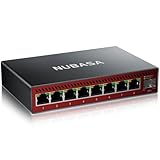
Overview: The NUBASA 8-Port 2.5Gb Switch delivers multigigabit performance to home offices and small businesses at an accessible price. With eight 2.5Gbps RJ45 ports and a 10Gbps SFP+ uplink, this unmanaged switch handles NAS backups, 4K video editing, and competitive gaming. Its aluminum chassis and fanless design promise silent operation, while auto-negotiation ensures seamless integration with legacy 10/100/1000Mbps devices. The compact form factor fits discreetly into any setup.
What Makes It Stand Out: This switch democratizes multigigabit networking by offering eight 2.5G ports at a budget price point. The 10G SFP+ uplink eliminates bottlenecks when connecting to NAS systems or routers, supporting both fiber and copper modules for maximum flexibility. The full aluminum housing provides exceptional passive cooling that plastic competitors lack. True plug-and-play functionality means zero configuration time, making it ideal for users who want performance without complexity.
Value for Money: At $52.99, this undercuts premium brands by 50-70% while delivering comparable core performance. You’re getting enterprise features—2.5G multigigabit ports and 10G uplink—in a consumer-friendly package. The silent, durable construction adds long-term value, though SFP+ modules are sold separately. For home labs, content creators, or gamers wanting to future-proof without enterprise budgets, this represents exceptional ROI that pays for itself in performance gains.
Strengths and Weaknesses: Strengths: Eight 2.5G ports at budget price; silent fanless aluminum design; flexible 10G SFP+ uplink; true plug-and-play compatibility; robust heat dissipation; compact form factor. Weaknesses: Unmanaged limits advanced features; SFP+ modules sold separately; lesser-known brand may raise support concerns; no PoE support; limited warranty details.
Bottom Line: The NUBASA 8-Port switch is a no-brainer for users seeking affordable multigigabit expansion. It perfectly balances performance, silence, and value for NAS owners, gamers, and home office professionals who don’t need managed features. Just budget for SFP+ modules.
7. NETGEAR 8-Port 1G/10G Multi-Gigabit Ethernet Unmanaged Switch (GS108MX) - with 1 x 10G/Multi-gig RJ-45 Ethernet Uplink, Desktop or Wall Mount, and Limited Lifetime Protection

Overview: The NETGEAR GS108MX brings trusted networking pedigree to the multigigabit space with eight 1G ports and one 10G/multi-gig RJ45 uplink. This unmanaged switch targets professionals needing reliable, high-speed connectivity for workstations, NAS devices, and media servers without management complexity. Backed by NETGEAR’s lifetime warranty and 24/7 support, it emphasizes reliability and brand assurance for business-critical environments where downtime isn’t an option.
What Makes It Stand Out: NETGEAR’s reputation for reliability is the headline here, supported by a lifetime limited hardware warranty and next-business-day replacement—unmatched in this category. The 10G RJ45 uplink port offers multi-gig speeds (1G/2.5G/5G/10G) over standard Cat6a cabling, eliminating SFP+ module costs and complexity. The switch supports both desktop and wall-mount placement, providing installation flexibility rare in this class. Its unmanaged nature ensures instant deployment with zero learning curve.
Value for Money: At $119.99, you’re paying a premium for NETGEAR’s brand, warranty, and support infrastructure—roughly double the NUBASA equivalent. For businesses and professionals, this insurance policy justifies the cost. Home users may find better value elsewhere, but the peace of mind, proven compatibility, and included 10G RJ45 port (no module needed) offset the price premium for those prioritizing reliability over raw port density.
Strengths and Weaknesses: Strengths: Industry-leading lifetime warranty; 24/7 expert support; 10G RJ45 uplink (no modules required); proven brand reliability; flexible mounting options; true plug-and-play. Weaknesses: Only eight 1G ports (no multigigabit RJ45); pricey for home use; unmanaged limits configuration; no SFP+ flexibility; plastic housing less durable than metal alternatives.
Bottom Line: Choose the GS108MX if you value bulletproof reliability and premium support over cost. It’s ideal for small businesses and professionals who need a dependable 10G uplink without management overhead. Home users on a budget should consider alternatives.
8. NETGEAR 12-Port 10G Multi-Gigabit Easy Smart Managed Switch (XS512EM) - Managed, with 2 x 10G SFP+, Desktop or Rackmount, and Limited Lifetime Protection
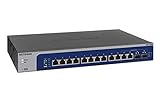
Overview: The NETGEAR XS512EM is a 12-port Easy Smart Managed switch designed for demanding small-to-medium businesses requiring full multigigabit speeds. Each port supports 1G/2.5G/5G/10G over RJ45, complemented by two shared SFP+ ports for fiber uplinks. This switch bridges the gap between unmanaged simplicity and full managed complexity, offering VLAN, QoS, and IGMP snooping through an intuitive web interface. It’s a serious investment for high-performance workgroups, video production teams, and growing businesses.
What Makes It Stand Out: This is the only switch in our roundup offering 10G multigigabit on every RJ45 port—not just the uplink. The Easy Smart Managed interface provides essential business features like traffic prioritization and network segmentation without requiring a networking degree. Two SFP+ ports enable redundant fiber connections to core switches. The included rackmount hardware and desktop flexibility support diverse deployments. NETGEAR’s lifetime warranty and 24/7 chat support provide enterprise-grade backing.
Value for Money: At $1,051.05, this is a professional tool, not a consumer gadget. The per-port cost is high, but justified for businesses needing consistent 10G performance across all devices. Compared to fully managed switches, it offers 80% of the functionality at 50% of the price. For video editors, engineers, or offices with 10G-equipped workstations, the productivity gains outweigh the cost. Home users and small labs should look elsewhere—this is overkill unless you’re running a business.
Strengths and Weaknesses: Strengths: 10G multigigabit on all 12 ports; Easy Smart management; dual SFP+ uplinks; lifetime warranty; rackmount/desktop flexibility; robust metal construction; business-class reliability. Weaknesses: Extremely expensive for non-business use; shared SFP+ ports reduce flexibility; management features still limited vs. full managed switches; high power consumption; overkill for typical home NAS setups.
Bottom Line: The XS512EM is a professional-grade investment for businesses that need 10G speeds everywhere and basic management. It’s perfect for creative agencies, engineering firms, and growing offices. For home users, the price is impossible to justify—stick with 2.5G options.
9. SODOLA 24 Port 2.5G Smart Web Managed Switch,24 x 2.5G Base-T Ports, 2 x 10G SFP+, Link Aggregation/QoS/VLAN/IGMP, 1U Mounted Multi-Gigabit Network Switch

Overview: The SODOLA 24-Port 2.5G Smart Managed Switch delivers serious port density for growing networks, featuring 24 multigigabit RJ45 ports and two 10G SFP+ uplinks. This 1U rackmount switch targets small businesses, home labs, and power users needing VLAN, QoS, and link aggregation capabilities without enterprise pricing. With 120Gbps switching capacity and a fanless bilateral cooling design, it balances performance, management, and silence for 24/7 operation in noise-sensitive environments.
What Makes It Stand Out: Twenty-four 2.5G ports at under $280 is unprecedented value, doubling the density of competitors at similar prices. The web-managed interface unlocks professional features like VLAN segmentation, IGMP snooping for multicast streaming, and link aggregation for NAS bonding. Its fanless metal design maintains silence while supporting full rackmount integration—rare in this price class. The dual 10G SFP+ uplinks provide redundancy and bandwidth for connecting to core networks or NAS storage without bottlenecks.
Value for Money: At $279.99, this SODOLA switch redefines price-per-port value for managed multigigabit switching. Comparable NETGEAR or TP-Link offerings cost 2-3x more for similar port counts. You’re getting enterprise-lite management, dual 10G uplinks, and silent operation at a prosumer price point. The main trade-off is brand recognition and potentially longer support response times. For home labs, small businesses, or surveillance systems, this delivers professional features without the 4-figure price tag.
Strengths and Weaknesses: Strengths: Exceptional 24-port density; smart web management; dual 10G SFP+ uplinks; fanless silent operation; 1U rackmount included; robust 120Gbps capacity; outstanding price-per-port value. Weaknesses: Lesser-known brand; requires manual IP configuration; no PoE support; SFP+ modules sold separately; warranty/support unclear; management interface less polished than premium brands.
Bottom Line: The SODOLA 24-port switch is a home lab dream and small business bargain. If you need dense 2.5G connectivity with management features on a budget, this is unbeatable. Brand-conscious enterprises should verify support, but power users will love the value.
10. NUBASA 5-Port 2.5Gb Switch with 10Gb SFP+ Port, Unmanaged Multigig Ethernet Splitter for NAS, Gaming, PC - Plug & Play, Silent Aluminum Housing, 2.5 Gigabit Network Switch

Overview: The NUBASA 5-Port 2.5Gb Switch scales down the multigigabit formula to its essentials: five 2.5Gbps RJ45 ports and one 10Gbps SFP+ uplink in a compact, silent package. Perfect for single-room deployments, gaming setups, or small office workgroups, this unmanaged switch delivers the same core technology as its 8-port sibling at an entry-level price. The aluminum chassis and fanless design ensure reliable, quiet operation for connecting a handful of high-bandwidth devices directly to a 10G backbone.
What Makes It Stand Out: This is the most affordable multigigabit switch with a 10G uplink on the market, removing cost barriers for casual users. The full aluminum construction—uncommon in sub-$40 networking gear—provides durability and passive cooling that plastic competitors can’t match. Its tiny footprint fits virtually anywhere, from desk corners to media cabinets. The 10G SFP+ port ensures your uplink won’t bottleneck NAS transfers or gaming traffic, while auto-negotiation handles legacy devices seamlessly.
Value for Money: At $39.99, this switch is impulse-buy territory for anyone curious about multigigabit networking. You’re getting 2.5G connectivity and 10G uplink potential for less than a typical dinner. While port density is limited, the price-per-feature ratio is outstanding. The silent metal design and plug-and-play simplicity add premium feel to a budget product. For small-scale deployments, it outperforms cheap 1G switches at nearly the same price.
Strengths and Weaknesses: Strengths: Unbeatable sub-$40 price; silent aluminum construction; 10G SFP+ uplink; true plug-and-play; compact footprint; auto-negotiation support; ideal for gaming or NAS setups. Weaknesses: Only five ports; unmanaged limits advanced features; SFP+ modules sold separately; brand support concerns; no PoE; limited scalability for growing networks.
Bottom Line: The NUBASA 5-Port switch is the perfect entry drug to multigigabit networking. Buy it for single-room gaming, a small NAS setup, or to test 2.5G waters without risk. If you need more ports, step up to its 8-port sibling, but for basic needs, this is unbeatable value.
Understanding the 10Gb NAS & CCTV Convergence
Why Your Storage and Security Systems Need to Talk
Your NAS isn’t just a file dump anymore—it’s the primary repository for video surveillance footage, the scratch disk for video editing, and the backup target for every device on your network. Modern CCTV systems don’t just record; they perform edge analytics, send metadata streams, and require constant random access for timeline scrubbing. When these systems share a network, they create competing demands: NAS wants massive, uninterrupted pipes for sequential transfers, while CCTV needs consistent, low-jitter delivery across dozens of concurrent streams. A switch that doesn’t intelligently manage these conversations creates collision domains in your bandwidth, resulting in dropped frames, corrupted transfers, and that dreaded “connection timeout” during critical backups.
The Bottleneck Problem: When Gigabit Just Isn’t Enough
Let’s run the numbers. Eight 4K H.265 cameras at 15Mbps each—that’s 120Mbps just for idle recording. Bump them to 30fps motion detection with AI object recognition? You’re looking at 400Mbps. Now add a 10Gb NAS serving four video editors pulling 8K raw footage, a Plex server transcoding for remote users, and automated cloud backups. Your 1Gbps uplink is now a parking lot during rush hour. Multi-gigabit switches with 2.5GbE and 5GbE ports solve the access layer problem, but the backbone—where NAS meets CCTV recorder—demands 10Gb SFP+ to prevent that catastrophic bottleneck that turns your sleek security system into a slideshow.
What Makes a Switch “Multi-Gigabit”?
Beyond 1Gbps: The Technical Landscape
Multi-gigabit switching transcends the traditional 1/10GbE binary choice. We’re talking about ports that auto-negotiate 100Mbps, 1GbE, 2.5GbE, 5GbE, and 10GbE over standard Cat5e/Cat6 cabling (via NBASE-T), plus dedicated SFP+ cages for fiber or DAC connections. The magic lies in the PHY chips and MAC controllers that can handle intermediate speeds without forcing a full 10GbE upgrade. For NAS/CCTV combos, this flexibility means your cameras can connect at 2.5GbE (future-proofing for 8K), your NAS uses 10GbE SFP+, and legacy devices still operate at 1GbE—all on the same switch without performance penalty.
SFP+ vs RJ45: Choosing Your Connection Strategy
RJ45 ports with 10GBASE-T seem convenient, but they’re power-hungry beasts—consuming 2-5 watts per port and generating substantial heat. SFP+ ports, using 10G DAC (Direct Attach Copper) cables for short runs or optical transceivers for distance, sip power at under 1 watt and introduce microsecond-level latency improvements. For NAS connections within the same rack, a 1-meter DAC cable provides a lossless, low-latency pipe that’s cheaper than a Cat6A patch cord. For CCTV recorders located 100 meters away in a separate building, SFP+ with single-mode fiber becomes your only viable option. The 2026 sweet spot? Switches offering a hybrid port layout—four to eight SFP+ uplinks with 12-24 multi-gigabit RJ45 downlinks.
Key Features That Define 2026’s Best Switches
Port Density and Flexibility
The ideal switch for this workload doesn’t treat ports as an afterthought. Look for models offering a minimum of 16 multi-gigabit RJ45 ports paired with 4-8 SFP+ uplinks. This 4:1 ratio provides sufficient upstream capacity when aggregating camera traffic. Crucially, examine the port buffer sizes—each port should have at least 12MB of packet buffer to handle microbursts from CCTV streams without dropping frames. Some switches share buffers across port groups; avoid these like the plague. Dedicated per-port buffers ensure that when camera 23 decides to send a keyframe burst, it doesn’t steal memory from your NAS transfer on port 1.
Power Over Ethernet++: Fueling Your CCTV Arsenal
Modern IP cameras with AI accelerators, heaters, and PTZ motors are power-hungry. PoE++ (802.3bt) delivers up to 90 watts per port, but the switch’s total power budget tells the real story. A 24-port switch might support PoE++ on every port, but if the power supply is only 740 watts, you can’t run 24 cameras at 60W each. Calculate your CCTV power requirements: a typical 4K AI camera draws 25-30W, while PTZ models can hit 70W. Add 20% overhead for cable loss and future firmware updates that increase power draw. For 2026 deployments, insist on a per-port power monitoring capability—this lets you detect failing cameras drawing erratic current before they die completely.
Buffer Memory and Packet Handling
This is where enterprise switches separate from SMB toys. CCTV traffic generates constant microbursts—keyframes can be 10x the size of typical P-frames, arriving in nanosecond clusters. Your switch needs deep buffers (32MB minimum for a 24-port model) and intelligent buffer management algorithms like Dynamic Buffer Allocation (DBA). For NAS traffic, look for support for Priority Flow Control (PFC) as part of Data Center Bridging (DCB). PFC allows you to pause specific traffic classes during congestion without dropping packets—critical for iSCSI or NFS connections where dropped packets mean retransmissions that kill throughput.
Network Architecture for Combined NAS/CCTV Workloads
VLAN Segmentation Strategies
Never, ever throw cameras and NAS storage on the same VLAN. Create three separate broadcast domains: VLAN 10 for management (switch access, camera configuration), VLAN 20 for CCTV video streams, and VLAN 30 for NAS data traffic. Use private VLANs on the CCTV VLAN to prevent cameras from talking to each other—this limits malware spread and reduces unnecessary broadcast traffic. For the NAS VLAN, consider enabling jumbo frames (9000 MTU) but only on ports directly connected to the NAS and clients that support it. The switch must support per-VLAN MTU settings; otherwise, you’ll fragment packets and destroy performance.
Quality of Service (QoS) Prioritization
CCTV video streams are surprisingly tolerant of latency—50ms delay won’t ruin a recording. But your NAS handling iSCSI for a VM? That needs sub-millisecond latency. Configure QoS with four queues: Queue 1 (highest) for NAS iSCSI/NFS management traffic, Queue 2 for NAS data transfers, Queue 3 for CCTV video, Queue 4 (lowest) for camera metadata and firmware updates. Use DSCP tagging at the camera and NAS level, and trust those tags on the switch. The critical feature here is per-queue buffer allocation—reserve 40% of buffers for Queue 1 and 2, 35% for Queue 3, and 25% for Queue 4. This prevents video floods from starving your storage traffic.
Link Aggregation for Maximum Throughput
A single 10Gb SFP+ uplink can saturate quickly with 4K cameras and multi-user NAS access. Deploy LACP (Link Aggregation Control Protocol) across two or four SFP+ ports to your core switch or NAS. But here’s the pro tip: use switch-dependent LACP with L3+L4 hashing algorithms. This ensures traffic from the same camera stream can be distributed across multiple links based on IP addresses and port numbers, not just MAC addresses. Some 2026 switches offer Adaptive Load Balancing that dynamically redistributes traffic when link utilization exceeds 70%, preventing the “elephant flow” problem where one heavy stream hogs a single link.
SFP+ Transceiver Deep Dive
Understanding Optical vs DAC Cables
DAC cables are passive copper assemblies with SFP+ connectors pre-attached—think of them as really thick, lossless Ethernet cables. They work up to 7 meters and cost less than $50. For runs under 5 meters, they’re unbeatable for NAS connections. Optical transceivers use lasers and fiber: SR (Short Range) for 300m on OM3 multimode fiber, LR (Long Range) for 10km on single-mode. The 2026 market introduces BiDi (Bidirectional) SFP+ that uses a single fiber strand, halving your cabling costs. For CCTV recorders in remote buildings, LR transceivers with single-mode fiber provide electrical isolation from lightning strikes—something copper can never offer.
Compatibility Matrix: What Works With What
Here’s where buyers get burned. That $30 generic SFP+ module might work, but will it report temperature and voltage to the switch’s monitoring system? Will it trigger alarms when laser power degrades? Stick to switches that support multi-vendor transceivers but verify DOM (Digital Optical Monitoring) functionality across all brands. For DAC cables, ensure they’re rated for the switch’s maximum operating temperature—cheap DACs develop intermittent faults at 45°C. Some 2026 switches now support cable diagnostics that measure insertion loss and return loss in real-time, predicting failures before they happen.
Distance Considerations for Different Media
Planning a campus deployment? Multi-mode fiber (OM4) supports 400m at 10Gb, but the cost difference to single-mode is negligible in 2026. Single-mode fiber (OS2) is future-proof for 25GbE and 40GbE upgrades. For warehouse installations with cameras 200m from the switch, you’re forced into fiber—no RJ45 or DAC option exists. Remember to account for splice loss: each fusion splice adds 0.1dB attenuation. Your optical power budget should have at least 3dB margin above the minimum receiver sensitivity to accommodate aging lasers and dirty connectors.
Performance Metrics That Actually Matter
Switching Capacity and Forwarding Rate
Manufacturers love quoting huge numbers—“480Gbps switching capacity!” But the forwarding rate (measured in Mpps, million packets per second) reveals the real story. A 24-port 10Gb switch needs a minimum of 357 Mpps to achieve wire-speed performance. Calculate this: (24 ports × 10Gbps × 2 directions) ÷ (64 bytes × 8 bits) = 375 Mpps theoretical maximum. If the switch only offers 200 Mpps, it will drop packets under microburst conditions. For CCTV, this means corrupted video files. For NAS, it means retransmissions that reduce effective throughput by 30-40%.
Latency Sensitivity in Video Surveillance
CCTV doesn’t care about 1ms vs 10ms latency, but your NAS running iSCSI for a database absolutely does. However, latency variation (jitter) kills both. A camera sending CBR (Constant Bit Rate) video expects the network to deliver packets at precise intervals. If jitter exceeds 50ms, the NVR’s buffer underruns and you lose frames. Look for switches with cut-through switching support—this reduces latency to under 2 microseconds per hop, compared to 15-20 microseconds for store-and-forward. The trade-off? Cut-through forwards corrupted packets. The solution: enable cut-through only on the CCTV VLAN, keep store-and-forward on the NAS VLAN.
Jumbo Frames and NAS Performance
Enabling 9000-byte MTU on your NAS VLAN can boost sequential transfer speeds by 15-20% by reducing CPU overhead. But here’s the catch: every device in that VLAN must support jumbo frames, including the switch’s management interface. Some switches silently drop jumbo frames if the egress port MTU is smaller, without sending ICMP fragmentation needed messages—debugging nightmare. Test with ping -f -l 8972 to verify end-to-end support. For CCTV VLAN, stick to standard 1500-byte frames; cameras rarely support jumbo frames, and the performance gain is negligible for small video packets.
Power and Thermal Design
PoE Budget Planning for 24/7 CCTV Operations
Your switch will run at 100% PoE load continuously—unlike VoIP phones that sleep at night. Calculate thermal output: a 740W PoE budget plus 80W switch operation equals 820W of heat. In a sealed network closet, that requires 2800 BTU/hr of cooling. Check the switch’s operating temperature range at full PoE load; some derate above 40°C ambient. For 2026 deployments, consider switches with intelligent power management that reduces PoE voltage slightly when cable length is under 10 meters, saving 5-10% power and heat. This feature alone can extend switch lifespan by 30%.
Fanless vs Active Cooling: The Noise Factor
Fanless switches are silent but limited to 8-12 ports and lower PoE budgets. For a 24-port PoE++ switch, active cooling is mandatory. The question becomes: how loud? Enterprise switches use temperature-controlled fans that spin at 3000 RPM under light load but ramp to 12000 RPM at full PoE. Look for acoustic specifications under full load—a switch rated at 45dB is whisper-quiet; one at 65dB belongs in a data center, not an office. Some 2026 models use liquid cooling loops for the PoE controller chips, reducing fan speed by 40% and noise by 15dB. If you’re installing in a recording studio or quiet office, this is non-negotiable.
Energy Efficiency Standards
802.3az Energy Efficient Ethernet (EEE) saves power during idle periods, but CCTV cameras never idle—they stream 24/7. More relevant is the switch’s ability to disable unused ports and reduce transmit power on short cable runs. The 2026 efficiency metric to watch is “watts per gigabit per port at 50% utilization.” A good switch delivers 0.8W/Gbps; a great one hits 0.5W/Gbps through advanced silicon processes. This translates directly to operational cost: a 24-port switch running at 0.5W/Gbps saves $120 annually in power compared to a 1.2W/Gbps model at $0.15/kWh.
Management and Monitoring Capabilities
Cloud Management vs Local GUI
Cloud-managed switches offer zero-touch provisioning and mobile app monitoring—perfect for distributed sites. But when your internet dies, can you still access the local GUI? The best 2026 switches offer hybrid management: cloud for monitoring and bulk updates, local SSH/WebUI for emergency access. Check if cloud management requires a subscription—some vendors charge $100/year per switch after the first year. For CCTV/NAS combos, ensure the cloud portal can display PoE consumption per port and NAS traffic analytics; otherwise, you’re paying for fancy remote access with no workload-specific insights.
SNMP and API Integration for Proactive Monitoring
Your NMS (Network Management System) needs to see everything: per-port bandwidth, PoE draw, SFP+ optical levels, buffer utilization, and temperature. SNMPv3 is table stakes; look for switches that support streaming telemetry via gNMI/gRPC. This pushes real-time metrics every second instead of polling every 5 minutes, catching microbursts that SNMP misses. For integration with CCTV VMS platforms, some switches offer REST APIs that let the VMS automatically disable PoE to a camera that’s malfunctioning or reboot it on a schedule. This level of automation separates professional installations from hobbyist setups.
Security Features: From Port Security to DHCP Snooping
CCTV cameras are notoriously insecure. Enable port security to lock each camera port to a single MAC address, preventing someone from unplugging a camera and connecting a laptop. DHCP snooping is critical—cameras are DHCP clients, and rogue DHCP servers are a classic attack vector. Dynamic ARP Inspection (DAI) prevents ARP spoofing between cameras and NVR. For the NAS VLAN, enable IP Source Guard to prevent IP address hijacking. The 2026 feature to demand: automatic VLAN assignment based on device fingerprinting. The switch recognizes a camera’s MAC OUI and automatically assigns it to VLAN 20, while a NAS with iSCSI extensions gets VLAN 30—no manual configuration needed.
Future-Proofing Your Investment
Emerging Standards: 25GbE and Beyond
SFP+ is 10Gb. SFP28 is 25Gb. Physically identical ports, different signaling. Many 2026 “SFP+” switches are actually SFP28-capable with a firmware update. This matters because your next NAS might have 25GbE, and upgrading the switch fabric is cheaper than replacing the entire switch. Ask vendors about their roadmap: will this switch support 25GbE on all SFP+ ports, or just a subset? Also inquire about 802.3ck (100GbE over copper) support for future core uplinks. The switch’s backplane should be non-blocking at 25GbE speeds, even if you’re only buying 10Gb today.
Firmware Update Policies
A switch is only as good as its firmware. Some vendors ship devices with 3-year-old firmware riddled with CVEs. Check the vendor’s security advisory page: do they release patches within 30 days of vulnerability disclosure? For CCTV/NAS use, firmware stability is as important as security. A bug that reboots the switch during a firmware update could corrupt your NAS array and lose CCTV footage. Look for switches with dual firmware banks and atomic updates—if the new firmware fails, it automatically rolls back. The 2026 gold standard: signed firmware with hardware root-of-trust, preventing malicious firmware installation even if the vendor’s update server is compromised.
Modular vs Fixed Configuration
Fixed switches are cheaper but offer zero flexibility. Modular switches let you add ports or change port types, but the base chassis costs 3x more. The 2026 compromise: stackable switches with interchangeable uplink modules. Buy a 24-port switch today with 4 SFP+ uplinks; next year, swap the uplink module for 8 SFP28 ports. This protects your investment while avoiding the chassis premium. For PoE, some modular switches let you add PoE++ blades to non-PoE ports—upgrade only the ports you need. Evaluate the module ecosystem: are third-party modules available, or are you locked into vendor pricing?
Budget Considerations and Total Cost of Ownership
Initial Acquisition vs Long-Term Value
A $1,200 switch with a 5-year warranty and free firmware updates costs less over time than an $800 switch requiring a $200/year support contract. Calculate TCO over the expected 7-year lifespan: include power consumption, transceiver costs, and management subscriptions. A switch that uses 100W less power saves $900 over 7 years at typical electricity rates. For CCTV/NAS combos, factor in the cost of redundant power supplies—losing your switch means losing security footage and storage access. A $300 redundant PSU option is cheap insurance compared to a $10,000 security incident.
Hidden Costs: Transceivers, Cables, and Licenses
That $1,000 switch price? It’s just the beginning. SFP+ transceivers cost $50-200 each; a 24-port switch with 8 SFP+ ports needs 16 transceivers for a redundant setup—$1,600 extra. DAC cables are cheaper but still $30-80 per cable. Some vendors require licenses for advanced features like L3 routing, BGP, or even SNMPv3. A “base” switch might need a $500 license to enable the features you need. For PoE++, ensure the power supply is included—some switches ship with a 250W PSU and require a $400 upgrade to support full PoE++ load. Always request a BOM (Bill of Materials) quote with all required accessories before committing.
Installation and Deployment Best Practices
Rack Placement and Cable Management
SFP+ ports are delicate. Mount the switch at 1U height for easy access—never at the top of a 42U rack where you’ll need a ladder. Leave 1U of empty space above and below for airflow; stacking switches directly reduces cooling efficiency by 40%. For cable management, use horizontal lacing bars every 2U to support DAC cables—they’re heavier than fiber and can torque the SFP+ ports if left dangling. Label both ends of every cable with the port number and device name; you’ll thank yourself at 2 AM when a camera fails. For fiber, use bend-radius management clips—exceeding the 30mm minimum bend radius increases attenuation and creates intermittent faults that are nightmares to diagnose.
Initial Configuration Checklist
Before racking the switch, connect a laptop and perform baseline configuration: set management IP, enable SSH, disable unused services (Telnet, HTTP), configure NTP for synchronized timestamps, and set up SNMPv3 with a complex passphrase. Create your three VLANs and assign ports—don’t leave anything in default VLAN 1. Enable PoE detection on camera ports but set the power limit to the camera’s maximum draw plus 10% to prevent overload. For SFP+ ports, manually set speed and duplex—auto-negotiation sometimes fails with certain transceivers, causing speed mismatches that appear as “flapping” links. Document every setting in a configuration management database; you’ll need this for disaster recovery.
Burn-in Testing Procedures
Never deploy a switch straight to production. Run a 72-hour burn-in test: connect all ports to traffic generators (or spare devices) at 100% load, enable all PoE ports at maximum draw, and monitor temperature logs. Use iperf3 to flood the switch with 64-byte packets (worst-case scenario) and verify zero packet loss. For CCTV simulation, use multicast UDP streams at 95% of port bandwidth—this stresses the switch’s IGMP snooping engine. Check SFP+ DOM values every hour; a transceiver whose transmit power drifts more than 1dB during burn-in will fail within months. If the switch passes, save the configuration and take a backup. If it fails, RMA it immediately—better now than after you’ve deployed 30 cameras.
Troubleshooting Common Issues
Intermittent Connectivity in High-Bandwidth Scenarios
Flapping SFP+ links that come and go randomly are almost always cable or transceiver issues. First, check DOM values: received power should be above -12dBm for SR optics. If it’s -20dBm, you have a dirty connector or severe bend loss. For DAC cables, reseat both ends—SFP+ cages develop oxidation that increases contact resistance. If the problem persists, reduce the link speed to 5GbE temporarily; if stability improves, you’ve exceeded the cable’s capabilities. Another culprit: buffer exhaustion. Use the switch’s CLI to check buffer utilization during the problem; if it’s >80%, you need a switch with deeper buffers or better QoS tuning.
PoE Power Fluctuations
A camera that randomly reboots often suffers from PoE voltage drop over long cable runs. The switch might report 55W delivered, but the camera receives only 48W at the end of a 100m cable. Use a PoE tester to measure voltage at the camera end; if it’s below 48V, the switch isn’t compensating for cable resistance. Some 2026 switches feature Automatic Voltage Compensation (AVC) that boosts output voltage based on cable length detection. If your switch lacks this, you’ll need to use shorter runs or mid-span injectors. Also watch for PoE budget overruns: if total draw exceeds the PSU rating, the switch may shut down ports randomly. Enable per-port power prioritization so critical cameras stay online while less important ones get cut.
SFP+ Module Recognition Problems
You insert a transceiver and the switch reports “Unsupported module.” This is often a firmware compatibility issue, not a hardware lock. Check the switch’s compatibility list and the transceiver’s firmware version. Some vendors require specific firmware on the transceiver itself—upgradable via the switch’s CLI. If you’re using a third-party transceiver, you may need to enable “unsupported transceiver” mode, which disables DOM monitoring. A better solution: buy transceivers from the switch vendor for critical links (NAS, core uplink) and use third-party for camera connections where DOM is less critical. For DAC cables, ensure they’re coded correctly—some cheap DACs report as “passive” when they’re actually “active,” causing voltage mismatches that prevent link establishment.
Real-World Performance Optimization
Tuning NAS Network Settings
Your 10Gb NAS needs more than just a fast connection. Set interrupt coalescing to reduce CPU overhead—on Linux, use ethtool -C eth0 rx-usecs 100 tx-usecs 100. Enable TCP window scaling and increase buffer sizes: sysctl -w net.core.rmem_max=134217728. On the switch, enable flow control (802.3x) on NAS ports but disable it on camera ports—cameras don’t honor PAUSE frames and will ignore them. For iSCSI, enable jumbo frames end-to-end and set the switch’s queue depth to 256 to handle multiple concurrent commands. Use MPIO (Multipath I/O) with two SFP+ connections to the NAS; configure the switch for round-robin load balancing to maximize throughput for multi-client access.
CCTV Bitrate Management
Your cameras are likely streaming at higher bitrates than necessary. An 8MP camera at 15fps with H.265 can deliver excellent quality at 6Mbps, not the default 12Mbps. Use the camera’s VBR (Variable Bit Rate) with a cap instead of CBR—this reduces average bandwidth by 40% while maintaining quality during motion. On the switch, enable multicast for cameras feeding multiple NVRs; this sends one stream that’s replicated in hardware, cutting bandwidth by 90% compared to unicast duplicates. Configure the switch’s IGMP snooping querier if you don’t have a router in the CCTV VLAN; without a querier, IGMP snooping times out and multicast floods all ports.
Concurrent Access Patterns
The real test comes at 8 AM Monday when 20 users start editing video, backups kick off, and security reviews overnight footage. Use the switch’s sFlow or NetFlow export to analyze traffic patterns—you’ll likely see “mice” flows (small, frequent packets) from camera metadata conflicting with “elephant” flows (large, sustained transfers) from NAS backups. The solution: enable ECN (Explicit Congestion Notification) on the NAS VLAN. ECN marks packets instead of dropping them, allowing TCP to reduce speed gracefully rather than suffering catastrophic backoff. For the CCTV VLAN, configure per-port rate limiting at 80% of port capacity—this prevents a single misconfigured camera from monopolizing uplink bandwidth.
Warranty, Support, and Community Ecosystem
Evaluating Manufacturer Support Tiers
“Lifetime warranty” sounds great until you read the fine print: next-business-day replacement, but you pay shipping. For CCTV/NAS, you need 4-hour on-site replacement or at least advance replacement (they ship first, you return later). Test the support line before buying: call at 2 AM with a technical question. If you reach a call center reading scripts, walk away. Premium support should include direct access to escalation engineers and firmware hotfixes for critical bugs. Some vendors offer “mission-critical” contracts with proactive monitoring—they’ll call you when the switch detects a failing SFP+ transceiver. This costs 15-20% of the switch price annually but prevents outages.
Third-Party Community Resources
Even with great vendor support, community knowledge is invaluable. Search forums, Reddit, and Discord for real-world experiences. Does the vendor’s CLI have undocumented commands that unlock advanced features? Are there open-source tools for configuration backup? For CCTV integration, has someone written a script that automatically disables PoE to cameras when the NVR detects tampering? A vibrant community means the switch ecosystem evolves faster than the vendor’s roadmap. Check GitHub for Ansible modules or Terraform providers—if they exist, you can automate your entire deployment and treat infrastructure as code, a requirement for scalable installations.
Frequently Asked Questions
1. Can I mix SFP+ and RJ45 10Gb ports in a LAG group for my NAS connection?
No, Link Aggregation Groups require identical port types and speeds. SFP+ and RJ45 10GbE use different PHY chips and cannot be bundled. Use all SFP+ or all RJ45 for LAG, and stick to SFP+ for lower latency and power consumption.
2. How many 4K cameras can a single 10Gb SFP+ uplink support before saturating?
Approximately 200 cameras at 8Mbps each, but real-world limits are lower due to microbursts and protocol overhead. Plan for 150 cameras per 10Gb link to maintain headroom for keyframe spikes and management traffic.
3. Do I need PoE++ for all cameras, or is PoE+ sufficient?
PoE+ (30W) covers most 4K fixed cameras. Reserve PoE++ (90W) for PTZ cameras with heaters or AI accelerators. Mixing both on the same switch is fine; just ensure the total power budget accounts for the peak draw of each device.
4. Should I use fiber or DAC cables for connecting my NAS within the same rack?
Always use DAC for runs under 5 meters. They’re cheaper, have lower latency, and consume zero power. Fiber only makes sense for distances over 7 meters or when you need electrical isolation.
5. What’s the ideal MTU setting when mixing NAS and CCTV on the same switch?
Use 1500 MTU for CCTV VLAN and 9000 MTU for NAS VLAN. The switch must support per-VLAN MTU. Never enable jumbo frames globally—it will break camera communication and cause massive packet loss.
6. How can I tell if my switch is dropping packets due to buffer exhaustion?
Check the switch’s interface counters for “output drops” and “no buffer” errors. During high load, use CLI commands to view buffer utilization in real-time. If buffers exceed 75% consistently, you need better QoS tuning or a switch with deeper buffers.
7. Is cloud-managed or on-prem management better for CCTV/NAS setups?
Hybrid is best. Cloud management simplifies multi-site monitoring, but local management ensures access during internet outages. Avoid cloud-only switches for critical security infrastructure.
8. Can I use third-party SFP+ transceivers without voiding the warranty?
Most enterprise switches allow third-party optics but won’t provide support for link issues until you install vendor-branded transceivers. Use third-party for non-critical camera links, vendor-branded for NAS and core connections.
9. What’s the single most important feature for preventing video loss during network congestion?
Per-port buffer allocation with QoS. This ensures CCTV streams have dedicated buffer space that NAS traffic cannot steal. Without it, a large file transfer will cause camera frames to drop.
10. How often should I replace SFP+ transceivers and DAC cables in a 24/7 operation?
Plan replacement at year 5 for transceivers (laser degradation) and year 3 for DAC cables (connector wear). Monitor DOM values quarterly; any transceiver showing TX power drop >1.5dB from baseline should be replaced immediately.