As a parent in 2026, the landscape of baby monitoring looks radically different than it did just five years ago. The anxiety of checking your sleeping infant’s breathing has been transformed by sophisticated technology that doesn’t just listen or watch—it actively measures vital signs with medical-grade precision. Smart baby breathing monitors with oxygen alerts have evolved from niche gadgets into essential parenting tools, offering real-time data that can provide both peace of mind and potentially life-saving information.
But with this technological leap comes overwhelming choice and critical decisions. Today’s monitors blend pulse oximetry, advanced sensors, and AI-driven analytics to track everything from oxygen saturation to micro-movements in breathing patterns. Understanding what separates a truly reliable device from a flashy gadget requires cutting through marketing hype to examine the features that genuinely matter for your baby’s safety and your family’s lifestyle.
Top 10 Smart Baby Breathing Monitors with Oxygen Alerts
Detailed Product Reviews
1. Owlet Dream Sock - FDA-Cleared Smart Baby Monitor - Track Live Pulse (Heart) Rate, Oxygen in Infants - Receive Notifications - Bedtime Blue

Overview: The Owlet Dream Sock in Bedtime Blue provides FDA-cleared monitoring of pulse rate and oxygen levels for infants 1-18 months. This wearable smart sock delivers real-time health data to your smartphone, offering hospital-grade technology designed for home nursery use and parental peace of mind.
What Makes It Stand Out: As the first FDA-cleared baby monitor of its kind, the Dream Sock offers validated medical accuracy. It provides live pulse oximetry readings, sleep trend analysis, and instant dual alerts through the Base Station and mobile app. The hybrid WiFi and Bluetooth system ensures continuous monitoring during outages, with backup battery power maintaining protection when electricity fails—a redundancy competitors rarely match.
Value for Money: At $264.99, this is a premium investment comparable to medical devices rather than consumer electronics. For parents of premature infants or those with health anxieties, the cost offsets potential emergency visits. The FDA clearance justifies the price over non-validated alternatives, providing regulatory-backed accuracy cheaper monitors cannot claim.
Strengths and Weaknesses: Strengths include FDA clearance, reliable dual-alert system, comprehensive sleep analytics, and integrated expert parenting tips. The soft fabric ensures comfortable extended wear. Weaknesses include the high price point, 18-month age limit, and required subscription for advanced Owlet360 insights. Some users experience false alarms during active sleep, potentially increasing anxiety.
Bottom Line: For parents prioritizing clinically validated monitoring with redundant safety features, the Owlet Dream Sock delivers exceptional peace of mind that justifies its cost. The Bedtime Blue color provides a soothing aesthetic with identical robust functionality to other variants.
2. Owlet Dream Sock® - FDA-Cleared Smart Baby Monitor - Track Live Pulse (Heart) Rate, Oxygen in Infants - Receive Notifications - Mint

Overview: The Owlet Dream Sock in Mint delivers the same FDA-cleared pulse rate and oxygen monitoring for infants 1-18 months as other color variants. This wearable medical device streams real-time vitals to your phone, providing clinically validated nursery monitoring that helps parents rest easier during those critical early months.
What Makes It Stand Out: This Mint variant carries identical FDA-cleared technology, offering live pulse oximetry, sleep tracking, and instant dual alerts via Base Station and app. The hybrid WiFi/Bluetooth connectivity provides uninterrupted monitoring during power or internet failures, with battery backup ensuring constant protection. The refreshing Mint color offers a modern, gender-neutral aesthetic that distinguishes it from traditional nursery palettes.
Value for Money: Priced at $299.00, this Mint version commands a $34 premium over other colors—a questionable value proposition since functionality is identical. While the FDA-cleared technology remains worth the investment for anxious parents, you’re essentially paying extra for aesthetics. The core value lies in medical-grade monitoring, not color preference, making this less economical than identical alternatives.
Strengths and Weaknesses: Strengths mirror other Owlet variants: FDA clearance, reliable dual alerts, comprehensive analytics, and expert sleep guidance. The Mint color provides stylish versatility. Weaknesses include the unnecessary price premium, 18-month usage window, subscription requirements for full features, and potential for false alarms that may disrupt parental sleep more than it reassures.
Bottom Line: The Mint Dream Sock offers the same excellent medical monitoring as other colors, but the inflated price makes it harder to recommend unless you specifically value the aesthetic. Consider more affordable color options for identical peace of mind.
3. Babytone Baby Sock Monitor, Tracks Real-Time Heart Rate and Movement, with Notification and Sleep Patterns, Smart Baby Monitor No WiFi with Bluetooth and Free APP, for 0-36 Months Newborn

Overview: The Babytone Baby Sock Monitor provides heart rate and movement tracking for babies 0-36 months without WiFi connectivity. Using low-radiation Bluetooth, this budget-friendly alternative streams data to a free app, offering sleep pattern analysis and wellbeing monitoring for extended developmental stages beyond competitor limits.
What Makes It Stand Out: The standout feature is the extended 0-36 month age range, accommodating toddlers when most monitors stop at 18 months. The no-WiFi, Bluetooth-only design minimizes radiation exposure and hacking risks while enabling data export in PDF/CSV formats for pediatrician visits. Three sock sizes ensure proper fit from newborn through toddlerhood, preventing the slippage that compromises data accuracy.
Value for Money: At $159.99, Babytone costs 40% less than premium competitors while offering longer usability. The absence of FDA clearance is offset by practical features like data exportability and extended monitoring duration. For parents wanting basic vitals tracking without medical-grade certification, this delivers solid functionality at a mid-range price that won’t strain new-parent budgets.
Strengths and Weaknesses: Strengths include extended age range, low-radiation Bluetooth, three size options, data export capabilities, and affordable pricing. The no-WiFi design enhances security. Weaknesses involve lack of FDA clearance, no oxygen monitoring (heart rate/movement only), potential connectivity issues without WiFi backup, and less polished app experience compared to premium brands. The absence of a Base Station means phone-dependent alerting.
Bottom Line: Babytone excels for budget-conscious parents wanting extended monitoring duration and data portability. While lacking medical certification, its practical features and affordability make it a smart choice for basic sleep and health tracking through toddlerhood.
4. Owlet Dream Sock - FDA-Cleared Smart Baby Monitor - Track Live Pulse (Heart) Rate, Oxygen in Infants - Receive Notifications - Dusty Rose

Overview: The Owlet Dream Sock in Dusty Rose provides identical FDA-cleared pulse rate and oxygen monitoring for infants 1-18 months as other color options. This wearable medical device delivers real-time vitals to your smartphone, offering clinically validated home monitoring that helps parents navigate early infancy with greater confidence and less anxiety.
What Makes It Stand Out: Like all Dream Socks, this Dusty Rose variant features pioneering FDA-cleared technology with live pulse oximetry, sleep trend analysis, and dual-alert redundancy through Base Station and app. The hybrid WiFi/Bluetooth connectivity ensures continuous monitoring during power or internet outages, with battery backup maintaining protection. The subtle Dusty Rose color provides a sophisticated, gender-neutral nursery aesthetic that appeals to modern design sensibilities.
Value for Money: At $264.88, this variant is priced essentially the same as the Bedtime Blue model, representing the standard premium tier for FDA-cleared monitoring. While expensive compared to non-medical alternatives, the cost is justified for parents wanting regulatory-validated accuracy. The minimal price difference between colors demonstrates consistent value, unlike the inflated Mint variant.
Strengths and Weaknesses: Strengths include FDA clearance, reliable dual-alert system, comprehensive sleep analytics, expert parenting tips, and comfortable fabric construction. The Dusty Rose color offers elegant styling. Weaknesses mirror other Owlet products: high price point, restrictive 18-month age limit, subscription required for advanced features, and occasional false alarms during active sleep that may disrupt parental rest.
Bottom Line: The Dusty Rose Dream Sock delivers the same excellent medical-grade monitoring as other standard-priced colors. For parents seeking FDA-cleared peace of mind with sophisticated aesthetics, this variant offers strong value without unnecessary markup.
5. Babytone Baby Sleep Monitor with Base Station- Smart Sleep Sock, Tracking Heart Rate and Movement, Wearable Baby Foot Monitor with Bluetooth and APP, for 0-36 Months Newborn
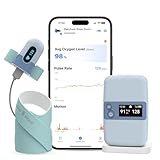
Overview: The Babytone Sleep Monitor with Base Station tracks heart rate and movement for babies 0-36 months, adding a standalone display unit to their budget-friendly formula. Using Bluetooth connectivity with a dedicated monitor, this system provides phone-independent alerts and data storage, addressing key limitations of the base Babytone model while maintaining affordability.
What Makes It Stand Out: The integrated Base Station sets this apart from other Babytone products, offering on-screen readings and audible alerts without smartphone dependency. The 16-hour sensor battery and 7-day base station battery provide extended coverage. Data syncs to the free app when connected, but the base stores four sessions internally, preventing data loss during phone disconnection—a practical feature for busy parents.
Value for Money: At $139.99, this is the most economical monitor with a Base Station, undercutting premium competitors by over 50%. While lacking FDA clearance and oxygen tracking, it delivers core functionality—heart rate and movement monitoring with standalone alerting—for a fraction of medical-grade prices. The extended 0-36 month range maximizes value per dollar spent.
Strengths and Weaknesses: Strengths include unbeatable price, Base Station independence, extended age range, long battery life, comfortable washable socks, and data export options. The Bluetooth-only design minimizes radiation. Weaknesses involve no FDA clearance, absence of oxygen monitoring, potentially less accurate readings than medical devices, and limited app polish. The two-size sock range may not fit as precisely as three-size alternatives.
Bottom Line: For budget-conscious families wanting Base Station convenience without premium pricing, this Babytone variant is exceptional. It sacrifices medical certification for affordability and practicality, making it ideal for parents seeking basic monitoring reassurance through toddlerhood.
6. Owlet Dream Duo (Gen 2) Smart Baby Monitor Bundle – HD Video Camera + Wearable Sock Tracks Baby’s Oxygen, Heart Rate & Sleep

Overview: The Owlet Dream Duo (Gen 2) combines an HD video camera with the FDA-cleared Dream Sock, creating a comprehensive monitoring system for infants 1-18 months. This premium bundle tracks oxygen levels, pulse rate, and sleep patterns, delivering real-time data through both a dedicated Base Station and smartphone app.
What Makes It Stand Out: As the first FDA-cleared smart baby monitor, the Dream Sock provides medical-grade peace of mind that consumer-grade trackers can’t match. The dual-notification system ensures you’ll never miss an alert, with both visual/audio cues on the Base Station and instant app notifications when readings fall outside preset ranges.
Value for Money: At $314.49, this represents significant investment, but it’s considerably less than the Gen 1 version. The FDA clearance alone justifies the premium over non-medical alternatives. Compared to purchasing a quality video monitor and separate health tracker, the bundle pricing is reasonable for anxious parents seeking comprehensive monitoring.
Strengths and Weaknesses: Pros: FDA-cleared medical device status; comprehensive vitals tracking (oxygen/pulse); dual notification system; HD video included; real-time data access Cons: High price point; sock may not fit all babies comfortably; 48-hour video storage limit (subscription required for more); limited to 18 months/30 lbs
Bottom Line: For parents prioritizing medical-grade monitoring and willing to invest in peace of mind, the Owlet Dream Duo (Gen 2) delivers unmatched safety assurance. The FDA clearance and comprehensive tracking justify the cost for families with health concerns or high anxiety.
7. Babytone Smart Baby Monitor – Baby Breathing Monitors with Rollover & Overheating Alarms, Long Battery Life, Real-Time Temperature Tracking, Free App for Infants & Newborns 0-24 Months (Sleep Clip)

Overview: The Babytone Smart Baby Monitor offers budget-conscious parents essential safety monitoring through a simple diaper clip design. Designed for infants 0-24 months, this Wi-Fi-free device tracks breathing rate, sleep position, and temperature, sending alerts via Bluetooth to the Vihealth app without exposing your baby to wireless radiation.
What Makes It Stand Out: The seven-day battery life and Wi-Fi-free operation address two major parental concerns: constant recharging and electromagnetic exposure. Its ability to detect stomach sleeping and send instant rollover alerts provides critical SIDS prevention functionality that many pricier monitors lack.
Value for Money: At $79.99, this monitor delivers exceptional value. It focuses on the most critical safety parameters without the premium pricing of oxygen-tracking competitors. The long battery life reduces maintenance hassle, and the Wi-Fi-free design eliminates monthly subscription costs, making it far more economical than connected alternatives over time.
Strengths and Weaknesses: Pros: Affordable price; 7-day battery life; Wi-Fi-free low-radiation design; rollover/stomach sleeping alerts; adjustable thresholds; 10-day onboard storage Cons: Bluetooth range limitations; no video monitoring; app connectivity can be inconsistent; lacks medical-grade certification
Bottom Line: The Babytone is an excellent entry-level monitor for practical parents who want core safety features without complexity or high costs. Its Wi-Fi-free design and extended battery life make it ideal for families prioritizing simplicity and minimal electromagnetic exposure.
8. Sense-U Pro Baby Monitor(Long Range) – Tracks Breathing Movement, Rollover & Temperature Anywhere for Better Sleep, Simple Clip-On Smart Tracker with Arousal Vibration, Audible Alerts & Sleep Analysis
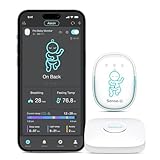
Overview: The Sense-U Pro Baby Monitor bridges the gap between basic trackers and premium medical devices with its intelligent clip-on design. Monitoring abdominal breathing movement, rollover, and temperature for infants 0-24 months, it uniquely features an arousal vibration mechanism that attempts to stimulate your baby if no movement is detected for 15 seconds.
What Makes It Stand Out: The proactive arousal vibration sets this apart from passive monitors, potentially rousing infants from dangerous sleep positions before triggering alarms. Supporting twin monitoring and multi-user app access, it’s built for modern families. The device functions independently without the app, a rare flexibility in smart monitors.
Value for Money: Priced at $139.99, it costs less than half of medical-grade alternatives while offering advanced features like vibration stimulation and comprehensive environmental monitoring. The inclusion of room temperature/humidity tracking and detailed sleep analysis provides premium value without subscription requirements.
Strengths and Weaknesses: Pros: Unique arousal vibration feature; twin monitoring support; multi-user family access; works without app; room humidity monitoring; long-range connectivity Cons: Not FDA-cleared; clip may detach on active babies; vibration might not wake all infants; app interface could be more intuitive
Bottom Line: The Sense-U Pro is a smart middle-ground choice for tech-savvy parents wanting more than basic monitoring without medical-grade prices. Its vibration feature and family-sharing capabilities make it particularly valuable for households with multiple caregivers or twins.
9. Owlet® Dream Duo (Gen 1) Smart Baby Monitor: FDA-Cleared Dream Sock® plus Owlet Cam 2 - Tracks & Notifies for Pulse Rate & Oxygen while viewing Baby in 1080p HD WiFi Video

Overview: The Owlet Dream Duo (Gen 1) represents the original FDA-cleared smart baby monitoring system, combining the Dream Sock with the Owlet Cam 2 for comprehensive vitals and video surveillance. Designed for infants 1-18 months, it tracks pulse rate and oxygen levels while providing 1080p HD video streaming.
What Makes It Stand Out: As the pioneering FDA-cleared monitor, this Gen 1 system established the gold standard for consumer medical monitoring. The integration of proven sock sensor technology with quality video monitoring created the template that competitors still follow. Its medical device status provides documentation and reliability that non-cleared devices cannot legally claim.
Value for Money: At $415.00, this older generation commands a premium over the Gen 2 model despite similar core functionality. While the technology remains medically sound, the inflated price reflects brand positioning rather than feature superiority. Budget-conscious buyers should opt for Gen 2, though this remains a reliable choice if found at discount.
Strengths and Weaknesses: Pros: FDA-cleared medical device; proven track record; reliable dual notifications; comprehensive vitals tracking; 1080p video quality Cons: Significantly overpriced compared to Gen 2; older camera technology; limited to 18 months; 48-hour storage requires subscription upgrade
Bottom Line: The Gen 1 Owlet Dream Duo remains a capable medical-grade monitor but its high price makes it difficult to recommend over the more affordable Gen 2 version. Consider only if discounted, as the core monitoring technology is nearly identical between generations.
10. Owlet Dream Sight (Gen 3) Smart Video Baby Monitor | 2K HD Camera w/Night Vision | Detects Crying, Motion & Temperature | Customizable Alerts | Two-Way Talk | Secure Wi-fi
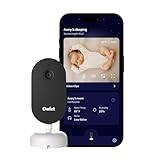
Overview: The Owlet Dream Sight (Gen 3) focuses exclusively on video and environmental monitoring, delivering a cybersecurity-certified camera without the wearable sock component. This 2K HD monitor detects crying, motion, and room temperature while offering two-way audio communication for infants and toddlers.
What Makes It Stand Out: The SGS Cybersecurity Mark makes this the only baby monitor with independent security certification, addressing modern parents’ hacking concerns. The 2K resolution exceeds standard HD competitors, while customizable alert sensitivity prevents notification fatigue. Its standalone nature appeals to parents who want monitoring without vitals tracking.
Value for Money: At $99.99, this competitively priced video monitor undercuts many premium brands while offering superior security and resolution. For families not requiring oxygen or breathing tracking, it eliminates unnecessary costs while providing top-tier video quality and environmental monitoring typically found in more expensive systems.
Strengths and Weaknesses: Pros: SGS Cybersecurity Mark; sharp 2K video; customizable alert sensitivity; two-way audio; no subscription required for basic features; dual-band WiFi stability Cons: No breathing or vitals tracking; requires reliable WiFi; no wearable sensor; limited to visual/audio monitoring
Bottom Line: The Owlet Dream Sight is an excellent choice for parents seeking a secure, high-quality video monitor without medical tracking complexities. Its cybersecurity certification and 2K resolution make it a standout value for families prioritizing digital safety and video clarity over biometric data.
Understanding Smart Baby Breathing Monitors
What Exactly Are Smart Baby Breathing Monitors?
These aren’t your parents’ audio monitors. Modern smart breathing monitors are wearable or contactless devices that continuously track your infant’s respiratory rate and blood oxygen levels (SpO2). Using photoplethysmography (PPG) sensors—the same technology found in hospital pulse oximeters—they emit harmless light waves that detect subtle changes in blood volume and oxygenation. The “smart” element comes from onboard processors that analyze this data in real-time, distinguishing between normal sleep movements and actual respiratory events that require parental attention.
How Oxygen Saturation Monitoring Works
Oxygen alerts trigger when SpO2 levels drop below predetermined thresholds, typically 80-90% depending on your pediatrician’s recommendations. The monitor’s sensor detects how much oxygen is bound to hemoglobin in your baby’s blood by measuring light absorption patterns. In 2026’s models, multi-wavelength LEDs have improved accuracy dramatically, reducing false alarms caused by motion artifacts or poor placement. Understanding that these readings can fluctuate normally during sleep cycles helps parents interpret alerts appropriately—brief dips during REM sleep are common, while sustained low readings warrant immediate investigation.
The Evolution of Baby Monitoring Technology
From Audio to AI: A Brief History
The journey from simple audio transmitters to today’s AI-powered health devices spans nearly four decades. The 2010s introduced video monitoring, while the early 2020s brought movement sensors. The real revolution began when consumer-grade pulse oximetry became viable for continuous infant monitoring. By 2026, machine learning algorithms can now differentiate between a baby’s normal sleep movements and concerning patterns with over 95% accuracy, a leap from the 70-75% accuracy rates of just three years ago.
Why 2026 Represents a Tipping Point
This year marks convergence of several critical factors: miniaturization of hospital-grade sensors, FDA guidance on consumer health devices, and mainstream adoption of predictive analytics. Battery efficiency has improved 300% since 2023, enabling smaller form factors that don’t compromise comfort. More importantly, 2026 sees the first widespread implementation of “smart baseline” technology, where monitors learn your baby’s unique breathing patterns over 7-10 days, creating personalized alert thresholds rather than one-size-fits-all parameters.
Key Features That Define Premium Monitors
Real-Time Oxygen Saturation (SpO2) Tracking
The gold standard feature continuously displays oxygen levels with updates every 2-5 seconds. Premium monitors offer configurable alert thresholds, allowing your pediatrician’s specific recommendations to be programmed. Look for devices that show not just current readings but also trend data—seeing a gradual decline over 30 seconds provides more context than an abrupt alert. The best systems also track perfusion index, indicating signal quality, so you know when readings are reliable versus when the sensor needs adjustment.
Breathing Pattern Analysis
Beyond simple movement detection, advanced monitors analyze respiratory rate variability, breath-to-breath intervals, and even chest wall movement patterns. They detect shallow breathing, periodic breathing common in preemies, and can distinguish between central and obstructive apnea events. This granularity matters because different breathing irregularities require different parental responses. Some 2026 models now include “breathing effort” metrics, measuring the mechanical work your baby’s chest performs—a crucial indicator of respiratory distress that precedes oxygen drops.
Alert Systems and False Positive Reduction
Intelligent alert hierarchy separates critical alarms from informational notifications. Premium devices use escalating alerts: a gentle vibration on the base unit for minor issues, escalating to smartphone notifications, then audible alarms if unacknowledged. Machine learning has slashed false positive rates from 30% to under 5% by filtering out motion artifacts, feeding events, and diaper changes. Look for monitors with “alert fatigue” protection—features that temporarily adjust sensitivity after multiple false triggers to prevent parents from ignoring genuine warnings.
Connectivity and App Integration
Modern monitors sync via low-energy Bluetooth 5.3 or Wi-Fi 6E for reliable, encrypted data transmission. The accompanying app should offer real-time dashboards, historical trend analysis, and seamless data sharing with pediatricians. In 2026, look for HL7 FHIR compliance, enabling direct integration with electronic health records at progressive medical practices. Cloud storage should be HIPAA-compliant with end-to-end encryption, and offline mode should store 24+ hours of data locally if connectivity fails.
Battery Life and Power Management
The best monitors now operate 16-20 hours on a single charge, with wireless charging pods that make daily recharging effortless. Power management features include adaptive sampling rates that reduce sensor frequency during stable sleep periods and “opportunistic charging” that tops off batteries during brief wake windows. Some models offer battery health indicators, alerting you when capacity degrades below 80%—critical for ensuring overnight reliability.
Critical Safety Standards and Certifications
FDA Clearance vs. FDA Approved: Understanding the Difference
This distinction is crucial: FDA approved means the device underwent rigorous clinical trials as a medical device, while FDA cleared indicates it’s substantially equivalent to an existing approved device. Most consumer monitors are FDA cleared as Class II medical devices, meaning they’re suitable for home monitoring but shouldn’t replace medical-grade equipment for high-risk infants. Ask manufacturers for their 510(k) clearance number and review the predicate device to understand the validation level.
Pediatric Medical Associations’ Recommendations
The American Academy of Pediatrics (AAP) maintains that monitors shouldn’t be used to prevent SIDS, but acknowledges their value for specific medical conditions. In 2026, the AAP updated guidelines to support monitors for premature infants, babies with chronic lung disease, or those with documented apnea events. Look for devices endorsed by pediatric pulmonologists or tested in NICU follow-up programs. The best manufacturers publish peer-reviewed validation studies in journals like Pediatrics or the Journal of Perinatology.
Data Privacy and Security Protocols
Your baby’s health data is incredibly sensitive. Premium monitors employ AES-256 encryption, two-factor authentication, and regular third-party security audits. In 2026, GDPR compliance is standard, but look for additional certifications like SOC 2 Type II or ISO 27001. Be wary of devices that sell anonymized data to third parties—reputable manufacturers maintain transparent privacy policies and offer data deletion on request. Local processing on the device itself, rather than cloud-based analysis, provides an additional privacy layer.
Placement Options and Wearable Technologies
Sock-Style Monitors: Pros and Cons
Foot-based monitors dominate the market for good reason: the foot’s thin skin and abundant capillaries provide excellent signal quality. Modern socks use medical-grade silicone and moisture-wicking fabrics that prevent skin irritation. However, they require precise sizing—too loose causes signal loss, too tight restricts circulation. The best designs include “fit check” algorithms that alert you to improper placement. Consider your baby’s age and growth rate; some socks fit 0-18 months while others require size upgrades every 6 months.
Wearable Bands and Chest Straps
Chest placement offers superior breathing motion detection but can be less comfortable for sensitive babies. 2026’s bands use soft, stretchable electronics that move with your baby’s breathing, reducing artifacts. They’re ideal for babies who kick off socks or have foot deformities. Look for hypoallergenic materials and designs that don’t compress the chest. The trade-off is slightly lower SpO2 accuracy compared to foot placement, though advanced algorithms compensate by cross-referencing breathing patterns with oxygen data.
Under-Mattress Sensor Pads
Contactless monitoring appeals to parents worried about wearables, but 2026’s technology still can’t match direct-contact SpO2 accuracy. These pads excel at detecting movement and breathing rate but rely on peripheral pulse signals that are inherently less reliable. They’re best suited for older infants or as supplementary monitors. If choosing this route, ensure the pad covers at least 70% of the crib mattress and includes pressure mapping to confirm your baby is within the sensing zone.
Clip-On and Adhesive Options
Emerging in 2026 are single-use adhesive sensors for travel or short-term monitoring. These medical-grade patches provide 24-48 hours of continuous data before requiring replacement. While expensive for daily use, they’re invaluable for post-hospitalization monitoring or during illness. Clip-on devices that attach to diapers offer a compromise, though they’re prone to dislodgement during active sleep. Always verify adhesive materials are dermatologist-tested and latex-free.
Accuracy and Reliability: What Parents Should Know
Clinical-Grade Sensors vs. Consumer-Grade
The sensor quality gap has narrowed significantly, but differences remain. Clinical-grade sensors use multiple wavelengths and higher sampling rates, providing accuracy within ±2% of arterial blood gas measurements. Consumer devices typically achieve ±3-4% accuracy under ideal conditions. For healthy term infants, this difference is negligible. For preemies or babies with respiratory conditions, ask your neonatologist if consumer-grade accuracy meets your needs or if a prescription medical device is warranted.
Environmental Factors That Affect Readings
Room temperature below 68°F can cause peripheral vasoconstriction, reducing signal quality. Bright ambient light, especially sunlight, can interfere with optical sensors—use blackout curtains or ensure sensors are covered. Dark nail polish (if used on infants) and certain fabrics can affect readings. The best monitors include environmental sensors that automatically adjust algorithms for room conditions. Electromagnetic interference from older baby monitors or microwaves can disrupt data transmission; Wi-Fi 6E models mitigate this by using less congested frequency bands.
Smart Features Beyond Breathing Monitoring
Sleep Tracking and Analysis
Modern monitors generate comprehensive sleep reports, tracking REM vs. non-REM cycles, sleep onset latency, and overnight wake periods. This data helps identify sleep regressions, evaluate nap schedules, and detect subtle changes indicating illness. Look for systems that provide actionable insights rather than raw data—suggestions like “baby’s sleep efficiency dropped 15%, consider earlier bedtime” are more valuable than graphs alone. Some platforms now integrate with pediatric sleep consultants who can remotely review your baby’s data.
Room Temperature and Humidity Sensors
Optimal sleep environment significantly impacts breathing quality. Integrated sensors help maintain 68-72°F and 40-60% humidity, conditions that reduce respiratory irritation. Premium monitors correlate environmental data with breathing patterns, alerting you if your baby shows signs of overheating or if dry air is causing nasal congestion. This feature becomes invaluable during illness when environmental adjustments can prevent breathing complications.
Cry Detection and Two-Way Audio
While not core to breathing monitoring, these features reduce the need for separate devices. Advanced cry analysis can differentiate between hunger, discomfort, and pain cries, providing context for nighttime awakenings. Two-way audio lets you soothe your baby without entering the room, potentially preventing sleep disruptions that affect breathing patterns. Ensure audio processing is local to avoid cloud latency that makes real-time communication impossible.
Installation and Setup Best Practices
Optimal Placement Guidelines
For sock monitors, position the sensor over the foot’s arch, not the toe or ankle. Ensure the foot is warm before application—cold feet reduce signal quality. For chest bands, place the sensor module directly over the sternum, with the band snug but allowing two fingers to fit underneath. Under-mattress pads require a firm, flat surface; memory foam toppers interfere with sensor accuracy. Always test placement during a nap before relying on the system overnight.
Calibrating Your Monitor for Maximum Accuracy
Most 2026 monitors require a 3-7 day calibration period to establish your baby’s baseline. During this time, minimize false alarms by keeping sensitivity at “learning mode” settings. Manually log known events—diaper changes, feedings, when baby is awake—to help the AI distinguish normal movements from concerning patterns. After calibration, review the baseline data with your pediatrician; they may suggest adjusting alert thresholds based on your baby’s unique physiology.
Integrating with Smart Home Ecosystems
Link your monitor to smart thermostats for automatic temperature adjustments when breathing patterns suggest discomfort. Connect to smart lighting for gentle wake-up routines that don’t startle your baby. However, maintain a dedicated physical base unit that functions independently—over-reliance on smart home integration creates failure points. The best systems offer both smart home connectivity and standalone reliability.
Understanding Alerts and Notifications
Decoding Different Alert Types
Learn your monitor’s alert hierarchy: yellow notifications might indicate poor signal quality or brief oxygen dips below 90%, while red alarms signal sustained desaturation under 85% or apnea events exceeding 20 seconds. Some systems include “pre-alert” warnings—subtle changes in breathing variability that predict potential issues. Understand that motion artifacts during diaper changes often trigger yellow alerts; acknowledging these helps the system learn and reduce future false alarms.
Customizing Sensitivity Levels
One-size-fits-all sensitivity fails to account for individual differences. Premature infants may require higher sensitivity to detect subtle breathing changes, while robust, active sleepers need reduced motion detection to avoid false alarms. The best monitors offer age-based presets that automatically adjust as your baby grows. During illness, temporarily increase sensitivity to catch early warning signs. Always test new sensitivity settings during supervised naps before overnight use.
What to Do When an Alarm Sounds
First, verify it’s not a false alarm—check the app for signal quality indicators and trend data. If the alert is legitimate, stimulate your baby gently while calling their name. If breathing doesn’t resume normally within 10-15 seconds or oxygen remains low, pick up your baby and perform appropriate response measures as directed by your pediatrician. Never ignore alarms assuming they’re false. Create a response plan with your pediatrician and practice it so nighttime alarms trigger automatic, calm action rather than panic.
Common Concerns and Limitations
When Monitors Shouldn’t Be Used
These devices aren’t recommended for co-sleeping situations, as adult movements create insurmountable noise in the data. They’re also unsuitable for babies under 5 pounds unless specifically designed for preemies, as sensor weight can affect readings. During active play or tummy time, remove wearables to prevent damage and inaccurate alerts. If your baby has dermatitis or broken skin on sensor placement sites, wait for healing to avoid irritation and infection risk.
The Difference Between Monitoring and Medical Diagnosis
Crucially, these monitors are screening tools, not diagnostic devices. They alert you to potential issues but can’t identify causes. A single night of poor readings doesn’t constitute a medical diagnosis—trends over multiple nights matter more. Always correlate monitor data with clinical observations: color changes, feeding difficulties, or unusual lethargy. Share concerning patterns with your pediatrician, but never adjust medical treatment based solely on consumer monitor data.
Addressing Radiation and EMF Worries
Modern monitors use Bluetooth Low Energy emitting less radiation than a standard smartphone. The optical sensors use LED light, not ionizing radiation. For concerned parents, choose monitors with airplane mode that stores data locally for batch sync later. Position the base unit at least 3 feet from the crib to minimize any EMF exposure. Remember, the stress reduction from reliable monitoring often outweighs theoretical EMF concerns, especially when using devices that meet FCC safety standards.
Price Ranges and Value Considerations
Budget-Friendly vs. Premium Features
Entry-level monitors ($150-$250) offer basic SpO2 and movement detection but lack advanced AI filtering and long-term trend analysis. Mid-range devices ($250-$400) provide the sweet spot: reliable sensors, good app integration, and customizable alerts. Premium monitors ($400-$600) include predictive analytics, pediatrician portal access, and superior build quality. Consider your specific needs—a healthy term infant may not require premium features, while a former preemie benefits from maximum accuracy and data granularity.
Subscription Models and Hidden Costs
Many 2026 monitors require subscriptions ($5-$15/month) for full feature access, including historical data, AI insights, and pediatrician sharing. Factor these ongoing costs into your budget. Some manufacturers lock basic functionality behind paywalls—avoid these models. Look for devices offering at least 30 days of free data storage and core features without subscription. Lifetime subscription bundles often provide better value if you plan to monitor multiple children.
Maintenance and Longevity
Cleaning and Care Instructions
Optical sensors require weekly cleaning with isopropyl alcohol to remove skin oils that degrade accuracy. Fabric components should be machine washable on gentle cycles—avoid harsh detergents that break down conductive threads. Inspect sensors monthly for cracks or discoloration that indicate degradation. Store devices in a cool, dry place; heat damages battery chemistry and sensor calibration. Most manufacturers recommend replacing wearable components every 12-18 months due to material fatigue.
Software Updates and Firmware Support
Choose manufacturers committed to at least 3 years of software support post-purchase. Regular firmware updates improve algorithm accuracy, patch security vulnerabilities, and add features. The best companies release quarterly updates based on aggregated user data (anonymized) and clinical feedback. Before purchasing, check the manufacturer’s update history—consistent updates indicate active development and long-term reliability.
Warranty and Customer Support Expectations
Premium monitors should include 12-24 month warranties covering sensor degradation and battery failure. Look for companies offering 24/7 technical support staffed by actual engineers, not just script-reading agents. Replacement policies matter—some manufacturers provide free sensor replacement if accuracy drops below advertised thresholds within the warranty period. Read warranty details carefully; water damage and improper cleaning often void coverage.
Traveling with Your Baby Monitor
Portability Features to Look For
Travel cases with charging compartments protect sensors during transit. Battery packs that charge via USB-C offer universal compatibility. Offline mode is essential for airplane use and areas with poor connectivity—ensure your monitor stores at least 48 hours of data locally. Compact base units that pair with your smartphone eliminate the need to carry separate displays. Some 2026 models include “travel calibration” that quickly adapts to new environments without requiring a full 7-day baseline reset.
International Power Compatibility
For international travel, verify the charging base accepts 100-240V input for universal voltage compatibility. USB-C charging is preferable to proprietary connectors—easily replaced if lost abroad. Check that your monitor’s radio frequencies comply with local regulations; some countries restrict certain Wi-Fi channels. Download offline maps of pediatric hospitals at your destination and confirm your monitor’s app works without VPN access, which may be restricted in some regions.
Future Trends in Baby Monitoring
AI-Powered Predictive Analytics
2026’s frontier is predicting events before they occur. Emerging monitors analyze subtle changes in heart rate variability, breathing pattern complexity, and oxygen saturation trends to forecast respiratory distress 30-60 minutes in advance. These systems compare your baby’s data against anonymized databases of thousands of infants, identifying patterns invisible to human observers. While promising, this technology remains investigational—use it as supplementary information, not a primary decision-making tool.
Integration with Pediatric Health Records
The most progressive manufacturers now offer direct EHR integration, allowing your pediatrician to review monitor data during telehealth visits or between appointments. This requires HIPAA-compliant APIs and your explicit consent for each data share. Some insurance companies are beginning to reimburse monitor costs for high-risk infants when data is shared with healthcare providers. This trend toward medical integration blurs the line between consumer and clinical devices, potentially raising standards across the industry.
Making Your Final Decision
Creating a Personalized Feature Checklist
Rank features by your specific situation: preemie parents prioritize accuracy and medical integration; tech-savvy parents value smart home connectivity; frequent travelers need portability. Create a must-have list: “FDA cleared,” “15-hour battery,” “no subscription required.” Then identify nice-to-haves: “cry detection,” “predictive analytics.” This prevents overspending on features you’ll never use while ensuring you don’t compromise on essentials.
Trial Periods and Return Policies
Never purchase a monitor without a 30-day return window. Setup can be challenging, and your baby may reject certain wearables. Test thoroughly during daytime naps before committing to overnight use. Keep all packaging and documentation. Some manufacturers offer “test drive” programs where you can try multiple models for a nominal fee. Use these programs—they’re invaluable for finding the right fit for your baby’s physiology and your parenting style.
Frequently Asked Questions
How accurate are home oxygen monitors compared to hospital equipment?
Consumer monitors in 2026 achieve ±3-4% accuracy compared to hospital pulse oximeters, which are accurate within ±2%. For healthy infants, this difference is clinically insignificant. However, for babies with respiratory conditions, hospital-grade equipment remains the gold standard. Always confirm concerning readings with a medical-grade device before making healthcare decisions.
Can these monitors prevent SIDS?
No device can prevent SIDS, and the American Academy of Pediatrics explicitly states monitors shouldn’t be marketed for this purpose. These devices alert you to breathing irregularities, allowing rapid response. They provide peace of mind and valuable data but are not protective devices. Safe sleep practices—back sleeping, firm mattress, no soft bedding—remain the most effective SIDS risk reduction strategies.
At what age should I stop using a breathing monitor?
Most parents discontinue use between 6-12 months when the SIDS risk decreases significantly and babies develop more stable breathing patterns. However, consider your baby’s unique situation—premature infants or those with ongoing respiratory issues may benefit from monitoring longer. The best approach is to discuss weaning with your pediatrician based on your baby’s medical history and monitor data trends.
Will my baby feel uncomfortable wearing a monitor all night?
Modern monitors weigh less than 20 grams and use soft, breathable materials. Most babies adapt within 3-5 nights. If your baby shows persistent discomfort—fussing when the device is put on, skin irritation, or sleep disruption—try alternative placement options or brands. Some manufacturers offer fabric swatches for sensitivity testing before purchase.
How do I know if an alert is a real emergency versus a false alarm?
Check the app immediately: look for signal quality indicators, review the 30-second trend graph, and note the alert type. Yellow alerts with “poor signal” are typically false. Red alerts showing sustained low oxygen or no breathing movement for 20+ seconds require immediate response. Over time, you’ll learn your monitor’s patterns. Always err on the side of caution—when in doubt, check on your baby.
Can I use these monitors for co-sleeping or bed-sharing?
No. Adult movements create insurmountable interference with sensors, and the risk of device displacement or entanglement increases. These monitors are designed for crib or bassinet use only. If you practice co-sleeping, discuss alternative monitoring strategies with your pediatrician, but wearable monitors are not suitable for this sleep arrangement.
Do I need a subscription to get basic functionality?
Reputable 2026 monitors provide core features—real-time alerts, current readings, and 24-hour data history—without subscription. Subscriptions typically unlock long-term trend analysis, AI insights, and pediatrician sharing portals. Avoid devices that require subscriptions for basic life-safety alerts, as this creates an unethical paywall for essential information.
How often should I clean the sensor, and what’s the best method?
Clean optical sensors weekly with 70% isopropyl alcohol on a cotton swab, removing skin oils and residue. Fabric components should be washed every 3-4 days using fragrance-free detergent. Never submerge electronic modules. Inspect sensors monthly for cracks or cloudiness that indicate degradation requiring replacement.
Can multiple caregivers receive alerts on their phones?
Yes, most 2026 monitors support 5-10 connected devices with customizable alert permissions. Primary caregivers receive all alerts; grandparents or babysitters might get only critical alarms. Ensure your monitor allows individual notification settings so one person’s Do Not Disturb mode doesn’t compromise safety coverage.
What should I do if my pediatrician questions the monitor’s readings?
Bring the device to an appointment and demonstrate its readings alongside the pediatrician’s medical-grade equipment. Share exported data reports showing trends over time. Ask your doctor to help you establish appropriate alert thresholds based on your baby’s health status. If significant discrepancies exist, contact the manufacturer—they may recalibrate or replace the device under warranty. Never adjust medical care based solely on consumer device data without professional consultation.