Phantom load isn’t just a quirky term energy geeks throw around at parties—it’s a silent budget assassin lurking in every modern home. As we barrel through 2026, with electricity rates climbing and our homes packed with more “smart” devices than ever, that insidious trickle of standby power has evolved from a minor nuisance into a major financial leak. The average American household now wastes over $200 annually on vampire power, with gaming consoles, smart TVs, and always-on assistants sipping electricity 24/7. But here’s the game-changer: smart power strips have undergone a radical transformation, bringing enterprise-level energy management to your living room for less than the cost of a family dinner out.
Gone are the days when “smart” meant a simple timer and a clunky app. Today’s budget-friendly power strips under $60 pack sophisticated energy monitoring, AI-driven automation, and seamless smart home integration that would have cost triple just two years ago. Whether you’re a sustainability warrior tracking every watt or just tired of paying for devices you’re not using, understanding what makes these modern strips tick is your first step toward genuine energy independence.
Top 10 Smart Power Strips for Phantom-Load Energy Management
Detailed Product Reviews
1. Kasa Smart Plug Power Strip HS300, Surge Protector with 6 Individually Controlled Smart Outlets and 3 USB Ports, Works with Alexa & Google Home, No Hub Required , White

Overview: The Kasa HS300 represents TP-Link’s premium smart power strip offering, featuring six individually controlled smart outlets alongside three always-on USB ports. This ETL-certified surge protector (1710 joules) integrates with Alexa, Google Assistant, and Cortana without requiring a hub, making it ideal for sophisticated home office setups or entertainment centers. The Kasa Smart app enables remote control and detailed energy monitoring from anywhere with a stable connection.
What Makes It Stand Out: True individual outlet control distinguishes this from lesser strips—power down your 3D printer while keeping your modem running. Comprehensive energy monitoring provides real-time consumption data per outlet, helping identify inefficient devices. The surge protection exceeds basic strips, and voice control works reliably across major platforms with minimal latency.
Value for Money: At $39.98, the HS300 delivers compelling value. Purchasing six individual smart plugs would exceed $60, without surge protection or energy monitoring. TP-Link’s proven ecosystem and regular firmware updates make this a wise long-term investment that outperforms many $50+ competitors while maintaining excellent build quality.
Strengths and Weaknesses: Strengths include granular outlet control, detailed energy monitoring, robust surge protection, stable app performance, and broad voice assistant compatibility. Weaknesses: USB ports lack individual control and smart scheduling, the unit is 2.4GHz WiFi only, and its 14.5-inch length demands substantial space. Some users may find the three-foot cord slightly short.
Bottom Line: An excellent choice for users wanting detailed energy insights and precise automation. The HS300 transforms power management into an intelligent, data-driven experience worth every dollar for serious smart home enthusiasts managing multiple electronics.
2. Kasa Smart Plug Power Strip KP303, Surge Protector with 3 Individually Controlled Smart Outlets and 2 USB Ports, Works with Alexa & Google Home, No Hub Required , White

Overview: The Kasa KP303 streamlines smart power control into a compact, budget-friendly package with three individually controlled outlets and two always-on USB ports. This ETL-certified surge protector works with Alexa and Google Assistant without a hub, targeting users needing basic automation without complexity. The Kasa app provides reliable remote access and scheduling from anywhere with an intuitive interface that even beginners master quickly.
What Makes It Stand Out: Affordability meets reliability—TP-Link’s trusted ecosystem at entry-level pricing. The scheduling feature enables automated routines like turning off gaming consoles at bedtime or starting coffee makers in the morning. Its compact 10.5-inch design fits easily on desks or nightstands where space is premium, and the 3-foot cord offers decent placement flexibility.
Value for Money: At $23.38, this is exceptional value. Three smart outlets typically cost $30+ separately, making the KP303 a cost-effective entry point. While lacking energy monitoring, it delivers core smart features that justify the price for budget-conscious buyers wanting brand reliability and proven performance.
Strengths and Weaknesses: Strengths include rock-solid app stability, easy setup, compact footprint, and reliable voice control. The USB ports provide convenient charging for phones and tablets. Weaknesses: No energy monitoring limits insights, only three controllable outlets may prove insufficient for larger setups, and USB ports aren’t smart-controlled. It’s also 2.4GHz-only, which may concern some users.
Bottom Line: Perfect for smart home newcomers or as a secondary strip for specific zones like bedside tables or small workstations. The KP303 offers TP-Link quality without premium pricing, making it an intelligent starting point for home automation that grows with your needs.
3. Smart Strip ECG-7MVR Energy Saving Surge Protector with Autoswitching Technology, 7 Outlet

Overview: The Smart Strip ECG-7MVR takes a different approach to intelligent power management, using autoswitching technology rather than WiFi connectivity. It features seven total outlets: one control, two always-on, and four switched outlets that respond to the control device’s power state. This simple, effective solution targets energy waste without network complexity or app dependencies, appealing to users wanting automation without the smart home learning curve.
What Makes It Stand Out: The autoswitching technology automatically powers down peripheral devices when a master device (like a PC or TV) enters standby mode. A user-adjustable sensitivity screw ensures compatibility across various electronics with different standby power signatures. The right-angle flat plug and 4-foot cord solve common installation challenges behind furniture or in tight spaces where traditional plugs won’t fit.
Value for Money: At $21.99, it’s competitively priced against basic surge protectors, offering intelligent energy savings without subscription costs. However, it lacks true smart features, making it less versatile than WiFi-enabled alternatives in the same price range. The value depends entirely on whether you need remote access or just automated switching for specific setups.
Strengths and Weaknesses: Strengths include simple operation without network dependencies, effective energy savings for PC/home theater setups, space-saving plug design, and reliable mechanical switching that works during internet outages. Weaknesses: No remote control, voice commands, or scheduling; limited flexibility compared to app-controlled strips; and the 4-foot cord may be short for some applications requiring more reach.
Bottom Line: Ideal for specific use cases like computer workstations where peripherals should automatically shut down with the PC. It’s not a true smart device but provides meaningful energy savings for users preferring simplicity over connectivity and avoiding potential WiFi congestion.
4. GHome Smart Power Strip 15A, 2.4G WiFi Smart plugs that work with Alexa & Google Home, Surge Protector Flat Plug with 6 APP Control WiFi outlets, FCC Listed, 7.18 ft flat extension cord, No Hub Needed

Overview: The GHome Smart Power Strip positions itself as a feature-rich alternative to mainstream brands, offering six smart outlets plus three USB ports (including USB-C) with a generous 7.18-foot flat cord. This FCC-listed surge protector works with Alexa and Google Assistant over 2.4GHz WiFi without requiring a hub, targeting users wanting modern connectivity and extended reach in bedrooms, offices, or small businesses.
What Makes It Stand Out: The 30W USB-C fast charging port with individual smart control is a standout feature rarely found in competitors. The extra-long 7.18-foot cord provides exceptional placement flexibility, while individual USB control allows scheduling charging cycles to preserve battery health. Energy monitoring tracks total consumption across all devices, helping identify waste and reduce electricity bills.
Value for Money: At $39.99, it matches the Kasa HS300’s price while adding USB-C and a longer cord. The feature set is impressive, though the lesser-known brand may give some buyers pause. Still, the hardware specifications justify the cost for users needing modern charging options and extended reach beyond standard six-foot cords.
Strengths and Weaknesses: Strengths include USB-C fast charging, individual USB port control, lengthy cord, energy monitoring, and competitive pricing. Weaknesses: 2.4GHz-only connectivity, potential app reliability concerns from a smaller brand, and unclear surge protection joule rating. The brand lacks TP-Link’s established track record and ecosystem maturity for long-term support.
Bottom Line: A compelling choice if USB-C charging and extended cord length are priorities. While brand recognition trails Kasa, the feature set and price make it worth considering for tech-forward users comfortable with a newer ecosystem and willing to trade some polish for advanced functionality.
5. Zooz Z-Wave Long Range Power Strip ZEN20 800LR with Energy Monitoring and 2 USB Ports | Works with Z-Box, Hubitat, Home Assistant, Compatible with SmartThings

Overview: The Zooz ZEN20 800LR is a premium Z-Wave power strip designed for advanced smart home ecosystems, offering five individually controlled outlets and two USB ports. Unlike WiFi alternatives, this device requires a Z-Wave hub (Z-Box, Hubitat, Home Assistant, SmartThings) and delivers superior range and security through Z-Wave Long Range technology with S2 encryption. It’s purpose-built for local-control smart homes that prioritize reliability and privacy.
What Makes It Stand Out: Z-Wave Long Range provides exceptional signal reach and reliability compared to WiFi, making it ideal for detached workshops or large properties. Individual outlet control with energy monitoring enables sophisticated automation scenes and power management. The USB ports report charging status to your hub, and S2 security exceeds typical WiFi device protection against potential vulnerabilities and network attacks.
Value for Money: At $98.75, this is a significant investment. However, for Z-Wave ecosystems, it consolidates five smart switches and energy monitors into one device, potentially saving money versus separate units. The ZWLR technology and security features justify the premium for serious enthusiasts who prioritize local control, range, and robust encryption over cloud-dependent alternatives.
Strengths and Weaknesses: Strengths include excellent Z-Wave Long Range performance, individual energy monitoring, robust S2 security, ETL certification, and reliable hub integration with status restoration after power failures. Weaknesses: Requires Z-Wave hub (added cost), USB ports aren’t Z-Wave controllable, incompatible with Ring/ADT/Alarm.com panels, and the price exceeds WiFi alternatives considerably for similar outlet counts.
Bottom Line: Essential for dedicated Z-Wave users needing range and security. For WiFi-centric homes, it’s overkill. The ZEN20 excels within its ecosystem but isn’t for casual smart home adopters or those invested in cloud-based platforms seeking plug-and-play simplicity.
6. Eve Energy Strip - Smart Triple Outlet & Power Meter for Apple Home, Built-in Schedules & Switches, Surge Protection, overcurrent Protection, overvoltage Protection, Energy metering

Overview: The Eve Energy Strip is a premium smart power strip designed exclusively for Apple HomeKit users. It features three independently controllable outlets with comprehensive power monitoring and robust electrical protection. Built with Apple’s ecosystem in mind, it offers seamless integration with Siri, iPhone, iPad, and Apple Watch for sophisticated home automation and energy management.
What Makes It Stand Out: This strip’s deep Apple HomeKit integration sets it apart, offering unparalleled privacy and security with end-to-end encryption. The individual outlet control via onboard buttons, app, or Siri provides exceptional flexibility. Its advanced energy metering tracks consumption and projects costs, while professional-grade surge, overcurrent, and overvoltage protection safeguard valuable electronics like no other consumer smart strip.
Value for Money: At $74.99, this is a premium investment justified by Apple-exclusive features and build quality. While significantly pricier than alternatives, it delivers energy monitoring, superior protection, and privacy that competitors lack. For Apple households, it eliminates the need for separate hub devices and integrates natively, making it cost-effective within that ecosystem compared to piecing together multiple devices.
Strengths and Weaknesses:
- Strengths: Native Apple HomeKit integration with no hub required; individual outlet control; comprehensive energy monitoring and cost projection; robust surge/overcurrent/overvoltage protection; strong privacy and security; onboard manual buttons; premium build quality.
- Weaknesses: Apple ecosystem only (no Android/Alexa/Google); no USB ports; premium pricing limits accessibility; requires recent iOS/iPadOS; fewer outlets than some competitors.
Bottom Line: The Eve Energy Strip is the definitive choice for dedicated Apple users prioritizing privacy, energy monitoring, and premium protection. Its high price is justified by seamless integration and advanced features, though Android users and budget-conscious buyers should look elsewhere.
7. Smart Power Strip, TESSAN WiFi Flat Plug Strip with 3 Smart Outlets and 3 USB Ports, 6 Feet Extension Cord, Only 2.4 GHz Wi-Fi, Compatible with Alexa and Google Home, White

Overview: The TESSAN WiFi Flat Plug Strip delivers smart home functionality at an accessible price point. It combines three individually controllable outlets with three always-on outlets and three USB charging ports. Compatible with Alexa and Google Home, this strip offers app-based control and scheduling without requiring a hub, making it ideal for budget-conscious smart home beginners.
What Makes It Stand Out: Its flat plug design and wall-mountable keyholes provide exceptional installation flexibility in tight spaces. The hybrid configuration of smart and always-on outlets maximizes versatility, allowing you to automate essential devices while keeping others continuously powered. The inclusion of three USB ports adds charging convenience rarely found in this price bracket.
Value for Money: At $27.99, this strip represents outstanding value. It undercuts most competitors while offering six AC outlets and three USB ports. While it lacks energy monitoring and uses only 2.4GHz WiFi, the core smart functionality and build quality match devices costing twice as much. It’s an economical entry point into smart home automation without sacrificing essential features.
Strengths and Weaknesses:
- Strengths: Extremely affordable; flat plug for space-saving; wall-mountable; three smart + three always-on outlets provide flexibility; three USB charging ports; no hub required; simple app control.
- Weaknesses: 2.4GHz WiFi only (no 5GHz); no energy monitoring; USB ports aren’t smart-controlled; surge protection details unspecified; plastic build feels less premium than competitors.
Bottom Line: The TESSAN strip is a fantastic budget option for Alexa/Google users wanting basic smart control. Its hybrid outlet design and mounting flexibility make it practical, though power users may miss energy monitoring and dual-band WiFi.
8. BN LINK Smart Plug Power Strip,Surge Protector with 6 Individually Controlled Smart Outlets, 4 USBs (incl. 20W USB-C), Compatible with Alexa and Google Home

Overview: BN LINK’s smart power strip packs six individually controlled AC outlets and four USB ports (including a 20W USB-C) into a surge-protected hub. Designed for Alexa and Google Assistant integration, it offers comprehensive device management through its proprietary app. The 2.4GHz WiFi connectivity and 1200 Joules surge protection make it a robust solution for modern smart homes and offices needing extensive automation.
What Makes It Stand Out: The six smart outlets provide more individually controllable ports than most competitors at this price. The 20W USB-C port with fast charging capability is a standout feature, supporting modern devices like tablets and smartphones. The strip’s ability to create custom schedules and group controls for multiple devices streamlines complex automation setups efficiently.
Value for Money: Priced at $35.14, this strip offers impressive feature density. Six smart outlets and four USB ports (with USB-C fast charging) under $40 represents strong value. While it requires 2.4GHz WiFi and uses a less-known app than major brands, the hardware capabilities rival premium options costing significantly more, making it a smart mid-range purchase.
Strengths and Weaknesses:
- Strengths: Six individually controlled outlets; 20W USB-C fast charging; 1200 Joules surge protection; four total USB ports; voice control compatibility; scheduling and grouping features; ETL certified.
- Weaknesses: 2.4GHz WiFi only; proprietary app may have fewer features than major platforms; no energy monitoring; indicator lights might be bright in bedrooms; initial setup can be finicky.
Bottom Line: BN LINK’s strip excels for users needing numerous smart outlets and fast USB charging. It’s a feature-rich, affordable choice for Alexa/Google ecosystems, though the single-band WiFi and lack of energy monitoring are notable trade-offs.
9. ZigBee Smart Power Strip Surge Protector,Smart Fast Charge, 4 Individually Controlled Outlets, Compatible with Alexa Google Home Phiilps HUE, Black
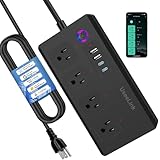
Overview: This ZigBee-enabled smart strip requires a compatible hub but rewards users with reliable mesh networking and four individually controlled AC outlets. It features three USB-A ports and one 20W USB-C port for fast charging. Designed for established smart home ecosystems like SmartThings, Home Assistant, or Echo devices with built-in ZigBee, it offers stable connectivity without WiFi congestion.
What Makes It Stand Out: ZigBee 3.0 compatibility ensures lower latency and more reliable connections than WiFi alternatives, especially in homes with many smart devices. The USB-C port’s 20W fast charging is impressive for a hub-dependent device. Family sharing features allow multiple users to control devices independently, a unique social feature uncommon in smart strips.
Value for Money: At $37.99, this strip is priced competitively for ZigBee devices. While requiring an additional hub investment (if not already owned), it eliminates WiFi bandwidth concerns and provides superior network stability. For users already invested in ZigBee ecosystems, it offers excellent value compared to adding multiple individual smart plugs.
Strengths and Weaknesses:
- Strengths: ZigBee reliability and mesh networking; 20W USB-C fast charging; four smart outlets; family sharing capabilities; no WiFi congestion; works with major hubs; USB ports controlled as unit.
- Weaknesses: Requires ZigBee hub (additional cost/complexity); not standalone; fewer smart outlets than some WiFi options; USB ports can’t be controlled individually; limited compatibility testing with unlisted hubs.
Bottom Line: Ideal for ZigBee ecosystem users seeking stable, hub-based control with fast charging. The hub requirement limits its appeal for WiFi-only households, but it’s a solid choice for expanding existing mesh networks.
10. Feit Electric Smart Power Strip, 4 Outlets + 4 USB Ports, Voice Control with Alexa & Google Assistant, App Control & Scheduling from Anywhere, 15 Amp, Indoor 4-Outlet Powerstrip, POWERSTRIP/WiFi

Overview: Feit Electric’s WiFi smart strip offers four individually controlled outlets and four USB ports with a total 4.8A output. It supports Alexa, Google Assistant, and Siri shortcuts without requiring a hub. The 5-foot cord and integrated night light make it practical for indoor use, while ETL certification ensures safety. Operating solely on 2.4GHz networks, it’s designed for straightforward plug-and-play smart home expansion.
What Makes It Stand Out: The built-in night light adds practical functionality uncommon in smart strips, providing subtle illumination for bedrooms or offices. Its multi-platform voice support (including Siri shortcuts) offers greater flexibility than many competitors. The 15-amp capacity handles higher-draw appliances safely, while the 5-foot cord provides better placement versatility than shorter alternatives.
Value for Money: At $37.20, this strip sits in the competitive mid-range segment. While offering fewer smart outlets than some rivals, the four USB ports, night light, and robust safety certifications justify the price. It lacks energy monitoring and USB-C, but the reliable brand reputation and multi-platform support make it a dependable choice for mainstream users.
Strengths and Weaknesses:
- Strengths: Multi-platform voice support (Alexa, Google, Siri); integrated night light; four smart outlets; four USB ports; 15-amp capacity; ETL certified; no hub required; 5-foot cord.
- Weaknesses: 2.4GHz WiFi only; no energy monitoring; USB ports aren’t smart-controlled; no USB-C fast charging; fewer smart outlets than some competitors; night light cannot be dimmed.
Bottom Line: Feit Electric delivers a reliable, safe smart strip perfect for users wanting basic automation with added convenience features. The night light and multi-platform support make it versatile, though tech enthusiasts may want more advanced features.
Understanding Phantom Load: The 2026 Energy Waste Crisis
Phantom load—also called vampire power or standby power—represents electricity consumed by electronics when they’re switched off but still plugged in. In 2026, this problem has intensified dramatically. The proliferation of IoT devices, smart appliances with always-on connectivity, and instant-on features means the typical home has 40+ devices drawing power continuously.
The True Cost of Standby Power
Let’s crunch the real numbers. A single cable box might draw 15-25 watts continuously, translating to roughly $3-5 per month. Multiply that by five gaming consoles, three smart speakers, two TVs, and a dozen chargers, and you’re looking at $25-40 monthly—money spent powering devices you’re not even using. With national electricity rates averaging $0.17/kWh (up 12% from 2024), phantom load now represents 10-15% of most residential electricity bills.
Devices That Sneakily Drain Your Wallet
The worst offenders in 2026 might surprise you. While older culprits like DVRs remain problematic, new energy vampires include smart refrigerators with touchscreen displays, Wi-Fi-enabled coffee makers with “ready” modes, and electric vehicle charger standby circuits. Even “eco-friendly” devices often maintain network connections that draw 3-5 watts continuously. Modern power strips must intelligently distinguish between necessary standby functions (like your router) and pure waste.
How Smart Power Strips Revolutionized Energy Management
The evolution from basic surge protectors to intelligent energy managers represents one of the most significant leaps in residential power technology. Today’s devices don’t just cut power—they learn, adapt, and communicate.
From Basic Timers to AI-Powered Control
Early smart strips offered crude scheduling: on at 8 AM, off at 10 PM. 2026’s models employ machine learning algorithms that analyze your usage patterns over 2-3 weeks, automatically creating optimized schedules. They recognize when your TV’s HDMI-CEC signals indicate it’s actually off versus standby, and they can differentiate between your phone’s trickle charge phase (which can be cut) and active fast charging.
The Budget Revolution: Quality Under $60
The sub-$60 category has become fiercely competitive, forcing manufacturers to prioritize value. What you get today for $45-60 would have cost $150+ in 2023: 8-10 outlets, 1800+ joule surge protection, ±1% energy monitoring accuracy, and Matter protocol support. This democratization means energy management is no longer a luxury for tech enthusiasts but an accessible tool for every household.
Critical Features That Define 2026’s Best Value Strips
When shopping in the budget tier, certain features separate genuinely smart devices from glorified timers. Understanding these distinctions prevents buyer’s remorse.
Energy Monitoring Precision
Accuracy matters. Cheaper strips might offer ±5-10% monitoring, making savings calculations meaningless. In 2026, demand ±2% accuracy or better—this requires dedicated metering chips rather than basic current transformers. Look for strips that provide per-outlet monitoring, not just aggregate data. This granularity lets you identify that your “efficient” smart speaker is actually consuming 8 watts continuously.
Control Protocols: Wi-Fi, Matter, and Beyond
Wi-Fi 6 compatibility is now standard, reducing latency and improving reliability in crowded networks. More importantly, Matter protocol support has become the differentiator. Strips with Matter work seamlessly across Apple HomeKit, Google Home, Amazon Alexa, and Samsung SmartThings without cloud dependency. Zigbee and Z-Wave options exist but often require hubs, adding hidden costs.
Surge Protection Ratings Decoded
Never compromise here. The $60 price point should still deliver 1800+ joules rating and <400V clamping voltage. Look for UL 1449 4th Edition certification specifically—this ensures the device has undergone rigorous testing. Some budget manufacturers inflate joule ratings without proper certification; always verify the UL file number.
Outlet Configuration: Designing Your Perfect Setup
Outlet layout dramatically impacts real-world usability. A strip with 10 outlets is useless if half are blocked by bulky adapters.
Always-On vs. Controlled Outlets
Premium budget strips offer 2-3 always-on outlets for essential devices (router, alarm system) and 6-7 controlled outlets for energy vampires. The magic lies in master-slave relationships: when your TV draws <5W (off), the strip can automatically cut power to connected outlets (soundbar, game console, streaming stick). Ensure the master outlet sensitivity is adjustable—some TVs maintain higher standby draws that confuse basic sensors.
Spacing Considerations for Brick Plugs
In 2026, manufacturers have finally addressed the “wall wart” problem. Look for strips with 1.5-2 inches between outlets on at least half the strip, or rotating outlets that pivot 90 degrees. Some innovative designs space every other outlet wider, creating a staggered pattern that accommodates four brick plugs without sacrificing total outlet count.
USB-C and Fast Charging Integration
USB ports have evolved from convenient add-ons to primary charging stations. Your 2026 strip must handle modern power delivery standards.
Wattage Standards in 2026
Budget strips now commonly include one or two USB-C ports with 30-65W Power Delivery (PD) 3.1 support—enough to charge a laptop. Avoid strips that only offer 15W USB-C; this is outdated. Multiple USB-A ports should deliver 12-18W per port with smart device detection. The key is independent USB control: can you schedule USB ports separately from AC outlets? This matters for overnight device charging.
Smart vs. Dumb USB Ports
“Dumb” USB ports remain continuously powered, creating their own phantom load. Smart USB ports with individual switching can cut power when devices reach full charge, preventing that midnight trickle waste that costs $2-3 monthly. The best strips communicate with your phone’s battery management system to detect charge completion accurately.
Automation and Scheduling Intelligence
Beyond simple on/off timers, modern automation creates genuine “set and forget” energy management.
AI Learning Patterns
Top-tier budget strips now offer 14-30 day learning periods where they map your behavior. They notice you never use the living room TV after 11 PM on weekdays but binge until 2 AM on weekends. The AI creates dynamic schedules that adapt to seasonal changes—recognizing longer daylight hours in summer means less lighting use. Some even factor in local electricity rate schedules, shifting non-critical device charging to off-peak hours automatically.
Vacation Mode and Security Features
Intelligent vacation mode doesn’t just randomize lights—it simulates occupancy by powering your actual usage patterns. It’ll turn on the TV for three hours in the evening, power up the gaming console for an hour, and even activate the coffee maker at 7 AM. This realism deters burglars more effectively than predictable timers. Look for geofencing capabilities that automatically enable vacation mode when your phone travels >5 miles from home.
Smart Home Integration Deep Dive
A power strip’s intelligence multiplies when it becomes part of your broader smart home ecosystem.
Matter Standard Adoption
Matter has finally delivered on its promise of universal compatibility. A Matter-certified strip integrates directly with your existing smart home hub without brand-specific apps. This means your HomeKit motion sensor can trigger outlet control, or your Alexa routine can cut power to all entertainment devices when you say “goodnight.” Crucially, Matter devices work locally—no internet required—so your automations function during outages.
Voice Assistant Compatibility
While Alexa, Google Assistant, and Siri support is table stakes, the execution varies. The best strips support natural language commands like “turn off everything in the living room except the router” without requiring preset scenes. Check for multi-user voice recognition—your “turn off my devices” command should affect only your bedroom outlets, not your partner’s home office.
Installation and Placement Strategies
Even the smartest strip underperforms if installed poorly. Location affects both performance and safety.
Avoiding Signal Interference
Never install smart strips directly behind metal entertainment centers or inside closed cabinets. Wi-Fi and Matter signals degrade significantly through metal. Place strips on side walls or use adhesive mounts to position them vertically. For basement or garage installations where Wi-Fi is weak, prioritize strips with external antenna options or mesh network compatibility.
Circuit Load Calculations
A 15-amp circuit supports 1800 watts total. Your smart strip might handle this, but what’s already on that circuit? Calculate continuous loads: refrigerator (150W), microwave standby (3W), plus your strip’s potential 1800W. Budget strips should include overload warnings in their apps—if you’re at 14 amps, you’ll get an alert before tripping the breaker. This prevents dangerous circuit overloads during holiday lighting season.
Safety Certifications You Must Verify
Budget pricing should never mean compromised safety. In fact, 2026’s competitive market has raised safety standards across all price tiers.
UL 1449 and UL 1363 Standards
UL 1449 covers surge protection devices; UL 1363 covers relocatable power taps. A quality budget strip carries both certifications. Check for the specific edition—4th Edition for UL 1449 is current as of 2026. Some manufacturers display fake UL marks; verify the file number on UL’s online database. This 30-second check could prevent a fire.
Thermal Protection Mechanisms
Smart strips should include thermal fuses that cut power if internal temperatures exceed 140°F (60°C). This prevents fire hazards from loose connections or overloaded outlets. The best budget models add app alerts for abnormal temperature rises, giving you early warning of failing power supplies or dusty environments causing overheating.
Troubleshooting Phantom Load Challenges
Even intelligent devices encounter stubborn energy vampires. Knowing common issues saves frustration.
When Devices Won’t Stay Off
Some smart TVs and cable boxes periodically “phone home” for updates, drawing 20-30W briefly. Basic strips interpret this as active use and power everything back on. Advanced models let you set grace periods—ignore spikes under 2 minutes—and minimum power thresholds. For truly stubborn devices, look for strips with “hard off” modes that ignore all power draws for a set period, forcing updates to wait until you manually reactivate.
Calibration and Accuracy Issues
Energy monitoring can drift over time. Quality strips include automatic calibration routines that run monthly, comparing against known loads. If your strip suddenly shows your TV drawing 500W when off, it’s likely a calibration error. Manual calibration using a known 60W incandescent bulb should be an option in the app. Avoid strips that require factory resets for recalibration—they’re hiding poor engineering.
Calculating Your Real-World Savings
Theoretical savings mean nothing without accurate measurement. Here’s how to project actual ROI.
The 2026 Energy Cost Formula
Calculate per-device waste: (Watts × Hours × Days) ÷ 1000 × $/kWh. A 12W phantom load running 20 hours daily costs: (12 × 20 × 30) ÷ 1000 × $0.17 = $1.22/month. Multiply by 15 devices = $18.30 monthly savings. Subtract the strip’s $55 cost, and you hit payback in three months. But factor in the strip’s own 2-3W standby draw—good models minimize this to <1W.
Payback Period Analysis
Realistic payback periods range from 2-8 months depending on your device mix. Gaming households with multiple consoles see faster returns than minimalist apartments. The key is tracking: use your strip’s app to generate monthly reports showing which devices you actually use. You might discover that “smart” air purifier you never touch is costing $4/month—time to sell it and double your savings.
Future-Proofing Your Purchase for 2027 and Beyond
Technology moves fast. A 2026 purchase should remain relevant for at least 3-4 years.
Firmware Update Policies
Check manufacturer commitments. Reputable brands guarantee 3-5 years of firmware updates for security patches and protocol improvements. Avoid no-name brands with no update history—Matter and Wi-Fi standards evolve, and outdated firmware creates vulnerabilities. Some strips now offer beta programs, letting you test new features like integration with emerging smart grid programs.
Emerging Standards on the Horizon
Keep an eye on UL 3000, the upcoming standard for AI-controlled power devices, and the new IEEE 1905.1 protocol for hybrid networking. While not essential in 2026, strips with upgradeable communication modules (via USB-C ports) can adapt to new standards. Also consider carbon footprint tracking features—some strips now calculate your phantom load’s CO₂ equivalent and sync with carbon offset programs.
Frequently Asked Questions
1. Will a smart power strip increase my Wi-Fi network load? Modern Wi-Fi 6 strips use negligible bandwidth—typically under 5MB daily for status updates. They connect intermittently, not continuously streaming data. If network congestion is a concern, prioritize Matter-certified strips that operate locally through your smart home hub, reducing direct Wi-Fi connections to zero.
2. Can I use smart power strips with GFCI outlets? Yes, but with caution. The strip’s electronics can sometimes trip sensitive GFCI breakers, especially during power-on surges. Look for strips with inrush current limiters. Test within the return period: plug in all devices and cycle the master outlet five times. If the GFCI trips, exchange for a different model.
3. What’s the lifespan of a budget smart power strip? Quality $50-60 strips last 5-7 years with proper use. The surge protection components degrade with each hit, but most now include LED indicators showing protection status. The smart features often outlive the surge protection—when the MOVs wear out after 3-4 years, the strip still functions as a smart switch but loses surge protection. Replace when the indicator light changes.
4. Do these strips work during internet outages? This depends on the protocol. Wi-Fi-only strips lose remote control but usually retain local button function and stored schedules. Matter-certified strips with thread networking continue full automation locally. Always check for “offline mode” in specifications—this ensures your schedules run even when the cloud is unreachable.
5. How accurate is the energy monitoring compared to my utility meter? Top budget strips achieve ±1-2% accuracy, but this is at the outlet level. Your utility meter measures whole-home usage. For validation, compare the strip’s total against a Kill-A-Watt meter on the same device. Discrepancies over 5% indicate poor calibration. Remember, the strip doesn’t measure its own 2-3W consumption, creating a tiny blind spot.
6. Can I daisy-chain multiple smart strips together? Electrically possible, but strongly discouraged. Daisy-chaining overloads the first strip’s surge protection and violates NEC safety codes. Instead, use a single high-quality strip with adequate outlets. If you need more coverage, install a second strip on a different circuit. For whole-home control, consider a smart electrical panel as the next upgrade.
7. What’s the difference between “controlled” and “master-controlled” outlets? Controlled outlets respond to schedules, app commands, or voice control independently. Master-controlled outlets trigger based on a “master” device’s power draw—when the master (like a TV) drops below a threshold, slave outlets cut off automatically. Master-control saves more energy but requires careful sensitivity adjustment to avoid false triggers.
8. Are USB ports on budget strips safe for expensive devices? Generally yes, if they carry USB-IF certification. However, cheap strips may lack proper over-current protection. Test with an old device first. For laptops, verify the USB-C port supports the correct PD profile—some budget strips only negotiate 15W despite claiming 30W+. Use a USB-C power meter ($15) to verify actual output before trusting it with your $2000 MacBook.
9. How do I handle devices that need occasional updates overnight? Use “maintenance windows” in the app. Set a weekly schedule where outlets power on from 2-4 AM for updates, then cut off again. Advanced strips can detect update patterns and automatically create these windows. For critical devices like smart thermostats, use always-on outlets or enable “update mode” that ignores low-power draws for 48 hours.
10. Will my electric company rebate smart power strips? Many utilities now offer instant rebates of $20-40 for Energy Star certified smart strips. Check your provider’s marketplace—some sell strips directly at discount. In 2026, several states added phantom load reduction devices to their energy efficiency programs, offering tax credits up to 30% of the purchase price. Keep receipts and look for strips with Energy Star 7.0 certification to qualify.