Stumbling through a dark hallway at 2 AM or fumbling for a light switch with arms full of groceries—these everyday frustrations are exactly what smart switches with built-in motion-based night-light automation eliminate. These intelligent devices represent the perfect marriage of convenience and efficiency, seamlessly blending into your home’s infrastructure while adding a layer of sophisticated automation that feels almost magical. Unlike traditional night-lights that occupy precious outlet space or basic motion sensors that lack integration, these next-generation switches transform your ordinary wall controls into responsive, energy-conscious guardians of your home’s ambiance.
The technology has evolved dramatically from simple on/off motion detectors. Today’s smart switches incorporate advanced PIR sensors, ambient light detection, customizable LED guides, and deep smart home integration that learns your patterns and adapts to your lifestyle. Whether you’re a tech enthusiast looking to expand your connected ecosystem or a homeowner seeking practical solutions for aging-in-place safety, understanding the nuanced features of these devices ensures you’ll make an investment that genuinely improves your daily routine rather than becoming another gadget gathering digital dust.
Top 10 Smart Switches with Built-In Motion-Based Night-Light Automation
Detailed Product Reviews
1. Kasa Smart WiFi Motion Sensor Switch, Single Pole, Needs Neutral Wire, 2.4GHz Wi-Fi Light Switch, Compatible with Alexa & Google Home, UL Certified, No Hub Required(KS200M),White,1-Pack

Overview: The Kasa KS200M delivers hands-free lighting control at an accessible price point. This single-pole motion-sensing switch automatically activates lights when you enter a room and shuts them off after a customizable timeout period. Designed for high-traffic areas like hallways, bathrooms, and laundry rooms, it eliminates fumbling for switches when your hands are full. The switch integrates seamlessly with major smart home platforms and requires no additional hub, making it an ideal entry point into automated lighting.
What Makes It Stand Out: The KS200M distinguishes itself with intelligent dual-sensor technology that combines motion detection with ambient light sensing. This prevents unnecessary daytime activation, saving energy and extending bulb life. Its broad compatibility supports up to 600W incandescent/halogen or 300W CFL/MLV/ELV loads, covering virtually any lighting scenario. The “Smart Mode” and “Away Mode” features allow you to create occupancy-based schedules that enhance both convenience and security, simulating presence when you’re traveling.
Value for Money: At $19.97, this switch costs only slightly more than basic smart switches while adding sophisticated motion sensing. Compared to competitors lacking daylight detection, it offers superior intelligence for the price. The UL certification and robust Kasa ecosystem provide long-term reliability that justifies the investment. For renters or homeowners seeking automation without rewiring, it’s a cost-effective upgrade that pays dividends in convenience and energy savings.
Strengths and Weaknesses:
- Strengths: Affordable motion detection; daylight sensor prevents false triggers; broad bulb compatibility; simple app setup; no hub required; works with Alexa and Google Assistant.
- Weaknesses: No dimming capability; requires neutral wire and 2.4GHz Wi-Fi; single-pole only; motion sensitivity isn’t adjustable in the app.
Bottom Line: The KS200M is an excellent choice for automating non-dimmable fixtures in busy household zones. While it lacks advanced customization, its reliable performance and smart features make it a standout value for hands-free lighting.
2. Kasa Smart Motion Sensor Switch, Dimmer Light Switch, Single Pole, Needs Neutral Wire, 2.4GHz Wi-Fi, Compatible with Alexa & Google Assistant, UL Certified, No Hub Required(ES20MP2) White 2-Pack

Overview: This two-pack of Kasa ES20MP2 switches combines motion detection with full-range dimming for comprehensive lighting automation. Perfect for multi-room projects, each switch responds to occupancy while letting you fine-tune brightness from 1% to 100% through the Kasa app or voice commands. The set transforms bedrooms, bathrooms, and hallways into intelligent spaces that adapt to both your presence and preferred ambiance, all without requiring a central hub.
What Makes It Stand Out: The dual functionality of motion sensing and dimming sets this product apart from standard smart switches. You can program different brightness levels for various times of day—gentle 20% illumination for midnight bathroom trips versus full brightness for evening cooking. The 2-pack bundle delivers convenience for larger homes at a reduced per-unit cost. Daylight detection ensures lights only activate when needed, while customizable timeout settings prevent energy waste in rarely-used spaces.
Value for Money: Priced at $42.68 ($21.34 per switch), this 2-pack offers meaningful savings over buying two single units separately. The dimming capability typically commands a $5-10 premium, making this bundle particularly attractive for whole-home automation projects. You’re essentially getting motion detection, ambient light sensing, and dimming at the price most brands charge for basic smart switches. The cost per smart feature is exceptional.
Strengths and Weaknesses:
- Strengths: Combines motion and dimming; excellent bulk pricing; intuitive app control; daylight detection; away mode security feature; easy integration with major platforms.
- Weaknesses: Requires neutral wire; 2.4GHz Wi-Fi only; no HomeKit support; motion zone could be wider for large rooms; installation needs careful attention for 3-way setups.
Bottom Line: For homeowners wanting both automation and ambiance control, this 2-pack delivers outstanding value. It’s the most economical way to deploy feature-rich motion dimmers throughout your home.
3. Kasa Smart Motion Sensor Switch, Dimmer Light Switch, Single Pole, Needs Neutral Wire, 2.4GHz Wi-Fi, Compatible with Alexa & Google Assistant, UL Certified, No Hub Required(ES20M) White 1-Pack

Overview: The ES20M is Kasa’s single-pack motion-sensing dimmer switch that brings intelligent ambiance to individual rooms. It automatically adjusts lighting based on occupancy while providing granular brightness control from 1% to 100%. Ideal for spaces where both convenience and mood matter—like master bedrooms or home offices—this switch learns your routines and responds accordingly. The streamlined design fits standard wall plates and connects directly to your Wi-Fi network.
What Makes It Stand Out: This switch excels at merging two premium features—motion activation and dimming—into one cohesive package. The ability to set different brightness triggers for various times creates truly personalized automation. For example, program it for soft 30% lighting during late-night hours and full brightness during the day. The daylight detection sensor adds intelligence by preventing activation when natural light is sufficient, while “Away Mode” cycles lights to deter intruders.
Value for Money: At $23.69, the ES20M sits at a sweet spot for a feature-rich smart switch. Motion dimmers from competitors often exceed $30, making this a compelling mid-range option. However, the 2-pack bundle offers better per-unit value at $21.34 each. For single-room applications or testing before a larger deployment, the price is justified. You’re paying a modest premium over non-dimming motion switches for significant flexibility in lighting control.
Strengths and Weaknesses:
- Strengths: Dual motion and dimming; customizable brightness levels; daylight sensor; app and voice control; UL certified; simple installation with neutral wire.
- Weaknesses: Higher cost than 2-pack version; limited to single-pole; no Apple HomeKit; 2.4GHz network requirement; motion sensitivity not adjustable.
Bottom Line: The ES20M is perfect for targeted automation in one or two key rooms. While the 2-pack offers better value, this single unit is ideal for those wanting to test motion dimming before committing to a whole-home upgrade.
4. Leviton Decora Smart Motion Sensing Dimmer Switch, Wi-Fi 2nd Gen, Neutral Wire Required, Works with My Leviton, Alexa, Google Assistant, Apple Home/Siri & Wired or Wire-Free 3-Way, D2MSD-1RW, White

Overview: Leviton’s D2MSD-1RW represents the premium tier of motion-sensing dimmers, offering unparalleled smart home integration. This switch supports Apple HomeKit/Siri alongside Alexa and Google Assistant—a rarity in this category. Its sophisticated sensors detect occupancy and ambient light while providing full-range dimming with customizable fade rates. The 3-way compatibility (both wired and wireless) makes it suitable for complex lighting circuits in stairways and large rooms where control from multiple locations is essential.
What Makes It Stand Out: HomeKit integration is the headline feature, enabling Siri voice control and seamless automation within Apple’s ecosystem. The “Room Response” capability allows one motion sensor to trigger other Decora Smart devices, creating coordinated lighting scenes. Customizable fade rates let you program gradual on/off transitions that reduce eye strain and extend bulb life. Unlike competitors, this switch offers both wired and wire-free 3-way configurations, providing flexibility for retrofitting older homes without running new cables.
Value for Money: At $59.99, this is a significant investment—nearly triple the cost of basic Kasa switches. However, for Apple-centric households, the native HomeKit support alone justifies the premium. The build quality exceeds budget alternatives, and the advanced features like Room Response and adjustable fade rates deliver professional-grade automation. If you need 3-way compatibility or Siri integration, this switch has no direct competition at this price.
Strengths and Weaknesses:
- Strengths: Apple HomeKit/Siri support; wired/wireless 3-way; Room Response for multi-device control; customizable fade rates; premium construction; broad platform compatibility.
- Weaknesses: Expensive; requires My Leviton app (less intuitive than Kasa); setup more complex; limited to 2.4GHz; no Z-Wave option for hub-based systems.
Bottom Line: The D2MSD-1RW is the top choice for Apple users and complex installations. While overkill for simple setups, its premium features and robust build quality make it worth the investment for discerning smart home enthusiasts.
5. Kasa Smart Light Switch HS200, Single Pole, Needs Neutral Wire, 2.4GHz Wi-Fi Light Switch Works with Google Home, UL Certified, No Hub Required, White

Overview: The HS200 is Kasa’s entry-level smart switch that strips away complexity to deliver reliable remote control at an unbeatable price. This non-dimming, non-motion-sensing switch simply makes any single-pole light circuit controllable via smartphone or voice command. Perfect for beginners or those seeking straightforward automation for porch lights, ceiling fixtures, or outdoor lighting, it installs easily with the guided Kasa app and requires no technical expertise beyond basic wiring knowledge.
What Makes It Stand Out: Simplicity is this switch’s greatest asset. The app-guided installation walks users through each step with clear diagrams and safety checks, reducing installer anxiety. While it lacks advanced sensors, its scheduling and “Away Mode” provide meaningful security benefits—automatically cycling lights to simulate occupancy. The switch integrates with both Alexa and Google Assistant, and its UL certification ensures safety. At under $16, it democratizes smart home technology for budget-conscious consumers.
Value for Money: Priced at $15.99, the HS200 is among the most affordable UL-certified smart switches available. It costs less than a dinner out yet delivers core smart functionality. For users who don’t need motion sensing or dimming, paying extra for those features would be wasteful. The 4+ million user base indicates proven reliability and ongoing app support. Compared to installing multiple smart bulbs, this switch controls entire fixtures more economically.
Strengths and Weaknesses:
- Strengths: Extremely affordable; simple app-guided setup; reliable performance; scheduling and away mode; UL certified; no hub required; trusted brand ecosystem.
- Weaknesses: No motion detection; no dimming; requires neutral wire; single-pole only; 2.4GHz Wi-Fi limitation; basic feature set.
Bottom Line: The HS200 is the smart switch for everyone else—those who want affordable, dependable control without bells and whistles. It’s the perfect starting point for building a smart home foundation room by room.
6. Lutron Maestro Motion Sensor Light Switch Indoor for Bathroom, Garage, Laundry Room, Any Bulbs, Occupancy Vacancy Sensor, Single-Pole, MS-OPS2-WH, White

Overview: The Lutron Maestro MS-OPS2-WH represents motion sensing technology at its most refined and reliable. This occupancy/vacancy sensor switch automatically illuminates spaces when you enter and extinguishes them upon exit, eliminating the perpetual worry of wasted electricity. Designed for bathrooms, garages, laundry rooms, and closets, it accommodates any bulb type and installs as a straightforward single-pole replacement for traditional switches.
What Makes It Stand Out: Lutron’s proprietary adaptive technology learns your preferred light levels over time, creating a personalized experience that prevents unnecessary activation during daylight hours. The built-in daylight sensing capability distinguishes between natural and artificial light, ensuring lights remain off when sufficient ambient illumination exists. Unlike many competitors, this switch requires no hub, WiFi, or complex configuration—it’s true plug-and-play automation.
Value for Money: At $22.95, the Maestro sits squarely in the budget-friendly category while delivering premium brand reliability. Traditional motion switches from lesser-known brands typically range $15-25, but few match Lutron’s 50+ year reputation for durability and precision engineering. The energy savings alone can recoup the investment within months for frequently used spaces.
Strengths and Weaknesses: Strengths include exceptional reliability, brand reputation, simple installation, universal bulb compatibility, and intelligent daylight sensing. The switch operates silently and responds quickly to motion. Weaknesses are limited customization options, lack of smart home integration, and inability to adjust timeout duration manually. The design prioritizes simplicity over flexibility.
Bottom Line: For homeowners seeking dependable, no-fuss automation without smart home complexity, the Lutron Maestro delivers unparalleled value. It’s the ideal choice for utility spaces where reliable hands-free operation matters more than app control or voice commands.
7. Milfra Smart Motion Sensor Light Switch,Motion Sensor Light Switch Works with Siri Alexa and Google Home, Voice and Remote Control, Neutral Wire Required
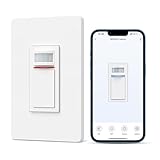
Overview: The Milfra Smart Motion Sensor Switch bridges the gap between affordable automation and comprehensive smart home integration. Supporting single-pole and three-way configurations, this $25.99 switch brings hands-free convenience to modern households through compatibility with Siri, Alexa, and Google Home ecosystems. The intuitive Smart Life app provides remote access and customization without requiring a separate hub.
What Makes It Stand Out: This 2024 model introduces granular control over ambient light thresholds and automatic shutoff timing up to one hour—a level of customization rare in this price bracket. The company’s decade-long specialization in smart switches manifests in thoughtful details like flame-retardant TPU construction and iron reinforcement plates for enhanced durability and safety. Three-way compatibility expands installation possibilities significantly.
Value for Money: Priced at just $25.99, Milfra undercuts most multi-platform smart switches by $10-15 while offering superior feature depth. Competing products from established brands typically start at $35+ for similar functionality. The inclusion of voice control across three major platforms represents exceptional value, though Siri requires initial setup.
Strengths and Weaknesses: Strengths include broad platform support, adjustable sensitivity and timeout, three-way wiring compatibility, robust safety features, and competitive pricing. Weaknesses involve the neutral wire requirement (limiting older home installations) and Siri’s dependency on pre-configured commands. The brand lacks Lutron or GE name recognition.
Bottom Line: Milfra delivers the best price-to-performance ratio for smart motion sensing. It’s perfect for tech-savvy homeowners wanting comprehensive voice control without premium pricing, provided they have neutral wiring and accept minor Siri limitations.
8. GE CYNC Smart Dimmer Light Switch & Motion Sensor, No Neutral Wire Required, Bluetooth and WiFi 3-Wire Switch, Works with Amazon Alexa and Google Home, White (1 Pack)

Overview: The GE CYNC Smart Dimmer Switch addresses a critical installation challenge: homes lacking neutral wires. At $64.99, this premium device combines motion sensing, dimming capability, and dual Bluetooth/WiFi connectivity in a single package. It transforms any dimmable bulb into a smart fixture while providing sophisticated automation through the CYNC app, powered by Savant’s robust platform.
What Makes It Stand Out: The no-neutral-wire design opens smart lighting to pre-1980s homes where rewiring is cost-prohibitive. Integrated motion and ambient light sensors automatically adjust brightness based on occupancy and natural light availability. The dimmer function provides granular control impossible with standard on/off switches, while dual connectivity ensures reliable operation even during WiFi outages.
Value for Money: While $64.99 commands a premium over basic smart switches, it eliminates $200+ electrician fees for neutral wire installation. Competing no-neutral solutions like Lutron’s Caseta start at similar prices but lack built-in motion sensing. For older homes, the value proposition is compelling—paying more upfront saves substantial retrofitting costs.
Strengths and Weaknesses: Strengths include revolutionary no-neutral installation, dimming capability, GE brand reliability, dual connectivity, and energy-saving automation. Weaknesses are the high price point, limitation to CYNC ecosystem, potential compatibility issues with certain LED bulbs in older homes, and lack of HomeKit support.
Bottom Line: This switch is the definitive solution for dimming-capable smart lighting in neutral-less homes. The premium price is justified by unique installation flexibility and brand trustworthiness, making it essential for historic homes wanting modern convenience.
9. MOES Smart Motion Sensor Switch Single Pole, Needs Neutral Wire, Wi-Fi PIR Infrared Motion Activated Light Switch, Smart Life Tuya APP Remote Control Compatible with Alexa and Google, FCC Listed

Overview: MOES delivers a feature-packed smart motion sensor switch that leverages the widespread Tuya Smart Life ecosystem. Priced at $26.99, this single-pole switch offers PIR infrared detection with adjustable sensitivity and time delay, making it ideal for bedrooms, hallways, and restrooms. The FCC listing and comprehensive warranty demonstrate serious commitment to quality and customer satisfaction.
What Makes It Stand Out: Exceptional customization options set MOES apart—users can fine-tune detection speed (0.6-1.5m/s), timeout duration, and ambient light thresholds. The scene linkage capability enables whole-home automation triggers, such as activating multiple lights when motion is detected. The industry-leading two-year warranty plus 60-day refund guarantee provides unmatched purchase protection.
Value for Money: At $26.99, MOES matches budget brands while offering premium features and warranty coverage. Most competitors provide only one-year warranties, making this an attractive proposition for risk-averse buyers. The Tuya ecosystem’s vast device compatibility further enhances long-term value, allowing seamless expansion of your smart home.
Strengths and Weaknesses: Strengths include highly adjustable parameters, scene linkage, excellent warranty, daylight detection, and FCC certification. Weaknesses involve the neutral wire requirement, reliance on the sometimes-cluttered Tuya app, and 2.4GHz WiFi limitation. Installation requires careful attention to wiring diagrams.
Bottom Line: MOES is the smart choice for detail-oriented users who prioritize customization and warranty security. It’s particularly suited for Tuya ecosystem enthusiasts wanting reliable motion automation with granular control over every operational aspect.
10. ELEGRP Smart Motion Sensor Switch, 2.4GHz Wi-Fi Single Pole Light Switch Works with Alexa & Google Assistant, APP Remote Control, Neutral Wire Required, UL Certified, No Hub Required (Black, 1 Pack)

Overview: ELEGRP introduces an innovative triple-sensor approach to smart lighting control. This $34.99 single-pole switch combines motion, ambient light, and an exclusive sound sensor to solve a common automation frustration: lights turning off when you’re stationary. The UL certification and sleek black finish cater to safety-conscious homeowners seeking modern aesthetics alongside intelligent functionality.
What Makes It Stand Out: The proprietary sound sensor technology represents genuine innovation—detecting subtle room noises to maintain illumination during motionless activities like reading or meditation. This addresses a fundamental flaw in traditional motion sensors. Comprehensive scheduling includes sunrise/sunset synchronization and countdown timers, while the UL certification exceeds basic FCC requirements for electrical safety.
Value for Money: Priced at $34.99, ELEGRP positions itself in the mid-range smart switch market. The unique sound sensor and UL certification justify the $8-10 premium over basic smart switches. While not the cheapest option, it solves specific use cases that competitors ignore, delivering targeted value for households frustrated by premature light shutdowns.
Strengths and Weaknesses: Strengths include innovative sound sensor, UL safety certification, comprehensive scheduling, triple-sensor redundancy, and Alexa/Google integration. Weaknesses are the neutral wire requirement, single-pole limitation (no three-way), black color option only, and potential sound sensor sensitivity adjustments needed in noisy environments.
Bottom Line: ELEGRP is the perfect solution for rooms where occupants remain still. The sound sensor innovation eliminates a major pain point, making it ideal for home offices, reading nooks, and bathrooms where traditional motion sensors fall short. The UL certification provides peace of mind.
What Are Smart Switches with Motion-Based Night-Light Automation?
Smart switches with motion-based night-light automation are hybrid electrical devices that replace traditional wall switches while integrating three core functionalities: standard light switching, passive infrared motion detection, and ambient LED illumination. Unlike standalone motion sensors or plug-in night-lights, these units consolidate multiple devices into a single, hardwired solution that controls your room’s primary lighting while providing subtle pathway illumination. The “smart” designation indicates network connectivity—typically via Wi-Fi, Zigbee, or Z-Wave—enabling remote control, scheduling, and integration with broader home automation platforms. The motion-based night-light specifically refers to the low-power LED that activates when darkness and movement are detected, operating independently from the main light circuit.
How Do These Intelligent Devices Actually Work?
These switches function through a sophisticated three-sensor system working in concert. First, a passive infrared (PIR) sensor detects heat signatures from moving bodies, distinguishing between human presence and pets or ambient temperature changes. Second, a built-in lux sensor measures ambient light levels, ensuring the night-light only activates in true darkness (typically below 10-30 lux). Third, when both conditions are met—darkness plus motion—the microcontroller triggers the low-power LED array, bathing the switch location in soft, directional light. The main relay remains unaffected unless manually pressed or triggered through automation rules. Advanced models incorporate microwave or ultrasonic sensors for enhanced sensitivity and reduced false triggers, while machine learning algorithms analyze usage patterns to optimize sensitivity and timing parameters over time.
Key Benefits of Integrating Motion-Activated Night-Lights
The advantages extend far beyond simple convenience. Safety takes center stage—eliminating tripping hazards in stairwells, bathrooms, and children’s rooms while providing crucial wayfinding for elderly family members or overnight guests. Energy efficiency emerges through precise, need-based illumination; the night-light typically consumes 0.5-2 watts versus 60 watts for a standard bulb left on. The psychological comfort of gentle, non-intrusive lighting supports natural circadian rhythms by avoiding harsh overhead lights during nocturnal activities. From a design perspective, these switches declutter your space by eliminating the need for separate motion detectors and plug-in night-lights. For smart home enthusiasts, they serve as additional occupancy sensors, feeding valuable presence data into automation routines for heating, cooling, and security systems.
Essential Features to Evaluate Before Buying
When evaluating options, prioritize adjustable lux sensitivity thresholds—the ability to fine-tune when the night-light activates based on your specific environment prevents premature illumination during twilight hours. Look for configurable timeout durations ranging from 15 seconds to 10 minutes, accommodating both quick bathroom trips and leisurely midnight kitchen visits. LED brightness control is crucial; the best models offer 5-10 incremental levels or percentage-based dimming. Dual-circuit compatibility matters if you plan to control both a light and a fan. Pay attention to the switch type: paddle, toggle, or button—each offers different tactile experiences and aesthetic fits. Advanced power monitoring capabilities provide insights into energy consumption, while vacation mode features simulate occupancy through randomized lighting patterns.
Understanding Motion Sensor Technology and Range
Motion detection quality determines user satisfaction more than any other feature. PIR sensors typically offer 100-180 degree detection arcs with 15-30 foot ranges, but their performance depends heavily on mounting height (optimal at 48-52 inches) and placement relative to expected movement paths. Consider the sensor’s field of view: does it detect lateral movement more effectively than direct approach? Some units feature adjustable blinders or masking tape to narrow detection zones, preventing false triggers from hallway traffic when installed in bedrooms. Multi-technology sensors combining PIR with microwave detection offer superior accuracy but consume slightly more standby power. The detection refresh rate—how quickly the sensor re-arms after timeout—affects responsiveness in high-traffic areas.
Night-Light Customization: Color, Brightness, and Timing
Personalization transforms a functional device into a seamless home element. RGB LEDs allowing 16 million color choices let you match your switch’s glow to your home’s aesthetic or use color-coding for different zones—cool blue for bathrooms, warm amber for hallways. Brightness should scale from barely perceptible (1-2 lumens) to clearly visible (20-30 lumens) for varied applications. Gradual fade-in/fade-out effects prevent jarring transitions and preserve night vision. Some advanced switches offer time-based color temperature shifting, mimicking natural light progression from warm evening tones to cooler morning hues. Consider models with separate brightness settings for “active” motion detection versus “standby” ambient glow, creating a two-stage lighting experience.
Installation Requirements: What Your Walls Might Be Hiding
Before purchasing, audit your electrical boxes. These switches require neutral wires for continuous power to the smart components and LED—absence of a neutral wire in older homes (pre-1980s) necessitates either costly rewiring or selecting specific no-neutral-compatible models with limited features. Measure box depth: smart switches typically need 25-30 cubic inches versus 15-18 for standard switches. Multi-gang installations present challenges with heat dissipation and RF interference between adjacent smart switches. Consider hiring a licensed electrician if your home has aluminum wiring, which requires special CO/ALR-rated devices and pigtail connections. Grounding is non-negotiable for safety and proper operation. Some jurisdictions require permits for smart device installations, particularly in rental properties or multi-family dwellings.
Hub Requirements: Wi-Fi vs. Proprietary Protocols
Your choice of connectivity protocol fundamentally shapes your smart home experience. Wi-Fi switches offer direct router connection without additional hardware, but may strain network bandwidth with dozens of devices and typically lack mesh networking capabilities. Zigbee and Z-Wave protocols create self-healing mesh networks where each device strengthens overall coverage, but require compatible hubs like SmartThings, Hubitat, or proprietary bridges. Thread-enabled switches represent the emerging standard, promising lower latency and IP-based communication with Matter compatibility. Evaluate hub ecosystem lock-in: some manufacturers restrict advanced features to their proprietary hubs. Consider future protocol support; switches with over-the-air firmware update capabilities can adapt to evolving standards like Matter, protecting your investment from obsolescence.
Smart Home Ecosystem Compatibility
Seamless integration with your existing platform determines real-world utility. Amazon Alexa integration enables voice control and Routines that combine the switch with other devices. Google Home support provides similar functionality with potentially better AI-powered automation suggestions. Apple HomeKit compatibility requires specific hardware certification but offers superior privacy controls and local processing. Samsung SmartThings and Hubitat Elevation appeal to power users with complex rule-based automation. Check for IFTTT support to create custom cross-platform applets. The switch’s API openness matters for advanced users wanting to integrate with Home Assistant or OpenHAB. Verify that motion sensor data and night-light controls are exposed to your platform—not all integrations provide full feature access, sometimes limiting you to basic on/off functionality.
Automation Capabilities Beyond Basic Motion Detection
Sophisticated automation separates premium switches from basic models. Look for conditional logic: “activate night-light only when main light is off AND lux is below threshold AND motion detected.” Time-based restrictions prevent unnecessary activation during daytime hours or early evening. Occupancy counting features track how many people enter/exit a room, keeping lights on until the last person leaves. Integration with door/window sensors can create contextual rules—night-light activates only when bedroom door is open. Some switches support geofencing, disabling motion detection when you’re away to conserve energy. Advanced models offer machine learning that recognizes individual family members’ movement patterns, adjusting sensitivity and timing accordingly. Consider switches that can trigger other devices: motion at the front door switch could illuminate pathway lights and disarm the security system.
Design Aesthetics and Form Factor Considerations
These devices become permanent wall fixtures, making design crucial. Faceplate options range from standard Decora-style paddles to capacitive touch panels with haptic feedback. Material choices include fingerprint-resistant matte finishes, glass surfaces, or metal trims that complement modern decor. LED indicator placement varies: some illuminate the paddle itself, others create a subtle downward glow. Consider switches with configurable LED behavior—whether indicators stay always-on, only during darkness, or only when the main light is off. For heritage homes, some manufacturers offer traditional toggle-style smart switches with hidden motion sensors. Color-matched faceplates in white, almond, black, or brown ensure seamless blending. Backward compatibility with existing multi-gang wall plates prevents the need for complete hardware replacement.
Energy Efficiency and Long-Term Cost Savings
While individual switches consume minimal standby power (0.5-2 watts), whole-home deployment makes efficiency matter. Calculate total cost of ownership: a $40 switch running 24/7 at 1 watt costs roughly $1.20 annually in electricity, while a $25 basic switch at 3 watts costs $3.60. LED night-lights operating 8 hours nightly at 1 watt add only $0.40 per year versus $30+ for a 60-watt incandescent bulb. Many utility companies offer rebates for smart home devices that demonstrate energy savings—check Database of State Incentives for Renewables & Efficiency (DSIRE). Power monitoring features help identify energy-hungry fixtures, potentially paying for the switch through usage insights alone. Consider the embodied energy: devices with replaceable components and extended warranties (5+ years) reduce electronic waste compared to disposable units.
Privacy and Security Implications
Motion sensors generate sensitive occupancy data that could reveal daily routines. Evaluate the manufacturer’s privacy policy: do they sell anonymized usage data to third parties? Local processing capabilities keep data on-device, while cloud-dependent switches transmit potentially sensitive information. Secure boot and encrypted firmware prevent malicious code injection. Regular security patches indicate manufacturer commitment—check historical update frequency before buying. Physical privacy shutters that disable the sensor when desired provide peace of mind in bedrooms. For shared living situations, consider switches with multi-user permission levels that prevent guests from accessing motion logs. Disable unnecessary cloud features if you primarily use local hub control, reducing attack surface. Some enterprise-grade switches offer VLAN support for network segmentation, isolating IoT devices from personal computers.
Troubleshooting Common Issues
False triggers plague poorly configured installations. Reduce sensitivity if pets activate the sensor, or install the switch higher (60+ inches) to avoid their heat signature. Flickering LEDs often indicate incompatible load types—installing a bypass resistor or using a neutral-based switch solves this. Network connectivity drops may require adjusting router channel width from 40MHz to 20MHz for better 2.4GHz penetration. If the night-light activates during daylight, recalibrate the lux sensor by covering it briefly during initial setup to establish baseline darkness. Multi-switch installations sometimes cause RF interference; separating Zigbee/Z-Wave channels or using Wi-Fi switches on different SSIDs helps. Unresponsive switches after power outages may need “air gap” reset or circuit breaker cycling. Document your wiring with photos before installation—this proves invaluable if troubleshooting requires rewiring.
Future-Proofing Your Investment
Technology obsolescence threatens long-term value. Prioritize switches supporting Matter, the new universal smart home standard backed by Apple, Google, Amazon, and Samsung. Over-the-air (OTA) firmware update capability ensures your device gains features and security patches for years. Modular designs with replaceable radio modules allow upgrading from Wi-Fi 4 to Wi-Fi 6 without full replacement. Open API access or Home Assistant compatibility future-proofs against manufacturer abandonment. Consider purchasing from established companies with 5+ year track records of supporting legacy products. Some manufacturers offer trade-in programs for upgrading to newer models. Evaluate the switch’s processing power: devices with adequate memory and CPU headroom can handle more complex automation as software evolves. Keep original packaging and receipts; some extended warranties require registration within 30 days of purchase.
How These Switches Compare to Alternative Solutions
Standalone motion sensor lights offer simplicity but lack integration and often provide harsh, overhead illumination. Plug-in night-lights cost less but consume outlets and lack smart features. Smart bulbs with motion detection built into the fixture solve single-room needs but require every bulb to be smart, multiplying costs. Battery-powered motion sensors provide flexible placement but need regular charging/replacement. Traditional switches with separate motion sensor modules create wall clutter and require complex wiring. Whole-home occupancy systems using mmWave radar offer superior detection but cost thousands. For renters, adhesive motion-sensor LED strips provide non-permanent solutions but lack permanence and integration. The integrated smart switch approach offers the best balance of aesthetics, functionality, and value for permanent installations where both primary lighting and pathway illumination are desired.
Making Your Final Decision: A Buyer’s Checklist
Before clicking purchase, verify neutral wire presence and box depth. Confirm your smart home platform supports the switch’s full feature set, not just basic on/off. Calculate total deployment cost including potential hub purchases. Check for UL or ETL certification for safety compliance. Read recent forum discussions about the specific model year—manufacturers sometimes silently downgrade components. Evaluate warranty terms: lifetime versus limited warranties reveal manufacturer confidence. Consider purchasing a single switch first to test real-world performance before committing to whole-home installation. Document your home’s Wi-Fi coverage in switch locations; weak signals cause frustration. Finally, assess your technical comfort level—some switches require neutral wires and load calibration that novices may find challenging, while others offer guided in-app installation wizards.
Frequently Asked Questions
1. Will the motion sensor detect my pets and constantly turn on the night-light?
Most quality switches include pet-immunity settings that ignore movement below a certain height or heat signature threshold. Installing the switch at least 5 feet high and adjusting sensitivity to “human-only” mode typically prevents false triggers from animals under 40 pounds. For larger pets, look for models with sensor masking capabilities to block lower detection zones.
2. Can I disable the night-light feature while keeping the smart switch functionality?
Yes, virtually all models allow independent control of the night-light through their companion app or physical button combinations. You can schedule it to activate only during specific hours, disable it entirely, or set it to manual-only activation. This flexibility proves useful for bedrooms where any light might disturb sleep.
3. Do these switches work in three-way or four-way configurations?
Many models support multi-way setups, but require companion “add-on” switches specifically designed for that system. You cannot mix a smart switch with traditional three-way switches. Check manufacturer specifications carefully, as some only work in single-pole installations. Proper three-way smart switching often needs traveler wire reconfiguration.
4. What happens during a power outage—will settings be lost?
Quality switches include non-volatile memory that preserves all settings through power losses. However, some budget models may reset to factory defaults. Look for specifications mentioning “power loss memory” or “settings retention.” Most devices reconnect to Wi-Fi automatically once power restores, though Zigbee/Z-Wave networks may take 2-5 minutes to re-establish mesh connections.
5. Can the night-light brightness be adjusted low enough to not disturb sleep?
Premium models offer brightness control down to 1-2 lumens—dimmer than most plug-in night-lights. This creates a subtle glow visible only to dark-adapted eyes. Some switches also feature “sleep mode” that further reduces brightness during programmed nighttime hours or uses red-spectrum LEDs that minimally impact melatonin production.
6. Are these switches compatible with LED, CFL, and incandescent bulbs?
Most work with all bulb types, but LED compatibility requires careful consideration. Older or low-quality LEDs may flicker due to minimum load requirements. Switches with neutral wires and adjustable minimum load settings prevent this issue. For ceiling fans, verify the switch is specifically rated for motor loads, as standard lighting switches can be damaged by inductive loads.
7. How secure are motion sensors from hacking or unauthorized access?
Security varies dramatically by manufacturer. Choose switches with AES-128 or higher encryption, regular security updates, and local processing options. Disable remote access if you only use local control. For maximum security, select Thread/Matter-certified devices that use blockchain-based authentication. Never use default passwords and enable two-factor authentication on associated accounts.
8. Will the motion sensor work through glass or walls?
PIR sensors detect heat signatures and cannot penetrate glass, walls, or solid objects. They require line-of-sight to the moving person. Microwave sensors can sometimes detect through thin walls but are rare in residential switches. Position switches to face open areas rather than being blocked by furniture or around corners for optimal performance.
9. Can I use these switches in bathrooms or other humid environments?
Only if specifically rated for damp or wet locations (UL-rated for damp locations). Standard smart switches can malfunction or pose shock hazards in high humidity. Look for IP44 or higher ratings for bathroom installations. Even with proper rating, ensure your bathroom has adequate ventilation and the switch isn’t directly exposed to water spray from showers.
10. What’s the typical lifespan of the LED night-light component?
The integrated LEDs are rated for 25,000-50,000 hours—equivalent to 8-17 years of nightly use. Unlike replaceable bulbs, when the LED fails, the entire switch requires replacement. This underscores the importance of choosing models with robust warranties. Some manufacturers specify LED lifespan separately from the switch mechanism warranty, so read terms carefully before purchasing.