Picture this: you walk through your front door after a long day, tap a single button on your wall, and watch as your entire home transforms. Lights adjust to a warm, welcoming glow, your thermostat settles into the perfect temperature, window shades lower for privacy, and your favorite playlist begins to flow through the speakers. This isn’t a scene from a futuristic movie—it’s the reality of smart switches with scene-recall buttons in 2026. These devices have evolved from simple on/off controls into sophisticated command centers that orchestrate your entire living environment with a single press.
As we navigate the increasingly complex landscape of smart home automation, physical scene-recall buttons have become more crucial than ever. While voice commands and smartphone apps dominate the conversation, there’s something irreplaceably satisfying about a tactile button that instantly summons your perfect “Movie Night,” “Dinner Party,” or “Good Morning” scene. The technology has matured dramatically, with new standards like Matter finally delivering on the promise of true interoperability, while AI-driven automation learns your preferences before you even know them yourself. But with this sophistication comes complexity—choosing the right scene-recall switch now requires understanding nuanced technical details that could make or break your smart home experience.
Top 10 Smart Switches with Scene-Recall Buttons
Detailed Product Reviews
1. MOES Wireless Smart Scene Switch Button, Require MOES HUB, Zigbee Connection Tuya Battery Powered Included 12 Scene Controller Light Switch for Smart Home Automation 4 Gang White

Overview: The MOES Wireless Smart Scene Switch is a Zigbee-based controller designed for users invested in the MOES ecosystem. This four-gang button panel requires a dedicated MOES Hub and offers 12 customizable scenes through single, double, and long-press actions. Powered by an included CR2430 battery, it installs anywhere without wiring, making it ideal for renters or those seeking flexible smart home control.
What Makes It Stand Out: This switch excels in its multi-action capability, squeezing twelve distinct commands from just four physical buttons. The Zigbee connection provides stable, low-power communication compared to Wi-Fi alternatives. Its ultra-thin 1.3cm profile and adhesive mounting option offer unmatched placement flexibility—use it as a wall switch or portable remote. The included battery and zero-wiring design make it exceptionally renter-friendly.
Value for Money: At $26.99, the switch itself is reasonably priced, but the mandatory MOES Hub (sold separately) pushes the total investment higher. For existing MOES users, this represents solid value compared to buying multiple individual switches. However, those starting fresh may find Wi-Fi alternatives more economical when factoring in the hub cost. The battery-included design saves an extra purchase.
Strengths and Weaknesses:
- Strengths: Zigbee reliability; 12 scenes from 4 buttons; included battery; tool-free installation; portable or wall-mounted; low power consumption
- Weaknesses: Requires MOES Hub; no Alexa/Google/Siri support; locked to MOES/Smart Life ecosystem; battery will need eventual replacement
Bottom Line: Perfect for current MOES ecosystem users wanting physical scene controls. The hub requirement and lack of voice assistant integration make it unsuitable for those seeking broader smart home compatibility. Choose this for Zigbee stability, not ecosystem flexibility.
2. Onvis Smart Button, 5-Keys Smart Switch, Scene Controller, Compatible with Apple HomeKit, Automatically Trigger Accessories & Scenes-Thread (iOS 17.4 or Later is Required)

Overview: The Onvis Smart Button is a premium HomeKit-exclusive controller leveraging Thread networking for Apple-centric smart homes. With five keys supporting single, double, and long-press actions, it delivers 15 scene triggers without requiring a separate hub. The device prioritizes privacy with end-to-end encryption and local control, making it ideal for security-conscious Apple users running iOS 17.4 or later.
What Makes It Stand Out: Thread connectivity sets this apart, offering faster response times and mesh network reliability superior to Bluetooth alone. The five-button layout provides more physical controls than most competitors, while the triple-action functionality maximizes utility. Its zero-cloud approach ensures complete privacy—no data leaves your local network. The sleek design blends seamlessly into modern Apple-centric environments.
Value for Money: Priced at $34.99, this commands a premium over Zigbee and Wi-Fi alternatives. However, for dedicated HomeKit users, the Thread support justifies the cost by future-proofing your setup and eliminating hub expenses. The build quality and privacy features add value for Apple loyalists. Android users or multi-platform households should look elsewhere, as this investment only makes sense within the Apple ecosystem.
Strengths and Weaknesses:
- Strengths: Thread networking; no hub required; 15 scenes from 5 buttons; complete privacy; end-to-end encryption; portable design
- Weaknesses: HomeKit-exclusive; requires iOS 17.4+; limited to Apple devices; higher price point; no Android support
Bottom Line: An excellent choice for pure HomeKit households prioritizing privacy and Thread performance. The high price and Apple-only limitation are justified for ecosystem loyalists. Avoid if you use Alexa, Google, or need cross-platform compatibility.
3. MOES Wireless Smart Scene Switch Button, Require MOES HUB, Zigbee Connection Tuya Battery Powered Included 12 Scene Controller for Smart Home Automation 4 Gang Black

Overview: Functionally identical to its white counterpart, the black MOES Wireless Smart Scene Switch offers the same Zigbee-based scene control for MOES ecosystem users. This four-gang controller requires a MOES Hub and provides 12 customizable scenes via single, double, and long-press actions. The included CR2430 battery powers the device, enabling wire-free installation anywhere in your home for convenient smart device management.
What Makes It Stand Out: Beyond the color option, this switch shares the same standout features: twelve scene commands from four buttons through multi-press functionality. The Zigbee protocol ensures reliable, low-power operation with minimal network congestion. Its 1.3cm slim profile and dual mounting system—adhesive wall plate or portable remote—offer exceptional placement versatility. The black finish provides a modern, discreet alternative for darker wall colors or minimalist aesthetics.
Value for Money: Matching the white version at $26.99, this switch presents identical value considerations. The base price is competitive, but the required MOES Hub adds to total cost. For existing MOES users, it’s an affordable expansion; new users must factor in hub expenses. The included battery and multi-action capability deliver good per-button value compared to single-function switches. Color choice doesn’t affect functionality or price.
Strengths and Weaknesses:
- Strengths: Color choice; Zigbee stability; 12 scenes from 4 buttons; included battery; tool-free installation; low power draw
- Weaknesses: Requires MOES Hub; no voice assistant support; ecosystem-locked; battery replacement needed eventually
Bottom Line: Choose based purely on aesthetic preference—black or white, the functionality remains identical. Ideal for current MOES users wanting flexible scene control without wiring. The hub requirement and lack of voice integration limit its appeal for those seeking broader smart home platforms.
4. TOPGREENER Smart Light Switch Wi-Fi Scene Controller, 8-Button Programmable Home Automation, Neutral Wire Required, 2.4GHz Network, UL Listed, FCC Compliant, TGWFSC8, White
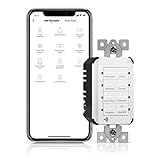
Overview: The TOPGREENER TGWFSC8 is a hardwired Wi-Fi scene controller replacing traditional in-wall switches. With eight physical buttons, it supports up to 14 custom scenes to command groups of Wi-Fi devices simultaneously. Unlike battery-powered options, this UL-listed switch requires a neutral wire and 2.4GHz network, offering permanent, maintenance-free operation. It integrates with Alexa and Google Assistant for voice control through Smart Life compatibility.
What Makes It Stand Out: This is a true in-wall solution eliminating battery changes forever. Eight dedicated buttons provide immediate physical access to more scenes than most competitors without multi-press complexity. The UL listing and FCC compliance ensure safety and reliability for permanent installation. Voice assistant integration sets it apart from hub-dependent systems, while Wi-Fi connectivity avoids additional bridge hardware. Each button can trigger complex multi-device automations.
Value for Money: At $43.99, it’s pricier than wireless options, but professional-grade features justify the cost. The hardwired design eliminates battery expenses and provides reliability worth the premium for permanent installations. However, neutral wire requirement may necessitate electrician installation, adding hidden costs. For new construction or renovations, it’s excellent value. The wall plate being sold separately is an annoying extra expense that diminishes perceived value.
Strengths and Weaknesses:
- Strengths: No batteries required; eight physical buttons; voice assistant support; UL listed; no hub needed; permanent installation
- Weaknesses: Requires neutral wire; professional install likely; wall plate not included; 2.4GHz only; higher upfront cost
Bottom Line: Best suited for new builds or renovations where neutral wires are accessible. The permanent, maintenance-free design and voice control make it ideal for serious smart home enthusiasts. Skip if you rent or want portable flexibility, and budget extra for installation and wall plate.
5. BroadLink Wireless Smart Button Scene Switch for Home Automation, Press Buttons to Activate Scenes

Overview: The BroadLink Wireless Scene Switch is a budget-friendly controller designed specifically for the BroadLink FastCon ecosystem. This four-button switch uses proprietary FastCon technology for one-step setup without account creation, targeting users prioritizing simplicity and privacy. However, its functionality is severely limited—scene control only works with LB4E26 smart bulbs (sold separately), making it unsuitable for controlling other smart devices like plugs or switches.
What Makes It Stand Out: The zero-setup approach is genuinely innovative—hold buttons for four seconds and devices auto-populate in the app without registration. No cloud dependency enhances privacy. Long-press dimming and color-tuning for compatible bulbs adds convenience. The FastCon protocol enables quick device pairing. Preset room-based automation provides out-of-box functionality. Up to two-year battery life reduces maintenance.
Value for Money: At $19.19, it’s the cheapest option, but limited compatibility severely restricts value. It only makes financial
6. Bkiyougo 10A Wireless Smart Switch, Wi-Fi Light Switch Compatible with Alexa & Google Home & SmartThings, FCC Certified, No Hub Required Support DIY Module(2 Pack)

Overview: The Bkiyougo 10A Wireless Smart Switch offers an affordable entry point into home automation with its two-pack DIY modules. These compact devices wire directly behind existing switches or outlets, transforming standard appliances into smart devices controllable via Wi-Fi. Operating on 2.4GHz networks without requiring a hub, they support up to 10A current and 3500W power, making them suitable for most household applications from lighting to coffee makers.
What Makes It Stand Out: This product distinguishes itself through exceptional value and versatility. The FCC certification ensures safety compliance, while the DIY nature appeals to technically inclined homeowners. With support for Alexa, Google Home, and SmartThings, integration flexibility is excellent. The Smart Life/Tuya app ecosystem provides robust scheduling, countdown timers, and remote access from anywhere with internet connectivity. The 3500W maximum wattage exceeds many competitors, handling high-power appliances like heaters or air conditioners safely.
Value for Money: At $12.99 for a two-pack ($6.50 per unit), this represents outstanding value. Individual smart switches typically cost $15-25 each. While requiring installation expertise, the cost savings are substantial for whole-home automation. Compared to hub-based systems, eliminating additional hardware expenses makes this particularly attractive for budget-conscious DIYers.
Strengths and Weaknesses: Strengths include unbeatable pricing, high power capacity, no hub requirement, FCC certification, and broad platform compatibility. The DIY module design allows customization for unique installations. Weaknesses involve mandatory electrical knowledge for safe installation, lack of 5GHz Wi-Fi support, and potential reliability concerns given the low price point. The generic brand may offer limited long-term support compared to established competitors.
Bottom Line: Ideal for experienced DIY enthusiasts seeking an economical smart home solution. The Bkiyougo switch delivers core functionality at a fraction of typical costs, though professional installation is recommended for those unfamiliar with electrical work. For budget whole-home automation, it’s compelling.
7. SwitchBot Smart Switch Button Pusher - Bluetooth Fingerbot for Rocker Switch/One-Way Button, Automatic Light Switch, Timer and APP Control, Works with Alexa When Paired with SwitchBot Hub (White)
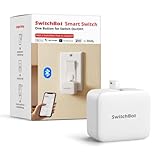
Overview: The SwitchBot Button Pusher revolutionizes smart home upgrades by eliminating the need for electrical rewiring. This Bluetooth-enabled fingerbot physically presses rocker switches and one-way buttons, making it perfect for renters or those hesitant about wiring modifications. The device operates via the SwitchBot app within Bluetooth range and supports scheduling independent of constant connectivity. When paired with a separate SwitchBot Hub, it gains Wi-Fi, cloud control, and voice assistant capabilities.
What Makes It Stand Out: Its non-invasive installation using 3M adhesive sets it apart—no tools, no wiring, no wall damage. The remarkable 600-day battery life (with twice-daily use) minimizes maintenance. Recent Matter support through Hub 2 enables Apple HomeKit integration, future-proofing the investment. The built-in timers function autonomously, ensuring reliability even during internet outages. It works with diverse devices: coffee makers, air conditioners, garage doors, and light switches.
Value for Money: At $24.65, the single Bot is reasonably priced for a specialized device. However, full functionality requires a $30-40 Hub purchase, bringing total investment to $55-65 per controlled switch. While pricier than some wired alternatives, the flexibility and rental-friendly nature justify costs for many users. Compared to replacing built-in switches, it offers significant savings in professional installation fees.
Strengths and Weaknesses: Strengths include tool-free installation, exceptional battery life, broad compatibility, autonomous timers, and expanding ecosystem support. Weaknesses are Bluetooth-only range without Hub, limited to rocker/one-way switches (no toggles or touchscreens), and dependency on additional hardware for voice control. Button resistance variations may affect reliability on stiff or aged switches.
Bottom Line: Excellent solution for renters, dorm residents, or anyone seeking non-permanent automation. While the Hub requirement adds cost, the versatility and ease of use make SwitchBot a worthwhile investment for gradual smart home expansion without electrical work.
8. SwitchBot Smart Switch Button Pusher(3Pack) with Hub Mini - Smart Switch Button Pusher, Wireless App & Timer Control, Compatible with Alexa, Google Home, IFTTT, Easy to Use, Smart Light Control Set

Overview: This comprehensive bundle includes three SwitchBot Button Pushers and a Hub Mini, delivering a complete smart home automation package. The system transforms existing rocker switches into app-controlled, voice-activated devices without wiring modifications. The Hub Mini bridges Bluetooth Bots to Wi-Fi, enabling remote access from anywhere and integration with Alexa, Google Home, IFTTT, and Apple HomeKit via Matter. Multiple control modes—Switch, Press, and Customization—adapt to various switch types and usage scenarios.
What Makes It Stand Out: The all-in-one nature provides immediate whole-room automation. The Hub Mini’s infrared capability extends control to IR-based appliances like TVs and air conditioners, consolidating device management. Voice commands work intuitively, and routines can control multiple rooms simultaneously. The three-pack configuration addresses typical home needs (living room, bedroom, kitchen) in a single purchase. The system supports complex automation sequences beyond simple on/off functions.
Value for Money: Priced at $93.49 ($31.16 per Bot with Hub amortized), this bundle offers savings over individual purchases. Buying three Bots separately plus a Hub would cost approximately $105-110. While premium-priced compared to wired smart switches, the value lies in installation-free setup and versatility across rental properties. For homeowners, it avoids professional electrician fees entirely.
Strengths and Weaknesses: Strengths include complete out-of-box solution, multi-device control, IR hub functionality, long battery life, and robust ecosystem integration. The three-way coverage is practical for most homes. Weaknesses involve higher upfront cost, ongoing battery replacements (though infrequent), and potential aesthetic concerns with visible devices on walls. Compatibility limitations with toggle switches or touchscreens remain.
Bottom Line: Perfect for those wanting comprehensive, installation-free automation. The bundle eliminates compatibility guesswork and provides immediate whole-home control. Despite the premium price, the convenience, flexibility, and expanding Matter support make this a top choice for modern smart homes without renovation.
9. LOUYSGEN Smart Light Switch Need Neutral Wire,FCC Certified,2.4GHz WiFi Push Button Switch Compatible with Alexa,APP Control Compatible with Tuya/Smart Life,Black 3 Gang

Overview: The LOUYSGEN 3-Gang Smart Switch provides a sleek, permanent smart lighting solution for modern homes. This black, three-button wall switch replaces traditional switches, controlling three separate light circuits independently. Requiring a neutral wire and 2.4GHz Wi-Fi, it integrates with Alexa and the Tuya/Smart Life ecosystem for voice and app control. The switch handles 110-220V voltages and 600W total power, featuring moisture-proof construction suitable for bathrooms and kitchens.
What Makes It Stand Out: The innovative three-way control association allows multiple switches to control the same light through app configuration—ideal for hallway or stairway lighting without traveler wires. Its moisture-proof design and wide operating temperature range (-4°F to 158°F) enable installation in challenging environments where electronics typically fail. The black finish offers a contemporary aesthetic alternative to standard white switches. Group control functionality commands multiple switches simultaneously with one tap.
Value for Money: At $21.99 for a three-gang switch, pricing is highly competitive—equivalent to $7.33 per controlled circuit. Comparable single-gang smart switches cost $15-20 each. The FCC certification and robust build quality suggest reliable performance without premium pricing. For new installations or renovations, it eliminates the need for separate smart bulbs or plug-in modules.
Strengths and Weaknesses: Strengths include three-way association capability, moisture resistance, wide voltage compatibility, no hub requirement, and attractive black design. The FCC certification ensures safety standards. Weaknesses are mandatory neutral wire (problematic in older homes), lack of 5GHz Wi-Fi support, and permanent installation requiring electrical work. The 600W total capacity may limit use with high-wattage fixtures.
Bottom Line: Excellent choice for homeowners undertaking renovations or with modern wiring. The three-way control feature solves complex lighting scenarios elegantly. While installation requires electrical knowledge, the feature set and competitive pricing make it a standout option for permanent smart lighting upgrades.
10. Tuya scene switch Hub with E24093 Tuya scene switch

Overview: The Tuya Scene Switch Hub with E24093 button is a compact, battery-powered smart controller designed for triggering automated scenes rather than directly controlling electrical loads. This portable hub communicates with the Smart Life app to execute customized actions, button sequences, and lifestyle-based automations. Unlike wired switches, it can be placed anywhere using self-adhesive backing, providing flexible control points throughout the home. The ultra-low power consumption ensures extended battery life.
What Makes It Stand Out: This device excels as a programmable scene trigger rather than a traditional switch. Users can configure single, double, and long-press actions to control multiple devices simultaneously—perfect for “Movie Night,” “Good Morning,” or “Away Mode” scenes. The wireless, tool-free installation allows placement on nightstands, walls, or even car dashboards. Its mini size and lightweight design make it travel-friendly. The hub functionality suggests it can serve as a local coordinator for other Tuya devices.
Value for Money: At $15.89, this is an affordable entry into advanced automation. Dedicated scene controllers often cost $30-50. However, its value depends entirely on existing smart device ecosystem investment—it controls nothing without compatible smart bulbs, plugs, or switches. For users already committed to Tuya/Smart Life platform, it offers convenient macro control at low cost. As a standalone purchase, functionality is limited.
Strengths and Weaknesses: Strengths include ultra-easy installation, portability, extended battery life, customizable multi-action buttons, and seamless Smart Life integration. The compact form factor suits any décor. Weaknesses are lack of direct load control (cannot replace wired switches), dependency on other smart devices, and ambiguous hub capabilities. Product descriptions are vague about maximum device connections or protocol support.
Bottom Line: Ideal for Tuya ecosystem users seeking convenient scene control. It excels as a supplementary controller but cannot serve as primary lighting control. For those wanting portable automation triggers without wiring, it’s a cost-effective addition. Avoid if you need direct circuit switching or don’t use Smart Life app.
Understanding Scene-Recall Technology in Modern Smart Switches
The Evolution from Basic Controls to Intelligent Scenes
The journey from traditional light switches to intelligent scene-recall buttons represents one of the most significant leaps in residential control interfaces. Early smart switches merely added app control to basic on/off functionality, requiring users to manually adjust multiple devices through clunky interfaces. Today’s scene-recall switches operate as distributed micro-controllers, storing complex macros that can manipulate dozens of devices across multiple protocols simultaneously. In 2026, we’re seeing the emergence of predictive scene engines that don’t just execute commands but anticipate needs based on time of day, occupancy patterns, and even biometric data from wearable devices.
How Scene-Recall Buttons Actually Work
At their core, scene-recall buttons trigger pre-programmed sequences of commands, but the mechanics are far more sophisticated than simple macro execution. When you press a scene button, the switch broadcasts a scene identifier to your home network, which participating devices receive and interpret based on their configured actions. Modern implementations use edge computing principles, storing scene definitions locally within the switch itself to ensure sub-200ms response times even during internet outages. The best 2026 models feature multi-stage scene execution, allowing for staggered actions—like dimming lights first, then adjusting HVAC, then activating entertainment systems—to avoid overwhelming your electrical infrastructure.
Why 2026 Marks a Turning Point for Scene-Based Automation
This year represents a convergence of three critical factors: Matter 1.3’s enhanced scene support, the mainstream adoption of Thread mesh networking, and the integration of local AI processing chips in mid-tier switches. For the first time, you can purchase scene-recall switches from different manufacturers that genuinely work together seamlessly, sharing scene definitions across ecosystems without cloud translation layers. Additionally, the introduction of energy-aware scene programming means your switches can now automatically optimize scenes based on real-time electricity pricing and solar battery storage levels.
Key Features That Define Premium Scene-Recall Switches
Multi-Button Configurations and Customization Depth
The physical layout of scene-recall buttons varies dramatically, and your choice should align with your household’s complexity needs. Entry-level models offer 2-3 buttons with single-tap functionality, while premium 2026 switches feature up to 8 physical buttons with multi-gesture support (single tap, double tap, long press, and even pressure-sensitive holds). The most advanced implementations allow for button remapping at the firmware level, meaning you can repurpose hardware buttons without reconfiguring your entire smart home platform. Look for switches that support conditional button behavior—where the same button triggers different scenes based on time of day, occupancy, or even which family member activated it through presence detection.
LED Feedback Systems and Visual Cues
Visual feedback has evolved from simple power indicators to sophisticated information displays. Modern scene-recall switches incorporate RGB LED arrays that can display scene status, device connectivity, and even energy consumption patterns. In 2026, we’re seeing the adoption of micro-discrete LED grids that can show custom icons or text—imagine glancing at your switch to see “AWAY MODE ACTIVE” or “SOLAR CHARGING.” The best implementations use ambient light sensors to automatically adjust LED brightness, preventing bedroom switches from becoming night-time distractions. Crucially, these LEDs should be individually addressable through your scene programming, allowing them to serve as status indicators for critical systems like security alarms or water leak sensors.
Backward Compatibility with Legacy Wiring
Despite advancing technology, most homes still run on decades-old electrical infrastructure. Leading 2026 scene-recall switches address this through hybrid power management, capable of operating on neutral-wire circuits for maximum reliability while also supporting no-neutral installations through capacitive load balancing and power-harvesting techniques. The most sophisticated models can auto-detect your wiring configuration and adjust internal parameters accordingly, preventing the flickering and instability that plagued early no-neutral installations. For multi-way switch setups (where multiple switches control the same light), look for devices that support virtual three-way switching through wireless association rather than requiring traveler wires.
Protocol Considerations for 2026 Ecosystems
Matter-Over-WiFi vs. Thread Networks
The Matter standard has finally delivered cross-platform compatibility, but implementation choices still matter significantly. Matter-over-WiFi switches offer straightforward setup and direct integration with existing home networks, but they consume more power and can contribute to WiFi congestion in device-dense homes. Thread-based switches create a self-healing mesh network that’s more reliable and responsive, with typical scene execution times 30-40% faster than WiFi alternatives. However, Thread requires a border router (often built into smart speakers or dedicated hubs), adding to initial costs. For scene-recall applications where milliseconds matter, Thread’s superior latency and reliability make it the preferred choice for most 2026 installations, especially in homes with 20+ smart devices.
The Role of Zigbee and Z-Wave in Modern Scenes
While Matter grabs headlines, Zigbee and Z-Wave remain deeply relevant in 2026’s scene-control landscape. These mature protocols offer superior device density—supporting hundreds of devices per network versus Matter’s current practical limit of around 50-70. Many premium scene-recall switches now function as multi-protocol translators, binding Zigbee sensors and Z-Wave locks into Matter scenes through local bridging. This hybrid approach leverages Zigbee’s low-power advantages for battery devices while using Matter for user-facing controls. If you’re expanding an existing Z-Wave or Zigbee installation, look for scene-recall switches that specifically advertise “protocol bridging” rather than forcing a complete ecosystem replacement.
Proprietary Protocols: Navigating the Trade-offs
Some manufacturers maintain proprietary protocols, arguing they offer superior performance and security. These systems often deliver scene execution speeds under 100ms and provide advanced features like device health monitoring and predictive maintenance alerts. The trade-off is ecosystem lock-in—your scene-recall switch won’t directly integrate with Matter or other platforms. However, in 2026, even proprietary systems are offering limited Matter compatibility through “guest mode” operation, where they expose basic scene controls to other ecosystems while keeping advanced features locked behind their native platform. Evaluate whether the performance benefits outweigh the flexibility costs, particularly if you plan to mix brands throughout your home.
Installation and Hardware Requirements
Neutral Wire vs. No-Neutral Solutions
The presence of a neutral wire in your switch box remains the single biggest technical constraint. Neutral-wire switches draw consistent power, enabling reliable scene execution and real-time status reporting. No-neutral solutions must leak small amounts of current through the load, which can cause LED bulbs to glow dimly when “off” and may limit scene complexity due to power constraints. In 2026, adaptive load compensation has largely solved these issues, with advanced switches using predictive algorithms to adjust their power draw based on connected devices. For new construction or major renovations, always install neutral wires to future-proof your investment. For retrofits, look for switches with adjustable minimum load settings and built-in load bypass capacitors.
Multi-Gang Box Compatibility Challenges
Physical space constraints become critical when upgrading multiple switches. Modern scene-recall switches are deeper than traditional switches due to their internal radios and processors—often requiring 35-40mm of depth versus the standard 25mm. In multi-gang configurations, heat dissipation becomes a concern, as tightly packed radios can interfere with each other and reduce reliability. Premium 2026 models feature thermal throttling and frequency-hopping to mitigate interference. When planning multi-gang installations, consider using separate, slimmer scene controllers paired with smart relays hidden in the ceiling or wall cavity, rather than stacking multiple full-featured switches. This approach also reduces cost while increasing flexibility.
Professional Installation vs. DIY Approach
While many scene-recall switches market themselves as DIY-friendly, the complexity of modern scenes often warrants professional installation. Certified smart home integrators can perform load calculations to ensure your switches receive adequate power, configure mesh network optimization, and set up backup power systems for critical scene controllers. They’ll also handle the nuanced programming of conditional scenes that depend on multiple variables. However, if you’re comfortable with electrical work and network configuration, DIY installation can work well for single-switch replacements. The key is to start with a clear network map and scene hierarchy plan—attempting to program scenes organically often results in conflicting commands and unreliable operation.
Scene Programming and Configuration Strategies
Cloud-Based vs. Local Scene Storage
Where your scenes are stored dramatically impacts reliability and privacy. Cloud-based storage allows for easy editing from anywhere and enables manufacturer AI to suggest scene optimizations, but introduces latency and dependency on internet connectivity. Local storage, either in the switch itself or a local hub, ensures scenes execute in under 200ms even during outages. The gold standard in 2026 is hybrid storage with automatic synchronization—scenes execute locally by default, but sync to cloud for backup and remote editing. Look for switches with onboard NAND flash storage (minimum 8MB) to handle complex scenes with 50+ device actions, and verify that local execution remains functional if the manufacturer ceases cloud services.
Time-Based Automation and Circadian Lighting
Scene-recall buttons shouldn’t just activate static scenes—they should serve as triggers for dynamic, time-aware environments. Advanced 2026 switches incorporate astronomical clocks that adjust scene parameters based on sunrise/sunset times and seasonal variations. Circadian lighting scenes automatically shift color temperature throughout the day, with morning scenes featuring cool, energizing light that gradually warms by evening. The most sophisticated implementations integrate with your calendar, automatically adjusting “Work From Home” scenes on meeting-heavy days or delaying “Evening Relaxation” scenes when you’re working late. Ensure your chosen switch supports variable interpolation within scenes, allowing a single “Good Morning” button to trigger different light levels and temperatures at 6 AM versus 9 AM.
Integrating Occupancy and Presence Detection
Static scenes are so 2025. Modern scene-recall switches should function as contextual triggers that adapt to who’s home and where they are. Look for switches with built-in mmWave radar sensors that can detect room occupancy through walls, enabling scenes that automatically adjust when you enter or leave a space. These sensors can differentiate between humans and pets, preventing your “Away” scene from activating when the cat walks by. For presence detection, switches should integrate with smartphone location services and wearable devices, recognizing which family member pressed the button and loading their personalized scene variants. The key is local processing—scenes should adapt in real-time without waiting for cloud AI analysis.
Advanced Integration Scenarios
Whole-Home Scene Synchronization
Coordinating scenes across multiple floors and zones requires master-slave switch architecture. In this model, a central scene controller (often in the master bedroom or entryway) broadcasts scene identifiers that subordinate switches echo and extend. For example, activating “Goodnight” on the master controller should cascade through bedroom, hallway, and exterior switches, each executing their zone-specific actions while reporting status back to the master. The best 2026 implementations use deterministic mesh routing, ensuring scene commands arrive in the correct sequence even in large homes with 30+ switches. Look for switches that support scene inheritance, allowing zone-specific switches to automatically enhance base scenes with local customizations.
Deep Voice Assistant Integration
While physical buttons are the star, voice integration remains a crucial backup. Modern scene-recall switches expose their scenes to voice assistants through intent-based APIs rather than simple name mapping. This allows you to say “make it cozy” instead of the exact scene name, with natural language processing interpreting your intent and selecting the appropriate scene. The integration should be bidirectional—voice commands activate scenes, and physical button presses update voice assistant status displays. In 2026, we’re seeing switches with onboard microphones that enable room-specific voice scene activation without waking distant smart speakers, using beamforming to isolate commands to the immediate area.
Security System Coordination
Scene-recall switches should serve as physical security interfaces, not just convenience controls. When your alarm system arms, switches should automatically execute “Away” scenes that create lived-in lighting patterns. During security breaches, panic buttons should trigger “Emergency” scenes that flood the property with light and unlock exit paths while locking interior doors. Look for switches with direct, local integration to security panels using protocols like DSC or Honeywell’s APIs, bypassing cloud services for critical safety functions. The switches should also monitor their own tamper status, alerting you if someone attempts to remove or disable them.
Power User Features to Demand
Conditional Logic and If-Then Triggers
Basic scene-recall is table stakes—2026’s advanced switches support conditional branching within scenes. A single “Entertain” button can trigger different lighting, music, and climate settings depending on outdoor temperature, number of connected devices (indicating guest count), or even air quality sensor readings. These conditions should be configurable through visual flowchart interfaces rather than code, but power users should have access to raw logic editors for complex scenarios. The switch’s processor should handle nested conditions (if-then-else chains up to 10 levels deep) without perceptible delay, storing variable states locally between executions.
Scene Backup and Import/Export Capabilities
Your scene configurations represent hours of careful tuning—they must be portable. Premium switches offer encrypted scene export to standard formats like JSON or YAML, allowing you to backup configurations to NAS drives or cloud storage. This is crucial when upgrading switches or expanding to second homes, as you can import proven scene structures and adapt them to new spaces. Look for switches that support scene templating, where you can create a “Bedroom Template” and deploy it across multiple rooms, with the switch automatically remapping device references. This feature is invaluable for rental property managers or homeowners with multiple properties.
Firmware Update Mechanisms
Longevity in smart home devices depends on consistent updates. Scene-recall switches should support over-the-air (OTA) updates through both manufacturer apps and third-party platforms like Home Assistant. Critically, updates should be staged—downloading to a backup partition first, then swapping during low-activity periods to prevent bricking. The best 2026 models feature automatic rollback if new firmware causes scene execution failures, and they maintain a “last known good” configuration that can be restored without network connectivity. Verify the manufacturer guarantees at least 7 years of security updates, and that the update process doesn’t erase your custom scenes.
Design and User Experience Factors
Button Tactility and Long-Term Durability
A scene-recall button you’ll press daily for years must feel perfect. Look for switches with mechanical key switches rated for at least 50 million actuations—comparable to high-end mechanical keyboards. The button travel should provide clear tactile feedback without being loud enough to disturb quiet environments. Premium models offer adjustable actuation force, allowing you to customize button feel for different users or applications. Avoid membrane-based switches, which degrade in tactile feel after just a few years. In 2026, we’re seeing magnetic levitation switches that use hall-effect sensors for contactless operation, eliminating physical wear entirely while providing satisfying haptic feedback through miniature linear actuators.
Aesthetic Customization Options
Your switches should complement your home’s design, not fight it. Leading manufacturers offer interchangeable faceplates in materials ranging from aircraft-grade aluminum to handcrafted wood veneers. Some provide custom engraving services for button labels, while others use e-ink displays that can dynamically relabel buttons based on active scenes. For historic homes, look for “invisible” installations where the scene controller hides in a closet and antique-style buttons connect via low-voltage wiring. The depth of customization extends to LED color themes that match your paint colors and button layouts that can be rotated 90 or 180 degrees to accommodate unusual gang box orientations.
Accessibility and Universal Design
Scene-recall switches must work for everyone in your household. In 2026, ADA compliance means more than just large buttons—it includes voice confirmation of scene activation, high-contrast LED feedback for low-vision users, and compatibility with switch access devices used by individuals with motor impairments. Look for switches with configurable activation delays (preventing accidental triggers) and the ability to require two-button simultaneous presses for critical scenes like “All Off” or “Emergency.” The best models integrate with hearing loop systems, providing visual scene indicators that sync with doorbell and phone alerts for deaf users.
Energy Management Through Scene Control
Load Monitoring and Scene Optimization
Modern switches do more than control devices—they monitor them. Integrated current sensors measure real-time power draw from connected loads, enabling scenes that automatically adjust to stay within circuit limits. This is crucial for older homes with limited electrical service, as you can program “High Load” scenes that temporarily dim non-essential lights when the HVAC system cycles on. The most advanced switches use machine learning to identify device signatures, alerting you when a scene activates a device that’s drawing abnormal power (indicating potential failure). They can also generate monthly reports showing which scenes consume the most energy, helping you optimize for efficiency without sacrificing convenience.
Phantom Load Management Strategies
Scene-recall switches themselves consume power—typically 0.5-2W depending on radio activity and LED brightness. In 2026, energy-conscious models feature “deep sleep” modes where they power down radios and dim LEDs during inactive periods, waking only on button press or scheduled scene execution. Some switches can harvest energy from the load circuit itself in no-neutral installations, achieving near-zero phantom load. For battery-powered wireless scene controllers, look for models with kinetic energy harvesting—each button press generates enough power to send the scene command, eliminating battery changes entirely. When evaluating switches, calculate the annual energy cost: a 1.5W switch running 24/7 costs about $2-3 per year in electricity, which adds up across 20+ switches.
Troubleshooting and Optimization
Resolving Scene Lag and Latency Issues
Scene execution delays ruin the magic. If your “Movie Night” scene takes 5 seconds to fully activate, the experience feels broken. Start troubleshooting by analyzing your network topology—scene commands should travel through the fewest hops possible. Use your switch’s diagnostic mode to trace scene execution paths, identifying slow-responding devices that are causing bottlenecks. In 2026, leading switches include built-in packet sniffers that log scene command propagation, showing exactly where delays occur. Common culprits include cloud-dependent devices that should be moved to local control, and mesh networks with too many battery-powered routers. Optimizing scene speed often means simplifying—replacing a complex 20-device scene with two staged scenes triggered in sequence can actually feel faster due to parallel execution.
Managing Button Mapping Conflicts
With multi-tap and long-press gestures, it’s easy to create conflicting commands. Perhaps a double-tap on your “Kitchen” switch is programmed to both activate “Cooking” scene and toggle the garbage disposal through a different platform. Modern switches include conflict detection algorithms that scan all configured triggers and alert you to overlapping commands. The best practice is to establish a household-wide button mapping standard: single taps always activate primary scenes, double taps toggle secondary functions, and long presses activate safety-related scenes. Document this mapping and store it in your switch’s configuration export. When conflicts arise, use priority arbitration—assigning each scene a priority level so critical commands (like “Emergency”) always override convenience scenes.
Future-Proofing Your Investment
Scalability for Growing Smart Homes
Your scene-recall switch should accommodate tomorrow’s devices, not just today’s. Look for switches with over-provisioned memory and processing power—models with 16MB+ flash storage and dual-core processors can handle firmware updates that add features for years. The switch’s scene capacity matters too: entry-level models might support 20 scenes with 10 devices each, while premium units handle 100+ scenes with 50+ devices and nested conditions. Consider switches with expansion ports for future modules—some 2026 models include hidden USB-C ports that can accept upcoming radio modules for standards that don’t even exist yet. Most importantly, choose switches that support “scene virtualization,” where a single physical button can cycle through multiple scene collections, effectively multiplying your control surface without requiring hardware upgrades.
API Access and Developer Community Support
The true test of a switch’s longevity is its developer ecosystem. Premium manufacturers provide open APIs with local network access, allowing integration with platforms like Home Assistant, Hubitat, and OpenHAB. Look for RESTful APIs with WebSocket support for real-time scene status updates, and MQTT compatibility for lightweight integration. The presence of an active developer community means unofficial integrations and feature extensions will continue even if the manufacturer loses interest. Check GitHub for community-maintained libraries and browse forums for the manufacturer’s responsiveness to developer requests. In 2026, the best manufacturers host official developer programs with documentation, SDKs, and even hardware loaner programs for community contributors.
Cost Analysis and Value Assessment
Understanding Price Tiers and Features
Scene-recall switches in 2026 fall into three distinct tiers. Entry-level models ($30-50) offer 2-3 buttons, single-protocol support (usually Matter-over-WiFi), and basic scene storage. Mid-range switches ($60-90) add multi-protocol support, conditional logic, and premium materials. High-end controllers ($100-150) feature advanced sensors, extensive customization, and professional integration tools. The price delta often reflects processing power and memory more than button count—a $120 switch might have the same hardware as a $70 model but unlock advanced features through software licensing. Consider total cost of ownership: a cheaper switch that requires replacement in 3 years due to inadequate updates costs more than a premium switch lasting 10+ years.
Hidden Costs: Hubs, Subscriptions, and Accessories
The sticker price rarely tells the full story. Many scene-recall switches require proprietary hubs for full functionality, adding $80-150 to your initial investment. While Matter promises hub-free operation, advanced features like conditional logic and energy monitoring often still require manufacturer-specific hubs. Subscription fees have also emerged, with some manufacturers charging $3-5 monthly for cloud scene storage, AI suggestions, and remote access. Evaluate whether these services offer genuine value or just lock basic features behind paywalls. Don’t forget accessory costs: decorative faceplates ($10-25 each), load bypass capacitors for no-neutral installations ($5-10 per switch), and professional installation if needed ($50-100 per switch). Budget for a managed network switch ($100-200) to isolate your smart home traffic and ensure reliable scene execution.
Frequently Asked Questions
1. Will scene-recall switches work during internet outages? Yes, but only if they store scenes locally. Look for switches that explicitly advertise “local execution” or “edge processing.” Matter-over-Thread switches generally perform better offline than WiFi models. Test this by disconnecting your internet and verifying scenes still execute.
2. How many devices can a single scene button control? This varies by model and protocol. Most 2026 switches support 30-50 devices per scene, but performance degrades beyond 20 devices on WiFi networks. Thread networks can handle 50+ devices efficiently. For larger scenes, use cascading triggers where one scene activates others in sequence.
3. Can I use scene-recall switches in rental properties? Absolutely. Battery-powered wireless scene controllers require no wiring and can be mounted with adhesive strips. For wired installations, use switches with “landlord mode” that preserves base functionality while allowing tenants to customize scenes, with easy reset procedures for move-out.
4. What’s the difference between scenes and routines? Scenes are device state snapshots activated by buttons (e.g., “Movie Night” sets specific light levels). Routines are time or event-triggered automations (e.g., “Sunset routine” activates scenes automatically). The best switches treat scenes as building blocks that routines can trigger.
5. How do I prevent accidental scene activation? Use switches with configurable activation delays or require multi-button presses for critical scenes. Many 2026 models support “confirmation mode” where the first press previews the scene (lights flash briefly) and a second press within 3 seconds confirms activation.
6. Can scene buttons control devices across different brands? Yes, thanks to Matter. However, advanced features like device-specific transitions or color loops may not translate perfectly between brands. Test cross-brand scenes thoroughly, and consider keeping critical scenes within a single ecosystem for reliability.
7. Do scene-recall switches consume power when idle? Yes, typically 0.5-2 watts. This “phantom load” costs $1-3 per switch annually. Energy-harvesting kinetic models eliminate this entirely but cost 2-3x more. Calculate break-even based on your electricity rates and number of switches.
8. How difficult is it to reprogram scenes after installation? Modern switches use smartphone apps with drag-and-drop interfaces. A simple scene takes 2-3 minutes to program; complex conditional scenes might take 15-20 minutes. The best apps offer “scene duplication” to speed up creation of similar scenes for different rooms.
9. Can scene-recall switches replace my existing dimmers? Many models include built-in dimming for attached loads, but check specifications carefully. Multi-button scene controllers often lack dimming capability and require separate smart dimmers. For clean installations, use scene switches with 0-10V or TRIAC dimming built-in.
10. What’s the expected lifespan of a smart scene-recall switch? Quality switches last 10-15 years. Key factors are button durability (look for 50M+ actuation ratings), firmware support (7+ year update commitment), and radio longevity (WiFi 6E and Thread will remain relevant through 2030). Avoid first-generation Matter devices, as protocol refinements in later versions may leave them unsupported.