Tired of fighting over the thermostat? You’re not alone. The promise of a perfectly comfortable home has long been sabotaged by the reality of hot spots, cold corners, and that one room that never seems to match the temperature on your main display. Multi-room integration through smart thermostat remote sensors isn’t just a luxury upgrade—it’s the difference between a house that merely has heating and cooling and a home that truly understands how you live. As homeowners become increasingly sophisticated about energy efficiency and personalized comfort, remote sensors have evolved from simple temperature reporting devices into intelligent home ecosystem components that can slash utility bills while eliminating the age-old battle for climate control.
But here’s the thing: not all remote sensors are created equal, and the market is flooded with options that promise the moon while delivering little more than basic temperature readings. Understanding what separates a genuinely useful sensor from a glorified thermometer requires diving deep into communication protocols, occupancy detection methods, and long-term ecosystem compatibility. Whether you’re building a new smart home from scratch or retrofitting an existing system, knowing what features matter most will save you from costly mistakes and frustrating returns.
Top 10 Smart Thermostat Remote Sensors for Multi-Room Integration
Detailed Product Reviews
1. Honeywell Home RCHTSENSOR-1PK, Smart Room Sensor works with T9/T10 WIFI Smart Thermostats

Overview: The Honeywell Home RCHTSENSOR-1PK is an add-on smart room sensor designed to expand the capabilities of your T9 or T10 WiFi Smart Thermostat. This battery-powered device monitors temperature and humidity in individual rooms, allowing your HVAC system to respond to conditions where they actually matter rather than just where the thermostat is mounted.
What Makes It Stand Out: The sensor’s motion detection capability sets it apart, automatically focusing comfort on occupied rooms rather than empty ones. With an impressive 200-foot signal range, it can communicate through most home constructions without issue. The humidity monitoring feature provides a more complete picture of room comfort, and the ability to schedule which rooms take priority at different times—like bedrooms at night—adds genuine lifestyle value.
Value for Money: At $32.00, this sensor sits competitively in the market. It’s slightly cheaper than the Sensi Room Sensor ($39.99) and comparable to ecobee’s sensors when purchased individually. For T9/T10 owners, this is a modest investment that unlocks significantly smarter climate control and potential energy savings by heating or cooling only occupied spaces.
Strengths and Weaknesses: Strengths include excellent wireless range, motion detection, humidity tracking, and flexible scheduling. The sensor is easy to install and genuinely improves comfort distribution. Weaknesses are its limited compatibility (only Honeywell T9/T10), battery dependency requiring periodic replacement, and the fact that a single sensor may not be sufficient for larger homes needing multi-room coverage.
Bottom Line: If you own a compatible Honeywell thermostat, this sensor is a worthwhile addition that delivers tangible comfort improvements. Start with one and expand as needed to create a truly responsive home climate system.
2. Honeywell Home T9 WiFi Smart Thermostat with 1 Smart Room Sensor, Touchscreen Display, White
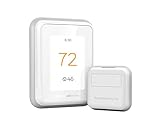
Overview: This package pairs the Honeywell T9 Smart Thermostat with a single Smart Room Sensor, creating a foundation for intelligent, multi-zone climate control. The touchscreen thermostat serves as the central command unit while the included sensor extends temperature monitoring to another room, addressing the common problem of hot and cold spots in modern homes.
What Makes It Stand Out: The system’s 200-foot sensor range is exceptional, allowing flexible placement far from the thermostat. Motion detection enables automatic comfort focusing on occupied rooms, while the thermostat’s compatibility with Amazon Alexa, Apple HomeKit, and Google Assistant provides versatile control options. The Auto Home/Away Scheduling learns your patterns to optimize energy usage automatically.
Value for Money: At $186.75, this package undercuts premium competitors like ecobee and Nest while delivering comparable core functionality. The included $32 sensor adds immediate value, and Energy Star certification promises utility bill reductions. Eligibility for utility demand response programs can provide additional rebates and ongoing rewards, enhancing long-term savings.
Strengths and Weaknesses: Strengths include broad smart home integration, impressive sensor range, intuitive scheduling, and motion-based room prioritization. The system effectively balances comfort and efficiency. Weaknesses include a less premium display compared to high-end competitors, potential need for a C-wire or adapter in older homes, and reliance on battery-powered sensors that require maintenance.
Bottom Line: The Honeywell T9 offers excellent value for homeowners seeking smart multi-room climate control without paying premium prices. It’s a feature-rich, practical solution that intelligently adapts to your lifestyle while keeping energy costs in check.
3. Honeywell Home RCHTSENSOR-2PK, Smart Room Sensor works with T9/T10 WIFI Smart Thermostats
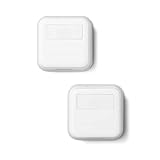
Overview: The RCHTSENSOR-2PK provides two identical Smart Room Sensors for your Honeywell T9 or T10 thermostat system, doubling your ability to monitor temperature and humidity across multiple locations. This package addresses larger homes or households wanting comprehensive climate awareness without purchasing sensors individually.
What Makes It Stand Out: Like the single pack, these sensors feature motion detection to prioritize occupied rooms and deliver data up to 200 feet from the thermostat. The two-pack allows immediate multi-room setup—perfect for monitoring both living areas and bedrooms simultaneously. The scheduling feature lets you automatically switch focus between sensors based on time of day, such as emphasizing bedroom comfort at night.
Value for Money: At $78.08 for two sensors, the per-unit cost is approximately $39, which is actually higher than buying two single sensors at $32 each ($64 total). This pricing structure is counterintuitive and diminishes the value proposition of the multi-pack. However, the convenience of a single package and potential retail availability might justify the premium for some buyers.
Strengths and Weaknesses: Strengths include identical functionality to the single sensor—motion detection, humidity monitoring, excellent range, and flexible scheduling—in a convenient two-pack. The sensors are straightforward to install and genuinely improve whole-home comfort. Weaknesses are the puzzling price premium over individual sensors, limited compatibility with only Honeywell T9/T10 thermostats, and the doubled battery maintenance requirement.
Bottom Line: While the RCHTSENSOR-2PK delivers reliable multi-room sensing capability, savvy shoppers should compare pricing against individual sensors. Buy this pack for convenience, but don’t expect cost savings over purchasing singles separately.
4. ecobee Smart Thermostat Premium with Smart Sensor and Air Quality Monitor - Programmable Wifi Thermostat - Works with Siri, Alexa, Google Assistant

Overview: The ecobee Smart Thermostat Premium represents the pinnacle of smart climate control, integrating a thermostat, air quality monitor, and SmartSensor into one sophisticated package. This premium device goes beyond temperature management to become a comprehensive home monitoring hub, complete with a vibrant display and built-in voice assistant capabilities.
What Makes It Stand Out: The built-in air quality monitor is a game-changer, alerting you to pollutants and reminding you to change filters. Radar occupancy sensing offers more reliable detection than traditional motion sensors, while seamless integration with ecobee’s doorbell camera creates a unified smart home ecosystem. The included SmartSensor and complete installation kit (PEK and trim kit) ensure compatibility with 95% of HVAC systems.
Value for Money: At $249, this thermostat commands a premium price but justifies it through exceptional build quality, metal siding, cinematic interface, and multi-functionality. The $50 SmartSensor value, included air quality monitoring, and energy savings up to 26% create a compelling ROI. When compared to purchasing separate air quality monitors and smart thermostats, the integrated approach offers significant value.
Strengths and Weaknesses: Strengths include premium materials, air quality monitoring, radar-based occupancy detection, built-in Alexa, extensive smart home integration, and broad HVAC compatibility. The large, vibrant display is class-leading. Weaknesses are the high upfront cost, potential feature overload for users wanting simple climate control, and a steeper learning curve to maximize all capabilities.
Bottom Line: For tech enthusiasts wanting the most advanced, feature-rich climate solution available, the ecobee Premium is unmatched. It transforms climate control into intelligent home management, making the premium investment worthwhile for those who’ll leverage its full potential.
5. Sensi Room Sensor-Compatible with Sensi Touch 2 Smart Thermostat

Overview: The Sensi Room Sensor is designed exclusively for the Sensi Touch 2 Smart Thermostat, enabling targeted temperature and humidity monitoring in specific rooms. This wireless sensor helps eliminate hot and cold spots by providing the thermostat with data from multiple locations, creating a more balanced and comfortable home environment.
What Makes It Stand Out: The sensor’s flexible placement options—either wall-mounted or using the included stand—make it adaptable to any room layout. Its ability to average temperature readings across multiple sensors helps reduce temperature variations throughout your home. The humidity monitoring feature provides additional environmental awareness, and the wireless design eliminates installation complexity.
Value for Money: Priced at $39.99, the Sensi Room Sensor sits slightly above Honeywell’s $32 single sensor but delivers comparable core functionality. For Sensi Touch 2 owners, it’s the only compatible option, making the price point acceptable. The potential energy savings from improved climate distribution and reduced HVAC cycling can offset the investment over time, though the ecosystem lock-in limits cross-platform flexibility.
Strengths and Weaknesses: Strengths include easy wireless installation, flexible placement options, humidity monitoring, and effective temperature averaging to reduce hot spots. The sensor integrates seamlessly with the Sensi Touch 2 interface. Weaknesses are its limited compatibility (only Sensi Touch 2), lack of motion detection capabilities found in competitors, and slightly higher price than some alternatives. The ecosystem lock-in means you’re committed to the Sensi platform.
Bottom Line: Sensi Touch 2 owners seeking to improve whole-home comfort will find this sensor a practical and effective addition. While platform-specific and missing some advanced features, it delivers reliable performance where it matters most—balanced, consistent temperature throughout your home.
6. Provirtec Smart Thermostat for Home with Room Sensor, 7 Days Programmable, Energy Saving WiFi Thermostats for House,APP & Touchscreen Control, C Wire Required, 3.95 Inch Large Screen

Overview: The Provirtec Smart Thermostat delivers surprisingly robust features at a budget-friendly price point. This 7-day programmable unit includes a room sensor and supports most 24VAC HVAC systems, making it an accessible entry into smart climate control for homeowners seeking basic automation without breaking the bank.
What Makes It Stand Out: The standout feature is the Bluetooth Mesh technology that maintains local control during WiFi outages—a reliability boost rarely seen in sub-$100 thermostats. The 3.95-inch touchscreen offers intuitive “traditional + smart” sliding controls accessible to all ages. Its three-mode system (Sleep/Home/Away) intelligently adjusts based on occupancy and even nighttime body temperature patterns.
Value for Money: At $79.99 with an included room sensor, this thermostat dramatically undercuts competitors. Similar packages from premium brands cost $150-$200, making Provirtec ideal for budget-conscious buyers wanting multi-room monitoring. The self-test compatibility guide reduces installation headaches, potentially saving professional setup costs.
Strengths and Weaknesses: Strengths include exceptional affordability, Bluetooth Mesh fallback connectivity, comprehensive HVAC compatibility, and user-friendly interface. The large screen enhances visibility. Weaknesses involve the lesser-known brand reputation, 2.4GHz WiFi limitation, C-wire requirement (no adapter included), and potentially less polished app experience compared to market leaders.
Bottom Line: The Provirtec thermostat is a compelling value play for homeowners wanting core smart features and room sensing without premium pricing. While it lacks brand prestige, its functional feature set and reliability-focused connectivity make it a wise choice for practical buyers.
7. Honeywell Home X8S Smart Thermostat with Room Sensor, Video Doorbell Compatibility, IAQ Control, and Customizable Touchscreen Display, Black

Overview: The Honeywell X8S represents the premium tier of smart climate control, integrating security and air quality management into a sophisticated package. This $249.99 thermostat transcends temperature regulation, offering doorbell camera integration and indoor air quality monitoring for homeowners seeking a centralized smart home hub.
What Makes It Stand Out: Its revolutionary doorbell camera view lets you see and speak with visitors directly from the 5-inch customizable touchscreen—a unique convergence of climate and security. Advanced IAQ control manages humidity and ventilation beyond basic temperature. The extended-range room sensor (200ft) provides unprecedented placement flexibility, while Matter certification ensures future-proof interoperability across all major smart platforms.
Value for Money: Though expensive, the X8S justifies its premium price through genuine innovation. Purchasing separate smart thermostat ($180), air quality monitor ($100), and integrating doorbell viewing would exceed this cost while creating ecosystem fragmentation. For tech enthusiasts wanting unified control, it’s a worthwhile investment.
Strengths and Weaknesses: Strengths include doorbell integration, comprehensive IAQ management, Matter certification, elegant customizable display, and robust occupancy detection. The wireless sensor’s range is class-leading. Weaknesses center on high cost, required separate doorbell purchase, potential complexity for average users, and over-specification for those wanting simple temperature control.
Bottom Line: The X8S excels for homeowners building integrated smart ecosystems where climate, security, and air quality converge. If you need just basic scheduling, it’s overkill. But for comprehensive home automation from a trusted brand, it’s unmatched.
8. Lux TQX Smart Thermostat for Home, Programmable WiFi with Matter Protocol, Occupancy Sensing, Includes 1 Remote Sensor - Works with Apple Home, Alexa, Google Home - C-Wire Included

Overview: The Lux TQX positions itself as a forward-thinking mid-range thermostat that embraces the Matter standard while delivering advanced occupancy sensing. At $149.99, it bridges the gap between budget options and premium models, offering future-proof connectivity and sophisticated presence detection.
What Makes It Stand Out: The millimeter-wave occupancy detection technology represents a significant leap beyond traditional motion sensors, enabling precise room occupancy learning for both climate and broader smart home automation. Matter protocol support ensures seamless integration with Apple Home, Alexa, and Google Home without cloud dependency. The intelligent display automatically adjusts brightness and content based on proximity and ambient light.
Value for Money: Competitively priced for a Matter-certified thermostat with included sensor and C-wire adapter. Comparable Matter devices cost $180-$220, making the TQX an attractive proposition for early adopters. The ability to pair five total sensors creates expandable multi-room comfort at reasonable incremental cost.
Strengths and Weaknesses: Strengths include Matter certification, cutting-edge mmWave occupancy detection, included C-wire adapter, intelligent adaptive display, and broad HVAC compatibility. The sensor expansion capability is generous. Weaknesses require a Matter-enabled smart speaker for initial connectivity, which adds hidden cost if you don’t own one. The Lux brand lacks Honeywell’s recognition, and setup complexity may challenge non-technical users.
Bottom Line: The TQX is an excellent choice for Matter ecosystem early adopters wanting advanced occupancy features without premium pricing. Its forward-looking design ensures compatibility with evolving smart home standards, making it a smart long-term investment.
9. Honeywell Home T9 WIFI Smart Thermostat, Smart Room Sensor Ready, Touchscreen Display, Alexa and Google Assist
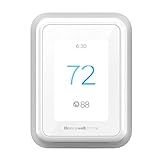
Overview: The Honeywell T9 stands as a proven mid-range smart thermostat from the industry’s most trusted brand. At $179.99, it focuses on intelligent scheduling and energy optimization rather than flashy extras, appealing to homeowners prioritizing reliability and efficiency over cutting-edge features.
What Makes It Stand Out: The T9’s geofencing capabilities automatically adjust temperatures based on your smartphone location, while Smart Response technology learns your home’s thermal patterns for predictive comfort. Monthly Energy Reports provide actionable insights into consumption patterns. Though sensors are sold separately, the system intelligently prioritizes different rooms by time of day when paired with additional units.
Value for Money: Positioned in the competitive mid-range segment, the T9’s price is justified by Honeywell’s reliability and sophisticated learning algorithms. However, the lack of an included sensor diminishes value compared to competitors offering complete packages at similar prices. Factor in $40-$50 per additional sensor for true multi-room functionality.
Strengths and Weaknesses: Strengths include rock-solid brand reputation, excellent geofencing, intelligent learning capabilities, comprehensive energy reporting, and broad HVAC compatibility. The app experience is polished and reliable. Weaknesses involve no included sensor, absence of Matter support, C-wire requirement without adapter, and a relatively basic display compared to premium alternatives.
Bottom Line: The T9 excels for homeowners wanting proven reliability and energy savings from an established brand. It’s less compelling for those seeking the latest connectivity standards or all-in-one packages, but remains a dependable workhorse for core smart climate control needs.
10. MoesGo Programmable WiFi Smart Thermostat for Home, No C-Wire Required by C-Wire Adapter, with Zone Remote Sensor, Remote Control Tuya/Smart Life, Compatible with Alexa and Google Assistant, 24VAC
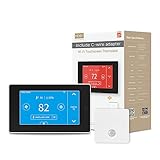
Overview: The MoesGo thermostat directly addresses the most common smart thermostat installation hurdle: the missing C-wire. At $129.99, it includes both a C-wire adapter and a remote temperature sensor, making it an exceptionally accessible entry point for homes lacking modern HVAC wiring.
What Makes It Stand Out: The included C-wire adapter eliminates the primary barrier to smart thermostat adoption in older homes, potentially saving $50-$100 in separate adapter costs. Zone control capabilities allow temperature management across different areas, while the Tuya/Smart Life platform integration provides robust automation options. The free remote sensor adds immediate multi-room monitoring value.
Value for Money: Outstanding value proposition. Comparable thermostats requiring separate C-wire adapters and sensors quickly exceed $180. The 7-day programmable scheduling with four modes delivers comprehensive automation at a budget price point, making smart climate control accessible to nearly any homeowner.
Strengths and Weaknesses: Strengths include C-wire adapter inclusion, free remote sensor, zone control functionality, affordable pricing, and Tuya ecosystem integration. The 23% energy savings claim is compelling. Weaknesses involve the Tuya platform’s learning curve, potential reliability concerns with lesser-known brand, limited HVAC compatibility details, and basic display aesthetics. Some users report connectivity hiccups requiring occasional app resets.
Bottom Line: The MoesGo thermostat is the ideal solution for older homes without C-wires or budget-conscious buyers wanting maximum features per dollar. While it lacks premium brand cachet, its practical inclusions and problem-solving design make it a smart purchase for cost-aware consumers.
Understanding Multi-Room Temperature Zoning
True multi-room comfort goes far beyond simply knowing the temperature in different areas of your home. It’s about creating distinct climate zones that respond intelligently to usage patterns, occupancy, and even the time of day. Traditional HVAC systems operate on a single-point measurement, typically from a hallway or central location, making decisions for the entire house based on one data point. Remote sensors transform this outdated model into a distributed network of micro-climate monitors that feed real-time data to your smart thermostat.
This distributed approach allows your system to average temperatures across multiple rooms, prioritize occupied spaces, or even create distinct heating and cooling schedules for different zones. The result? Your bedroom stays cool for sleeping while the living room remains cozy for evening relaxation—without manual adjustments or energy waste.
Why Remote Sensors Are Essential for True Multi-Room Comfort
The fundamental flaw in single-thermostat homes is that you don’t live in your hallway. Yet that’s exactly where most thermostats are installed—near return air vents, away from windows, in spaces you barely occupy. Remote sensors solve this spatial disconnect by bringing climate intelligence to where you actually spend time.
Beyond simple temperature readings, modern sensors detect occupancy, measure humidity, and monitor ambient light levels. This multi-dimensional data allows your HVAC system to make smarter decisions, like reducing heating to an empty guest room while maintaining comfort in your home office. The energy savings from this targeted approach typically pay for the sensor investment within 12-18 months, while the comfort improvement is immediate.
The Occupancy Advantage
Occupancy detection represents the biggest leap forward in sensor technology. Infrared motion sensors, Bluetooth proximity detection, and even machine learning algorithms that predict room usage patterns ensure your system responds to real life, not just temperature setpoints. This means no more heating an empty house because your thermostat thinks it’s too cold in that unused upstairs hallway.
Key Features to Evaluate Before You Buy
Sensor Communication Protocol
The backbone of any reliable multi-room system is its communication method. Wi-Fi sensors offer direct cloud connectivity but can congest your network and drain batteries quickly. Proprietary mesh networks, often running on 900MHz frequencies, create dedicated pathways between sensors and the thermostat, delivering superior range and battery life at the cost of ecosystem lock-in. Bluetooth Low Energy (BLE) strikes a middle ground with decent efficiency but limited range.
Consider your home’s layout and construction materials. Thick walls, metal ductwork, and radiant barrier insulation can cripple Wi-Fi signals while barely affecting lower-frequency mesh networks. Always verify the maximum sensor-to-thermostat distance specifications and whether repeaters or range extenders are available for larger properties.
Temperature Accuracy and Calibration
A sensor that’s off by even two degrees can sabotage your entire system’s efficiency. Look for specifications detailing temperature accuracy—±0.5°F is excellent, while ±1°F is acceptable. More importantly, investigate whether the sensor supports user calibration. Manufacturing variations and placement-specific factors (like proximity to electronics or exterior walls) can skew readings, and the ability to fine-tune offsets ensures your data remains trustworthy.
Some advanced systems offer automatic calibration through machine learning, comparing sensor readings over time and adjusting for consistent biases. This feature proves invaluable for maintaining accuracy as sensors age or when you rearrange furniture that affects airflow.
Occupancy Detection Technology
Passive infrared (PIR) sensors remain the most common occupancy detection method, but their effectiveness varies dramatically. Wide-angle PIR sensors (120-180 degrees) cover more area but may trigger false positives from pets. Narrow-beam sensors offer precision but require more careful placement. Some premium sensors combine PIR with additional technologies like ultrasonic or microwave detection for redundancy, virtually eliminating false readings.
Consider sensors with adjustable sensitivity settings. This allows you to dial in performance based on room size, pet presence, and typical usage patterns. The best systems let you set different occupancy timeouts per room—perhaps 30 minutes for a bathroom but two hours for a bedroom where you might sit still reading.
Humidity Monitoring Capabilities
Temperature tells only half the comfort story. Relative humidity dramatically affects how warm or cool a room feels, and sensors that monitor both provide your thermostat with the data needed to optimize for true comfort rather than just a number. This becomes especially critical in basements, bathrooms, and sunrooms where humidity swings are common.
Look for sensors that report humidity levels alongside temperature and can trigger whole-home dehumidification or humidifier activation. Some systems even calculate dew point, preventing condensation issues before they start.
Battery Life and Power Options
Nothing kills the smart home experience faster than constantly replacing batteries. Wi-Fi sensors typically last 6-12 months, while low-power mesh network sensors can run 2-3 years on a single coin cell. Some sensors offer optional USB power, perfect for permanent installations in home offices or master bedrooms.
Consider battery type and availability. Standard AAAs are convenient but require frequent changes. Coin cells last longer but are less common. The sweet spot? Sensors using readily available AA or AAA lithium batteries that might only need annual replacement while delivering rock-solid performance.
Compatibility Considerations: Not All Sensors Work With All Thermostats
Here’s a hard truth that trips up many buyers: thermostat and sensor compatibility is rarely universal. Most manufacturers use proprietary communication protocols, creating walled gardens where only their sensors work with their thermostats. Before falling in love with any sensor’s feature set, verify it speaks the same language as your existing or planned thermostat.
Even within brands, compatibility isn’t guaranteed. Newer sensors sometimes require updated thermostat firmware or specific base models. Check manufacturer compatibility matrices carefully, and don’t rely on retail site descriptions—they’re often incomplete or outdated. The thermostat manufacturer’s official website remains the definitive source.
Consider future-proofing by choosing a thermostat brand with a history of backward compatibility. Some companies maintain sensor compatibility across multiple thermostat generations, protecting your investment when you eventually upgrade the main unit.
Installation and Setup: What to Expect
Most remote sensors promise “easy installation,” but the reality varies significantly based on your home and technical comfort level. Magnetic mounting, adhesive strips, and screw-in options each have trade-offs. Magnetic mounts offer flexibility but can be knocked loose by kids or pets. Adhesive mounts are clean but may damage paint when removed. Screw-in mounts provide permanence but require tools and commitment.
Setup complexity ranges from scanning a QR code in a slick app to pressing obscure button combinations while timing your actions perfectly. Before purchasing, search for setup videos specific to the sensor model. These reveal the true user experience better than any marketing copy. Pay attention to how the system handles sensor naming, room assignment, and priority settings—these configuration steps determine how useful your sensors ultimately become.
Advanced Features That Separate Good from Great
Learning Algorithms and Adaptive Scheduling
The best multi-room systems don’t just follow rules—they learn from your behavior. Machine learning algorithms analyze occupancy patterns, temperature preferences, and even weather forecasts to anticipate needs before you feel discomfort. A sensor that notices you always turn up the heat in your home office at 8 AM on weekdays can begin pre-warming the space at 7:45 AM automatically.
This predictive capability extends to seasonal adjustments, learning that your south-facing living room needs less heating in winter afternoons due to solar gain. The system becomes smarter over time, reducing manual interventions and optimizing energy use continuously.
Geofencing Integration
Geofencing uses your smartphone’s location to determine when you’re heading home, allowing the system to switch from energy-saving away mode to comfort mode before you walk through the door. Advanced implementations combine geofencing with sensor data, recognizing that “home” doesn’t mean “using every room.” The system might warm the main living areas when you arrive but keep guest rooms in eco-mode until actually needed.
Remote Access and App Control
While basic sensor data appears in your thermostat’s app, premium systems offer deeper control. Individual sensor priority adjustment, temporary occupancy overrides, and detailed historical data should be accessible remotely. The app experience often defines long-term satisfaction—clunky interfaces lead to abandoned features.
Voice Assistant Compatibility
“Alexa, what’s the temperature in the nursery?” seems simple, but implementation quality varies wildly. Some systems provide full sensor data access through voice assistants, while others offer only basic queries. Check whether you can adjust settings, switch modes, or receive proactive notifications via voice commands.
Energy Usage Reporting
Granular energy reporting that attributes HVAC usage to specific rooms or zones transforms how you understand your home’s efficiency. These insights reveal that your rarely-used formal dining room costs $30 monthly to keep climate-controlled, prompting smarter scheduling decisions. Look for systems that provide actionable recommendations, not just raw data dumps.
Common Pitfalls and How to Avoid Them
The most frequent mistake is sensor quantity miscalculation. Too few sensors leave dead zones; too many create data conflicts and diminishing returns. A good rule: start with sensors in rooms where you spend at least two hours daily, plus one for each distinct floor or HVAC zone.
Placement errors sabotage performance. Mounting sensors above heat sources, in direct sunlight, or near drafty windows produces garbage data that confuses your system. Always follow manufacturer guidelines, typically placing sensors on interior walls, five feet high, away from vents and electronics.
Ignoring sensor maintenance leads to drift and failure. Annual battery replacement (even if the app shows 30% remaining) prevents mid-winter failures. Occasional cleaning removes dust that can affect temperature and motion readings. Some sensors benefit from annual recalibration using a known-accurate thermometer.
Optimizing Sensor Placement for Maximum Efficiency
Strategic placement multiplies sensor effectiveness. For occupancy detection, position sensors to cover entry points and primary activity areas without pointing directly at doors (which can cause false triggers). In bedrooms, place sensors away from the bed to avoid false “unoccupied” readings when you’re sleeping still.
Temperature measurement accuracy demands interior wall placement, away from heat sources like televisions, lamps, and direct sunlight. The five-foot height guideline isn’t arbitrary—it represents average breathing zone temperature while avoiding floor-level cold spots and ceiling-level heat stratification.
Consider sensor density based on room usage patterns. An open-plan living area might need multiple sensors to accurately gauge comfort across different seating zones, while a small powder room needs none at all. Stairwells and hallways benefit from sensors only if they serve as primary traffic paths; otherwise, they represent unnecessary data points.
The Role of Firmware Updates and Long-Term Support
Your sensor’s capabilities on day one may pale compared to its potential after two years of firmware updates. Manufacturers committed to continuous improvement regularly add features, improve algorithms, and expand compatibility through over-the-air updates. Research a company’s update history before committing—frequent updates indicate active development, while sporadic updates suggest a product nearing end-of-life.
Update mechanisms matter too. Automatic overnight updates minimize disruption but can occasionally introduce bugs. Manual updates give you control but require diligence. The best systems offer staged rollouts, where updates deploy to a subset of users first, with broader release contingent on positive feedback.
Cost vs. Value: Making Smart Investment Decisions
Remote sensors range from $30 to $100+ each, with premium features commanding higher prices. Calculate value based on potential energy savings, not just upfront cost. A $75 sensor that enables 15% HVAC savings in a large bedroom might pay for itself in 10 months, while a $40 basic sensor in a rarely-used guest room never breaks even.
Consider bundle pricing. Many thermostats offer discounted sensor multi-packs, reducing per-sensor cost by 20-30%. Starter packs with three sensors often represent the sweet spot for average homes, providing enough coverage to demonstrate value while leaving room for expansion.
Don’t forget hidden costs. Some sensors require proprietary batteries or mounting accessories sold separately. Others need a subscription service for advanced features. Factor in total cost of ownership over a five-year period to make accurate comparisons.
Privacy and Security Considerations
Remote sensors collect intimate data about your daily routines—when you wake up, which rooms you use, when you’re away. This information deserves protection. Prioritize sensors using encrypted communication protocols (AES-128 or higher) and manufacturers with transparent privacy policies that explicitly state they won’t sell your data.
Local processing options provide enhanced privacy by keeping data on-device rather than in the cloud. Some systems offer hybrid approaches, processing sensitive occupancy data locally while using cloud resources for less-sensitive temperature averaging. Review what data leaves your home and whether you can opt out of analytics collection.
Physical security matters too. Guest-accessible sensors could theoretically be tampered with. Tamper-detection alerts notify you if a sensor is moved or opened, while PIN-protected configuration prevents unauthorized changes.
Troubleshooting Common Issues
Sensor offline errors top the complaint list. Before blaming the device, check for interference from baby monitors, microwave ovens, or neighboring Wi-Fi networks. Mesh network sensors may need repositioning to maintain reliable paths back to the thermostat. A simple sensor reboot—removing the battery for 30 seconds—resolves many connectivity glitches.
Temperature discrepancies between sensors often stem from placement rather than defects. Verify each sensor’s location against manufacturer guidelines. If readings still seem off, use a calibrated thermometer to check accuracy and apply offset calibration if available.
Occupancy detection failures frequently trace back to sensitivity settings. Increase sensitivity in large rooms or spaces with minimal movement. Decrease it in areas with pets, oscillating fans, or passing traffic. Some sensors allow you to disable occupancy detection entirely for problematic locations, using them purely for temperature averaging.
Future-Proofing Your Multi-Room Setup
Technology evolves rapidly, and today’s cutting-edge sensor may become tomorrow’s bottleneck. Choose sensors supporting over-the-air firmware updates and from manufacturers with proven track records of backward compatibility. Open standards like Thread and Matter promise future interoperability, but implementation remains inconsistent—verify specific device support rather than assuming compatibility.
Modular expansion capabilities protect your investment. Systems allowing you to add sensors incrementally, mix sensor types (temperature-only vs. full-featured), and integrate with future thermostat upgrades provide the longest useful life. Avoid proprietary ecosystems that lock you into a single generation of products.
Consider emerging technologies on the horizon. Sensors with CO₂ monitoring, air quality detection, and even radar-based presence detection are entering the market. While not essential today, choosing a platform that has demonstrated willingness to adopt new sensor types positions you for easy upgrades.
Integration with Whole-Home Automation Ecosystems
The real magic happens when your sensors inform more than just HVAC. Integration with smart shades can lower blinds when a west-facing room gets too hot, reducing cooling load. Smart ceiling fans can activate based on occupancy and temperature differential. Even smart lighting can respond to room occupancy data from your climate sensors, eliminating redundant motion detectors.
Look for sensors that publish data to common home automation platforms through APIs or native integration. RESTful APIs offer maximum flexibility for DIY enthusiasts, while native support for platforms like SmartThings, Hubitat, or Home Assistant provides plug-and-play expansion.
Webhook support enables creative automations. Imagine receiving a text when your wine cellar sensor detects temperature excursions, or having your security system arm automatically when no occupancy has been detected for 24 hours. These integrations transform sensors from single-purpose devices into multi-functional home intelligence nodes.
Environmental Impact and Energy Savings Potential
Multi-room sensors deliver environmental benefits beyond personal comfort. By heating and cooling only occupied spaces, typical households reduce HVAC runtime by 15-30%. For an average home, this translates to 1,500-3,000 pounds of CO₂ emissions avoided annually—the equivalent of taking a car off the road for two months.
Peak demand reduction represents another environmental win. By pre-cooling rooms before heat waves hit and strategically cycling cooling during peak hours, sensor-informed systems reduce strain on the electrical grid. Some utilities offer rebates for smart thermostat installations precisely because of this grid-stabilizing effect.
The manufacturing impact matters too. Sensors with replaceable batteries and modular designs reduce electronic waste. Companies offering take-back programs for end-of-life devices demonstrate genuine environmental commitment beyond marketing claims.
Frequently Asked Questions
How many sensors do I actually need for effective multi-room control?
Start with sensors in rooms you occupy for at least two hours daily, plus one per floor. Most 2,000-3,000 square foot homes achieve excellent results with 3-5 sensors. You can always add more later, so begin with high-impact areas like bedrooms and main living spaces rather than over-sensing from day one.
Will remote sensors work if my home has multiple HVAC zones?
Yes, but implementation varies. Some systems assign sensors to specific zones, while others average data across the entire home. For multi-zone systems, prioritize sensors that support zone-specific control, allowing each HVAC unit to respond to its own set of sensors rather than whole-home averaging.
Can I mix different sensor brands with one thermostat?
Generally no. Most thermostats use proprietary protocols that lock you into their ecosystem. However, some third-party hubs can bridge different systems, and emerging Matter standard promises future interoperability. For now, assume you’ll need matching-brand sensors for reliable operation.
Do sensors work in homes with radiant floor heating or ductless mini-splits?
Absolutely, though benefits differ. With radiant heat, sensors help maintain even temperatures across large zones and can control individual manifold loops if your system supports it. For mini-splits, sensors provide better room-level control than the unit’s built-in thermostat, especially in larger spaces.
How do pets affect occupancy sensors?
Most PIR sensors can be pet-immune up to 40-80 pounds when mounted properly. Position sensors to cover human height zones (4-6 feet) while avoiding low angles where pets travel. Some systems allow you to mark specific sensors as “pet-friendly,” adjusting sensitivity automatically or disabling occupancy-based control in those rooms.
What’s the typical range between sensors and the thermostat?
In open spaces, mesh network sensors reach 50-100 feet. Walls, especially those with metal studs or radiant barriers, reduce range significantly. If your home exceeds 4,000 square feet or has challenging construction, look for systems with repeater capabilities or consider thermostats that support multiple sensor hubs.
Can sensors help with hot or cold spots even without smart vents?
Yes. By averaging temperatures across rooms, your system runs longer to pull up the coldest zone while preventing the hottest from becoming unbearable. While not as targeted as smart vents, this approach significantly improves comfort and often reveals underlying issues like leaky ducts or inadequate insulation.
How often should I replace sensor batteries?
Replace annually as preventive maintenance, even if the app shows remaining capacity. Cold weather accelerates battery drain, and a sensor that reads 40% in September might die in January. Lithium batteries perform better in temperature extremes and last 30-50% longer than alkalines in sensor applications.
Will sensors work during a power outage?
Sensors with battery power continue operating during outages, but their usefulness depends on your thermostat. Most smart thermostats lose Wi-Fi connectivity without power, though some have limited battery backup. The sensors will resume normal function immediately when power returns, with no data loss.
Can I take my sensors with me when I move?
Yes, but verify they’ll work with your new home’s thermostat. If you’re switching brands, the sensors become useless. Some companies offer transfer programs or buyback options. When house hunting, consider leaving sensors installed as a selling point—smart home features increasingly influence buyer decisions.