Streaming 8K movies while your smart home devices chatter away and your family video conferences in the next room? In 2026, that’s not a luxury—it’s just Tuesday. But if your network stumbles every time someone microwaves popcorn, you’re not living in the future; you’re fighting yesterday’s connectivity battles. Wi-Fi 6 mesh systems with dedicated backhaul have become the non-negotiable foundation for modern digital life, transforming frustrating dead zones into seamless, speed-of-thought coverage. Let’s decode what makes these systems essential and how to choose one that won’t be obsolete before your next phone upgrade.
Top 10 Wi-Fi 6 Mesh Systems with Dedicated Backhaul
Detailed Product Reviews
1. TP-Link Deco X55 AX3000 WiFi 6 Mesh System - Covers up to 6500 Sq.Ft, Replaces Wireless Router and Extender, 3 Gigabit Ports per Unit, Supports Ethernet Backhaul, Deco X55(3-Pack)

Overview: The TP-Link Deco X55 AX3000 three-pack delivers robust Wi-Fi 6 mesh networking for large homes up to 6,500 square feet. This system replaces traditional routers and extenders with a unified network that eliminates dead zones while supporting up to 150 simultaneous devices. Each unit features three Gigabit Ethernet ports and supports wired backhaul for enhanced performance.
What Makes It Stand Out: The Deco X55 excels with its AX3000 dual-band speeds (2402 Mbps on 5GHz, 574 Mbps on 2.4GHz) and seamless roaming capabilities. Its commitment to cybersecurity through TP-Link’s CISA Secure-by-Design pledge ensures enterprise-grade protection. The three-pack configuration provides exceptional flexibility, allowing any unit to serve as the main router while others extend coverage through intelligent mesh technology. Ethernet backhaul support means you can leverage existing wiring for maximum throughput.
Value for Money: At $149.99 for three units, the X55 offers remarkable value compared to purchasing a high-end router plus extenders. Competitors with similar coverage often cost $200+ while lacking Wi-Fi 6 efficiency. The three-pack is particularly cost-effective versus the two-pack version, offering 44% more coverage for only $20 more.
Strengths and Weaknesses: Strengths: Wi-Fi 6 efficiency; extensive 6,500 sq.ft coverage; 150-device capacity; three Gigabit ports per unit; Ethernet backhaul support; strong security commitment; excellent multi-pack value.
Weaknesses: Gigabit ports limit wired speeds to 1Gbps; not Wi-Fi 7 future-proof; maximum wireless speeds require Wi-Fi 6 client devices.
Bottom Line: The Deco X55 three-pack is an outstanding choice for large households seeking reliable, secure Wi-Fi 6 coverage without breaking the bank. It balances performance, features, and value brilliantly.
2. TP-Link Deco 7 Pro BE63 Tri-Band WiFi 7 BE10000 Whole Home Mesh System - 6-Stream 10 Gbps, 4x2.5G Ports Wired Backhaul, 4X Smart Internal Antennas, VPN, HomeShield, Free Expert Support (3-Pack)

Overview: The Deco 7 Pro BE63 represents the cutting edge of home networking with Wi-Fi 7 technology. This three-pack system blankets up to 7,600 square feet with blistering 10 Gbps total speeds while supporting 200+ devices. It features four 2.5G WAN/LAN ports per unit, USB 3.0 connectivity, and AI-driven roaming for seamless connectivity.
What Makes It Stand Out: Wi-Fi 7 innovations like Multi-Link Operation, 4K-QAM, and 320 MHz channels deliver unprecedented performance. The tri-band system allocates 5188 Mbps on 6GHz, 4324 Mbps on 5GHz, and 574 Mbps on 2.4GHz. TP-Link’s simultaneous wireless and wired backhaul technology maximizes throughput, while AI-Roaming continuously optimizes connections as you move. Four smart internal antennas provide superior coverage without visual clutter.
Value for Money: At $469.99, this premium system targets early adopters and power users. While expensive, it’s competitively priced for Wi-Fi 7 mesh systems offering multi-gigabit ports and extensive coverage. Future-proofing your network for 8K streaming, AR/VR, and next-gen gaming justifies the investment, though most households won’t utilize its full potential until Wi-Fi 7 devices become mainstream.
Strengths and Weaknesses: Strengths: Wi-Fi 7 future-proofing; 10 Gbps combined speeds; 2.5G multi-gig ports; 7,600 sq.ft coverage; 200+ device support; AI-Roaming; USB 3.0; simultaneous backhaul.
Weaknesses: Premium pricing; requires Wi-Fi 7 devices for full benefits; overkill for average households; setup complexity for novices.
Bottom Line: For tech enthusiasts wanting the absolute best, the Deco 7 Pro BE63 three-pack delivers bleeding-edge performance. Most users should wait for Wi-Fi 7 device adoption before investing.
3. TP-Link Deco X55 AX3000 WiFi 6 Mesh System - Covers up to 4500 Sq.Ft, Replaces Wireless Router and Extender, 3 Gigabit Ports per Unit, Supports Ethernet Backhaul, Deco X55(2-Pack)
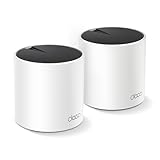
Overview: The Deco X55 two-pack condenses the reliable AX3000 Wi-Fi 6 performance into a more compact package for medium-sized homes up to 4,500 square feet. It maintains the same core features as its three-pack sibling: dual-band speeds up to 3000 Mbps, 150-device capacity, and three Gigabit ports per unit with Ethernet backhaul support.
What Makes It Stand Out: This configuration offers the same robust Wi-Fi 6 technology and cybersecurity commitment in a scaled-down form factor. The system’s intelligent mesh ensures seamless roaming, while the flexibility to use either unit as the primary router simplifies installation. TP-Link’s CISA Secure-by-Design pledge provides peace of mind with advanced security features built-in from the ground up.
Value for Money: Priced at $129.99, the two-pack presents a questionable value proposition compared to the three-pack version. For only $20 more, the three-pack delivers 44% additional coverage (6,500 vs 4,500 sq.ft) and an extra node for challenging layouts. Unless your space is precisely 3,500-4,500 square feet, the three-pack offers better long-term flexibility and resale value.
Strengths and Weaknesses: Strengths: Wi-Fi 6 performance; three Gigabit ports per unit; 150-device capacity; Ethernet backhaul; strong security; compact two-unit setup.
Weaknesses: Poor value versus three-pack; limited 4,500 sq.ft coverage; Gigabit port speed ceiling; no Wi-Fi 7 future-proofing.
Bottom Line: The Deco X55 two-pack performs well but makes financial sense only for specific medium-sized layouts. Most buyers should strongly consider the three-pack for superior value and coverage flexibility.
4. TP-Link Deco 7 Pro BE63 Tri-Band WiFi 7 BE10000 Whole Home Mesh System- 6-Stream 10 Gbps, 4x2.5G Ports Wired Backhaul, 4X Smart Internal Antennas, VPN, HomeShield, Free Expert Support (2-Pack)

Overview: The Deco 7 Pro BE63 two-pack brings flagship Wi-Fi 7 performance to medium-large homes up to 5,800 square feet. This system delivers the same 10 Gbps tri-band speeds and advanced features as the three-pack but in a more compact configuration. Each unit includes four 2.5G ports, USB 3.0, and AI-driven roaming technology.
What Makes It Stand Out: Wi-Fi 7 capabilities including Multi-Link Operation and 320 MHz channels provide next-generation throughput. The tri-band design separates 6GHz (5188 Mbps), 5GHz (4324 Mbps), and 2.4GHz (574 Mbps) for optimal device management. TP-Link’s unique simultaneous wireless and wired backhaul ensures maximum performance, while the four smart internal antennas maintain sleek aesthetics without sacrificing range.
Value for Money: At $349.99, the two-pack saves $120 compared to the three-pack while still covering substantial area. However, the price remains premium, and the coverage gap may leave larger homes with weak spots. For homes under 5,000 square feet, it offers better value than the three-pack, but pushing beyond that risks needing an additional node later.
Strengths and Weaknesses: Strengths: Wi-Fi 7 technology; 10 Gbps speeds; 2.5G multi-gig ports; 5,800 sq.ft coverage; 200+ device support; AI-Roaming; USB connectivity.
Weaknesses: Still expensive; reduced coverage vs three-pack; needs Wi-Fi 7 clients; potential coverage gaps in complex layouts.
Bottom Line: The Deco 7 Pro two-pack is a balanced Wi-Fi 7 option for medium-large homes. Consider your exact square footage carefully—undersizing now may cost more later than buying the three-pack upfront.
5. TP-Link Deco X15 Dual-Band AX1500 WiFi 6 Mesh Wi-Fi System | Replaces Routers and Extenders | Covers up to 5,600 sq.ft. | 2 Gigabit Ports per Unit, Supports Ethernet Backhaul, 3-Pack
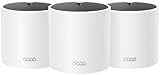
Overview: The Deco X15 three-pack delivers budget-friendly Wi-Fi 6 mesh coverage for up to 5,600 square feet. This entry-level system provides AX1500 speeds (1201 Mbps on 5GHz, 300 Mbps on 2.4GHz) and supports 120 devices across three units. Each node includes two Gigabit Ethernet ports and supports wired backhaul for improved performance.
What Makes It Stand Out: Remarkable coverage-per-dollar ratio makes this the most affordable three-pack mesh system from TP-Link. The system maintains core Deco features including seamless roaming, a unified network name, and TP-Link’s cybersecurity commitment. Dynamic backhaul optimization automatically manages traffic between nodes, ensuring stable connections throughout your home.
Value for Money: At $114.98, the X15 offers exceptional value for budget-conscious buyers. Competing systems with similar coverage typically cost 50-100% more. While speeds are modest, the three-unit configuration effectively eliminates dead zones in medium-large homes where a single router fails. The minor savings versus the X55 three-pack ($35) may be worthwhile for users prioritizing coverage over maximum throughput.
Strengths and Weaknesses: Strengths: Extremely affordable; 5,600 sq.ft coverage; three-unit setup; Wi-Fi 6 compatibility; 120-device capacity; Ethernet backhaul; strong security.
Weaknesses: AX1500 speeds limit performance; only two ports per unit; lower device capacity than premium models; not suitable for gigabit internet plans.
Bottom Line: The Deco X15 three-pack is the smart choice for budget-focused households needing reliable mesh coverage without premium speeds. Perfect for basic streaming, browsing, and smart home connectivity in larger spaces.
6. NETGEAR Orbi 370 Series Dual-Band WiFi 7 Mesh Network System for Home (RBE373) – Wireless Router + 2 Extenders, Security Features, 5 Gbps, Covers 6,000 sq.ft., 70 Devices, 2.5GB Internet Port, BE5000

Overview: The NETGEAR Orbi 370 Series RBE373 ushers in the WiFi 7 era for mainstream households. This three-unit mesh system blankets 6,000 square feet with up to 5 Gbps speeds while supporting 70 devices. Featuring a 2.5GB internet port and Enhanced Backhaul technology, it’s engineered for homes demanding cutting-edge connectivity without enterprise complexity.
What Makes It Stand Out: WiFi 7 capability at this price point is groundbreaking, delivering 1.7x faster performance than WiFi 6 with full backward compatibility. NETGEAR’s security-first approach includes automatic firmware updates and Advanced Router Protection, shielding your network proactively. The dual-band architecture with Enhanced Backhaul maintains consistent speeds for 4K streaming, gaming, and video conferencing simultaneously.
Value for Money: At $299.99, it commands a premium but future-proofs your network for years. Comparable WiFi 6 systems save $100-$150 but lack multi-gigabit readiness. The 2.5GB port alone justifies the cost for gigabit-plus internet subscribers. While WiFi 7 client devices remain limited, investing now prevents premature obsolescence as smartphones and laptops adopt the standard.
Strengths and Weaknesses: Strengths include next-generation WiFi 7 technology, extensive coverage, robust security, and multi-gig port support. Weaknesses are its dual-band configuration (competitors offer tri-band), a modest 70-device limit for smart homes, and early-adopter pricing. The limited number of WiFi 7 devices currently available means you won’t utilize full potential immediately.
Bottom Line: Ideal for tech-forward households wanting to stay ahead of the connectivity curve. If you have or plan to upgrade to multi-gigabit internet, this investment makes sense. For average users with standard plans, WiFi 6 alternatives offer better immediate value while WiFi 7 matures.
7. TP-Link Deco X15 Dual-Band AX1500 WiFi 6 Mesh Wi-Fi System | Replaces Routers and Extenders | Covers up to 3,900 sq.ft. | 2 Gigabit Ports per Unit, Supports Ethernet Backhaul, 2-Pack

Overview: The TP-Link Deco X15 democratizes WiFi 6 mesh networking with an aggressive price point. This two-pack system eliminates dead zones across 3,900 square feet, delivering AX1500 speeds while supporting 120 devices through intelligent dynamic backhaul. It replaces frustrating router-extender setups with seamless, unified connectivity.
What Makes It Stand Out: Remarkable affordability meets reliable performance. At under $90, it outperforms budget extenders while maintaining Deco ecosystem stability. Each unit’s dual Gigabit ports enable wired connections or Ethernet backhaul for enhanced stability. TP-Link’s cybersecurity commitment, backed by CISA’s Secure-by-Design pledge, ensures your network receives ongoing protection updates.
Value for Money: Exceptional value defines the X15. Comparable mesh systems cost 50-100% more, while traditional extenders create handoff headaches. For small to medium homes with internet plans under 500 Mbps, this delivers 90% of the premium experience at 30% of the cost. The two-unit configuration provides flexibility for different layouts without overpaying for unnecessary hardware.
Strengths and Weaknesses: Strengths include unbeatable pricing, straightforward app-based setup, robust device handling, and flexible backhaul options. Weaknesses are the modest AX1500 speed ceiling, lack of WiFi 7 future-proofing, and no multi-gig ports. Power users with gigabit internet will find throughput limiting, and the two-pack may leave gaps in multi-story homes.
Bottom Line: Perfect for budget-conscious families, renters, or anyone upgrading from an aging router. If your internet plan is under 500 Mbps and you need reliable whole-home coverage, the Deco X15 is nearly impossible to beat. For gigabit speeds or larger homes, consider stepping up to AX3000 systems or higher.
8. TP-Link Deco 7 BE23 Dual-Band BE3600 WiFi 7 Mesh Wi-Fi System | 4-Stream 3.6 Gbps, 160 Mhz | Covers up to 4,500 Sq.Ft | 2× 2.5G Ports Wired Backhaul | VPN,MLO,AI-Roaming, HomeShield, 2-Pack

Overview: The TP-Link Deco 7 BE23 strikes an impressive balance between WiFi 7 innovation and mainstream affordability. This two-pack system covers 4,500 square feet with BE3600 speeds reaching 3.6 Gbps, supporting 150 devices. Dual 2.5G ports per unit and advanced features like MLO and AI-Roaming target households wanting future-ready performance.
What Makes It Stand Out: WiFi 7 technology at $180 makes next-generation connectivity accessible. Multi-Link Operation (MLO) and 4K-QAM maximize throughput with compatible devices like the iPhone 16 Pro. Simultaneous wireless and wired backhaul options provide installation flexibility, while four high-gain antennas per node ensure strong signal penetration through walls and floors.
Value for Money: Strong value against both WiFi 6 and premium WiFi 7 systems. You get multi-gig ports and next-gen technology for $120 less than the NETGEAR Orbi 370, while delivering comparable coverage. The 2.5G ports justify upgrading from WiFi 6 systems costing $100-$150. For gigabit-plus internet users, this hits the sweet spot of performance and price.
Strengths and Weaknesses: Strengths include WiFi 7 readiness, dual 2.5G ports, excellent coverage, high device capacity, and TP-Link’s security commitment. Weaknesses are the dual-band limitation (no dedicated backhaul), potential software maturity issues with new WiFi 7 implementations, and only two units compared to three-pack competitors. Maximum speeds require WiFi 7 clients.
Bottom Line: An intelligent middle ground for those wanting WiFi 7 without the premium price tag. Ideal for households with gigabit-plus internet and newer devices. If you can live with two nodes instead of three and want future-proof features today, the Deco 7 BE23 delivers exceptional bang for your buck.
9. Amazon eero 6+ mesh wifi system - Supports internet plans up to a Gigabit, Coverage up to 4,500 sq. ft., Connect 75+ devices, 3-pack
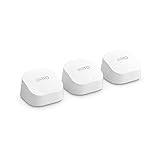
Overview: The Amazon eero 6+ prioritizes simplicity and reliability in a three-pack mesh system covering 4,500 square feet. Supporting gigabit speeds and 75+ devices, this WiFi 6 solution emphasizes user experience through patented TrueMesh technology and an exceptionally intuitive app interface.
What Makes It Stand Out: eero’s TrueMesh intelligently routes traffic to eliminate dead zones and minimize drop-offs, creating a seamless connectivity experience. The three-unit configuration provides more placement flexibility than two-pack systems, crucial for multi-story homes. Setup takes minutes, making it accessible even for non-technical users who want robust WiFi without complexity.
Value for Money: At $299.99, the pricing feels premium for WiFi 6 technology in 2024, especially with WiFi 7 systems available at the same price. The value lies in eero’s ecosystem integration with Alexa and the polished, worry-free user experience. For those prioritizing stability and simplicity over cutting-edge specs, the premium is justifiable for the “it just works” factor.
Strengths and Weaknesses: Strengths include effortless setup, reliable TrueMesh performance, three-unit coverage, and strong ecosystem integration. Weaknesses are the WiFi 6 limitation when WiFi 7 is emerging, no multi-gig ports, and a price that competes directly with next-generation alternatives. The 75-device limit may constrain growing smart homes, and advanced users will find customization options limited.
Bottom Line: Best suited for users who value simplicity and reliability above all else. If you’re deeply invested in the Amazon ecosystem and want a “set it and forget it” network, the eero 6+ delivers. For performance-per-dollar seekers or those wanting future-proofing, WiFi 7 alternatives offer more compelling value.
10. Cudy AX3000 Wi-Fi 6 2.5G Mesh System, Covers up to 2100 Sq.Ft, Replaces Wireless Router and Extender, Supports Ethernet Backhaul, Ideal for 2.5G Network, M3000 2-Pack

Overview: The Cudy M3000 packs surprising value into a WiFi 6 mesh system by including 2.5G multi-gigabit ports at a budget-friendly price. This two-pack covers up to 4,800 square feet with AX3000 speeds, supporting over 200 devices. It targets users wanting faster wired connectivity without paying premium prices.
What Makes It Stand Out: The 2.5G WAN port on each unit is a rarity in sub-$150 mesh systems, enabling full utilization of multi-gig internet plans. The exceptional 200+ device capacity exceeds many competitors. Ethernet backhaul support provides flexibility for challenging layouts, and the Cudy app promises straightforward management without technical complexity.
Value for Money: At $119.99, this system delivers features typically found in $200+ products. The 2.5G port alone adds significant future-proofing value. While brand recognition lags behind TP-Link or NETGEAR, the hardware specifications are compelling for price-conscious buyers wanting multi-gig readiness without the usual cost premium.
Strengths and Weaknesses: Strengths include multi-gig ports, exceptional device capacity, strong coverage claims, and aggressive pricing. Weaknesses are the lesser-known brand with potentially less mature software, WiFi 6 instead of WiFi 7, and limited third-party reviews validating real-world performance. Support infrastructure may not match larger competitors, and long-term firmware update commitment remains unproven.
Bottom Line: A hidden gem for specific use cases. If you have a multi-gig internet connection and need wired throughput on a budget, the Cudy M3000 is uniquely positioned. For general users prioritizing brand reliability and software polish, established alternatives offer more peace of mind. It’s a calculated risk with potentially high rewards.
Understanding Wi-Fi 6 Technology and Why It Matters in 2026
Wi-Fi 6 isn’t just a faster version of its predecessor—it’s a complete reimagining of how wireless networks handle our increasingly crowded digital ecosystems. As we enter 2026, the average household connects over 25 devices simultaneously, from smartphones and laptops to security cameras, thermostats, and voice assistants. Wi-Fi 6 was engineered specifically for this reality, introducing technologies that make your network more efficient, not just quicker.
The Evolution from Wi-Fi 5 to Wi-Fi 6
Remember when a single HD Netflix stream could cripple your network? Wi-Fi 5 (802.11ac) was a workhorse for its time, but it treated all devices equally—like a traffic cop who gives the same green light duration whether you’re driving a Ferrari or a bicycle. Wi-Fi 6 (802.11ax) introduces intelligent traffic management that prioritizes devices based on their needs. The jump from 256-QAM to 1024-QAM modulation alone delivers up to 25% more data in the same radio waves, but the real magic lies in how it orchestrates the entire wireless symphony.
Key Wi-Fi 6 Features That Transform Home Networking
OFDMA (Orthogonal Frequency Division Multiple Access) splits channels into smaller resource units, letting your router serve multiple devices simultaneously instead of making them wait in line. MU-MIMO (Multi-User, Multiple Input, Multiple Output) has also been upgraded to work on both uploads and downloads, a game-changer for cloud backups and video calls. Target Wake Time extends battery life on IoT devices by scheduling their check-ins, reducing unnecessary chatter. In 2026, these features aren’t theoretical—they’re what separate networks that hum along from those that hiccup.
What Is a Mesh System and Why Your Home Needs One
A single router is like a streetlight trying to illuminate an entire neighborhood. Mesh systems deploy multiple nodes that work in concert, creating a unified network blanket that extends to every corner of your property. Each node communicates with its neighbors, dynamically routing traffic along the most efficient path and self-healing when one unit goes offline.
How Mesh Networks Differ from Traditional Routers and Extenders
Traditional extenders create separate network names and cut your bandwidth in half because they use the same channel to talk to both your devices and the main router. It’s like having a conversation where you have to repeat everything twice. Mesh systems use a single SSID and intelligent handoff—your device connects to the strongest node automatically as you move through your home. The experience is seamless; you won’t notice the transition, but you’ll definitely notice the absence of buffering.
The Real-World Benefits of Whole-Home Coverage
Dedicated backhaul transforms mesh from good to exceptional. Without it, nodes compete with your devices for bandwidth on the same channels. With dedicated backhaul, there’s a private highway for node-to-node communication. This means your 4K stream doesn’t slow down because the mesh nodes are syncing in the background. In multi-story homes or properties over 2,500 square feet, this distinction becomes the difference between a network that feels fast and one that actually delivers consistent gigabit speeds everywhere.
Decoding Dedicated Backhaul: The Secret to Seamless Performance
Dedicated backhaul is the invisible architecture that makes premium mesh systems worth the investment. It’s a separate wireless band—or a wired connection—reserved exclusively for communication between mesh nodes. Think of it as building a private express lane for your routers to coordinate, while leaving the other lanes completely open for your devices.
Wireless vs. Wired Backhaul: Making the Right Choice
Wireless backhaul typically uses the 5 GHz or 6 GHz band, offering flexibility for placement since you don’t need Ethernet cables running between nodes. In 2026, tri-band systems with a dedicated 6 GHz backhaul channel are the gold standard, delivering multi-gigabit inter-node speeds without touching your device traffic. Wired backhaul, using Ethernet cables between nodes, is the performance purist’s choice—unbeatable stability, zero interference, and maximum speed. The catch? Your home needs to be pre-wired or you’re facing a retrofit project. Many premium systems support hybrid configurations, letting you wire critical nodes while placing satellite units wirelessly.
How Dedicated Backhaul Eliminates Bottlenecks
Without dedicated backhaul, every hop between nodes cuts your effective speed roughly in half. A device connected to a remote node might see 200 Mbps on a speed test, even though your internet plan delivers a gigabit. Dedicated backhaul preserves that full gigabit throughput across all nodes. This becomes critical when you’re moving large files between computers on different floors or streaming high-bitrate content from a local NAS. The backhaul ensures that node-to-node communication never becomes the weak link in your network chain.
Critical Features to Evaluate in Wi-Fi 6 Mesh Systems
Shopping for mesh systems in 2026 means looking beyond flashy speed numbers on the box. The real-world performance depends on a constellation of features working together harmoniously.
Speed Ratings and Real-World Performance
Manufacturers love touting combined speeds like “AX6000,” but that number aggregates all bands and represents theoretical maximums under perfect lab conditions. What matters is the speed per band—especially the 5 GHz and 6 GHz channels you’ll actually use. Look for systems where the dedicated backhaul band offers at least 2,400 Mbps. More importantly, check independent tests that measure throughput at distance and through walls. A system that delivers 800 Mbps consistently to your backyard office beats one that claims 6,000 Mbps but drops to 100 Mbps after one wall.
Coverage Area and Node Count
Coverage specifications are notoriously optimistic, often measured in open spaces without interference. For a typical wood-framed home, divide the advertised coverage by 1.5 to get realistic numbers. A three-pack claiming 6,000 square feet realistically covers about 4,000 square feet. Node count matters more than raw coverage claims—three properly placed nodes outperform two overworked units every time. Consider your home’s layout: each node covers roughly 1,500-2,000 square feet in ideal conditions, but walls, mirrors, and appliances shrink that radius significantly.
Ethernet Ports and Wired Connectivity Options
The best mesh nodes double as wired access points. Look for at least two Gigabit Ethernet ports per node—one for wired backhaul if needed, and another for connecting devices like smart TVs or gaming consoles directly. Premium systems now include 2.5 GbE or even 10 GbE ports on the main router, future-proofing for multi-gig internet plans. USB ports for network storage or printers are increasingly rare but still valuable for specific use cases. Don’t overlook this seemingly minor spec; it determines your flexibility for both backhaul and device connectivity.
Security Standards and Parental Controls
In 2026, WPA3 encryption is non-negotiable. It protects against password-guessing attacks and secures connections on open networks. Beyond encryption, look for systems with automatic security updates, built-in VPN servers for secure remote access, and IoT device isolation features that quarantine potentially compromised smart home gadgets. Parental controls have evolved from simple time limits to sophisticated AI-driven content filtering and usage analytics. The best systems offer per-device profiles, homework time schedules, and real-time activity dashboards without requiring a subscription.
Smart Home Integration and IoT Support
Your mesh system is the digital foundation of your smart home. Look for built-in Matter support and Thread border router functionality, which are becoming essential for reliable IoT device communication. Some systems now integrate directly with home automation platforms, letting you pause Wi-Fi via voice command or trigger routines based on device connectivity. Dedicated IoT networks that segregate bandwidth-hungry devices from your critical work laptop can prevent a misbehaving smart bulb from dragging down your entire network.
Installation and Setup: What to Expect
Gone are the days of CD-ROM installations and cryptic admin panels. Modern mesh systems prioritize user experience, but the depth of that experience varies dramatically between brands.
Mobile App vs. Web Interface Management
Most systems now require a smartphone app for initial setup, which simplifies the process but can frustrate power users. The app should offer clear node placement guidance using signal strength indicators and walk you through optimal positioning. After setup, evaluate whether the system offers a full-featured web interface for advanced configuration. Some lock you into the app permanently, which becomes limiting when you need to troubleshoot or implement complex settings. The sweet spot is a system that excels at both: app-based simplicity for beginners and web-based depth for experts.
Advanced Configuration Options for Power Users
Even if you’re not a network engineer today, you might become one tomorrow. Look for systems that offer DHCP reservations, port forwarding, Dynamic DNS, VLAN support, and VPN client/server functionality. Quality of Service (QoS) settings should go beyond basic device prioritization to allow application-level control—like ensuring your video conferencing app always gets bandwidth precedence over background downloads. Firmware that supports third-party modifications or at least offers an open-source foundation indicates a system that respects user control.
Future-Proofing Your Network Investment
Networking gear should last five to seven years. In 2026, that means anticipating not just tomorrow’s devices, but tomorrow’s standards and usage patterns.
Wi-Fi 6E and Wi-Fi 7 Readiness
Wi-Fi 6E extended Wi-Fi 6 into the 6 GHz band, and Wi-Fi 7 (802.11be) is already appearing in flagship devices. A pure Wi-Fi 6 system isn’t immediately obsolete, but consider whether the hardware has the processing power and radio architecture to support future firmware updates. Some Wi-Fi 6 systems have been updated to support 6E features through software, while others are permanently limited. Look for systems with robust CPUs (quad-core 1.8 GHz or better) and ample RAM (512 MB minimum) as indicators of upgrade potential.
Scalability and Adding Nodes Later
Your network needs will grow. The system you choose should allow seamless addition of nodes from the same product family, ideally supporting mixed generations. Some manufacturers lock you into specific models or require you to replace the entire system for upgrades. Check whether the system supports wired or wireless backhaul for added nodes, and whether the mobile app makes expansion intuitive. The best systems let you start with a two-pack and add a third node two years later without reconfiguring your entire network.
Troubleshooting Common Mesh Network Issues
Even the best mesh systems encounter problems. Understanding common pitfalls helps you choose a system designed to avoid them.
Optimizing Node Placement for Maximum Performance
The “one node per floor” rule is outdated. Modern systems perform best with nodes placed in a staggered pattern, ensuring each unit can see at least one other node at strong signal strength. Avoid placing nodes near metal appliances, fish tanks, or mirrors. Height matters—mounting nodes 4-6 feet off the ground often improves coverage. Many systems now include LED indicators that show signal strength to neighboring nodes; use these religiously during setup. Don’t be afraid to experiment—moving a node even three feet can dramatically improve performance.
Dealing with Interference and Channel Congestion
In dense urban areas, your neighbor’s network can be your biggest enemy. Look for systems with automatic channel selection that scans for congestion and switches bands dynamically. DFS (Dynamic Frequency Selection) channels in the 5 GHz band offer less-crowded airspace but may cause brief disconnections when radar signals are detected. The best systems handle this transparently. For power users, manual channel selection and transmit power adjustment give you granular control over your wireless environment. Some advanced systems even coordinate with neighboring networks to minimize interference—a feature that becomes invaluable in apartment buildings.
Frequently Asked Questions
1. Do I really need a dedicated backhaul band if I have gigabit internet?
Yes, absolutely. Your internet speed is just one part of the equation. Dedicated backhaul preserves that gigabit throughput to all nodes, especially for local network traffic like streaming from a NAS, file transfers between devices, or gaming on a remote node. Without it, you’ll see speeds drop by 40-60% at each hop, turning your gigabit plan into 300 Mbps reality for devices far from the main router.
2. Can I mix different brands of mesh nodes together?
Generally no. Mesh systems use proprietary protocols for node-to-node communication, so a node from Brand A won’t integrate with Brand B’s system. Some systems support the EasyMesh standard, but implementation is inconsistent. For best performance and seamless roaming, stick to nodes from the same product family. Think of it like building with LEGO—different brands might look similar, but they don’t click together.
3. How many nodes do I need for a 3,000 square foot home?
For a typical two-story home of that size, a three-pack system is ideal. Place the main router centrally on the first floor, one satellite on the second floor near staircases, and the third either in a backyard office or basement. Avoid the temptation to over-node; too many units too close together can cause interference and actually reduce performance. Start with three and add a fourth only if specific dead zones persist after optimal placement.
4. Is wired backhaul always better than wireless?
Wired backhaul provides superior stability and maximum speed, but wireless offers flexibility. If your home has Ethernet wiring, use it for at least the main router and one satellite node. For nodes in hard-to-wire locations, wireless backhaul on a dedicated 6 GHz band performs remarkably well—often within 10-15% of wired performance. The best setup is hybrid: wire critical nodes and go wireless where necessary.
5. Will a Wi-Fi 6 mesh system improve my old Wi-Fi 5 devices’ performance?
Indirectly, yes. While Wi-Fi 5 devices can’t use Wi-Fi 6 features, a modern mesh system reduces congestion overall. Your old laptop will benefit from cleaner airwaves, less interference from newer devices that are now using more efficient protocols, and better roaming between nodes. The network becomes more organized, so even legacy devices experience fewer drops and more consistent speeds.
6. How often should I reboot my mesh system?
Quality mesh systems with dedicated backhaul are designed to run for months without reboots. If you find yourself restarting weekly to maintain performance, that’s a sign of either poor firmware or inadequate hardware for your usage. Look for systems with automatic maintenance windows that reboot during off-hours. Manual reboots should be needed only after firmware updates or when troubleshooting specific issues.
7. What’s the difference between tri-band and quad-band systems?
Tri-band systems have one 2.4 GHz band and two 5 GHz bands (or 5 GHz + 6 GHz), with one band dedicated to backhaul. Quad-band systems typically add a second 6 GHz band, creating two potential backhaul channels or dedicating one to high-performance devices. For most homes in 2026, a well-implemented tri-band system with 6 GHz backhaul is more than sufficient. Quad-band shines in specific scenarios: multi-gigabit internet plans, heavy local server usage, or homes with dozens of high-bandwidth devices.
8. Can I use my mesh system with my ISP’s modem-router combo?
Yes, but you’ll want to put the ISP device in bridge mode to disable its routing functions and avoid double NAT issues. This turns it into a simple modem, letting your mesh system handle all routing, DHCP, and Wi-Fi duties. Some mesh systems can auto-detect this configuration and guide you through the setup. If bridge mode isn’t available, you can still use the mesh system in access point mode, though you’ll lose some advanced features.
9. How do I know if my mesh nodes are placed correctly?
Use your system’s signal strength indicators—most apps show real-time connection quality between nodes. Nodes should show “good” or “excellent” backhaul connections. Run speed tests from devices connected to each node; speeds should be within 20% of your main router’s performance. If a satellite node shows dramatically slower speeds, try moving it closer to the main router or another satellite. Physical placement matters: avoid closets, cabinets, and placing nodes on the floor.
10. Are subscription services for mesh systems worth it?
Most premium mesh systems in 2026 include robust parental controls, security features, and QoS without requiring a subscription. Some brands lock advanced features like AI-powered threat protection, detailed analytics, or VPN services behind monthly fees. Evaluate whether these specific features justify the cost for your household. For many users, the free tier offers sufficient protection and control. If a subscription is required for basic functionality like time limits or content filtering, consider that a red flag and look elsewhere.