The modern home is entering an era where every watt matters and every light switch has the potential to be an intelligent energy steward. As we move deeper into 2026, Wi-Fi smart switches have evolved from simple convenience gadgets into sophisticated tools for serious energy management. They’re no longer just about turning lights on with your voice—they’re about understanding your consumption patterns, optimizing for grid efficiency, and slashing your electricity bills while reducing your carbon footprint.
But here’s the challenge: the market is now flooded with options boasting everything from AI-powered predictive lighting to grid-interactive demand response capabilities. How do you separate genuine innovation from marketing fluff? This guide cuts through the noise, giving you the expert framework to evaluate smart switches based on what truly matters for energy efficiency in 2026. We’ll explore the technical specifications, emerging standards, and hidden considerations that manufacturers rarely advertise but that make all the difference in real-world performance.
Top 10 Wi-Fi Smart Switches for Energy-Efficient Lighting Control
Detailed Product Reviews
1. Kasa Smart Light Switch HS200, Single Pole, Needs Neutral Wire, 2.4GHz Wi-Fi Light Switch Works with Google Home, UL Certified, No Hub Required, White

Overview:
The Kasa HS200 is a single-pole smart switch from TP-Link’s reputable Kasa line, designed to bring app and voice control to your home lighting. This UL-certified switch requires a neutral wire and 2.4GHz Wi-Fi, offering reliable performance without a hub. With over 4 million users trusting the Kasa ecosystem, it represents a solid entry point into smart home automation for standard on/off lighting control.
What Makes It Stand Out:
The standout feature is the comprehensive app-guided installation that walks users through wiring step-by-step, significantly reducing installation anxiety. The “Away Mode” randomly cycles lights to simulate occupancy, adding a genuine security layer beyond simple scheduling. Unlike many competitors, Kasa’s Silicon Valley engineering pedigree shows in its stable connectivity and intuitive app interface, backed by meaningful safety certifications.
Value for Money:
At $15.99, the HS200 sits in the sweet spot for branded smart switches. It’s priced competitively with budget alternatives while offering superior reliability and support. Considering the UL certification and robust app experience, you’re getting enterprise-grade features at consumer pricing, making it cheaper than hiring an electrician for basic automation.
Strengths and Weaknesses:
Strengths include excellent app guidance, reliable voice control with Alexa/Google, flexible scheduling, trusted brand reputation, and no hub requirement. Weaknesses are the neutral wire requirement (common but limiting), 2.4GHz-only connectivity, and the need for basic electrical knowledge despite app help. It’s also single-pole only, limiting placement options.
Bottom Line:
The Kasa HS200 is the ideal smart switch for DIYers comfortable with basic wiring. It balances affordability, safety, and performance brilliantly, making it our top recommendation for first-time smart lighting projects where dimming isn’t needed.
2. GHome Smart Plug, WiFi Smart Plugs Work with Alexa and Google Home, Smart Outlet Timer with APP Remote Control, 2.4GHz Wi-Fi Only, No Hub Required, ETL FCC Listed

Overview:
The GHome Smart Plug 4-pack delivers entry-level smart home functionality at an aggressive price point. These ETL/FCC-listed outlets connect via 2.4GHz Wi-Fi (with optional Bluetooth setup) and work with both Alexa and Google Assistant. Designed for lamps, fans, and small appliances, they offer remote control and scheduling without requiring a hub, making them accessible for renters and homeowners alike.
What Makes It Stand Out:
The dual Bluetooth/WiFi connection option ensures faster, more reliable pairing than WiFi-only alternatives. Compatibility with three major apps (GHome, Smart Life, Tuya) provides unusual flexibility, letting users choose their preferred ecosystem. The group control feature allows combining multiple plugs into single-tap scenes, while family sharing enables whole-household access without complex account management.
Value for Money:
At $25.99 for four plugs ($6.50 each), this represents exceptional bulk value. Individual smart plugs from premium brands typically cost $15-25 each, making this package perfect for outfitting multiple rooms economically. The cost-per-outlet rivals non-smart timers while delivering far superior functionality, though long-term app support remains a question mark for the lesser-known brand.
Strengths and Weaknesses:
Strengths include unbeatable per-unit pricing, stable connectivity, multi-app support, voice control, and easy scheduling. Weaknesses involve the 2.4GHz limitation, less polished app experience than Kasa, vague brand reputation, and no energy monitoring. The Note section about Alexa/Google setup being indirect could confuse some users.
Bottom Line:
For budget-conscious buyers needing multiple smart outlets, this 4-pack is nearly impossible to beat. Accept the minor brand risk for the dramatic cost savings, especially for seasonal or secondary uses like holiday lighting and humidifiers.
3. GHome Smart Plug, WiFi Smart Plugs Work with Alexa and Google Home, Smart Outlet Timer with APP Remote Control, 2.4GHz Wi-Fi Only, No Hub Required, ETL FCC Listed, White

Overview:
This 2-pack of GHome Smart Plugs offers the same core functionality as the 4-pack version, providing WiFi-enabled remote control for any three-prong device. These ETL/FCC-certified plugs support voice commands via Alexa and Google Assistant, plus app-based scheduling through multiple platforms. They’re designed for users who need smart control for just a couple of devices rather than a whole-home deployment.
What Makes It Stand Out:
Like its larger sibling, the dual Bluetooth/WiFi connection ensures reliable setup, while compatibility with GHome, Smart Life, and Tuya apps gives users ecosystem flexibility. The scheduling and timer functions support both circular and random patterns, useful for security applications. The product’s primary distinction is simply the smaller quantity, making it a lower-commitment entry point for smart home curious consumers.
Value for Money:
At $17.99 for two plugs ($9.00 each), the value is decent but notably weaker than the 4-pack offering. While still cheaper than premium single plugs, the per-unit cost is 38% higher than the bulk option. This makes sense only if you genuinely need just two outlets; otherwise, the 4-pack delivers superior economics. It’s priced appropriately for a mid-tier budget option.
Strengths and Weaknesses:
Strengths mirror the 4-pack: good connectivity, multi-app support, voice control, and scheduling. Weaknesses include the 2.4GHz-only limitation, lesser-known brand reputation, potentially confusing setup note about indirect Alexa/Google connection, and lack of advanced features like energy monitoring. The higher per-unit cost versus the 4-pack is also a drawback.
Bottom Line:
Choose this 2-pack only if you need exactly two smart outlets. For any larger project, the 4-pack version offers substantially better value. It’s a capable, no-frills solution for basic smart control of lamps or fans on a modest budget.
4. Kasa Smart Dimmer Switch HS220, Single Pole, Needs Neutral Wire, 2.4GHz Wi-Fi Light Switch Works with Alexa and Google Home, UL Certified, No Hub Required, 1 Pack

Overview:
The Kasa HS220 builds upon the HS200’s foundation by adding dimming capability to the trusted Kasa smart switch platform. This single-pole dimmer requires a neutral wire and 2.4GHz WiFi, offering smooth brightness control from 0-100% through the Kasa app, voice commands, or physical touch. UL-certified and hub-free, it targets users wanting more nuanced lighting control than simple on/off switches provide.
What Makes It Stand Out:
The “Gentle Off” fade feature is genuinely useful, especially for bedrooms where abrupt darkness can be jarring. The dimming calibration adapts to different bulb types (LED, incandescent) automatically, preventing flicker—a common issue with cheap dimmers. Like the HS200, the app-guided installation and Away Mode security features remain standout elements that differentiate Kasa from generic alternatives.
Value for Money:
At $16.08, the HS220 costs virtually the same as the non-dimming HS200, making it an automatic upgrade choice. Premium smart dimmers often exceed $25-30, so this represents outstanding value. You’re getting sophisticated fade curves, bulb compatibility management, and the full Kasa ecosystem for the price of a basic smart switch, with no meaningful compromises.
Strengths and Weaknesses:
Strengths include excellent dimming performance, Gentle Off feature, reliable app/voice control, UL certification, and the same trusted platform as other Kasa devices. Weaknesses are the neutral wire requirement, 2.4GHz-only connectivity, single-pole limitation, and need for minimum load (some LED bulbs may not work). Installation complexity is marginally higher than standard switches.
Bottom Line:
The HS220 is the smart dimmer to beat at this price. Unless you need three-way wiring, there’s no reason to choose the HS200 over this. The dimming functionality and Gentle Off feature add genuine everyday value for virtually zero premium.
5. Kasa Smart Light Switch HS200P3, Single Pole, Needs Neutral Wire, 2.4GHz Wi-Fi Light Switch Compatible with Alexa and Google Home, UL Certified, No Hub Required, 3 Count -Pack of 1 , White

Overview:
The Kasa HS200P3 is a 3-pack of TP-Link’s popular HS200 smart switches, delivering the same reliable single-pole on/off control in a cost-effective bundle. Each switch requires neutral wiring and 2.4GHz WiFi, offering app and voice control without a hub. UL-certified and trusted by over 4 million users, this pack is designed for whole-room or multi-room smart lighting projects where consistent aesthetics and platform uniformity matter.
What Makes It Stand Out:
Bulk packaging from a premium brand is rare at this price point. Each switch includes the same excellent app-guided installation, Away Mode security, and scheduling features as individual units. The three-pack enables cohesive smart lighting design—imagine automating a living room’s overhead, porch, and hallway lights simultaneously while maintaining a single app ecosystem and consistent switch appearance throughout your home.
Value for Money:
At $32.22 for three ($10.74 each), you save about 33% compared to buying individual HS200s at $15.99. This represents genuine bulk value without sacrificing quality or support. For projects requiring 2-4 switches, this hits the economic sweet spot, though the 4-pack GHome plugs remain cheaper for non-dimmer applications. The per-unit cost is low enough to justify widespread deployment.
Strengths and Weaknesses:
Strengths include significant cost savings, trusted Kasa reliability, UL certification, excellent app experience, and voice control. Weaknesses are the same as the single HS200: mandatory neutral wire, 2.4GHz-only operation, single-pole limitation, and electrical installation requirements. The commitment to three switches may be excessive for single-room renters.
Bottom Line:
This 3-pack is the smart choice for anyone planning multiple switch upgrades. The savings add up quickly, and the Kasa ecosystem’s reliability justifies the modest premium over no-name alternatives. Perfect for homeowners modernizing several rooms at once.
6. Smart Light Switch with Bluetooth Remote, Single Pole One-Way WiFi Wall Switch, Smart Life App & Voice Control, Compatible with Alexa & Google Assistant, Neutral Wire Required, No Hub Needed

Overview: This versatile smart wall switch combines WiFi and Bluetooth connectivity for reliable control of single-pole lighting circuits. Designed for modern smart homes, it integrates seamlessly with Alexa and Google Assistant while maintaining the familiar tactile feedback of a traditional button press. Requiring a neutral wire but no additional hub, it offers straightforward installation for most standard electrical boxes.
What Makes It Stand Out: The dual-connection approach sets this apart—when WiFi fails, Bluetooth provides instant local control via remote. The traditional button design is refreshingly intuitive compared to capacitive touch panels, making it accessible for all ages. Comprehensive scheduling and timer functions enhance both security and energy efficiency, allowing you to simulate occupancy or automate daily routines without complex programming.
Value for Money: At $24.99, this switch sits comfortably in the mid-range category. The inclusion of Bluetooth backup functionality adds significant value over basic WiFi-only alternatives. While cheaper options exist, the combination of dual connectivity, voice control, and reliable physical buttons justifies the price premium for those prioritizing dependability.
Strengths and Weaknesses: Strengths include reliable dual connectivity, intuitive physical buttons, easy app integration, and robust scheduling options. Weaknesses center on the neutral wire requirement (limiting retrofit applications) and single-pole-only design, which won’t work for three-way configurations. The absence of advanced features like energy monitoring may disappoint data-driven users.
Bottom Line: An excellent choice for straightforward lighting control with reliability as a priority. The Bluetooth backup and physical buttons make it ideal for everyday users who want smart functionality without sacrificing traditional switch feel. Perfect for single-pole installations where dependability matters more than advanced analytics.
7. TONGOU Smart Wifi Switch, 1P+N AC90-240V 1-50A, Smart Life/Tuya APP Remote Control, with Power Monitoring, Export/Clear Power Data, DIN Rail Mounted, with LCD Display, Recloser Function, FCC Certified
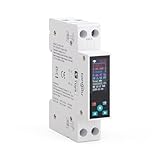
Overview: This industrial-grade smart switch delivers professional-level power management for high-current applications up to 50A. Mounted on standard DIN rails, it provides comprehensive electrical protection and monitoring for resistive loads like heaters and ovens. The integrated LCD display offers real-time data visibility, while the Smart Life/Tuya integration enables remote management and automation.
What Makes It Stand Out: The extensive protection suite—including over-current, overvoltage, undervoltage, and overpower safeguards—distinguishes this from consumer-grade switches. Real-time power monitoring with hourly, daily, monthly, and yearly data export capabilities transforms it into a serious energy management tool. The intelligent recloser function attempts automatic recovery after fault conditions, minimizing downtime for critical equipment.
Value for Money: At $31.99, this represents exceptional value for an industrial switch with monitoring capabilities. Comparable units with similar protection ratings and data logging typically cost $50-80. The caveat: it lacks short-circuit protection, requiring an additional breaker, which adds to total installation cost.
Strengths and Weaknesses: Strengths include robust multi-level protection, detailed power monitoring with export functionality, local button control with password security, and versatile 1-50A current range. Weaknesses include no short-circuit protection, complex installation requiring electrical knowledge, and the N-pole’s inability to disconnect, which may not meet all safety codes.
Bottom Line: Ideal for monitoring and controlling high-power resistive loads in workshops, commercial settings, or advanced home installations. The comprehensive data logging and protection features make it a powerful tool for energy-conscious users comfortable with electrical work. Not for novices, but excellent for those needing industrial capabilities at a consumer price point.
8. Kasa Outdoor Smart Plug, Smart Home Wi-Fi Outlet Timer, Max Load 15A/1875W, IP64 Weather Resistance, Compatible with Alexa, Google Home & SmartThings, No Hub Required, ETL Certified(KP401)

Overview: Kasa’s outdoor smart plug brings reliable smart control to exterior spaces with impressive weather resistance and connectivity. Rated IP64 and handling up to 15A/1875W, it powers everything from landscape lighting to pool pumps. The 300-foot WiFi range ensures connectivity across large properties, while ETL certification guarantees safety for outdoor electrical loads.
What Makes It Stand Out: The exceptional WiFi range and robust IP64 weatherproofing make this purpose-built for challenging outdoor environments. Kasa’s ecosystem integration extends beyond Alexa and Google to include SmartThings, offering broader smart home compatibility. The sunrise/sunset offset scheduling adds intelligent automation that adapts to seasonal daylight changes without manual reprogramming.
Value for Money: At just $13.23, this represents outstanding value. Comparable outdoor smart plugs typically cost $20-30, making this a budget-friendly yet feature-rich option. The ETL certification and established Kasa brand reputation provide confidence that cheaper alternatives often lack.
Strengths and Weaknesses: Strengths include superior weather resistance, long-range WiFi, high power capacity, multi-platform voice control, and intelligent scheduling. Weaknesses include 2.4GHz-only WiFi limitation and the bulky design that may not fit all outdoor outlet configurations. The attached cover, while protective, can be cumbersome for frequent access.
Bottom Line: The best budget outdoor smart plug available, delivering premium features at an entry-level price. Perfect for holiday lighting, security lights, or pool equipment where weather resistance and reliable connectivity are paramount. The Kasa ecosystem integration makes it an easy recommendation for both new and existing smart home setups.
9. TONGOU DIY 1P+N Smart Wi-Fi Switch, Work with Alexa and Google Assistant for Voice Control, 20A with Energy Monitor, Smart Life/Tuya APP Remote Control, Timer Functions, DIN Rail Mounted,FCC Certified

Overview: This compact DIN rail switch enables quick smart conversion of traditional appliances up to 20A. Designed for DIY enthusiasts, it integrates into existing electrical panels to control devices like table lamps and fans remotely. The energy monitoring provides basic consumption data through Smart Life/Tuya apps, while voice control adds convenience for everyday operation.
What Makes It Stand Out: The “DIY Mode” positioning makes this uniquely accessible for hobbyists wanting to smarten individual appliances without replacing them. Installation inside electrical panels keeps devices visually unchanged while adding smart functionality. The 20A capacity handles most small appliances, and the energy monitoring offers sufficient data for casual usage tracking.
Value for Money: At $21.39, it’s priced appropriately for a basic smart switch with monitoring. However, it lacks the protection features of its TONGOU sibling (Product 7), making it less versatile for high-stakes applications. It’s a fair price for DIY smart conversion but not a standout bargain.
Strengths and Weaknesses: Strengths include straightforward DIY installation, compact DIN rail design, energy monitoring, dual app compatibility, and voice control integration. Major weaknesses include zero built-in protections (no overcurrent, overvoltage, etc.) and the N-pole’s permanent connection, limiting safety disconnect capability. It’s purely a remote-controlled relay, not a protective device.
Bottom Line: Best suited for tech-savvy users wanting to experiment with smart home automation on a budget. Ideal for controlling low-risk appliances where basic on/off functionality and energy monitoring suffice. Not recommended for critical or high-value equipment due to the complete absence of protective features. Consider this a smart relay, not a safety device.
10. WiFi Smart Energy Monitor Switch Meter, Compatible with Alexa Google Home, Remote Control with Smart Life/Tuya App, Din Rail Tester Current Voltage Amperage Power Meter AC 110-230V 60A Multimeter

Overview: This high-capacity energy monitor switch combines a 60A smart relay with comprehensive electrical metering capabilities. Mounted on DIN rails, it measures voltage, current, power, and energy while providing remote control through Smart Life/Tuya. The family sharing feature allows multiple users to monitor and control connected devices, making it suitable for shared spaces or rental properties.
What Makes It Stand Out: The 60A capacity significantly exceeds typical consumer switches, enabling monitoring of entire sub-panels or high-power equipment. Family sharing functionality is rare in this category, adding collaborative control possibilities. The ability to view historical consumption data in chart format transforms it into a genuine energy management tool rather than just a switch.
Value for Money: At $33.99, it offers solid value for a 60A metered switch. The high current rating and family sharing features justify the price over basic 20A alternatives. However, like Product 9, it lacks protective features, requiring external breakers for safety, which should be factored into total cost.
Strengths and Weaknesses: Strengths include high 60A capacity, comprehensive energy monitoring, multi-user family sharing, voice control integration, and timer automation. Weaknesses include no built-in electrical protections, 2.4GHz WiFi limitation, and potentially complex installation for average homeowners. The “multimeter” label may mislead users expecting standalone measurement without control function.
Bottom Line: An excellent energy monitoring solution for advanced users managing high-current circuits. The family sharing feature makes it particularly valuable for multi-user environments. While not a protective device, its metering capabilities and high capacity make it ideal for monitoring HVAC systems, electric vehicle chargers, or workshop equipment where energy tracking is prioritized over automated protection.
Understanding Wi-Fi Smart Switches: The Backbone of Modern Lighting
The Anatomy of a Smart Switch: Beyond Simple On/Off
A Wi-Fi smart switch is far more than a relay that interrupts current. In 2026, these devices are miniature data centers perched inside your wall. They contain power monitoring chips that sample electrical flow thousands of times per second, radio modules that communicate with your router using the latest Wi-Fi 6E protocols, and microprocessors running lightweight machine learning models. The key distinction from traditional switches is their ability to maintain a constant low-power connection to your network while controlling the high-power load to your lighting fixtures. This dual-power nature is what makes energy efficiency both a feature and a challenge—poorly designed switches can consume more power in standby than they save through automation.
Why 2026 Is a Pivotal Year for Energy-Efficient Smart Lighting
The convergence of three forces makes 2026 a watershed moment. First, the Matter 1.3 protocol has achieved mainstream adoption, finally delivering on the promise of seamless cross-platform compatibility. Second, new DOE regulations require all connected lighting controls to meet stringent standby power limits of 0.5 watts or less. Third, utility companies are rolling out time-of-use rates that make granular lighting control financially compelling. Together, these factors mean that choosing the right smart switch today directly impacts both your immediate utility costs and your home’s future-proofing.
Regulatory Changes and Energy Standards
The 2025 Energy Conservation Standards for Connected Equipment mandate that all smart switches sold after January 2026 must display a certified Energy Rating score based on real-world standby consumption, active efficiency, and network communication overhead. Look for the blue “Smart Energy Certified” label—it’s not just marketing; it guarantees the device has passed third-party testing for phantom load reduction and efficient power factor correction.
The Matter Protocol Revolution
Matter has eliminated the ecosystem lock-in that plagued early smart home adoption. In 2026, a Matter-certified smart switch should work natively with Apple HomeKit, Google Home, Amazon Alexa, and Samsung SmartThings without requiring manufacturer-specific hubs or cloud accounts. This interoperability reduces network congestion and eliminates redundant polling, which directly improves energy efficiency by cutting unnecessary Wi-Fi traffic.
Core Features That Define Next-Generation Smart Switches
Advanced Energy Monitoring and Reporting
The gold standard in 2026 is per-switch energy metering accurate to within 1% of actual consumption, with data export capabilities. Top-tier switches sample power at 10kHz or higher, capturing not just wattage but power factor, voltage fluctuations, and harmonic distortion. This granular data lets you identify which circuits waste the most energy and calculate precise ROI. Avoid switches that only offer “estimated” usage based on runtime—they’re guessing, not measuring.
AI-Powered Adaptive Lighting Control
Machine learning has moved from cloud servers to edge processing inside the switch itself. Modern devices analyze motion patterns, ambient light levels, and even your smartphone location to predict when rooms will be occupied. The key differentiator is local processing—switches that run AI models on-device reduce latency and eliminate cloud computing energy overhead. Look for terms like “edge AI” or “on-device learning” in specifications.
Ultra-Low Standby Power Consumption
In 2026, premium switches achieve standby draws as low as 0.2 watts using switched-mode power supplies and selective radio sleep modes. This matters because a typical home has 20-40 switches. At 0.2W each, that’s 4-8W total phantom load; at the older 1.5W standard, it’s 30-60W—enough to erase your lighting savings. Check the spec sheet for “standby power consumption” or “no-load draw” and insist on seeing third-party test results.
Multi-Way and Multi-Location Support
Energy efficiency extends beyond single-pole installations. Next-gen switches use digital traveler wires or wireless three-way protocols that eliminate the constant parasitic draw of traditional mechanical three-way setups. The best implementations create a mesh network between switches in a multi-way circuit, allowing them to power down their Wi-Fi radios and communicate locally via Thread or Zigbee, waking Wi-Fi only when needed for remote access.
Local Control and Offline Functionality
Cloud dependency is an energy vampire. Every command that routes through a remote server adds latency and consumes data center power. In 2026, leading switches offer true local control via Thread, Matter-over-Wi-Fi, or direct LAN APIs. This means your automations continue working during internet outages, and routine commands never leave your home network, reducing both energy use and response time.
Installation Deep Dive: What You Need to Know Before You Buy
Wiring Requirements and Neutral Wire Considerations
The neutral wire debate has evolved. While older no-neutral switches used inefficient capacitive coupling that generated heat and wasted power, 2026’s best designs use ultra-low-power harvesting circuits. However, neutral-wire switches remain more efficient and support higher loads. Before buying, use a non-contact voltage tester to check your boxes. If you have neutrals (white wires bundled in the back), always opt for neutral-required switches—they’ll save 15-30% more energy on equivalent circuits.
Single-Pole vs. Multi-Pole vs. Multi-Way Configurations
Understanding your circuit type is critical for energy performance. Single-pole is straightforward. Multi-pole (double-pole) controls 240V loads and requires switches with two independent relays. Multi-way (three-way, four-way) circuits need companion switches designed for digital communication. The energy trap? Mixing old mechanical switches with smart ones in multi-way setups creates phantom paths that leak current. Replace all switches in a multi-way circuit with compatible smart models from the same ecosystem.
Smart Switch Environments: Indoor, Outdoor, and Wet-Rated Options
Outdoor and garage installations present unique energy challenges. Temperature extremes force switches to draw more power for internal heating or cooling. In 2026, look for switches with extended temperature ranges (-20°F to 120°F) and IP56 or higher ratings. The most efficient models use conformal coatings and sealed designs that eliminate the need for active thermal management, saving 0.3-0.5W continuously compared to older ventilated designs.
Compatibility Matrix: Ensuring Seamless Integration
Ecosystem Compatibility: Alexa, Google, Apple, and Beyond
Matter certification has simplified this, but nuances remain. Apple HomeKit prioritizes privacy and local control, making it the most energy-efficient ecosystem for iOS households. Google Home excels at predictive routines based on calendar integration. Alexa offers the widest device compatibility. The key is to pick one primary ecosystem to avoid duplicate automation engines that double your network traffic and cloud polling.
Hub vs. Hub-Free Architectures
Hub-based systems (like Hubitat or Home Assistant) centralize processing and reduce per-device Wi-Fi overhead, but the hub itself consumes 5-15W. Hub-free Wi-Fi switches eliminate the hub but add to your router’s load. For homes with 15+ switches, a hub architecture is typically 20% more efficient overall. For smaller setups, direct Wi-Fi is simpler and slightly more efficient. Calculate based on your device count: (number of switches × 0.3W Wi-Fi overhead) vs. hub idle consumption.
Legacy Lighting and Bulb Compatibility
LED compatibility remains a minefield. Poorly matched switches and bulbs cause flicker, which forces the switch to draw extra power to stabilize the load. In 2026, leading switches include adjustable minimum load settings and trailing-edge dimming that works with even the most sensitive LEDs. Look for “flicker-free certification” and minimum load specifications under 3W. For maximum efficiency, pair switches with fixtures that have built-in LED arrays rather than bulb sockets—this eliminates the socket’s contact resistance losses.
Cross-Platform Automation and Scene Control
Energy efficiency multiplies when switches work together. A scene that dims multiple lights to 70% rather than running one at 100% can save 40% energy while providing better illumination distribution. Ensure your switches support native scene commands (Matter scenes, Z-Wave scenes) that execute as single network messages rather than sequential individual commands. This reduces network congestion and ensures synchronized action.
Security in the Connected Age: Protecting Your Lighting Network
End-to-End Encryption and Secure Boot
Every smart switch is a network node that can be exploited. In 2026, insist on devices with hardware-based secure boot that prevents firmware tampering and AES-256 encryption for all network traffic. But here’s the energy angle: poorly implemented security forces the CPU to work harder, increasing power draw by 0.1-0.2W. The best switches use dedicated cryptographic co-processors that handle encryption without waking the main CPU, maintaining both security and efficiency.
The True Cost of Ownership: ROI and Energy Savings Analysis
Calculating Payback Periods
Let’s crunch real numbers. A premium smart switch costs $35-50 and saves an average of 8 kWh annually through automation and efficient standby. At $0.14/kWh, that’s $1.12/year in direct savings—seemingly terrible ROI. But factor in demand response payments ($25-50/year from utilities), extended LED bulb life from gentler dimming ($10/year), and HVAC savings from reduced heat generation ($5/year), and payback drops to 2-3 years. The secret is that energy savings are just the tip of the iceberg; the real value is in ecosystem-wide efficiency gains.
Emerging Trends Shaping 2026 and Beyond
Human-Centric Lighting and Circadian Rhythm Support
Circadian lighting adjusts color temperature and intensity to match natural daylight, improving health and productivity. The energy impact is counterintuitive: while you might use lights more hours per day, you’ll run them at lower average power levels. Advanced switches now integrate with circadian algorithms that optimize for both wellness and energy, often reducing consumption by 15% compared to manual dimming while delivering superior light quality.
Predictive Maintenance and Self-Diagnostics
Smart switches now monitor their own internal components, predicting capacitor failure or relay degradation before they cause inefficiency. A failing relay can increase resistance and waste 2-5W as heat. Switches with self-diagnostic features alert you to efficiency losses, ensuring peak performance throughout their 10+ year lifespan. This is especially valuable in commercial settings where dozens of switches operate continuously.
Grid-Interactive Capabilities for Demand Response
The most exciting 2026 development is direct utility integration. Switches with OpenADR (Open Automated Demand Response) certification can receive signals from your utility to dim or delay non-essential lighting during peak demand. Participants earn bill credits of $50-150 annually, and the grid-wide efficiency gains reduce the need for peaker plants. Look for switches with the green “Grid-Interactive” logo and check if your utility offers time-of-use rates or demand response programs.
Your Smart Switch Selection Framework: A Buyer’s Checklist
Before clicking “buy,” run through this energy-focused checklist: ✓ Does it have a published standby power draw under 0.5W with third-party verification? ✓ Is it Matter 1.3 certified for cross-platform local control? ✓ Does it support true energy metering, not just runtime estimates? ✓ Are the minimum load specifications compatible with your LED fixtures? ✓ Does it offer offline automation that doesn’t rely on cloud servers? ✓ Is the security implementation hardware-based to avoid CPU overhead? ✓ Does it support digital multi-way communication to eliminate traveler wire losses? ✓ Can it integrate with your utility’s demand response program? ✓ Does the manufacturer provide firmware updates for at least 5 years? ✓ Is the warranty 3+ years, indicating confidence in component longevity? If you can answer “yes” to at least eight, you’ve found a switch that will deliver genuine energy savings in 2026’s connected home landscape.
Frequently Asked Questions
1. How much standby power does a typical 2026 smart switch consume, and why does it matter?
Premium switches now draw 0.2-0.5 watts in standby, while older models might use 1-1.5 watts. With 30 switches in a typical home, that’s the difference between 6W and 45W of continuous phantom load—adding up to $40-60 annually in wasted electricity.
2. Can smart switches really save money, or do they just cost more upfront?
When properly configured, they save $30-60 per year per switch through reduced runtime, demand response credits, and extended bulb life. Payback periods now average 2-3 years, not counting the convenience and security benefits.
3. What’s the difference between Matter and Thread, and which is more energy-efficient?
Matter is an application-layer protocol that ensures device interoperability, while Thread is a low-power mesh networking technology. They work together: Matter-over-Thread is often more energy-efficient than Matter-over-Wi-Fi because Thread radios use less power and create local mesh networks.
4. Do I need a neutral wire for energy-efficient smart switches?
While no-neutral switches have improved, neutral-wire models remain 15-30% more efficient and support better dimming ranges. If your home has neutrals in the switch boxes, always use them for maximum energy savings.
5. Will smart switches work during a power outage or internet outage?
During power outages, no switch will function without backup power. During internet outages, switches with local control (Matter, Thread, or direct LAN) continue working normally; cloud-dependent switches become non-responsive.
6. How do I know if my LED bulbs are compatible with a smart dimmer switch?
Check the bulb’s dimming spec sheet for “trailing-edge” or “ELV” compatibility, and ensure the switch’s minimum load rating is lower than your bulb’s wattage. In 2026, look for the “Flicker-Free Certified” logo on both bulbs and switches.
7. Are hub-based systems more energy-efficient than Wi-Fi direct switches?
For homes with 15+ devices, hub systems are typically 20% more efficient by reducing Wi-Fi congestion. For smaller setups under 10 devices, direct Wi-Fi is slightly more efficient by eliminating the hub’s 5-15W continuous draw.
8. What security features should I prioritize to avoid energy-wasting exploits?
Look for hardware-based secure boot, AES-256 encryption, and automatic security updates. Avoid switches that require disabling WPA3 or opening firewall ports, as these indicate poor security architecture that can be exploited to create energy-wasting botnet attacks.
9. Can smart switches integrate with my solar panel system or battery storage?
Yes, many 2026 models include APIs for home energy management systems. They can be programmed to reduce lighting load when solar production is low or during battery discharge cycles, maximizing your self-consumption and reducing grid dependence.
10. How long do smart switches typically last, and do they lose efficiency over time?
Quality switches are rated for 50,000-100,000 on/off cycles (10-15 years). Efficiency can degrade if relay contacts corrode or capacitors age. Models with self-diagnostics alert you to performance drops, but most maintain 95%+ efficiency throughout their lifespan if not overloaded.