Imagine walking into your home with arms full of groceries and simply saying, “Turn on the kitchen lights,” and instantly, your space illuminates. No fumbling for switches, no awkward elbow maneuvers—just seamless, intuitive control that feels like magic but is actually sophisticated technology working silently behind your walls. Voice-controlled lighting has evolved from a futuristic novelty into a practical home upgrade that enhances accessibility, energy efficiency, and pure convenience.
But here’s the reality: not all smart switches are created equal, and the path to voice-activated illumination is paved with technical considerations that can make or break your smart home experience. From compatibility nightmares to wiring surprises that leave you in the dark, choosing the right smart switch requires more than just picking the first option that promises Alexa integration. This comprehensive guide walks you through everything you need to know to make an informed decision, ensuring your investment delivers the responsive, reliable voice control you’ve envisioned.
Top 10 Smart Switches for Voice-Controlled Lighting
Detailed Product Reviews
1. Kasa Matter Smart Light Switch: Voice Control w/Siri, Alexa & Google Assistant | UL Certified | Timer & Schedule | Easy Guided Install | Neutral Wire Required | Single Pole | 2.4GHz Wi-Fi | KS205

Overview:
The Kasa KS205 represents the next generation of smart switches with Matter certification. This single-pole switch enables seamless integration across all major smart home platforms including Apple Home, Alexa, Google Home, and SmartThings. The switch requires a neutral wire and 2.4GHz Wi-Fi, offering reliable control through the Kasa app or voice commands, plus offline LAN operation when internet connectivity fails.
What Makes It Stand Out:
Matter protocol support is the headline feature, providing true cross-platform compatibility and future-proofing your smart home investment. The Multi-Admin feature allows simultaneous control from different ecosystems—a game-changer for mixed-platform households. LAN control ensures your lights work even during internet outages, while the app-guided installation simplifies DIY setup without requiring electrical expertise.
Value for Money:
At $21.99, this switch sits at the premium end of basic smart switches but delivers exceptional value for Matter-enabled devices. Competitors with similar cross-platform support often cost $30+. You’re investing in interoperability that prevents ecosystem lock-in, making it cost-effective for households using multiple voice assistants or planning future platform changes.
Strengths and Weaknesses:
Pros include Matter certification, offline LAN control, intuitive app guidance, and robust scheduling with Away Mode security. Cons are the neutral wire requirement (common but limiting for older homes), 2.4GHz-only Wi-Fi, and Matter’s still-maturing ecosystem which may cause occasional compatibility hiccups with legacy devices.
Bottom Line:
The KS205 is an excellent choice for anyone building a future-proof, multi-platform smart home. The Matter support justifies the modest price premium over basic Wi-Fi switches, offering flexibility that single-platform alternatives cannot match.
2. Wireless Dimmer Switch, Remote Light Switch and Receiver kit, Compatible with Alexa Voice Control, Smart Wall Switch Lighting Fixture for Ceiling Lights Pendant Lamps, Support 2.4G&5G

Overview:
This innovative dimmer kit combines a wireless remote with smart capabilities, offering flexibility for controlling ceiling lights and pendant lamps without rewiring. The system includes a receiver and detachable remote that communicates through walls, plus Alexa voice control via Bluetooth connection and dual-band Wi-Fi support for enhanced network compatibility.
What Makes It Stand Out:
The wireless remote operates independently of Wi-Fi, transmitting signals through obstacles without line-of-sight requirements. This allows you to add switch locations anywhere without running new wires. The memory function retains brightness settings after power outages, and the dual-band support (2.4G&5G) provides network flexibility that single-band switches lack.
Value for Money:
Priced at $18.99, this kit offers remarkable value by combining wireless remote capability with smart dimming. Traditional wireless switch kits cost $15-20 without smart features, while standalone smart dimmers run $25+. You’re effectively getting two control methods for the price of one, plus dual-band connectivity that future-proofs your network setup.
Strengths and Weaknesses:
Pros include wireless remote operation, brightness memory, wide bulb compatibility (dimmable LED/halogen/incandescent/CFL), and dual-band Wi-Fi. Major cons: requires dimmable bulbs (non-dimmable will flicker and potentially fail), needs neutral wire, and Alexa control relies on Bluetooth rather than direct Wi-Fi, which may limit range and reliability.
Bottom Line:
Perfect for renters or homeowners wanting to add switch locations without cutting walls. Just ensure your bulbs are dimmable before purchasing, and verify the Bluetooth-to-Alexa connection meets your reliability expectations.
3. Amazon Basics Smart Switch, Single Pole, Works with Alexa Only, 2.4 GHz Wi-Fi, No Hub Required, White

Overview:
The Amazon Basics Smart Switch delivers essential smart functionality at a budget-friendly price point. Designed exclusively for Alexa ecosystems, this single-pole switch requires a neutral wire and 2.4GHz Wi-Fi, offering straightforward voice and app-based control without additional hubs. The guided installation via video and manual provides clear direction for DIY installation.
What Makes It Stand Out:
Its primary distinction is affordability without sacrificing core features. Deep integration with Alexa routines allows sophisticated scheduling and automation within the Amazon ecosystem. The switch maintains Amazon’s commitment to simplicity, stripping away complexity to focus on reliable, no-frills operation for Alexa-centric households.
Value for Money:
At $13.59, this is one of the most economical smart switches from a major brand. Comparable no-name brands cost $15-18, while premium alternatives run $20-25. The trade-off is platform exclusivity, but for Alexa-only homes, it delivers full functionality at 30-40% savings, making it an accessible entry point to smart lighting.
Strengths and Weaknesses:
Pros include exceptional price, simple setup, no hub requirement, and seamless Alexa integration with routine support. Cons are significant: no Google Assistant or Siri support, no dimming capability, and limited advanced features compared to multi-platform alternatives. The 2.4GHz-only connectivity may cause issues in crowded Wi-Fi environments.
Bottom Line:
An outstanding value for households fully committed to Alexa. If you don’t need cross-platform support or advanced features, this switch delivers reliable smart control at an unbeatable price, making whole-home automation financially accessible.
4. Kasa Smart Kasa Matter Smart Dimmer Switch: Voice Control w/Siri, Alexa & Google Assistant,UL Certified, Timer & Schedule, Easy Guided Install,Neutral Wire Required, Single Pole, 2.4GHz Wi-Fi, 3-Pack
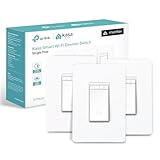
Overview:
This three-pack of Kasa’s Matter-enabled dimmer switches brings intelligent lighting control to multiple rooms with one purchase. Each switch offers 1-100% dimming range, cross-platform compatibility, and requires neutral wire with 2.4GHz Wi-Fi connectivity. The bundle provides a cost-effective solution for whole-home smart lighting upgrades with premium features.
What Makes It Stand Out:
Matter certification ensures these dimmers work across Apple Home, Alexa, Google Home, and SmartThings simultaneously. The bulk packaging provides significant cost savings, and the dimming capability adds ambiance control missing from standard on/off switches. LAN control maintains functionality during internet outages, and the memory function preserves your last brightness setting.
Value for Money:
At $56.19 ($18.73 per switch), this 3-pack saves approximately $10 compared to buying individually. Matter-enabled dimmers typically retail for $25-35 each, making this bundle 25-45% cheaper. For whole-home upgrades, the savings compound while delivering premium features like cross-platform support and smooth dimming performance that budget options cannot match.
Strengths and Weaknesses:
Pros include Matter cross-platform support, smooth dimming from 1-100%, excellent bulk pricing, reliable Kasa app integration, and Away Mode security. Cons mirror the single switch: neutral wire required, 2.4GHz-only connectivity, and Matter ecosystem still evolving. The 3-pack lacks color variety options, offering only white.
Bottom Line:
Ideal for comprehensive smart home upgrades. The combination of Matter support, dimming capability, and bulk savings makes this the best value for multi-room installations, delivering future-proof technology at near-budget pricing when purchased as a bundle.
5. Kasa Smart Light Switch HS200, Single Pole, Needs Neutral Wire, 2.4GHz Wi-Fi Light Switch Works with Google Home, UL Certified, No Hub Required, White

Overview:
The Kasa HS200 is a proven workhorse in the smart switch market, offering reliable single-pole control through a trusted platform. Requiring neutral wire and 2.4GHz Wi-Fi, it integrates with Alexa and Google Assistant while maintaining UL safety certification. With over 4 million users, it represents battle-tested reliability for mainstream smart home adoption.
What Makes It Stand Out:
With over 4 million users and Silicon Valley development, Kasa offers unmatched reliability and ongoing support. The UL certification ensures safety, and the established ecosystem means fewer compatibility issues. The guided installation and trusted brand reputation provide peace of mind that newer or budget brands cannot match, making it a safe choice for first-time smart home adopters.
Value for Money:
At $15.99, it positions between budget and premium options. While cheaper than Matter switches, it costs more than Amazon Basics. You’re paying for proven reliability, safety certification, and dual-platform support (Alexa/Google), which justifies the $2-3 premium over no-name alternatives. The brand’s longevity ensures continued app updates and compatibility.
Strengths and Weaknesses:
Pros include trusted brand reputation, UL certification, stable app experience, and Away Mode security feature. Cons: lacks Matter support for future-proofing, no dimming capability, 2.4GHz-only connectivity, and requires neutral wire. No Apple HomeKit support limits iOS-centric households. The design is functional but utilitarian.
Bottom Line:
A dependable, safety-certified choice for those prioritizing reliability over cutting-edge protocols. Perfect for homeowners wanting proven technology without premium pricing, offering the best balance of trust, features, and affordability in the mid-range smart switch market.
6. Kasa Smart Light Switch HS200P3, Single Pole, Needs Neutral Wire, 2.4GHz Wi-Fi Light Switch Compatible with Alexa and Google Home, UL Certified, No Hub Required, 3 Count -Pack of 1 , White

Overview: The Kasa HS200P3 is a three-pack of single-pole smart switches from TP-Link’s popular Kasa line. These UL-certified switches offer remote control via the Kasa app, voice integration with Alexa and Google Assistant, and robust scheduling features. Designed for standard installation, they require a neutral wire and 2.4GHz Wi-Fi, with the app providing clear step-by-step guidance for safe setup and configuration.
What Makes It Stand Out: The three-pack configuration delivers exceptional value for whole-home automation projects. Kasa’s app-guided installation simplifies what can be an intimidating electrical project, while the brand’s Silicon Valley pedigree and 4-million-user trust instills confidence. The “Away Mode” security feature randomly cycles lights to deter intruders, and UL certification ensures comprehensive safety standards are met.
Value for Money: At $10.74 per switch, this pack undercuts most competitors by 30-50%. Individual smart switches typically retail for $15-25, making this bundle ideal for multi-room projects. The robust app ecosystem and three-year warranty further justify the investment for long-term use and reliability.
Strengths and Weaknesses: Strengths include unbeatable per-unit pricing, trusted brand reputation, intuitive app setup, reliable scheduling, and no hub requirement. Weaknesses are the neutral wire requirement (challenging in older homes), 2.4GHz-only Wi-Fi (less flexible than dual-band), lack of dimming capability, and no native three-way support for complex circuits.
Bottom Line: This three-pack is the smartest choice for homeowners planning multiple installations. If your home has neutral wiring, it’s the best value entry into whole-home smart lighting.
7. Wireless Dimmer Switch, 2 Remote Light Switch and 1 Receiver kit, Compatible with Alexa Voice Control, Single Pole Smart Wall Switch Lighting Fixture for Ceiling Lights Lamps, Support 2.4G&5G

Overview: This innovative kit includes two wireless remotes and one receiver, creating a versatile dimming solution for ceiling lights and lamps. It supports dimmable LEDs (200W), halogen/incandescent (300W), and CFLs (200W), requiring a neutral wire. Unique among these products, it offers both physical remote control and Bluetooth-based Alexa voice integration, bridging traditional and smart lighting.
What Makes It Stand Out: The wireless remotes operate independently of Wi-Fi, transmitting through walls without line-of-sight limitations—perfect for garages or detached spaces. The memory function recalls your last brightness setting, and flexible single-pole or three-way configurations eliminate extra wiring. Detachable remotes mount anywhere without electrical boxes.
Value for Money: At $23.99 for a complete dimming kit with two remotes, this undercuts smart dimmers by 40%. Traditional dimmer switches cost $15-20 alone, making the added wireless control and smart features a genuine bargain for comprehensive control.
Strengths and Weaknesses: Strengths include true wireless remotes, broad bulb compatibility, dimming capability, memory function, and flexible installation. Weaknesses are Alexa integration limited to Bluetooth (less reliable than Wi-Fi), unclear brand reputation, and potential signal interference. The neutral wire requirement remains a barrier for older homes.
Bottom Line: Ideal for users wanting both physical remote convenience and basic smart features. Choose this for garages, basements, or three-way setups where wireless remotes add practical value.
8. Kasa Smart Switch 2-Gang HS200-2, Single Pole,Neutral Wire Required, 2.4GHz Wi-Fi Light Switch Compatible with Alexa and Google Home, UL Certified, No Hub Required, White

Overview: The Kasa HS200-2 elegantly consolidates two independent smart switches into a single-gang wall plate, controlling separate circuits without bulky multi-gang boxes. It maintains Kasa’s signature features: app control, voice integration, scheduling, and UL certification, while requiring neutral wire and 2.4GHz Wi-Fi for connectivity.
What Makes It Stand Out: This space-saving design solves aesthetic challenges in compact spaces where two switches are needed but wall real estate is limited. The flush installation looks premium, and the Kasa app simplifies the otherwise complex wiring of dual circuits. Each switch operates independently within the unified housing, providing full smart control.
Value for Money: At $22.98 for two switches, the per-circuit cost of $11.49 rivals the HS200P3 pack, but with superior space efficiency. Comparable dual smart switches cost $30-40, making this an excellent value for renovations or upgrades where wall space is at a premium.
Strengths and Weaknesses: Strengths include elegant 2-in-1 design, independent circuit control, trusted Kasa ecosystem, easy guided installation, and robust scheduling. Weaknesses are the neutral wire requirement, 2.4GHz-only connectivity, no dimming functionality, and need for a compatible single-gang box with proper depth.
Bottom Line: Perfect for modernizing tight spaces like bathrooms, hallways, or small kitchens. If you need two switches in one location, this is the most elegant and cost-effective solution available.
9. TP-Link Tapo Matter Smart Light Switch: Voice Control w/Siri, Alexa & Google Home | UL Certified | Timer & Schedule | Easy Guided Install | Neutral Wire Required | Single Pole | Tapo S505(2-Pack)

Overview: The Tapo S505 represents TP-Link’s Matter-enabled generation, offering future-proof smart switches that work seamlessly across all major platforms: Apple Home, Alexa, Google Home, and SmartThings. This two-pack provides single-pole control with app guidance, voice integration, and local network operation.
What Makes It Stand Out: Matter certification eliminates ecosystem lock-in, allowing multi-platform control simultaneously. The Multi-Admin feature lets household members use different apps, while LAN control ensures operation without internet. This forward-thinking approach future-proofs your smart home investment against platform changes.
Value for Money: At $9.46 per switch, this is the lowest price in the comparison, undercutting even Kasa’s value packs. Matter-enabled switches typically cost $20-30 each, making this an unprecedented bargain for cutting-edge technology.
Strengths and Weaknesses: Strengths include Matter compatibility, lowest per-unit cost, offline LAN control, multi-platform support, and Tapo’s growing ecosystem. Weaknesses are the newer Matter standard (potential early-adopter bugs), neutral wire requirement, 2.4GHz Wi-Fi limitation, and Tapo’s less-established reputation compared to Kasa.
Bottom Line: The best value for future-proofing your smart home. If you’re starting fresh or expanding, Matter compatibility makes this a no-brainer despite minor growing pains.
10. Kasa Matter Smart Dimmer Switch: Voice Control w/Siri, Alexa & Google Assistant | UL Certified | Timer & Schedule | Easy Guided Install | Neutral Wire Required | Single Pole | 2.4GHz Wi-Fi | KS225

Overview: The Kasa KS225 merges Matter’s universal compatibility with full-range dimming (1-100%), creating a premium yet affordable smart dimmer. It supports Siri, Alexa, and Google Assistant, offers advanced scheduling, and operates locally via LAN when internet fails. Like others, it requires neutral wire and 2.4GHz Wi-Fi.
What Makes It Stand Out: This is one of the few Matter-certified dimmers under $20, combining Kasa’s reliability with next-gen interoperability. The granular dimming control, Siri support (rare at this price), and seamless offline operation distinguish it from budget alternatives. The “Away Mode” security feature adds peace of mind.
Value for Money: At $18.93, it matches the Tapo S505’s aggressive pricing but adds dimming capability. Competing Matter dimmers cost $25-35, making this a 30% savings. The feature-to-price ratio is exceptional for a Matter device from an established brand.
Strengths and Weaknesses: Strengths include Matter certification, full-range dimming, triple voice assistant support, reliable scheduling, and trusted Kasa brand. Weaknesses are the neutral wire requirement, single-switch packaging (no bulk discount), 2.4GHz-only Wi-Fi, and limited three-way support.
Bottom Line: The top choice for Matter ecosystems needing dimming. Kasa’s reliability and Matter’s flexibility make this the best sub-$20 smart dimmer available.
Understanding Smart Switch Technology
Smart switches are the unsung heroes of home automation, replacing traditional wall switches with connected devices that communicate wirelessly with your home network and voice assistants. Unlike smart bulbs that require constant power and can be rendered useless by someone flipping a physical switch, smart switches control the actual circuit, maintaining smart functionality regardless of how many times your houseguests insist on using the wall control.
These devices embed microprocessors and wireless radios directly into your wall, creating a permanent smart infrastructure that works with any standard light bulb. This fundamental difference means you’re investing in your home’s electrical system rather than disposable bulbs, making smart switches a more permanent and ultimately more cost-effective solution for whole-home lighting control.
Why Voice Control Changes Everything
Voice control transforms smart switches from smartphone-dependent gadgets into truly hands-free experiences. While app control is useful, it’s often just as cumbersome as walking to the switch. Voice commands, however, integrate lighting into your natural workflow—cooking, cleaning, relaxing, or managing children.
The psychological shift is profound. You’re no longer thinking about “using technology” but simply expressing intent. This natural interaction model is why voice-controlled lighting has become the gateway drug for whole-home automation. It justifies the investment by delivering daily, frictionless value that app-based control rarely matches.
Key Voice Assistant Ecosystems Explained
Your choice of voice assistant ecosystem isn’t just a preference—it’s a decision that determines compatibility, feature depth, and future expansion possibilities. Each platform has distinct philosophies and technical requirements that directly impact which smart switches will work seamlessly in your home.
Amazon Alexa Integration
Alexa boasts the broadest smart home device support, making it the most flexible choice for voice-controlled lighting. Smart switches that work with Alexa typically connect through Wi-Fi or a smart hub, enabling routines, group controls, and advanced commands like “Alexa, set the living room lights to 30 percent.” Alexa’s strength lies in its vast Skills ecosystem and the ability to create complex scenes that combine lighting with other devices.
Google Assistant Compatibility
Google Assistant excels at natural language understanding, allowing more conversational commands like “Hey Google, make the bedroom brighter” or “Dim the kitchen lights.” Its integration with Google’s ecosystem means your lighting can be part of Home & Away routines based on your phone’s location. However, Google has been more selective about device certification, so compatibility lists tend to be more curated than Alexa’s.
Apple HomeKit Support
HomeKit offers the most secure and privacy-focused approach to voice-controlled lighting, but with stricter hardware requirements. Smart switches must include specific Apple-certified chips, which often means higher prices but delivers end-to-end encryption and local control that doesn’t rely on cloud processing. Siri commands like “Set the movie scene” work even when your internet is down, a significant advantage for reliability.
SmartThings and Cross-Platform Options
Samsung SmartThings and similar hubs act as universal translators, connecting Zigbee and Z-Wave switches to multiple voice assistants simultaneously. This hub-based approach future-proofs your investment by decoupling the switch from any single ecosystem. If you switch from Alexa to Google Assistant, your switches remain compatible. The trade-off is added complexity and the need for an always-powered hub device.
Essential Features to Evaluate
When comparing smart switches, look beyond basic on/off functionality. Response time matters immensely—switches that take more than a second to respond to voice commands feel broken, not smart. Seek devices with local processing capabilities that reduce cloud dependency.
Consider multi-way support if you have switches controlling the same light from multiple locations. Not all smart switches support three-way wiring, and those that do often require specific companion switches rather than working with your existing secondary switches.
Physical button feel and feedback mechanisms separate premium options from budget choices. High-quality switches provide satisfying tactile clicks or haptic feedback that confirms your action even when voice control is the primary interface. LED indicators showing switch status or network connectivity are small but crucial details for troubleshooting.
Wiring Requirements: What Your Home Needs
Your home’s electrical infrastructure is the ultimate gatekeeper for smart switch installation. Most smart switches require specific wiring configurations that weren’t standard in homes built before the 1980s. Before purchasing anything, you’ll need to understand what hides behind your switch plates.
The most common barrier is the absence of a neutral wire, which provides the continuous power smart switches need to maintain their wireless radios. While newer switches have workarounds, they often come with limitations. Another consideration is the depth of your electrical boxes—smart switches are substantially deeper than traditional switches, requiring about 1.5 inches of depth that older shallow boxes may not provide.
Single-Pole vs. Three-Way vs. Multi-Way Configurations
Single-pole switches are straightforward: one switch controls one light. These are the easiest to replace with smart versions. Three-way configurations—where two switches control the same light—introduce complexity that requires either specialized smart switches designed for three-way operation or replacing all switches in the circuit with smart models that communicate wirelessly.
Multi-way setups with four or more switches demand even more careful planning. Some manufacturers offer dedicated accessory switches that work with a primary smart switch, while others require replacing every switch in the circuit. The wrong choice here results in non-functional switches or lights that turn on unpredictably. Always map your wiring configuration before shopping.
Dimming Capabilities: Beyond Simple On/Off
Smart dimmer switches add nuanced control that voice assistants handle beautifully. Commands like “Set lights to movie mode” or “Dim to 40 percent” create ambiance that simple on/off switches cannot. However, dimming introduces compatibility concerns with your light bulbs.
LED bulbs, especially budget models, can flicker or buzz when dimmed by smart switches not specifically designed for them. Look for switches with adjustable minimum brightness settings and compatibility with leading-edge or trailing-edge dimming technologies. The best smart dimmers automatically calibrate to your specific bulbs, eliminating guesswork.
Hub vs. Hub-Free: The Connectivity Question
Wi-Fi smart switches connect directly to your home network, offering easy setup but potentially straining your router with dozens of devices. They also depend entirely on cloud services, meaning no voice control during internet outages. Hub-based switches using Zigbee or Z-Wave create a mesh network that’s more reliable and responsive, with local control that keeps working when your internet doesn’t.
The hub-free approach appeals to beginners with its simplicity, but power users often prefer hub-based systems for their scalability and ecosystem flexibility. Some newer switches support Thread and Matter, promising the best of both worlds: direct local communication without a dedicated hub. Understanding this trade-off is crucial for long-term satisfaction.
Neutral Wire Requirements: The Deal-Breaker Detail
The neutral wire provides the return path for electricity that smart switches need to power their internal electronics while keeping the circuit off. In homes built before 1980, neutral wires often don’t exist in switch boxes—they’re typically run only to the light fixture. This single factor eliminates about 70% of smart switches from consideration for older homes.
No-neutral switches exist but use trickle power or require minimum load specifications that can cause LED bulbs to glow faintly when “off.” Some work by sending wireless signals to a control module installed at the fixture itself. If you have neutral wires, your options expand dramatically, and you’ll enjoy more reliable performance. Always verify with a voltage tester—don’t trust visual wire color alone.
Installation Complexity: DIY vs. Professional
Installing a smart switch isn’t just swapping wires. It involves working with high-voltage electricity, understanding load requirements, and configuring wireless networks. While many homeowners successfully DIY single-pole installations, three-way circuits and older wiring often demand professional expertise.
Consider your comfort level with electrical work and the age of your home. Modern homes with standard single-pole switches and neutral wires are generally DIY-friendly. Older homes with knob-and-tube wiring, aluminum wiring, or non-standard configurations require an electrician for safety and code compliance. Factor installation costs into your budget—professional installation typically runs $50-150 per switch.
Design and Aesthetics: Matching Your Decor
Smart switches shouldn’t look like alien technology bolted to your walls. Premium options offer customizable faceplates, color-matched screws, and designs that complement modern or traditional decor. Some feature subtle LED indicators that can be disabled for bedrooms where any light is disruptive.
Consider button layout—some use capacitive touch surfaces while others maintain traditional paddle or toggle designs. Touch-sensitive models look sleek but can be accidentally triggered. Paddle designs offer familiar operation for guests. The best smart switches blend in so well that visitors don’t notice they’re smart until you demonstrate voice control.
Advanced Features Worth Considering
Motion detection built into the switch itself eliminates the need for separate sensors, enabling automatic lighting that still responds to voice commands. Energy monitoring tracks consumption per switch, helping identify inefficient bulbs or forgotten lights. Vacation mode randomizes lighting patterns for security.
Some switches offer configurable double-tap and triple-tap actions, turning a single switch into multiple scene controllers. Others include ambient light sensors that automatically adjust dimming based on natural light levels. These features differentiate premium switches from basic models and significantly enhance long-term value.
Privacy and Security Considerations
Every smart switch connected to your network represents a potential entry point for bad actors. Wi-Fi switches that communicate with cloud servers create data trails about when you’re home and your lighting patterns. Hub-based systems with local processing keep more data within your home.
Look for switches that support WPA3 encryption, receive regular security updates, and offer options to disable cloud connectivity if desired. HomeKit-certified switches provide the strongest privacy guarantees, with end-to-end encryption and on-device processing. Read privacy policies carefully—some manufacturers monetize usage data.
Troubleshooting Common Voice Control Issues
Even perfect installations encounter issues. Voice commands failing to respond, delays, or switches that drop off the network are common frustrations. Most stem from Wi-Fi congestion, weak signals at the switch location, or cloud service outages.
Learn to diagnose whether issues are network-related, assistant-related, or switch-specific. A switch that responds instantly to physical touch but lags on voice commands points to network or cloud problems. One that fails both ways suggests a wiring or hardware issue. Understanding these distinctions saves hours of unnecessary troubleshooting and helps you communicate effectively with technical support.
Future-Proofing Your Smart Lighting Investment
The smart home landscape evolves rapidly. Switches that support Matter, the new universal smart home standard, ensure compatibility with future devices regardless of manufacturer. Thread radio technology provides mesh networking without hub dependency while maintaining local control.
Consider switches from manufacturers with strong track records of firmware updates and backward compatibility. Avoid proprietary protocols that lock you into a single ecosystem. The goal is investing in infrastructure that will still work seamlessly five years from now, even as voice assistants evolve and new platforms emerge.
Frequently Asked Questions
1. Can I install smart switches in an apartment I’m renting?
Generally, no—smart switches require replacing existing electrical components, which violates most lease agreements and poses liability issues. Consider smart bulbs or plug-in smart switches for rental-friendly voice-controlled lighting that doesn’t involve permanent modifications.
2. Will smart switches work during a power outage?
Smart switches require electricity to operate their wireless radios, so they won’t respond to voice or app commands during outages. However, some models include battery backup or default to “on” when power returns, preventing you from being stuck in the dark.
3. Do I need to replace all switches in a three-way circuit?
It depends on the specific smart switch model. Some require replacing only one switch, using wireless communication to control the circuit. Others need companion accessory switches at every location. Always check the manufacturer’s three-way wiring diagrams before purchasing.
4. Can smart switches control ceiling fans or other appliances?
Standard smart switches are designed only for lighting loads and can be damaged by fan motors or appliances. However, specialized smart fan controllers and heavy-duty smart switches exist for these applications. Never exceed the switch’s rated load capacity.
5. Why does my smart switch buzz or hum when dimmed?
This typically indicates incompatibility between the dimmer switch and your LED bulbs. Try replacing bulbs with dimmer-compatible models or adjust the switch’s minimum brightness setting. High-quality smart dimmers include calibration features to eliminate buzzing.
6. How many smart switches can my Wi-Fi network handle?
Most consumer routers support 30-50 connected devices before performance degrades. If planning whole-home smart lighting, consider a hub-based system (Zigbee/Z-Wave) that doesn’t consume Wi-Fi bandwidth or upgrade to a mesh Wi-Fi system designed for high device counts.
7. Can visitors control lights without using voice commands?
Yes, all smart switches retain physical button functionality. Premium models also support guest access through companion apps or temporary voice recognition. Some offer NFC tags that visitors can tap with their phones for basic control.
8. What’s the difference between Thread and Zigbee?
Both are mesh networking protocols, but Thread is IP-based and designed for seamless internet integration without hubs. It promises better reliability and is backed by the Matter standard. Zigbee requires a hub but has a more extensive existing device ecosystem. Thread represents the future, while Zigbee dominates the present.
9. Will my smart switches become obsolete?
Quality switches from major manufacturers receive firmware updates for years. However, cloud-dependent Wi-Fi switches face higher obsolescence risk than hub-based systems. Choosing Matter-compatible devices significantly reduces long-term obsolescence concerns.
10. Can I mix smart switches from different brands?
Yes, if they support the same voice assistant ecosystem. However, you’ll need multiple apps for setup and configuration. Using switches from one brand within a single room ensures consistent behavior and easier troubleshooting, while mixing across rooms is generally fine.