Buildinga smart home with 100 Z-Wave devices isn’t just a bigger version of a 20-device setup—it’s a completely different beast that will expose every weakness in your controller. While basic hubs handle a handful of sensors and switches gracefully, they start gasping for digital air around the 60-70 device mark, revealing latency issues, dropped commands, and automation failures that can turn your futuristic home into a frustrating mess. The difference between a smooth, responsive 100-device network and a sluggish, unreliable one almost always comes down to controller architecture decisions made before the first device was ever paired.
The reality is that most Z-Wave controller marketing focuses on beginner-friendly features and glosses over the technical specifications that actually matter at scale. You need to think less like a consumer buying a gadget and more like an IT architect designing a robust, mission-critical system. This guide pulls back the curtain on what separates controllers that merely survive 100 devices from those that thrive with them, ensuring your investment today won’t become tomorrow’s bottleneck.
Top 10 Z-Wave Controllers for 100-Device Smart Homes
Detailed Product Reviews
1. Z-Stick 10 Pro - Zigbee 3.0 & Z-Wave 800 Series USB Adapter - Works with HomeAssistant - Zigbee2MQTT - Z-Wave Controller - Z-Wave Long Range - Up to 1 Mile Wireless Range - cloudfree

Overview: The Z-Stick 10 Pro is a powerful dual-protocol USB gateway for advanced smart home enthusiasts. Combining Z-Wave 800 Series Long Range and Zigbee 3.0 radios in one compact device, it enables direct communication with thousands of devices through platforms like HomeAssistant and Zigbee2MQTT. Its slim design ensures it won’t obstruct adjacent USB ports, making it ideal for dedicated controllers like Raspberry Pi setups.
What Makes It Stand Out: This adapter’s standout feature is true dual-radio functionality with cutting-edge silicon. The Z-Wave 800 Series chip delivers unprecedented 1-mile range, while the Zigbee 3.0 EFR32MG21 chip ensures robust mesh performance. Unlike hubs with cloud dependencies, this operates entirely locally, giving you complete privacy and control. Its plug-and-play compatibility with major open-source platforms makes it exceptionally versatile for custom smart home builds.
Value for Money: At $59.99, the Z-Stick 10 Pro offers remarkable value for technically-inclined users. Purchasing separate Z-Wave and Zigbee adapters would cost significantly more while consuming additional ports. The latest-generation chips future-proof your investment, and the long-range capability eliminates need for multiple repeaters in large properties. For HomeAssistant users, this is arguably the most cost-effective dual-radio solution available.
Strengths and Weaknesses:
- Strengths: Dual-protocol support; latest 800 Series Z-Wave LR; compact non-blocking design; extensive compatibility (8000+ devices); local-only operation ensures privacy; excellent range.
- Weaknesses: Requires technical expertise to configure; no standalone operation (must remain plugged in); limited to USB host devices; documentation may be sparse for beginners.
Bottom Line: The Z-Stick 10 Pro is an exceptional choice for DIY smart home builders using HomeAssistant or similar platforms. Its dual-radio capability, future-proof chips, and impressive range make it a worthwhile investment for those comfortable with technical setup. Beginners should consider a more plug-and-play hub instead.
2. Hubitat Elevation Home Automation Hub (Model C-8 Pro) Compatible with Alexa, Apple HomeKit, Google Home, Zigbee, Z-Wave, Matter, Aqara

Overview: The Hubitat Elevation C-8 Pro is a premium local-processing hub designed for serious smart home automation. Supporting Z-Wave 800 Series, Zigbee 3.0, and Matter protocols, it connects to over 1000 devices from 100+ brands. Unlike cloud-dependent systems, all automation logic runs directly on the hub, delivering exceptional speed, reliability, and privacy for complex smart home scenarios.
What Makes It Stand Out: The C-8 Pro’s local execution philosophy eliminates latency and internet dependency entirely. Its Matter bridge support is transformative, allowing legacy Zigbee and Z-Wave devices to appear in Apple HomeKit and Google Home ecosystems. The built-in Z-Wave 800 Series chip provides extended range, while the robust rule engine enables sophisticated automations without subscription fees. Native Alexa and HomeKit integration bridges ecosystem gaps seamlessly.
Value for Money: Priced at $184.95, the C-8 Pro commands a premium but justifies it through capabilities. Competing hubs often require cloud subscriptions or lack multi-protocol support. The Matter bridging feature alone saves hundreds compared to replacing existing devices. For users with diverse ecosystems or those prioritizing privacy, this one-time investment eliminates recurring costs while delivering superior performance and compatibility.
Strengths and Weaknesses:
- Strengths: Complete local processing; Matter bridge capability; multi-protocol support (Z-Wave, Zigbee, Matter); no subscription fees; extensive device compatibility; robust automation engine.
- Weaknesses: Steep learning curve for beginners; higher upfront cost; web-based interface feels dated; community apps can be hit-or-miss; initial setup requires network knowledge.
Bottom Line: The Hubitat C-8 Pro is the ultimate hub for privacy-focused power users with complex, multi-brand smart homes. Its local processing and Matter bridging are unmatched. While beginners may find it overwhelming, tech-savvy users will appreciate its speed, reliability, and ecosystem flexibility. Worth every penny for serious automation.
3. Aeotec Heavy Duty Smart Switch, Z-Wave Plus Home Security ON/Off Controller, 40 amps. Electricity Consumption & Monitoring
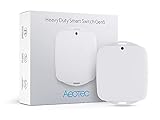
Overview: The Aeotec Heavy Duty Smart Switch is an industrial-grade Z-Wave controller built for high-power appliances up to 40 amps. Designed for water heaters, pool pumps, and electric vehicle chargers, it provides remote on/off control and real-time energy monitoring. In emergencies, it can instantly disconnect power to prevent damage, making it as much a safety device as a convenience tool.
What Makes It Stand Out: This switch’s 40A capacity far exceeds standard smart switches (typically 15A), opening automation possibilities for major household systems. Its precise energy monitoring tracks consumption in watts and kilowatt-hours, helping identify costly appliances. The emergency shutoff capability provides peace of mind during power fluctuations or leaks. Built with Z-Wave Plus, it acts as a reliable repeater while maintaining secure, encrypted communication.
Value for Money: At $105.99, this specialized device delivers strong value for its niche. Standard smart plugs cannot handle high-power appliances, and hardwired alternatives often cost more. The energy monitoring feature can pay for itself by identifying inefficient devices, while the safety shutoff could prevent costly damage. For homes with pools, hot tubs, or electric heating, it’s a reasonably priced automation and monitoring solution.
Strengths and Weaknesses:
- Strengths: 40A high-power capacity; real-time energy monitoring; emergency auto-shutoff safety feature; Z-Wave Plus repeater functionality; broad hub compatibility; robust build quality.
- Weaknesses: Requires professional installation for many users; bulky design needs dedicated electrical box; single-device control only; higher cost than standard switches; limited to 220V systems.
Bottom Line: The Aeotec Heavy Duty Switch excels for automating high-power appliances where standard smart switches fail. Its energy monitoring and safety features justify the premium price for specific use cases. However, the installation complexity makes it best suited for electrically-inclined homeowners or those hiring professionals. A must-have for pool and EV charging automation.
4. Enbrighten Z-Wave In-Wall Smart Light Switch with QuickFit and SimpleWire, Works with Google Assistant, Alexa, & SmartThings, Z-Wave Hub Required, Smart Home, 700 Series, 58433

Overview: The Enbrighten 58433 is an in-wall Z-Wave smart switch featuring innovative QuickFit and SimpleWire technologies that streamline installation. The 700 Series radio ensures reliable mesh networking while supporting voice control through Google Assistant and Alexa when paired with a compatible hub. It replaces standard switches with neutral wires, enabling remote control and scheduling for lighting and fixtures throughout the home.
What Makes It Stand Out: QuickFit technology reduces housing depth by 20%, solving fitment issues in crowded multi-gang boxes common in older homes. SimpleWire’s patented auto-detecting terminals eliminate guesswork by automatically identifying line/load wires—saving time and preventing dangerous miswiring. Dual offset ground ports facilitate daisy-chaining in complex setups. These installer-focused innovations make it the most DIY-friendly hardwired Z-Wave switch available.
Value for Money: At $39.99, this switch hits the sweet spot for quality and convenience. While 700 Series chips aren’t the latest, they remain highly reliable and compatible. Competing switches often lack the space-saving design and auto-detection features, potentially costing extra in electrician fees. For DIYers tackling multi-gang boxes or shallow switch enclosures, the time and frustration saved easily justify the modest premium over basic Z-Wave switches.
Strengths and Weaknesses:
- Strengths: QuickFit shallow design fits crowded boxes; SimpleWire auto-detection prevents wiring errors; dual ground ports for multi-switch setups; reliable 700 Series Z-Wave; excellent build quality; competitive pricing.
- Weaknesses: Requires neutral wire (not compatible with all homes); 700 Series (not latest 800); hub required for smart features; single-pole only (no three-way without add-on); bulkier than non-smart switches.
Bottom Line: The Enbrighten 58433 is the ideal choice for DIY installers facing space constraints or wiring uncertainty. Its innovative design features solve real installation headaches, making it worth the slight premium. While it requires a neutral wire and hub, the reliability and installer-friendly features make it a top recommendation for most homeowners upgrading to Z-Wave lighting control.
5. Minoston 800 Series Zwave Dual Outlet Plug, On/Off Z-Wave Repeater Switch with 2 Individual Control Sockets, Hub Required, Z Wave LR Smart Plugs Compatible with SmartThings, Hubitat, Fibaro (MP26Z)

Overview: The Minoston MP26Z is a versatile Z-Wave 800 Series dual-outlet smart plug that independently controls two devices through a single Z-Wave node. Each socket can be operated separately via hub apps or voice commands. The 800 Series chip provides Z-Wave Long Range capability up to 1300 feet, while built-in repeater functionality strengthens mesh networks. Setup is streamlined through QR code pairing, making it accessible for users of all technical levels.
What Makes It Stand Out: Independent outlet control from one device is a game-changer for space efficiency, essentially providing two smart plugs in one footprint. The 800 Series LR support delivers exceptional range for large properties or outbuildings without requiring intermediate repeaters. The QR code setup process is genuinely sub-minute, eliminating the exclusion/inclusion dance that plagues many Z-Wave devices. Its compact design relative to dual outlets makes it practical for standard wall plates.
Value for Money: At $34.99, this dual-outlet plug offers exceptional value. Two separate smart plugs would cost $50-60, making this nearly half the price while saving outlet space. The 800 Series future-proofs your investment, and the LR capability reduces need for additional mesh extenders. For SmartThings or Hubitat users wanting to control lamps, fans, or holiday lighting independently, it’s one of the best cost-per-outlet values in Z-Wave.
Strengths and Weaknesses:
- Strengths: Independent dual-outlet control; Z-Wave 800 Series LR (1300ft range); QR code setup under one minute; built-in repeater; compact dual design; broad hub compatibility; excellent price-per-outlet value.
- Weaknesses: Requires Z-Wave hub; bulkier than single plugs; max 15A total (7.5A per outlet); LR mode may need compatible hub; no energy monitoring; blocks both outlets on standard wall plates.
Bottom Line: The Minoston MP26Z is a no-brainer for anyone needing to control two devices in one location. Its independent control, lightning-fast setup, and impressive 800 Series range make it a standout value. While hub-dependent and slightly bulky, the convenience and cost savings over separate plugs make it highly recommended for expanding Z-Wave systems, especially in larger homes where range matters.
6. NEO Z-Wave Plus Smart Mini Plug, Compact Z-Wave Outlet for Home Automation, Works with Smartthings, Basic On/Off Function, 500 S2

Overview: The NEO Z-Wave Plus Smart Mini Plug delivers fundamental smart home control in a compact package. This outlet adapter provides basic on/off functionality for any connected appliance while integrating seamlessly with major Z-Wave hubs like SmartThings. Its small form factor ensures it won’t block adjacent outlets, making it practical for power strips and wall plates where space is limited.
What Makes It Stand Out: This device distinguishes itself through dual-purpose utility. Beyond simple switching, it features built-in energy monitoring to track consumption patterns and identify power-hungry appliances. Its signal repeater capability actively strengthens your Z-Wave mesh network, extending coverage to distant devices. The S2 security framework ensures encrypted communication, providing peace of mind for security-conscious users.
Value for Money: At $19.99, this plug sits in the budget-friendly tier for Z-Wave devices. Competitors with energy monitoring typically retail for $25-35, making this an economical entry point. The added network repeater functionality essentially provides two devices for the price of one, delivering exceptional ROI for users building or expanding their Z-Wave ecosystem.
Strengths and Weaknesses: Strengths include effortless setup, real-time energy tracking, compact design, and network strengthening capabilities. The S2 security protocol is a significant advantage. Weaknesses center on limited functionality—no scheduling independent of hub software, dimming capability, or power reporting customization. It requires an existing Z-Wave hub, adding hidden costs for newcomers.
Bottom Line: Ideal for Z-Wave users seeking affordable appliance control and network expansion. The energy monitoring and repeater features make it more valuable than basic alternatives, though hub-dependent operation limits standalone utility.
7. Wireless Zigbee Smart Button, 4-Way Remote Control Button Switch for Smart Home Devices, Scene Controller, Compatible with Tuya, Home Assistant, Homey, Hubitat, Requires Tuya Zigbee Hub

Overview: This Zigbee smart button offers tactile remote control for your entire smart home ecosystem. With four physical buttons supporting multiple press types, it serves as a versatile scene controller compatible with major platforms including Home Assistant, Hubitat, and Tuya. The included lithium battery provides months of cable-free operation.
What Makes It Stand Out: The button’s versatility shines through its 12 possible actions (4 buttons × 3 press types), enabling complex automation triggers without opening an app. Its programmable nature allows customization for lighting scenes, blind adjustment, or security modes. The energy-efficient Zigbee protocol ensures minimal battery drain while maintaining reliable mesh network connectivity.
Value for Money: Priced at $21.24, this controller undercuts many proprietary remotes while offering superior compatibility. Comparable Z-Wave remotes cost $30-40, making this an attractive Zigbee alternative. The long-lasting battery reduces maintenance costs, though the required hub represents an additional investment for non-Zigbee households.
Strengths and Weaknesses: Strengths include extensive customization, broad platform support, excellent battery life, and compact portability. The multi-press functionality maximizes utility per button. Weaknesses involve hub dependency—requiring specific Zigbee coordinators—and potential connection issues noted in documentation. Zigbee interference in crowded 2.4GHz environments may affect reliability.
Bottom Line: A cost-effective scene controller for established Zigbee users. Its flexibility and compatibility make it superior to brand-locked alternatives, but factor in hub requirements and potential troubleshooting time when evaluating total cost.
8. Homey Bridge | Smart Home Hub for Home Automation. Features Z-Wave Plus, Zigbee, Wi-Fi, BLE & Infrared. Compatible with Amazon Alexa & Google Home.

Overview: Homey Bridge positions itself as a universal smart home translator, supporting five major protocols in one $68.99 hub. It consolidates Z-Wave, Zigbee, Wi-Fi, Bluetooth, and infrared devices under a single control interface, eliminating the need for multiple brand-specific hubs. The included three-month Premium subscription unlocks advanced automation capabilities.
What Makes It Stand Out: The Flow automation engine enables sophisticated conditional logic without coding, while privacy-by-design architecture ensures data stays local. Voice control integration with Alexa, Google, and Siri shortcuts provides hands-free operation across protocols. Compatibility with thousands of devices from major brands like Philips Hue, Sonos, and Yale makes it exceptionally versatile.
Value for Money: At $68.99, Homey Bridge competes directly with SmartThings and Hubitat. The multi-protocol support alone justifies the price compared to buying separate hubs. However, the mandatory $2.99/month Premium subscription for more than five devices significantly impacts long-term value, making it pricier than competitors over time.
Strengths and Weaknesses: Major strengths include unparalleled protocol support, intuitive Flow creation, robust privacy protections, and extensive brand compatibility. The three-month trial allows proper evaluation. Critical weaknesses center on the subscription model—basic functionality is crippled without Premium. Limited to five devices free-tier users, which barely covers a single room.
Bottom Line: Excellent for multi-protocol households prioritizing privacy and advanced automation. Calculate subscription costs over your expected ownership period. If you exceed five devices, alternatives like Hubitat may prove more economical long-term despite steeper learning curves.
9. Wireless Zigbee Smart Button, 12 Scene Controller, 4-Way Remote Control Button Switch for Smart Home Devices, Compatible with Tuya, Home Assistant, Homey, Hubitat, Requires Tuya Zigbee Hub

Overview: This enhanced Zigbee button controller builds on the standard four-button design by supporting 12 distinct scenes through single, double, and long presses. Powered by two AAA batteries promising two-year longevity, it eliminates frequent recharging. Compatibility spans Tuya, Home Assistant, Homey, and Hubitat via Zigbee 3.0 coordinators.
What Makes It Stand Out: The 12-scene capacity provides exceptional density, controlling an entire home’s lighting, climate, and entertainment from one remote. AAA battery operation offers easier replacement than coin cells, while the two-year lifespan minimizes maintenance. Direct Home Assistant support via Zigbee 3.0 USB dongles bypasses proprietary hubs, increasing flexibility.
Value for Money: At $23.95, it commands a $2.71 premium over similar four-button controllers, justified by extended battery life and higher scene capacity. The AAA power system saves money over time compared to replacing lithium coin cells. For Home Assistant users, avoiding a dedicated hub purchase represents substantial savings.
Strengths and Weaknesses: Strengths include remarkable scene density, universal battery format, multi-hub compatibility, and exceptional energy efficiency. The two-year battery claim reduces maintenance anxiety. Weaknesses involve larger physical size due to AAA batteries and potential pairing complexity with certain platforms. Documentation quality varies across supported ecosystems.
Bottom Line: Superior to basic four-button remotes for users needing extensive scene control. The AAA battery system and broad compatibility make it a practical choice, particularly for Home Assistant setups. Accept the modest price premium for long-term convenience and flexibility.
10. Remotec Z-Wave Smart Thermostat - ZTS-500 with Your Z-Wave Hub
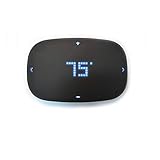
Overview: The Remotec ZTS-500 brings Z-Wave control to HVAC systems that competitors often ignore. Supporting 24VAC conventional heating, heat pumps, millivolt systems, and two-stage cooling, it covers nearly any residential setup. The minimalist digital display shows temperature and status, while Z-Wave Plus enables remote access and scheduling through your hub.
What Makes It Stand Out: Unmatched HVAC compatibility sets this apart—few smart thermostats support millivolt or zoned hot water systems. OTA update capability future-proofs the device, and advanced configuration options cater to professional installers. Flexible power options (battery or C-wire) simplify installation in older homes lacking common wires.
Value for Money: At $69.99, it significantly undercuts Nest and Ecobee while offering superior system compatibility. For Z-Wave ecosystems, it eliminates cloud dependencies and subscription fees. However, lacking native app control and sophisticated learning features, it trades convenience for compatibility and privacy.
Strengths and Weaknesses: Strengths include exceptional HVAC support, Z-Wave Plus reliability, installation flexibility, and privacy-focused local control. The sleek display balances aesthetics and functionality. Weaknesses involve complex DIY installation for multi-stage systems, no standalone scheduling, and dependency on hub software for advanced features. No energy reporting or usage insights.
Bottom Line: Perfect for Z-Wave users with non-standard HVAC systems. It sacrifices flashy features for rock-solid compatibility and local control. Professional installation recommended for complex setups. Consider alternatives if you want learning algorithms or detailed energy analytics.
Understanding Z-Wave Controller Capacity: Why 100 Devices Demands More
Crossing the 100-device threshold fundamentally changes how your Z-Wave network behaves. Each device doesn’t just add one more node to your mesh—it introduces routing table entries, neighbor updates, security handshakes, and automation triggers that compound exponentially. A controller designed for 30 devices might technically “support” 100 on paper, but the user experience degrades into command delays of 3-5 seconds and automations that fire inconsistently.
The Mesh Network Effect at Scale
Z-Wave’s mesh architecture means devices relay signals for each other, which is brilliant for reliability but creates overhead. With 100 devices, your network generates constant routing updates, especially when you add mobile devices like battery-powered sensors that change their neighbor tables frequently. Your controller must process these updates in real-time while maintaining a complete network map. Cheaper controllers use slower processors that queue these updates, causing the “why won’t my light turn on immediately?” syndrome that plagues large networks. The routing table alone for 100 devices can consume several megabytes of memory—more than some entry-level hubs even have available.
Processing Power and Memory Requirements
Here’s what most product pages won’t tell you: the Z-Wave protocol stack itself consumes resources that grow with each device. Each device maintains a security context (especially with S2), automation subscriptions, and association groups. A 100-device network can easily require 256MB of RAM just for stable operation, with CPU clock speeds below 1GHz resulting in noticeable lag when multiple automations trigger simultaneously. Think of it like a restaurant—serving 10 customers is easy for one chef, but serving 100 requires serious kitchen infrastructure and staff coordination.
Key Performance Metrics for Large-Scale Z-Wave Deployments
When evaluating controllers, you’ll encounter specifications that seem similar across price points. The devil lives in the details that manufacturers hope you won’t ask about.
Z-Wave Chipset Generations and Compatibility
The Z-Wave 500 series chipset maxes out at 232 devices theoretically, but practical limits hit around 70-80 due to memory constraints. The 700 series doubled available memory and improved processing, pushing real-world limits to 150+ devices. The latest 800 series introduces dynamic channel selection and enhanced security frameworks that are non-negotiable for 100-device networks. More importantly, chipset generation determines your network’s range and ability to handle concurrent commands—a 500-series controller might process one command at a time, while 700+ series handle multiple simultaneous operations.
Memory Architecture: RAM, Storage, and Device Limits
Don’t confuse flash storage with RAM. A controller might have 4GB of storage for logs and backups but only 128MB of RAM, which becomes your actual bottleneck. For 100 devices, target controllers with at least 512MB RAM and 4GB flash storage. This matters because Z-Wave networks store device “healing” data, multiple routing paths per device, and encryption keys that persist in memory. Insufficient RAM causes the controller to swap data to slower flash storage, creating micro-delays that cascade into macro-frustrations.
CPU Performance and Automation Latency
Clock speed tells only part of the story. Look for multi-core processors where one core handles Z-Wave radio communication while another manages automation logic and user interfaces. Single-core controllers force everything through one pipeline, so when your “Good Night” routine tries to turn off 30 lights simultaneously, the processor chokes and commands stagger over 10-15 seconds. A dual-core 1.5GHz processor can dispatch the same commands in under 3 seconds because it并行izes radio transmission and rule processing.
Software Ecosystem: The Brain Behind Your 100-Device Network
Hardware without sophisticated software is just an expensive paperweight. The controller’s operating system and application layer determine how gracefully it handles network complexity.
Local vs. Cloud Processing Models
Cloud-dependent controllers become liabilities with 100 devices. Every command round-trips through distant servers, introducing 200-500ms latency per operation. When your “Arrive Home” automation triggers 40 device updates, that’s 8-20 seconds of cloud-induced delay. True local processing keeps everything on your LAN, with response times under 100ms even for complex scenes. More critically, local controllers continue functioning during internet outages—essential when your security system, locks, and lighting depend on Z-Wave.
Automation Engine Sophistication and Rule Complexity
Basic “if this then that” logic breaks down at scale. You need controllers with state machines, variables, and conditional branching. For example, a robust engine can handle: “If motion detected in hallway AND time is between sunset and sunrise AND master bedroom light is off AND security system is armed-away, THEN turn on hallway light at 30% brightness for 2 minutes, except when front door was opened in the last 5 minutes.” This requires the controller to maintain state awareness across dozens of devices—something simple rule engines can’t manage without creating dozens of separate automations that conflict with each other.
Mobile App Responsiveness and Remote Access
With 100 devices, your mobile app isn’t just a remote—it’s a network monitoring dashboard. Apps that load all device states on launch will take 10+ seconds to become responsive. Look for controllers with delta-updating apps that only refresh changed devices, and that cache device metadata locally. The app should also provide network health metrics like routing tables, signal strength maps, and device timeout logs—diagnostic tools that become indispensable at scale.
Network Topology Optimization for Maximum Reliability
Your controller is only as good as the network it orchestrates. A brilliant controller with poor device placement will still underperform.
Strategic Device Placement and Repeater Planning
In 100-device networks, battery-powered sensors shouldn’t be repeaters—that’s what mains-powered devices are for. Map your home’s RF environment: each Z-Wave device has a 30-50 foot range through walls. Place repeating devices (switches, outlets, powered sensors) no more than 40 feet apart in a mesh pattern. Your controller should support network mapping tools that visualize these relationships, showing you exactly where coverage gaps exist. Pro tip: include at least 20% more repeating nodes than minimum calculations suggest—device failures shouldn’t partition your network.
Z-Wave Plus and S2 Security Implications
Z-Wave Plus devices support “Explorer Frames” that automatically discover optimal routes, reducing controller overhead. With 100 devices, this feature cuts network healing time from hours to minutes. S2 security, while essential, adds 3-5KB of cryptographic overhead per device. A controller without hardware acceleration for S2 handshakes will take 30+ seconds to include each S2 device—imagine pairing 100 devices at that pace. Ensure your controller supports S2 bulk inclusion and maintains encryption state efficiently in memory.
Integration Capabilities: Bridging Your Z-Wave Island
A 100-device Z-Wave network that can’t communicate with your other smart home tech creates more problems than it solves.
Matter, Zigbee, and Wi-Fi Convergence Strategies
Your controller shouldn’t treat Z-Wave as a walled garden. Look for native Matter support (Thread radio) and Zigbee 3.0 compatibility running on separate radio chips. Controllers that share a single radio between protocols force you to choose one or switch modes—useless for integrated homes. The ideal architecture has dedicated radios for each protocol, with a unified automation engine that can trigger Z-Wave scenes from Zigbee sensors or Matter devices. This prevents the “hub stacking” problem where you need three separate controllers, each with its own app and automation silo.
API Access and Third-Party Compatibility
With 100 devices, you’ll eventually want to integrate with Home Assistant, Hubitat, or custom dashboards. Controllers with locked-down APIs force you into their ecosystem. Look for RESTful APIs, WebSocket support, and MQTT publishing capabilities. The API should expose not just device control but network diagnostics—allowing you to build custom monitoring that alerts when device response times degrade or routing paths become suboptimal.
Future-Proofing Your Investment
Your 100-device network is a foundation, not a destination. The controller you choose must grow with your ambitions.
Over-the-Air Update Policies and Longevity
Manufacturers abandon controllers that don’t generate recurring revenue. Investigate the company’s OTA update history—are they still updating 3-year-old models? Do they charge for major firmware upgrades? A quality controller receives free monthly updates that improve performance and security. Check community forums (not just official channels) for patterns of bricking devices during updates or abandoning older hardware. Your controller should have a 5-7 year useful life minimum.
Expandability Beyond 100 Devices
Today’s 100-device controller might need to handle 150 devices next year. Some controllers hard-limit device counts in software regardless of hardware capacity—avoid these. Look for controllers that support secondary Z-Wave radios or USB stick expansion. The Z-Wave protocol itself supports multiple networks (Home IDs) on one controller; advanced units can manage several logical networks, effectively multiplying device capacity while keeping them logically separated (guest house, detached garage, etc.).
Setup Best Practices for Large Z-Wave Networks
Even the best controller fails if provisioned poorly. Large networks demand methodical inclusion strategies.
Inclusion Strategies and Network Healing
Never pair all 100 devices in one day. Add devices in batches of 10-15, allowing the network to stabilize for 24 hours between sessions. Each inclusion triggers neighbor discovery and route calculations; overwhelming this process creates suboptimal routing that persists until manual healing. Use “add as S2” for security without sacrificing speed—modern controllers can batch-authenticate multiple devices. After full deployment, schedule weekly network heals during low-activity hours (3 AM), but disable automatic healing; it’s too disruptive for large networks.
Backup and Recovery Protocols
With 100 devices, a controller failure means re-pairing everything—a multi-day nightmare. Your controller must support automated daily backups to local NAS or cloud storage. More importantly, test restoration: some controllers backup device lists but not network topology or security keys, forcing you to exclude and re-include every device manually. The gold standard is a full disk image backup that includes the Z-Wave chip’s network key storage, allowing true disaster recovery in under an hour.
Troubleshooting Complex Z-Wave Networks
When 100 devices misbehave, random troubleshooting wastes days. You need systematic diagnostics.
Diagnostic Tools and Network Mapping
Your controller should provide a per-device “last seen” timestamp with millisecond precision, showing exactly when a device fell off the network. Advanced controllers offer signal strength (RSSI) per neighbor relationship, not just per device—revealing that your garage door sensor isn’t failing, but its optimal repeater (the smart switch in the laundry room) has poor signal to the controller. Look for controllers that log Z-Wave frame-level data, letting you see if a “failed” command was never sent, got lost in transit, or was rejected by the destination device.
Common Bottlenecks at Scale
The most insidious bottleneck isn’t the controller—it’s device-specific polling. With 100 devices, polling 30 devices every 30 seconds saturates the Z-Wave network’s limited bandwidth. Disable all polling; rely on devices to push state changes. Another hidden issue: association groups. If 20 devices are associated to report to one sensor, that sensor’s radio gets overwhelmed. Use controller-based associations instead of direct device-to-device for groups larger than 3. Finally, watch for “chatty” devices that spam the network with power reports every second; these can be throttled in advanced controller settings.
Security Considerations for Extensive Smart Home Deployments
A 100-device network is a 100-entry attack surface. Security isn’t optional—it’s architectural.
S2 Security Framework Implementation
S2 Authenticated and S2 Access Control aren’t just checkboxes. With 100 devices, manually entering PINs for each device during inclusion is impractical. Look for controllers that support QR code scanning for S2 inclusion and can bulk-upgrade existing S0 devices to S2 (when firmware supports it). More importantly, the controller must isolate S2 keys per device class—your door lock’s encryption keys shouldn’t share memory space with your garden moisture sensor’s keys. This prevents a compromised low-security device from becoming a vector to attack high-security devices.
Network Segmentation and Guest Access
Advanced controllers support creating logical device groups with separate user permissions. You can grant babysitters control over lights and thermostats but not security or door locks, all through the same controller. For AirBnB rentals or guest houses, some controllers support multiple Z-Wave networks (Home IDs) on one hardware platform, truly isolating guest devices from your primary network while simplifying management. This also limits blast radius: a guest’s malicious device can’t attack your core network.
Cost Analysis: Total Ownership for 100-Device Systems
The sticker price rarely reflects true cost when scaling to 100 devices.
Hardware vs. Subscription Models
Subscription-based controllers often seem cheaper initially but cost $500-800 over five years. For 100 devices, this sometimes includes cloud processing that introduces latency. One-time-purchase controllers cost more upfront ($200-400) but pay for themselves in 2-3 years. However, factor in support: subscription models often include priority phone support, which becomes valuable when 100 devices fail at 2 AM. The hidden cost is migration: if you outgrow a subscription controller, migrating 100 devices to new hardware can take 20+ hours of manual work.
Hidden Costs of Scaling
That $150 hub seems economical until you discover it needs a $50 USB stick to reach 100 devices, a $30 extended warranty because it runs hot under load, and a $100/year subscription for remote access. Power consumption matters too: a controller running 24/7 at 15W costs $18/year in electricity; enterprise controllers at 30W cost $36/year. Over five years, that’s a $90 difference. Also consider the cost of your time: a controller with poor diagnostics might require 5 hours of troubleshooting monthly versus 30 minutes for a robust system. At $50/hour value of time, that’s a $2,700 difference over three years.
Frequently Asked Questions
Will any Z-Wave Plus controller work for 100 devices, or do I need special hardware?
Z-Wave Plus certification alone doesn’t guarantee 100-device performance. While Z-Wave Plus improves range and pairing, the certification doesn’t specify memory or CPU requirements. You specifically need a controller with at least 256MB RAM, a multi-core processor, and a 700-series or newer chipset. Many Z-Wave Plus hubs are designed for 50-device networks and will experience significant lag beyond that, even though they’re technically compliant.
How long should it realistically take to pair 100 devices to a capable controller?
With an optimized controller supporting S2 bulk inclusion and QR code scanning, expect 8-12 hours of active pairing time spread across 3-4 days. This includes allowing 24-hour stabilization periods between batches. Rushing the process by pairing all devices in one marathon session often results in a network that takes weeks to self-optimize and may never achieve optimal routing, ultimately requiring you to rebuild it methodically anyway.
Can I mix Z-Wave 500-series and 800-series devices on the same 100-device network?
Yes, but with performance tradeoffs. The network operates at the speed and capability of the oldest device in a given communication path. If an 800-series device routes through a 500-series switch, that transaction uses 500-series bandwidth. With 100 devices, this can create unpredictable latency. Aim for 80% of your repeating devices (switches, outlets) to be 700-series or newer to maintain network-wide performance improvements.
What’s the single most important feature for preventing automation lag with 100 devices?
Local processing with a multi-threaded automation engine. Cloud controllers simply can’t overcome internet latency when dispatching dozens of commands simultaneously. Beyond that, look for controllers that support command queuing with priority levels—so your security system’s “intrusion detected” automation jumps ahead of the “dim lights for movie” routine that’s still processing.
How often should I rebuild or heal a 100-device Z-Wave network?
Never perform full network heals automatically. Schedule manual heals quarterly, or after adding/removing more than 10 devices. Full heals can take 4-6 hours on large networks and temporarily degrade performance. Instead, enable “explorer frame” support on Z-Wave Plus devices, which continuously optimizes routes without the disruptive full heal process. This maintains 95% of optimal routing with zero downtime.
Will adding more repeaters always improve my 100-device network?
Not beyond a point. The Z-Wave protocol supports up to 4 hops maximum, so adding repeaters beyond what’s needed for coverage creates unnecessary routing complexity. Each device can only maintain 232 neighbor entries in its table—excessive repeaters cause neighbor table overflow, forcing the controller to make suboptimal routing decisions. Aim for the minimum number of repeaters that provides reliable coverage plus a 15% redundancy buffer.
How do I secure a 100-device Z-Wave network without making it unusable?
Implement S2 security on all devices that support it, but use S2 Authenticated (not Access Control) for most devices to balance security with inclusion convenience. Disable S0-only devices’ ability to control S2 devices through associations—force all cross-device communication through the controller, which enforces security policies. Finally, change your network’s Home ID from the factory default; this prevents pre-computed attack dictionaries from being effective.
What’s the realistic lifespan of a Z-Wave controller handling 100 devices 24/7?
Quality controllers last 5-7 years before hardware degradation impacts performance. The Z-Wave radio chip itself is rated for 10+ years, but capacitors on the motherboard and flash memory wear from constant logging reduce lifespan. Controllers with passive cooling (no fans) and industrial-grade components last longer. Budget for replacement in year 5, and ensure your backup strategy includes full disk imaging to make migration to new hardware painless.
Can I run multiple Z-Wave controllers to manage 100 devices and divide the load?
Yes, but it’s complex. You can run separate Z-Wave networks (different Home IDs) on different controllers, but devices on one network cannot directly control devices on another. You’d need a master automation platform (like Home Assistant) to bridge them, which introduces another failure point. Some enterprise controllers support multiple Z-Wave radios on one system, which is preferable. Only consider multi-controller setups if you have physically separated structures (guest house, barn) where network isolation is beneficial.
How much should I budget monthly for electricity and maintenance costs?
Expect $3-6/month in electricity depending on controller efficiency. Maintenance costs are harder to quantify: budget 2-4 hours monthly for monitoring and minor adjustments in year one, dropping to 30 minutes monthly once stabilized. If you value your time at $50/hour, that’s $25-100/month in effective maintenance cost. Subscription-based controllers reduce time cost but increase cash cost by $10-15/month. Over five years, the total ownership cost difference between premium and budget controllers is often less than $500 when factoring in time savings and avoided replacement costs.