Imagine unlocking your smart door, adjusting the thermostat, or checking your security cameras from a coffee shop across the country—all while knowing your data isn’t passing through some third-party cloud server where it could be intercepted or logged. That’s the promise of a router-based VPN server: your personal, private tunnel back home. Unlike commercial VPN services that route your traffic through their servers, a router-based VPN puts you in complete control, creating a secure bridge directly to your home network.
As smart homes become more sophisticated, the need for secure remote access has evolved from a nice-to-have feature to a critical security layer. Every device you connect—from cameras and doorbells to thermostats and voice assistants—creates a potential entry point for cyber threats. A properly configured router-based VPN server acts as a fortress gatekeeper, encrypting your connection and making your home network accessible only to those with the digital keys. This guide will walk you through everything you need to know to implement this powerful security solution, from understanding core concepts to optimizing performance and troubleshooting issues.
Top 10 Router-Based VPN Servers for Smart Home Remote Access
Detailed Product Reviews
1. Capri CP-EL128, Server & 2 Travel Router VPN – Secure Home Network Access from Anywhere, Keep Your Home IP Wherever You are, and Enjoy Private, Full VPN Control

Overview: The Capri CP-EL128 is a premium remote work solution designed for professionals who need secure access to their home network while traveling. This package includes a central server and two portable travel routers, enabling two users to maintain their home IP address from anywhere in the world. It’s engineered specifically for those who can’t afford IP-based service disruptions.
What Makes It Stand Out: The unique KeepYourHomeIP technology preserves your residential IP address, which is invaluable for accessing geo-restricted banking, streaming, and work services that block commercial VPNs. The dual travel router setup allows colleagues or family members to work simultaneously, each with multiple devices connected seamlessly. This bypasses the common problem of IP blacklisting that affects standard VPN services.
Value for Money: At $470, this is a significant investment. The price is justified for remote workers who absolutely require their home IP address, but the ongoing subscription requirement (only one month free included) adds long-term costs. Comparable business VPN solutions cost less but don’t offer IP preservation. You’re paying for a specialized niche capability.
Strengths and Weaknesses: Strengths include unique home IP retention, true portability, simultaneous dual-user support, and seamless multi-device connectivity. Weaknesses are the high upfront cost, mandatory subscription service, lack of Wi-Fi 6 specifications, and limited coverage details.
Bottom Line: Ideal for digital nomads and remote professionals who need their exact home IP address for work-critical applications. For general VPN needs, more affordable options exist, but nothing else replicates this specific IP-preservation capability.
2. D-Link Gigabit VPN Router —Perfect for Remote and Hybrid Work —4 Port Gigabit Dual WAN Failover —Enterprise-Grade Encryption —Follows TAA/NDAA—Limited Lifetime Protection (DSR-250V2)

Overview: The D-Link DSR-250V2 is an enterprise-grade VPN router that brings corporate-level security to small businesses and remote teams at an accessible price point. Designed for hybrid work environments, it extends your office network securely to home locations without complex configuration, supporting up to 25 VPN tunnels.
What Makes It Stand Out: This router supports an impressive array of VPN protocols including IPSec, PPTP, L2TP, OpenVPN, and SSL with strong encryption standards (DES, 3DES, AES). Its dual WAN failover automatically switches to backup internet during outages, ensuring uninterrupted video calls and file transfers. TAA/NDAA compliance and Taiwan manufacturing make it suitable for government contractors and security-conscious organizations.
Value for Money: At just $90.68, this represents exceptional value. You’re getting business-grade features like load balancing, multiple VPN tunnels, and lifetime protection for less than many consumer routers. Competing enterprise routers typically cost 3-5x more, making this a budget-friendly powerhouse.
Strengths and Weaknesses: Strengths include robust security protocols, dual WAN reliability, regulatory compliance, simplified web-based management, and lifetime warranty. Weaknesses are dated Wi-Fi standards (no Wi-Fi 6), steeper learning curve for non-technical users, and bulkier design compared to modern mesh systems.
Bottom Line: Perfect for small businesses needing secure remote access without enterprise budgets. The failover capability alone justifies the price for mission-critical operations. Home users may find it overkill, but for business, it’s an unbeatable value.
3. Aircove | Wi-Fi 6 VPN Router for Home | Protect Unlimited Devices | Free 30-Day ExpressVPN Trial | (U.S. & Canada Version)

Overview: The Aircove Wi-Fi 6 VPN Router brings ExpressVPN’s renowned privacy protection to your entire home network. Unlike software VPNs that protect individual devices, Aircove secures every connected gadget automatically, from smart TVs to IoT devices that typically lack VPN support. It’s a hardware solution to whole-home privacy.
What Makes It Stand Out: This router lets you connect different devices to different VPN locations simultaneously—stream international content on your TV while banking locally on your laptop. The built-in ExpressVPN integration means no software installation per device. Wi-Fi 6 delivers speeds up to 1,200 Mbps across 1,600 sq ft, while parental controls and ad-blocking work even without VPN active, adding everyday utility.
Value for Money: At $189.90, the hardware is reasonably priced for a Wi-Fi 6 router, but the required ExpressVPN subscription ($8.32-$12.95/month) is the real ongoing cost. The 30-day free trial helps you evaluate, but factor in long-term subscription fees when budgeting. Similar routers without VPN lock-in cost less upfront.
Strengths and Weaknesses: Strengths include whole-home VPN coverage, multi-location flexibility, Wi-Fi 6 performance, unlimited device protection, and always-on security. Weaknesses are mandatory subscription cost, US/Canada-only version, and dependence on single VPN provider without alternative protocol support.
Bottom Line: Excellent for ExpressVPN subscribers wanting hassle-free network-wide protection. The multi-location feature is genuinely useful. If you’re not committed to ExpressVPN long-term, consider a VPN-agnostic alternative.
4. ExpressVPN Aircove | Wi-Fi 6 VPN Router for Home | Protect Unlimited Devices | Free 30-Day ExpressVPN Trial | International Version
Overview: The International Version of ExpressVPN’s Aircove router delivers the same Wi-Fi 6 VPN protection as its North American counterpart, tailored for UK and European users. It extends ExpressVPN’s privacy benefits to every device on your network without per-device software installation, creating a secure bubble for your entire smart home.
What Makes It Stand Out: Like the US version, it enables simultaneous connections to multiple VPN locations, letting you geo-shift different devices independently. The router’s integrated ExpressVPN client protects unlimited devices, including smart home gadgets that can’t run VPN software natively. Wi-Fi 6 performance reaches 1,200 Mbps across 1,600 sq ft coverage, while ad-blocking and tracker protection remain active even when VPN is disabled.
Value for Money: Priced at $189.90, the hardware cost is competitive for Wi-Fi 6 routers, but requires an active ExpressVPN subscription ($8.32-$12.95/month) for VPN functionality. The 30-day free trial allows risk-free testing, though long-term subscription costs exceed the initial hardware investment within two years.
Strengths and Weaknesses: Strengths include comprehensive device protection, flexible multi-location VPN routing, Wi-Fi 6 speeds, and robust parental controls. Weaknesses are the mandatory ongoing subscription, regional version restrictions, and complete reliance on ExpressVPN’s service without fallback options or protocol flexibility.
Bottom Line: Perfect for UK/European ExpressVPN users seeking seamless whole-home VPN coverage. The convenience factor is high, but lock-in to a single provider requires commitment. For region-flexible users, the US version offers identical functionality.
5. TP-Link AC4000 Smart WiFi Router - Tri Band Router, MU-MIMO, VPN Server, Parental Control, 1.8GHz CPU, Gigabit, Beamforming, Link Aggregation, Rangeboost, Works with Alexa(Archer A20),Black
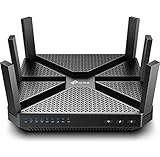
Overview: The TP-Link Archer A20 is a performance-focused tri-band router that earned J.D. Power awards for customer satisfaction in 2017 and 2019. While it includes VPN server capabilities, its primary strength lies in delivering blazing AC4000 speeds for gaming, 4K streaming, and high-bandwidth households that demand reliable connectivity.
What Makes It Stand Out: This router’s 1.8 GHz 64-bit CPU handles multiple simultaneous requests effortlessly, while MU-MIMO and RangeBoost technologies eliminate buffering and extend coverage throughout larger homes. Tri-band operation dedicates a 5GHz band to high-priority traffic, and Link Aggregation doubles wired speeds for NAS devices. Alexa compatibility adds smart home convenience without complexity.
Value for Money: At $95.55, the Archer A20 offers exceptional performance-per-dollar. It outpaces many newer routers in raw speed while costing significantly less than Wi-Fi 6 alternatives. For users prioritizing throughput over cutting-edge standards, this represents outstanding value that has aged remarkably well.
Strengths and Weaknesses: Strengths include award-winning reliability, powerful processing, tri-band flexibility, robust QoS, and affordable pricing. Weaknesses are lack of Wi-Fi 6, VPN server-only functionality (no built-in VPN client/service), and bulkier design. Security features are basic compared to dedicated VPN routers.
Bottom Line: Best for users seeking high-performance networking with occasional VPN server needs. If your primary goal is network-wide VPN protection, look elsewhere. For speed, stability, and value, the Archer A20 remains a compelling choice despite its age.
Understanding Router-Based VPN Servers for Smart Home Access
What Is a Router-Based VPN Server?
A router-based VPN server is a virtual private network service that runs directly on your home router rather than on a separate computer or through a subscription service. It creates an encrypted tunnel between your remote device (phone, laptop, tablet) and your home network, allowing you to access your smart home devices as if you were physically connected to your Wi-Fi. The encryption happens at the router level, meaning all data passing through the tunnel is scrambled using sophisticated algorithms, making it unreadable to anyone who might intercept it.
How It Differs from Traditional VPN Services
The fundamental difference lies in control and destination. Commercial VPN services like NordVPN or ExpressVPN route your traffic through their servers, masking your IP address from the websites you visit. A router-based VPN server, conversely, doesn’t hide your location from the world—it creates a secure path to your home network. You’re not renting privacy; you’re building a private road. This distinction is crucial for smart home access because you need to connect to your specific network, not anonymize your browsing activity.
The Role in Smart Home Security
Smart home devices are notoriously insecure. Many lack robust encryption, receive infrequent security updates, and communicate over protocols that can be intercepted. A router-based VPN server creates a single, hardened entry point into your network. Instead of exposing multiple devices to the internet through port forwarding or cloud services, you expose only the VPN port. Once connected, you can access your devices through their local IP addresses, keeping them hidden from the public internet and potential attackers scanning for vulnerable IoT devices.
Why Router-Based VPNs Are Ideal for Remote Smart Home Access
Direct Network Access Without Cloud Dependencies
Most smart home ecosystems rely on cloud servers to facilitate remote access. Your phone talks to Amazon’s or Google’s servers, which then talk to your devices. This creates latency, potential privacy issues, and dependency on third-party uptime. A router VPN eliminates this middleman. Your phone connects directly to your router, which then routes traffic locally to your devices. The result is faster response times, no subscription fees for cloud storage, and complete data sovereignty. If the internet is working, your remote access works—regardless of whether some company’s server is down.
Unified Security for All Connected Devices
When you use a router-based VPN, every single device on your network becomes accessible without needing individual remote access capabilities. Your smart garage opener from 2015 that never received security updates? It’s safely behind the VPN. Your IP cameras with questionable firmware? They’re not exposed to the internet. The VPN creates a unified security perimeter, treating your entire smart home as a single, protected entity rather than a collection of individually vulnerable gadgets.
Cost-Effectiveness Over Time
While setting up a router-based VPN requires an upfront investment in capable hardware, it pays dividends. There are no monthly fees, no subscription tiers, and no limits on how many devices you can connect. For power users with dozens of smart home devices, the cost savings compared to premium cloud services add up quickly. Additionally, you’re not paying with your data—there’s no privacy policy to scrutinize because you are the privacy policy.
VPN Protocols: Choosing the Right One for Your Needs
OpenVPN: The Gold Standard
OpenVPN has been the workhorse of router-based VPNs for over two decades. It’s open-source, thoroughly audited, and highly configurable. Running on either UDP (faster) or TCP (more reliable) ports, OpenVPN can bypass many network restrictions because it can be configured to use common ports like 443, which is rarely blocked. The trade-off is computational overhead—OpenVPN isn’t the fastest protocol, but its maturity and security track record make it ideal for users prioritizing reliability over raw speed.
WireGuard: Modern Speed and Simplicity
WireGuard represents a fundamental rethinking of VPN architecture. With roughly 4,000 lines of code compared to OpenVPN’s 100,000+, it’s leaner, faster, and easier to audit. It uses state-of-the-art cryptography and maintains connections more reliably when switching networks (like moving from Wi-Fi to cellular). For smart home access, WireGuard’s lower CPU overhead means your router can handle higher throughput with less powerful hardware. The main drawback? It’s newer, so some older devices may lack native client support, though this is rapidly changing.
IPsec/IKEv2: Enterprise-Grade Security
IPsec with IKEv2 is the protocol most large corporations use for their remote access solutions. It’s natively supported on virtually all modern operating systems, meaning you often don’t need to install third-party client software. The protocol excels at maintaining connections during network transitions and is highly resistant to blocking. However, it can be more complex to configure on routers, and some ISPs throttle IPsec traffic. For smart home users embedded in Apple ecosystems, IKEv2’s native iOS and macOS support is a significant advantage.
PPTP and L2TP: Legacy Options to Avoid
Point-to-Point Tunneling Protocol (PPTP) and Layer 2 Tunneling Protocol (L2TP) appear in many router firmwares but should be avoided. PPTP’s encryption can be cracked in minutes with modern tools, and L2TP lacks encryption on its own (it’s usually paired with IPsec, creating complexity without benefit). These protocols exist for backward compatibility but have no place in a security-conscious smart home setup. Always choose OpenVPN, WireGuard, or IPsec/IKEv2.
Critical Features to Evaluate in VPN-Ready Routers
Processing Power and VPN Acceleration
VPN encryption is computationally intensive. A router’s CPU determines how fast it can encrypt and decrypt data. Look for routers with multi-core processors clocked at least 1 GHz for basic performance. More importantly, seek hardware with dedicated VPN acceleration—some processors include AES-NI instruction sets that dramatically speed up encryption. Without adequate CPU power, your 1 Gbps internet connection might crawl to 20 Mbps when using the VPN, making 4K camera streams or large file transfers painful.
Firmware Flexibility and Open-Source Support
Stock router firmware from manufacturers is often limited, buggy, and rarely updated. Firmware like OpenWrt, DD-WRT, or ASUSWRT-Merlin unlocks the full potential of your hardware. These open-source options provide more frequent security patches, better VPN configuration interfaces, and advanced features like policy-based routing. Before purchasing a router, check community support forums to ensure the model has a robust developer community. A router is only as good as its firmware’s ability to stay secure and functional.
Dynamic DNS Integration
Most home internet connections use dynamic IP addresses that change periodically. Without a static IP, you won’t know how to connect to your VPN server. Dynamic DNS (DDNS) solves this by assigning a persistent domain name (like myhome.example.com) that automatically updates when your IP changes. Quality router firmware includes built-in DDNS clients for services like No-IP, DuckDNS, or Cloudflare. Some routers even offer free DDNS subdomains. This feature is non-negotiable for reliable remote access.
Split Tunneling Capabilities
Split tunneling allows you to choose which traffic goes through the VPN and which uses your regular internet connection. For smart home access, you might want only traffic destined for your home devices (192.168.1.x) to use the VPN, while your web browsing goes directly to the internet. This reduces load on your router and improves speeds. Advanced implementations can even route traffic based on domain names or applications, giving you granular control over your connection.
Client Capacity and Concurrent Connections
Consumer routers often limit how many simultaneous VPN connections they can handle. This isn’t just about family members—each device counts separately. If you have a phone, tablet, and laptop all connected, that’s three connections. Some routers cap connections at 5-10, which becomes problematic for larger households or when sharing access with trusted friends. Check specifications for concurrent connection limits, and consider that WireGuard generally supports more connections than OpenVPN on the same hardware due to lower overhead.
Hardware Considerations for Optimal Performance
CPU Requirements for VPN Encryption
The heart of VPN performance is the processor. For WireGuard, a dual-core ARM processor at 1.4 GHz can handle 200-300 Mbps throughput. For OpenVPN, you’ll need similar specs just to reach 100 Mbps. If you have gigabit internet and want to maintain those speeds over VPN, you’re looking at quad-core processors in the 2 GHz range or hardware with cryptographic accelerators. Don’t rely on manufacturer marketing—search for real-world VPN throughput tests from community forums where users share actual performance data.
RAM and Storage Needs
VPN services don’t just need CPU; they require memory. Each connection consumes RAM, and firmware with VPN features needs space for configuration files, certificates, and logs. A router with 256 MB of RAM is the absolute minimum for a reliable VPN server; 512 MB or 1 GB provides headroom for future firmware updates and more connections. Internal storage (flash memory) should be at least 128 MB to accommodate firmware with VPN server packages installed. Some advanced setups even use USB storage for extensive logging or additional software.
Gigabit Ethernet and Wi-Fi Standards
While VPN encryption happens at the router level, your local network speed matters. Ensure the router has gigabit Ethernet ports on all LAN connections—some budget models only have gigabit on the WAN port. For Wi-Fi, Wi-Fi 6 (802.11ax) is becoming essential not just for speed but for handling the dozens of smart home devices that constantly chatter on your network. The improved MU-MIMO and OFDMA technologies in Wi-Fi 6 keep your IoT devices from interfering with your VPN traffic.
Heat Management and Reliability
VPN processing generates heat, and consumer routers are often designed with inadequate cooling. A router running a VPN server 24/7 will operate at higher temperatures than one just handling basic routing. Look for routers with good ventilation, consider adding passive cooling stands, or even small USB fans for high-performance models. Overheating causes thermal throttling, which cripples VPN performance, and can lead to premature hardware failure. Metal chassis generally dissipate heat better than plastic.
Security Best Practices for Router VPN Deployment
Certificate-Based Authentication vs. Passwords
Never rely on passwords alone for VPN access. Certificate-based authentication uses cryptographic keys that are exponentially more secure. Generate unique certificates for each device or user, so if a phone is lost, you can revoke that specific certificate without affecting other connections. Most robust firmware includes easy certificate management tools. Combine certificates with strong passphrases for an additional layer—the certificate proves the device is authorized, the passphrase proves the user is legitimate.
Implementing Perfect Forward Secrecy
Perfect Forward Secrecy (PFS) ensures that even if a session key is compromised, past and future sessions remain secure. This is achieved by generating unique session keys for each connection that aren’t derived from the server’s main private key. Both OpenVPN and WireGuard support PFS by default when configured correctly, but you must verify it’s enabled. In OpenVPN, this means using an Ephemeral Diffie-Hellman key exchange. For smart homes, where connections might last hours or days, PFS is critical for long-term security.
Firewall Rules and Network Segmentation
Your VPN shouldn’t be a backdoor to your entire network. Implement firewall rules that restrict VPN clients to only necessary resources. For example, allow access to your smart home hub (192.168.1.10) and cameras (192.168.1.20-25) but block access to your personal computer (192.168.1.100). Create a separate VLAN for IoT devices and only allow VPN access to that VLAN. This way, even if a VPN connection is compromised, an attacker can’t access your personal files or other sensitive systems.
Regular Firmware Updates and Patch Management
VPN software vulnerabilities are discovered regularly. A router running a three-year-old firmware version is a ticking time bomb. Set up automatic firmware updates if your router supports it, or schedule monthly manual checks. Subscribe to security mailing lists for your firmware project. For critical vulnerabilities, be prepared to update within days, not weeks. Keep offline backups of your configuration so you can quickly restore settings after an update. Remember: security is a process, not a one-time setup.
Step-by-Step Setup: What to Expect
Initial Router Configuration
Before touching VPN settings, establish a solid foundation. Change default passwords, disable remote management from the WAN side, and set up a secure Wi-Fi network. Update to the latest firmware version. Configure your LAN with a non-standard subnet (avoid 192.168.1.x or 192.168.0.x) to reduce conflicts when connecting from external networks that use the same ranges. Document every setting change—you’ll thank yourself during troubleshooting.
Generating Certificates and Keys
The certificate generation process varies by protocol. For OpenVPN, you’ll create a Certificate Authority (CA), server certificate, and individual client certificates. WireGuard uses simpler key pairs. Most router firmware provides wizard-like interfaces for this, but understanding the underlying process helps when things go wrong. Store your CA private key securely—if it’s compromised, you’ll need to regenerate every certificate. Use strong key lengths: at least 2048-bit for RSA keys or 256-bit for ECC keys.
Port Forwarding and ISP Considerations
Your VPN server needs to be reachable from the internet. This typically requires forwarding a port from your modem to your router—usually UDP 1194 for OpenVPN or UDP 51820 for WireGuard. Some ISPs use carrier-grade NAT (CGNAT), which prevents direct inbound connections. If you’re behind CGNAT, you’ll need to contact your ISP for a public IP or use a VPS with a reverse tunnel. Test your port forwarding with online tools before configuring clients—if the port isn’t accessible, nothing else matters.
Client Configuration Across Devices
Each device needs a client configuration file that includes server address, port, protocol, and authentication keys. Most platforms have native or third-party clients: OpenVPN Connect for mobile devices, WireGuard apps for all major OSes. For smart home control, configure your home automation app to connect to local IPs rather than cloud services when the VPN is active. Export configurations securely—never email unencrypted keys. QR codes in WireGuard make mobile setup painless, while OpenVPN’s .ovpn files work universally.
Troubleshooting Common Router VPN Challenges
Connection Drops and Stability Issues
Frequent disconnections often stem from NAT timeouts on your ISP’s side or aggressive power-saving on mobile devices. Enable keepalive packets in your VPN configuration—OpenVPN’s keepalive 10 60 sends a ping every 10 seconds and assumes disconnection after 60 seconds of no response. For mobile devices, disable battery optimization for the VPN client app. Check router logs for authentication errors or resource exhaustion. Sometimes, simply switching from UDP to TCP can improve stability on unreliable networks.
Slow Speeds and Performance Bottlenecks
If your VPN speeds are disappointing, first verify your router’s CPU isn’t maxed out during transfers. Use router monitoring tools to check CPU usage. Try switching protocols—WireGuard is often 2-3x faster than OpenVPN on the same hardware. Adjust encryption ciphers; AES-128-GCM is faster than AES-256-CBC with negligible security difference for most users. Ensure your client device isn’t the bottleneck—old phones can’t handle high-speed encryption. Consider that upload speeds often limit download speeds over VPN; a 100 Mbps symmetric connection performs better than 1000/50 Mbps asymmetrical.
NAT and Double-NAT Complications
Double-NAT occurs when your modem and router both perform network address translation, breaking VPN connectivity. If your modem has a built-in router, either disable its routing functions (bridge mode) or put your VPN router in the modem’s DMZ. For triple-play services (phone/TV/internet), bridge mode might break TV service—research your ISP’s specific requirements. Use traceroute from inside your network to identify where NAT is happening; the first private IP hop is your primary router.
Certificate and Authentication Failures
“TLS handshake failed” or “certificate verify failed” errors are common and frustrating. First, verify system times are synchronized—certificate validation fails if clocks differ by more than a few minutes. Ensure the server certificate includes the correct Common Name or Subject Alternative Name matching your DDNS hostname. Check that client certificates haven’t expired (they typically last 365 days). For WireGuard, a single character error in a key will cause silent failures—triple-check key transcription. Keep a text file with all certificate details for quick reference.
When to Consider Alternative Solutions
Cloud-Based VPN Services
Router-based VPNs aren’t for everyone. If you lack technical confidence or time for maintenance, a cloud VPN service like Tailscale or ZeroTier might be better. These services handle the complex networking automatically, punching through CGNAT and firewalls without configuration. They’re ideal for users who prioritize convenience over absolute control. The trade-off is trusting a third party and potentially paying subscription fees, but for many, the ease of use justifies the cost.
Dedicated VPN Appliances
For users with gigabit fiber and high-performance needs, a dedicated VPN appliance like a small PC running pfSense or OPNsense outperforms consumer routers. These solutions offer enterprise-grade features: failover, multiple WAN support, and intrusion detection. A mini PC with a modern Intel or AMD processor can handle WireGuard at 1 Gbps speeds for under $300. This approach separates routing from VPN duties, allowing independent upgrades and more robust logging.
NAS-Based VPN Servers
If you already own a Network Attached Storage (NAS) device from Synology or QNAP, it likely has built-in VPN server capabilities. These devices typically have more powerful CPUs than routers and excellent software interfaces. The downside is that your NAS must remain powered on 24/7, and you’re adding VPN exposure to a device that already contains your most valuable data. Proper network segmentation becomes even more critical—place the NAS on a separate VLAN from your IoT devices.
Frequently Asked Questions
1. Will using a router-based VPN slow down my internet connection?
Only traffic passing through the VPN is affected. Your regular internet usage won’t slow down. VPN traffic itself will be slower than your raw connection due to encryption overhead, typically 10-30% on modern hardware. The exact impact depends on your router’s CPU and the VPN protocol—WireGuard is significantly faster than OpenVPN.
2. Can I use a router-based VPN to access streaming services while traveling?
Yes, but with caveats. By connecting to your home VPN, streaming services will see your home IP address, potentially allowing access to your home region’s content. However, many services actively block known VPN IPs, and residential IPs can sometimes be flagged. Performance may also suffer due to upload speed limitations on your home connection.
3. How many devices can connect to my router VPN simultaneously?
This varies by router hardware and firmware. Most consumer routers support 5-15 concurrent connections. High-end models or those running open-source firmware might support 50+ connections. WireGuard handles concurrent connections more efficiently than OpenVPN. Check your router’s specifications and monitor CPU usage as you add devices.
4. Is a router-based VPN legal?
In most countries, including the US, Canada, and EU nations, running a personal VPN server is completely legal. You’re not hiding your identity or engaging in illegal activities—you’re securely accessing your own property. Some restrictive regions may have regulations about encryption, so check local laws if traveling internationally.
5. What happens if my home internet goes down?
If your home internet is offline, your VPN server will be unreachable. There’s no way around this—the VPN requires an active internet connection at both ends. Consider a backup internet connection (like a 5G hotspot) with automatic failover if constant availability is critical for security systems.
6. Can I set up a router VPN without technical experience?
Basic setups are possible with modern firmware wizards, but you’ll need to understand concepts like port forwarding, DDNS, and certificate management. If terms like “UDP port” or “TLS certificate” are completely foreign, consider starting with a cloud-based solution like Tailscale before tackling a full router implementation.
7. Will a VPN help protect my smart home devices from hackers?
Indirectly, yes. By not exposing your devices directly to the internet and requiring VPN authentication to access them, you eliminate the most common attack vectors. However, a VPN doesn’t fix vulnerabilities within the devices themselves—compromised devices can still be used for lateral movement inside your network. Combine VPN access with network segmentation for best results.
8. How do I access my VPN from a hotel or corporate network?
Most hotels and corporate firewalls block uncommon ports. Configure your VPN to use port 443 (HTTPS) over TCP, as this is almost never blocked. Some networks use captive portals that require authentication before allowing VPN traffic—connect and authenticate through the portal first, then activate your VPN. In extremely restrictive environments, obfuscation tools like Shadowsocks may be necessary.
9. Should I use a free DDNS service or pay for one?
Free services like DuckDNS or No-IP’s free tier work perfectly for most users. Paid options offer more domain choices, faster IP updates, and better support. The critical factor is reliability—choose a service with a long track record. If your ISP changes your IP frequently, prioritize a service with sub-60-second update times.
10. Can I use my router VPN on public Wi-Fi safely?
Absolutely. In fact, this is one of the best use cases. Public Wi-Fi is notoriously insecure, but connecting through your home VPN encrypts all your traffic from the moment it leaves your device. This prevents man-in-the-middle attacks, packet sniffing, and malicious hotspot operators from seeing your activities. Just ensure your VPN client is configured to block internet access if the VPN disconnects (a kill switch).