Gone are the days of racing home to intercept a package or nervously checking tracking updates while stuck in a meeting. The rise of e-commerce has brought unprecedented convenience to our doorsteps, but it’s also invited an unwelcome guest: porch piracy. Every year, millions of packages vanish from doorsteps, costing consumers and retailers billions. Meanwhile, traditional lockboxes and keyed padlocks create more problems than they solve—lost keys, forgotten combinations, and the impossibility of granting access to a delivery driver halfway across town.
Enter smart padlocks for delivery boxes: the sophisticated intersection of physical security and digital innovation. These aren’t your grandfather’s padlocks with finicky dials or easily-picked cylinders. Modern smart padlocks combine biometric authentication, encrypted wireless communication, and intelligent access management to create a fortress for your deliveries that’s both impenetrable to thieves and effortlessly accessible to legitimate carriers. Whether you’re managing a single-family home, a multi-unit dwelling, or a small business receiving daily shipments, understanding the nuances of this technology is crucial to making an informed investment that actually protects what matters.
Top 10 Smart Padlocks for Delivery Boxes
Detailed Product Reviews
1. Aurosmart Heavy Duty Fingerprint Padlock with Key, Smart Gate Lock with Keypad, Keyless Entry Digital Combination Lock for Outdoor Fence, Gate, Shed, Storage Unit, Pool, Locker, Tuya App

Overview: The Aurosmart Heavy Duty Fingerprint Padlock delivers six unlocking methods in a rugged package designed for demanding outdoor use. This smart lock combines biometric technology with a hardened steel shackle, making it perfect for gates, storage units, pools, and commercial applications where reliability is paramount.
What Makes It Stand Out: Six access options—fingerprint, RFID, passcode, NFC, app, and physical key—provide unmatched flexibility. The Tuya app enables remote user management, time-limited passwords, and detailed access logs. The 360° fingerprint reader unlocks in 0.5 seconds and stores 50 prints plus 100 codes, offering enterprise-level control for personal or commercial use.
Value for Money: Priced at $59.99, this lock justifies its cost through superior construction. The 10mm hardened stainless-steel shackle withstands 15 kN cutting force, while IP65 weatherproofing and 12-month battery life outperform cheaper alternatives. It’s a long-term investment that eliminates rekeying costs and provides professional-grade security.
Strengths and Weaknesses: Strengths:
- Six versatile unlocking methods
- Heavy-duty 10mm shackle with impressive force ratings
- Excellent weather resistance (-4°F to 122°F)
- Long 12-month battery life with USB-C emergency backup
- Comprehensive app controls and audit trails
Weaknesses:
- Premium pricing may deter budget-conscious buyers
- Requires Tuya app account setup
- No Apple Watch or smart home ecosystem integration
Bottom Line: The Aurosmart padlock is a premium security solution ideal for property managers and homeowners needing reliable, flexible outdoor protection. Its durability and feature set make it worth the investment.
2. Combination Lock eLinkSmart Gym Locker Padlock with 9 Digit Push Button Password Fingerprint APP Unlock Keyless Biometric Security Metal Padlock for Gym and School Lockers Storage Tool Box

Overview: The eLinkSmart Gym Locker Padlock offers a unique 9-digit push-button password system alongside biometric access in a compact, gym-friendly design. This versatile lock serves school lockers, toolboxes, and storage units with multiple access methods and robust app controls for shared environments.
What Makes It Stand Out: The 9-button mechanical password entry distinguishes it from traditional dial combinations, allowing 20 programmable passwords and anti-peep functionality. The app supports over 1,000 users with remote authorization and scheduling—uncommon at this price point. IP67 waterproofing provides superior moisture protection compared to standard IP65 locks.
Value for Money: At $48.99, this lock balances affordability with features. The 0.6cm stainless steel shackle offers decent cut resistance, while six-month battery life and 2,000 unlocks per charge match pricier competitors. The ability to manage 1,000+ users makes it ideal for shared facilities without enterprise pricing.
Strengths and Weaknesses: Strengths:
- Innovative 9-button password system with anti-peep protection
- Supports 1,000+ app users with remote scheduling
- IP67 superior waterproof rating
- Compact size fits most locker hasps
- Type-C charging with portable power bank compatibility
Weaknesses:
- Shackle diameter (6mm) thinner than heavy-duty alternatives
- Only 20 fingerprint slots vs. 50+ on premium models
- App interface less polished than major ecosystems
- No physical key backup mentioned
Bottom Line: The eLinkSmart padlock excels for gyms, schools, and shared workspaces needing affordable multi-user management. Its button-password system and excellent water resistance make it a practical choice for indoor/outdoor locker security.
3. Smart Key Lock Box with Code – Bluetooth & PIN Unlock, APP Controlled Digital Lockbox for Keys, Generate eKeys and Remote Passcodes for Airbnb Hosts, Landlords, Families, Realtors (Wall Mounted)
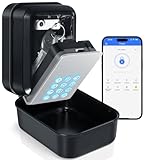
Overview: This Smart Key Lock Box provides secure key storage with Bluetooth and PIN code access for property managers, Airbnb hosts, and families. The wall-mounted design holds multiple keys and access cards, eliminating physical key handovers while maintaining emergency access capabilities.
What Makes It Stand Out: The large interior capacity—holding 8 house keys or 2-3 car fobs—sets it apart from smaller lock boxes. TTLock app integration enables remote eKey management and one-time PIN creation without recipients needing the app. The USB-C emergency port provides access even during battery failure, addressing a common lockbox vulnerability.
Value for Money: At $48.99, it competes directly with traditional combination lock boxes while adding smart features. The ABS shell and aluminum alloy body provide adequate weather resistance for most climates. However, requiring AAA batteries (not included) and an optional WiFi gateway for full remote management adds hidden costs.
Strengths and Weaknesses: Strengths:
- Spacious interior for multiple keys and fobs
- Bluetooth and PIN code dual access methods
- Remote eKey management via TTLock app
- USB-C emergency unlock port
- IP65 weatherproof rating with wide temperature range
Weaknesses:
- AAA batteries not included in purchase
- No built-in WiFi; full remote control requires separate gateway
- ABS plastic shell less robust than metal alternatives
- Cannot charge via USB-C, only emergency unlock
Bottom Line: This lock box suits Airbnb hosts and landlords needing convenient key sharing. While affordable, factor in battery and potential gateway costs. It’s practical for moderate-security applications but not high-risk areas.
4. Anweller Fingerprint Gym Locker Lock with Code Keypad, Waterproof Gate Locks for Outdoor Fence, Keyless Entry Smart Combination Padlock, Pad Lock for Locker Storage Unit Shed Pool School

Overview: The Anweller P7 positions itself as the world’s first fingerprint and passcode padlock with Apple Watch integration. This medium-sized smart lock targets active users needing quick gym access while offering sufficient durability for outdoor fence and gate applications in various weather conditions.
What Makes It Stand Out: Apple Watch unlocking capability differentiates it in a crowded market of biometric padlocks. The four access methods—fingerprint, passcode, app, and Apple Watch—cater specifically to iOS users seeking seamless device integration. The alloy steel and zinc alloy construction with hardened steel shackle provides balanced security for its size category.
Value for Money: Priced at $49.99, it sits in the mid-range but lacks the heavy-duty credentials of similarly priced alternatives. The 110mAh battery delivers six months standby and 2,000 unlocks—competitive but not class-leading. The 40-minute fast charging is convenient, though the six-month battery life trails longer-lasting competitors.
Strengths and Weaknesses: Strengths:
- Apple Watch integration for iOS users
- Four versatile unlocking methods
- IP65 weatherproofing for indoor/outdoor use
- Fast 40-minute Type-C charging
- 6-month warranty with lifetime technical support
Weaknesses:
- Only 110mAh battery capacity
- No RFID or NFC support
- Limited user capacity compared to enterprise models
- “World’s first” claim difficult to verify
- No physical key backup mentioned
Bottom Line: The Anweller P7 appeals to Apple ecosystem users wanting wearable convenience. It’s best for gym lockers and light outdoor use, but those needing heavy-duty security or larger user capacity should consider more robust alternatives.
5. eLinkSmart Fingerprint Gym Locker Lock, Keyless Biometric Padlock, Weatherproof Electronic Digital Bluetooth App Smart Combo Pad Lock for Outdoor Fence Gate School Locker Storage Pool Shed - Black

Overview: The eLinkSmart P6 offers streamlined biometric security at a budget-friendly price point. This keyless padlock focuses on core smart features—fingerprint and app control—without unnecessary complexity, making it accessible for students, gym-goers, and homeowners seeking simple, reliable protection for everyday use.
What Makes It Stand Out: The ultra-fast 0.2-second fingerprint recognition outpaces many premium competitors significantly. At $38.99, it’s one of the most affordable Bluetooth-enabled biometric locks available today. The simplified feature set focuses on essential functions—fingerprint management, unlock records, and remote sharing—without overwhelming users with rarely-used options.
Value for Money: This lock delivers remarkable value that punches above its weight class. The alloy steel construction and hardened steel shackle match mid-range competitors, while the six-month battery life and 2,000 unlocks per charge exceed expectations for the price. It sacrifices RFID and keypad access but maintains core biometric security that most users actually need daily.
Strengths and Weaknesses: Strengths:
- Exceptionally fast 0.2-second fingerprint unlocking
- Highly affordable at under $40
- Durable alloy steel and hardened shackle construction
- Six-month battery life with 2,000 unlocks
- Simple, user-friendly app interface
- 6-month warranty with lifetime support
Weaknesses:
- Limited to fingerprint and app only (no keypad/RFID)
- Smaller 110mAh battery capacity
- No Apple Watch or NFC integration
- Basic feature set lacks advanced scheduling
- No physical key backup mentioned
Bottom Line: The eLinkSmart P6 is the best value biometric lock for budget-conscious buyers. It prioritizes speed and simplicity over features, making it perfect for personal lockers, sheds, and gates where straightforward fingerprint access is the primary need.
6. Moquin Smart Key Lock Box, TTLock APP Control, Fingerprint, Manual Keys, Access Card, EKey and Passcode Unlock, Electronic Bluetooth Wireless Lock Box for Airbnb Realtor House Office

Overview: The Moquin Smart Key Lock Box is a comprehensive access management solution designed for property managers, Airbnb hosts, and real estate professionals. This versatile lockbox offers six different unlocking methods including fingerprint recognition, TTLock app control, manual keys, access cards, eKeys, and passcodes, providing exceptional flexibility for various scenarios.
What Makes It Stand Out: The standout feature is the biometric fingerprint scanner combined with multiple access options, rare in this price range. The IP65-certified zinc alloy construction withstands extreme temperatures from -20°C to 55°C, while the dual security system allows emergency USB-C power or manual key override. The flexible installation options—wall mounting or U-shaped shackle hanging—add significant versatility.
Value for Money: At $94.99, the Moquin sits in the mid-range category, but the required G2 gateway for remote access (sold separately) adds hidden costs. While feature-rich, competitors offer WiFi-enabled units without additional purchases. The four AAA batteries aren’t included, further increasing initial investment.
Strengths and Weaknesses: Strengths include versatile unlocking methods, robust weatherproofing, and emergency backup options. Weaknesses are the separate gateway requirement for remote functionality, battery exclusion, and somewhat complex setup for non-tech users.
Bottom Line: Ideal for users prioritizing multiple access methods over pure remote convenience. Factor in the gateway cost before purchasing, but the fingerprint recognition and durable build make it a solid choice for professional property management.
7. MAIUSCOLI Package Delivery Box for Outside, Large Parcel Drop Box with Lockable Secure, Waterproof and Anti-Theft Storage for Porch, Curbside, House (Black)

Overview: The MAIUSCOLI Package Delivery Box offers a robust solution for protecting parcels from weather and theft. Constructed from all-weather resin, this large-capacity box features an innovative security system designed specifically for outdoor use on porches and curbsides.
What Makes It Stand Out: The clever 1-way, 2-tray delivery system prevents unauthorized access while allowing couriers to deposit packages securely. Unlike simple lockboxes, this design ensures storage compartment remains inaccessible until unlocked. The ability to weight the base or anchor it with included screws provides superior anti-theft protection against porch pirates.
Value for Money: Priced at $127.99, this delivery box offers excellent value for its size and security features. Comparable metal alternatives cost significantly more, though the resin construction may not match metal’s durability. The padlock compatibility is a plus, but requiring users to supply their own lock adds $10-20 to the total cost.
Strengths and Weaknesses: Strengths include generous capacity, innovative tray system, weather resistance, and flexible security options. Weaknesses are the resin material’s potential vulnerability to determined thieves, lack of included lock, and bulky appearance that may not suit all aesthetics.
Bottom Line: An excellent investment for frequent online shoppers in package-theft prone areas. The secure delivery system and weather protection justify the price, though purchasing a quality padlock is essential for maximum security.
8. Thlevel Smart Key Lock Box Electronic Bluetooth Lock Box with APP Control & PIN Code Types,Share eKey Wall Mounted Lock Box for Airbnb Realtor House Office

Overview: The Thlevel Smart Key Lock Box delivers affordable smart security for key management. Designed for Airbnb hosts, realtors, and homeowners, this Bluetooth-enabled lockbox provides app-controlled access without breaking the bank.
What Makes It Stand Out: At just $49.99, it offers impressive features including TTLock app integration, anti-peep virtual passwords, and IP65 weatherproof certification. The wall-mount design with zinc alloy construction withstands temperatures from -20°C to 55°C, making it suitable for harsh outdoor conditions. The ability to generate time-limited access codes streamlines property management.
Value for Money: This lockbox represents exceptional value, undercutting competitors by 50% or more while retaining core smart features. However, the Bluetooth-only limitation means no true remote access without being within range. Three AAA batteries (not included) are required, and the backup USB-C power option provides peace of mind.
Strengths and Weaknesses: Strengths include unbeatable price, solid weatherproofing, user-friendly app, and emergency power option. Weaknesses are lack of WiFi connectivity, smaller interior capacity than premium models, and battery exclusion.
Bottom Line: A budget-friendly champion for those needing basic smart key storage. Perfect for Airbnb hosts who can be on-site for initial setup. If you don’t need remote access and want maximum features for minimal cost, this is your best bet.
9. Thlevel Smart Key Lock Box Electronic Bluetooth Lock Box with APP Control & PIN Code Types,Share eKey Wall Mounted Lock Box for Airbnb Realtor House Office with Removable Shackle
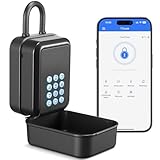
Overview: The Thlevel Smart Key Lock Box with Removable Shackle offers the same excellent value as its sibling model but adds versatile installation options. This Bluetooth-enabled lockbox caters to users needing flexible mounting solutions without compromising on smart features.
What Makes It Stand Out: The removable shackle distinguishes this model, allowing tool-free hanging on doorknobs, railings, or fences. This flexibility, combined with the same TTLock app functionality and IP65 weatherproof rating, makes it adaptable to various scenarios. The shackle locks with the main unit, preventing theft of the entire box.
Value for Money: At $49.99, this model delivers identical value to the wall-mount version while providing superior installation versatility. The choice between hanging and wall mounting at no extra cost makes it the better option for most users. The same caveats apply: Bluetooth-only, no included batteries, but excellent feature-to-price ratio.
Strengths and Weaknesses: Strengths include flexible installation, removable shackle, comprehensive app features, and weatherproof construction. Potential weaknesses involve the shackle being a possible vulnerability point compared to direct wall mounting, and the same Bluetooth range limitations as the standard model.
Bottom Line: Choose this over the wall-mount-only version unless you’re certain you need permanent installation. The removable shackle adds valuable flexibility without increasing cost, making it the more practical choice for Airbnb hosts and realtors needing adaptable key management solutions.
10. Yale Smart Delivery Box with Wi-Fi - Package Box for Outdoor Storage - Receive Packages from Any Carrier and Protect Them from Weather and Porch Pirates – Gray Medium

Overview: The Yale Smart Delivery Box represents the premium tier of package security, combining WiFi connectivity with robust construction. This medium-sized box protects deliveries from weather and theft while offering true remote management through the Yale Access app.
What Makes It Stand Out: Unlike Bluetooth-only competitors, built-in WiFi enables remote locking/unlocking from anywhere without additional hubs. The innovative Delivery Mode keeps the box unlocked until first delivery, then auto-locks—perfect for receiving multiple packages. Yale’s reputation for security and the box’s dual functionality as a bench add unique value.
Value for Money: At $280, this is a significant investment costing double most competitors. However, the WiFi capability, brand reliability, and smart features justify the premium for tech-savvy users. The ability to receive notifications and manage access remotely eliminates the need for separate gateways or being on-site.
Strengths and Weaknesses: Strengths include true remote access, trusted brand, Delivery Mode, and versatile usage. Weaknesses are the high price point, medium capacity that may not accommodate oversized packages, and potential WiFi connectivity issues in areas with poor signal.
Bottom Line: The best choice for those wanting maximum convenience and remote management. The WiFi integration and Yale brand reliability make it worth the premium price if your budget allows and you frequently receive valuable deliveries while away from home.
What Are Smart Padlocks for Delivery Boxes?
Smart padlocks represent a fundamental evolution in access control, specifically engineered for the unique challenges of secure package delivery. Unlike conventional padlocks that rely on physical keys or static combinations, these devices leverage digital authentication methods—fingerprints, smartphone apps, temporary PIN codes, or even voice commands—to grant entry. When integrated with a secure delivery box, they create a closed-loop system where only authorized individuals can deposit packages while you maintain complete control over access permissions.
The technology extends far beyond simple locking mechanisms. Premium models function as miniature security computers, equipped with processors, encrypted storage, wireless radios, and sensors that monitor everything from shackle position to unauthorized tampering attempts. They’re designed to withstand both digital attacks and physical brute force, creating a comprehensive security solution that addresses modern delivery vulnerabilities. Think of them as gatekeepers that never sleep, never forget, and never lose their keys.
The Porch Piracy Problem: Why You Need Smart Security
Package theft has evolved from a crime of opportunity into a sophisticated, organized criminal enterprise. Thieves now follow delivery trucks, use apps to track packages, and target specific neighborhoods during peak delivery hours. Traditional solutions like hiding packages behind planters or asking neighbors to watch your stoop are Band-Aids on a hemorrhaging wound. Even standard lockboxes fail because they require you to either leave them unlocked (defeating the purpose) or share a combination that can’t be changed after each delivery.
Smart padlocks solve this core dilemma by enabling time-sensitive, single-use access that automatically expires. A driver receives a one-time code valid for 15 minutes, drops your package, and that code becomes useless forever. Meanwhile, you receive instant notification with a timestamp and often a photo confirmation. This creates an audit trail that deters theft and provides evidence if something goes wrong. The psychological deterrent is equally powerful—a visibly robust, tech-enabled security system signals that your property is protected, causing most opportunistic thieves to move on to easier targets.
Core Technologies Behind Smart Padlocks
Understanding the underlying technology helps you cut through marketing hype and identify genuinely secure solutions. The most effective smart padlocks integrate multiple technological layers that work in concert to create a seamless yet fortified user experience.
Biometric Authentication: Your Fingerprint as the Key
Fingerprint sensors have migrated from smartphones to padlocks, offering unparalleled convenience and security. Capacitive sensors create a detailed map of your fingerprint’s unique ridges and valleys, converting this data into an encrypted template that never leaves the device. The best implementations store this information in a secure element isolated from the main processor, preventing extraction even if someone physically compromises the lock.
Look for sensors with liveness detection that distinguish real fingers from molds or photocopies. Multi-angle recognition allows you to unlock the padlock regardless of how you position your finger—a crucial feature when you’re carrying groceries and need one-handed operation. The enrollment process should support multiple fingers per user and at least 20-50 total fingerprint profiles for family members or trusted individuals.
Wireless Connectivity: Bluetooth, Wi-Fi, and Cellular Options
Connectivity determines how you interact with your smart padlock and what happens when you’re away from home. Bluetooth-only models offer simplicity and extended battery life but require you to be within 30-50 feet to manage access—a limitation if you need to grant entry while at work. Wi-Fi enabled locks provide true remote management, allowing you to create codes, receive notifications, and monitor status from anywhere with internet access.
Cellular-connected padlocks represent the premium tier, using LTE-M or NB-IoT networks to maintain communication even during internet outages. This is particularly valuable for delivery boxes located at remote properties or in areas with unreliable Wi-Fi. However, cellular models typically require subscription plans and consume more power. The sweet spot for most homeowners is a Bluetooth + Wi-Fi hybrid that maintains local control while offering remote capabilities when needed.
Power Systems: Battery Life and Emergency Backup
A smart padlock with a dead battery is just an expensive paperweight. Lithium batteries dominate the market, with lifespans ranging from six months to two years depending on usage frequency and connectivity type. Solar-assisted models integrate tiny photovoltaic panels that trickle-charge the battery, extending life indefinitely in sunny locations. This is ideal for outdoor delivery boxes exposed to direct sunlight.
Emergency backup mechanisms separate reliable locks from potential lockouts. Look for hidden micro-USB ports that accept portable battery packs, or 9V battery terminals on the lock’s bottom that provide enough juice for a single unlock cycle. Some premium models include kinetic energy harvesting—generating power from the act of pressing the fingerprint sensor or turning the shackle. Always verify the low-battery warning system provides alerts at 20% and 10% capacity, giving you ample time to recharge.
Types of Smart Padlocks for Different Delivery Scenarios
Not all delivery boxes are created equal, and neither are the padlocks that secure them. The market segments into specialized categories designed for specific environments and threat levels.
Weatherproof Ratings: Understanding IP Codes
Outdoor installation demands rigorous weather resistance. The Ingress Protection (IP) rating system uses two digits: the first indicates dust protection (0-6), the second water resistance (0-9). For year-round outdoor use, insist on IP65 or higher—the “6” means complete dust-tight construction, while “5” indicates resistance to water jets from any direction. IP67 offers temporary submersion protection, valuable in flood-prone areas.
Beyond the rating, examine material choices. Marine-grade stainless steel (316) resists salt corrosion in coastal regions, while zinc alloy bodies with powder coating provide excellent durability at lower cost. Internal components should be encapsulated in epoxy resin or silicone gel to prevent condensation damage. Temperature operating range matters too—quality locks function from -4°F to 140°F, ensuring reliability during winter freezes and summer heatwaves.
Security Grades: Commercial vs. Residential Use
The American National Standards Institute (ANSI) grades locks from 1 (highest security) to 3 (basic residential). For delivery boxes containing valuable items like electronics or medications, Grade 2 represents the minimum acceptable standard. Grade 1 locks withstand 10,000 cycles and resist professional attack for 10 minutes, making them suitable for small business applications where high-value inventory arrives daily.
Shackle diameter and material directly impact cut resistance. Shackles under 8mm can be severed with manual bolt cutters in seconds. Premium locks feature 10mm+ shackles made from hardened boron alloy steel, requiring power tools to defeat. Some designs use shrouded shackles that minimize exposed surface area, forcing thieves to cut through the lock body itself—a much more difficult proposition.
Key Features That Separate Good from Great
While basic smart padlocks open with a fingerprint or code, exceptional models anticipate real-world complications and provide elegant solutions to problems you haven’t yet considered.
Temporary Access Management for Delivery Personnel
The hallmark feature of delivery-focused smart padlocks is sophisticated temporary access. Basic models generate a PIN you can text to drivers, but this creates security gaps if the code is intercepted or reused. Advanced systems integrate directly with major carriers through proprietary platforms, automatically generating and transmitting one-time codes when a package is out for delivery.
Time-restricted access windows add another layer of control. You can set codes to work only during specified hours—say, 8 AM to 8 PM—preventing middle-of-the-night tampering. Duration limits ensure codes expire after 15-30 minutes, eliminating the risk of a driver sharing your code with others. The best systems provide usage logs showing exactly when the lock was accessed and by which code, creating accountability.
Real-Time Notifications and Activity Logs
Intelligence transforms a simple lock into a comprehensive security system. Push notifications should instantly alert you to every lock/unlock event, shackle movement, and tamper attempt. Geofencing capabilities can notify you when a delivery driver arrives at your property, even before they access the lock.
Activity logs serve multiple purposes: they confirm successful deliveries, help resolve disputes with carriers, and identify suspicious patterns like repeated access attempts at odd hours. Exportable logs in CSV format are invaluable for small businesses tracking inventory receipts. Some systems automatically timestamp entries with GPS coordinates, providing proof that deliveries occurred at your specified location.
Anti-Tamper Technology and Physical Durability
Sophisticated attacks target the lock’s electronics rather than its physical body. Vibration sensors detect cutting or prying attempts, triggering audible alarms up to 120 decibels—loud enough to startle thieves and alert neighbors. Accelerometers sense when the lock is being struck with tools, while hall-effect sensors monitor magnetic fields for electromagnetic interference attacks.
Physical design matters equally. Look for locks with no visible screws on the exterior, dual-ball bearing locking mechanisms, and reinforced steel lock bodies over 3mm thick. Some models include decoy features like fake reset buttons that trigger alarms when pressed, or hardened steel rods embedded in the shackle to destroy saw blades.
Installation and Setup: What to Know Before You Buy
Even the most advanced smart padlock fails if it doesn’t physically fit your delivery box or proves too complex to install correctly. Proper planning prevents costly returns and security gaps.
Shackle Size and Box Compatibility
Measure twice, buy once. Document your delivery box’s hasp thickness, clearance height, and diameter requirements. Standard shackles accommodate 1/4" to 3/8" hasps, but some boxes require long-shackle variants for deep-set mounting points. The shackle’s inner clearance should exceed your hasp height by at least 1/4" to ensure easy operation in freezing conditions when metal contracts.
Consider the lock’s body dimensions too. Bulky smart padlocks may not fit narrow spaces between the box door and frame. Models with rotating shackles offer flexibility, allowing you to position the lock body away from obstructions. For retrofits, examine whether your existing box requires a hasp upgrade to support the lock’s weight—some smart padlocks exceed one pound and need reinforced mounting.
DIY vs. Professional Installation
Most smart padlocks install with simple tools: a screwdriver, adjustable wrench, and maybe a drill for new hasps. However, integration with existing smart home systems or hardwired power solutions may require professional installation. Electricians can install low-voltage transformer kits that eliminate battery concerns entirely, connecting your lock to continuous power.
Professional installation becomes advisable for multi-unit residential buildings where centralized management is needed. Security integrators can configure systems where property managers control all locks through a single dashboard while residents receive package notifications. They’ll also ensure proper weather sealing and structural reinforcement that DIY installations often overlook.
Integration with Delivery Services and Smart Home Systems
A smart padlock operating in isolation provides security but not convenience. True value emerges when it seamlessly connects with the broader ecosystem of services and devices you already use.
Modern smart padlocks increasingly integrate with Amazon Key, Walmart InHome, and other carrier-specific programs. These platforms automatically generate access credentials when you place an order, transmitting them directly to the driver’s handheld device. The driver doesn’t need to call you or enter codes manually—they simply hold their device near the lock, which verifies the encrypted token and opens automatically.
For unsupported carriers, IFTTT (If This Then That) applets bridge the gap. You can create workflows where a text message containing a tracking number automatically generates a temporary PIN, or where lock events trigger your security cameras to record. API access for developers allows custom integrations with property management software, enabling automated tenant onboarding and access revocation.
Smart Home Ecosystem Compatibility
Your lock should communicate with your smart home hub—whether that’s Samsung SmartThings, Apple HomeKit, or Google Home. This enables voice commands like “Hey Google, unlock my delivery box” and allows the lock to participate in automation routines. For example, unlocking the delivery box could automatically turn on pathway lights at night, or disarm a specific security zone while leaving perimeter protection active.
Z-Wave and Zigbee protocols offer advantages over Wi-Fi for hub-connected locks, consuming less power and creating mesh networks that extend range. Matter, the new universal smart home standard, promises future-proof interoperability across ecosystems. When evaluating compatibility, verify not just current support but the manufacturer’s track record for firmware updates that maintain compatibility as platforms evolve.
Security Standards and What They Actually Mean
Marketing claims of “military-grade encryption” and “unhackable design” are meaningless without verification against established standards. Understanding certifications helps you separate substance from fluff.
Encryption and Data Protection
AES-256 encryption is the current gold standard for data at rest and in transit—this is what protects your fingerprint templates and access logs from interception. However, encryption is only as strong as its key management. Look for locks that use hardware security modules (HSMs) to generate and store encryption keys, preventing extraction even if the device is physically dissected.
End-to-end encryption ensures your data remains encrypted from the lock to your phone, never decrypted on intermediary servers. This prevents the manufacturer or potential hackers from accessing your usage patterns or biometric data. GDPR compliance indicates the manufacturer follows strict European data protection standards, a good sign even for US consumers. Regular third-party security audits, published transparently, demonstrate ongoing commitment to identifying and patching vulnerabilities.
Tamper Alerts and Anti-Theft Mechanisms
Effective tamper detection combines multiple sensor types. Accelerometers detect physical shocks from hammers or drills, while gyroscopes sense orientation changes if someone tries to remove the entire lock. Capacitive touch sensors on the lock body trigger alerts when handled without proper authentication, and infrared sensors detect attempts to obscure the lock with spray paint or tape.
Response mechanisms should escalate progressively. A single bump might trigger a notification, while sustained attacks activate a piercing alarm and automatically log GPS coordinates. Some systems integrate with local security monitoring services, dispatching guards when tampering is detected. The lock’s firmware should automatically brick itself after multiple failed admin authentication attempts, preventing attackers from resetting it to gain control.
Cost Considerations and Value Assessment
Price ranges from $50 for basic Bluetooth models to over $300 for cellular-connected commercial units. Understanding what drives these costs helps you invest wisely rather than cheaply.
Understanding Total Cost of Ownership
The sticker price rarely reflects true ownership costs. Battery replacement adds $10-20 annually for disposable lithium cells, while rechargeable models consume about $0.50 in electricity per year. Cellular locks require data plans typically costing $3-8 monthly—factor this into your budget from the start.
Warranty terms reveal manufacturer confidence. One-year warranties are standard, but premium brands offer two to three years plus lifetime technical support. Consider replacement costs if the lock fails outside warranty; cheap models often aren’t worth repairing. Some manufacturers offer trade-in programs, providing credit toward newer models as technology evolves.
Subscription Services: Necessary or Optional?
Many smart padlocks offer free basic functionality with premium features behind subscription paywalls. Free tiers typically include basic locking/unlocking and limited user management. Paid subscriptions unlock advanced capabilities: video integration, detailed analytics, priority customer support, and extended cloud storage for access logs.
Evaluate whether subscription features justify the cost. For residential users receiving a few packages weekly, free tiers often suffice. Small businesses managing dozens of daily deliveries may find $5-15 monthly subscriptions worthwhile for audit trails and carrier integration. Avoid locks that brick basic functionality if you cancel subscriptions—ethical manufacturers keep core features accessible regardless of payment status.
Maintenance, Battery Management, and Troubleshooting
Smart padlocks require minimal maintenance but neglecting basics leads to lockouts and security vulnerabilities. Establish a quarterly maintenance routine that takes less than five minutes.
Clean fingerprint sensors monthly with isopropyl alcohol to remove oil buildup that degrades recognition accuracy. Lubricate the shackle with dry graphite powder—not oil, which attracts dirt—every six months. Inspect weather seals for cracks and replace them annually to maintain IP ratings. For solar models, clean photovoltaic panels with a soft cloth to ensure maximum charging efficiency.
Troubleshooting Common Issues
Fingerprint recognition failures often stem from dry skin or minor cuts. Re-enroll your fingerprint seasonally, capturing multiple angles to account for variations. Bluetooth connectivity problems frequently resolve by clearing the app cache and re-pairing the device. Wi-Fi locks that drop connection may need firmware updates or closer proximity to your router—consider mesh network extenders for outdoor installations.
If the lock becomes completely unresponsive, most models include a hardware reset sequence: holding the shackle in a specific position while pressing the sensor. This should be a last resort, as it erases all settings. Always maintain a backup access method, whether it’s a mechanical override key (stored securely off-site) or an administrative PIN written down and stored in a safe.
Limitations and Realistic Expectations
No security system is impenetrable, and smart padlocks have specific constraints that informed buyers must acknowledge. Understanding these limitations prevents disappointment and ensures you implement complementary security measures.
Extreme cold temporarily reduces battery capacity by 30-50%, potentially causing shutdowns during winter storms. Keep a portable battery pack handy for emergency power. Thick gloves prevent fingerprint recognition—enroll a knuckle or the side of your finger as a cold-weather backup. Heavy rain can interfere with capacitive sensors; look for models with hydrophobic coatings that repel water droplets.
Network dependency creates vulnerabilities. Wi-Fi locks become dumb locks during internet outages unless they store offline access credentials. Bluetooth models require your phone to be present, which isn’t always practical. Cellular locks depend on carrier coverage, which may be spotty in rural areas. Always verify that your chosen model provides local backup access methods that work without connectivity.
The Future of Smart Delivery Security
The smart padlock market is evolving rapidly, with emerging technologies poised to transform how we receive deliveries. Staying informed about these trends helps you choose a lock that won’t become obsolete within a year.
Biometric technology is advancing beyond fingerprints. Ultrasonic sensors can map fingerprints through gloves and light dirt, while vein recognition uses near-infrared light to scan subsurface blood vessel patterns, making spoofing nearly impossible. AI-powered behavior analysis learns your delivery patterns and can flag anomalies—like a 2 AM access attempt—as high-risk, automatically denying entry and alerting you.
Integration with autonomous delivery vehicles and drones is already being tested. Future locks will communicate directly with delivery robots, verifying digital signatures and granting access without human intervention. Blockchain-based access logs promise immutable audit trails that can’t be altered, even by manufacturers. As delivery security becomes more critical, expect to see smart padlocks integrated into municipal package locker networks, creating neighborhood-scale secure delivery infrastructure.
Frequently Asked Questions
How do delivery drivers know how to use my smart padlock?
Most smart padlocks designed for deliveries include clear instructions on the box itself—often a QR code or short URL linking to a 30-second video demonstration. Advanced systems integrate directly with carrier apps, providing drivers step-by-step guidance through their handheld devices. For unsupported carriers, you can include instructions in your delivery address notes or set up automated text messages with access details that trigger when a package is marked “out for delivery.”
What happens if my smart padlock’s battery dies while I’m away?
Quality smart padlocks provide multiple warnings before complete depletion, including app notifications, LED indicators, and even email alerts at 20% and 10% battery levels. If you miss these warnings, emergency power options like micro-USB ports or 9V battery contacts allow temporary activation. For extended absences, enable low-power modes that disable non-essential features, extending battery life by up to 300%. Some models automatically send a final “critical battery” notification when they enter this state.
Can smart padlocks be hacked remotely?
While no connected device is entirely hack-proof, reputable smart padlocks employ multiple security layers: AES-256 encryption, secure element chips, and end-to-end encrypted communication. The most significant vulnerability is typically weak user passwords, not the lock itself. Enable two-factor authentication in the companion app, use unique 16+ character passwords, and regularly update firmware. Locks that process biometric data locally (rather than in the cloud) eliminate the most sensitive attack vector. No documented cases exist of properly configured premium smart padlocks being hacked remotely.
Do smart padlocks work in extreme weather conditions?
Premium models rated IP65 or higher operate reliably from -4°F to 140°F. In extreme cold, battery capacity temporarily decreases but returns to normal when temperatures rise. Solar-assisted models maintain charge better in winter when properly positioned to capture low-angle sunlight. For desert climates, verify the lock uses solid-state components without LCD screens, which can fail above 120°F. Coastal residents should choose marine-grade stainless steel to prevent salt corrosion. Always check the manufacturer’s specified operating range before purchasing.
How many fingerprints or users can I register?
Residential models typically store 20-50 fingerprint templates and support 100-200 app users. This accommodates family members, regular couriers, and service providers. Commercial-grade locks manage 100+ fingerprints and unlimited app users with role-based permissions. When evaluating capacity, consider not just current needs but future requirements—growing families, new roommates, or expanding businesses. Some systems charge subscription fees beyond a certain number of users, so verify pricing structures.
Will a smart padlock work with my existing delivery box?
Most smart padlocks fit standard hasp configurations, but measure carefully before purchasing. Key dimensions include shackle diameter (typically 1/4" to 3/8"), shackle clearance height (minimum 1" for most boxes), and lock body width. Many manufacturers provide printable sizing templates on their websites. If your box has a narrow or recessed hasp, look for models with adjustable or rotating shackles. Some delivery boxes require minor modifications like drilling new mounting holes or adding a reinforced strike plate to support the lock’s weight.
What’s the difference between Bluetooth and Wi-Fi smart padlocks?
Bluetooth locks connect directly to your smartphone, offering simplicity and extended battery life (often 12-24 months) but requiring proximity for management. Wi-Fi locks connect to your home network, enabling remote access, real-time notifications, and integration with smart home systems, but typically need battery replacement every 3-6 months. Bluetooth models suit users who primarily receive deliveries when home or can pre-generate codes. Wi-Fi models benefit those needing remote management, instant alerts, or integration with security cameras and voice assistants.
Can I grant temporary access to house cleaners or dog walkers?
Absolutely. Smart padlocks excel at temporary credentialing. Create time-restricted codes valid only during specific hours (e.g., Tuesdays 10 AM-2 PM) or for a set number of uses. Some systems generate QR codes you can email that expire after first use. For regular service providers, schedule-based access automatically activates and deactivates credentials on recurring intervals. You receive notifications when they access the lock, and logs show exactly when they arrived and departed—perfect for verifying service hours.
How long do smart padlocks typically last?
Physical durability spans 5-10 years for quality models, with electronic components often lasting longer. Battery lifespan depends on usage: a lock accessed 5 times daily may need annual replacement, while one accessed twice weekly lasts 2+ years. Solar models potentially operate indefinitely. Software support is the real limiting factor—manufacturers typically provide firmware updates for 3-5 years before discontinuing support. Choose brands with proven track records of long-term support and active user communities that can extend functionality beyond official support periods.
Are smart padlocks worth the investment compared to traditional locks?
For anyone receiving more than two packages weekly or living in neighborhoods with porch piracy concerns, smart padlocks deliver compelling ROI. They eliminate replacement costs for stolen items (averaging $150 per incident), reduce time spent coordinating deliveries or filing claims, and may lower home insurance premiums. The convenience of never hiding keys or remembering combinations adds intangible value. For small businesses, audit trails and delivery confirmations save hours of administrative work monthly. While the initial cost is 5-10x higher than traditional locks, most users recover this investment within 12-18 months through prevented thefts and reclaimed time.