Living in a rental doesn’t mean you have to remain in the dark about your energy consumption. In fact, renters often face the most unpredictable utility bills—older appliances, outdated insulation, and inefficient heating systems can turn a seemingly affordable apartment into a financial black hole. Wireless energy monitoring sensors have emerged as a game-changing solution that puts power (literally) back in your hands without requiring permanent installations or landlord renovations. These clever devices offer real-time insights into your electricity usage, helping you identify energy vampires, optimize your habits, and potentially slash your monthly bills by 10-30%—all while keeping your security deposit intact.
Unlike traditional energy monitoring systems that demand hardwired connections and professional electricians, today’s wireless solutions are designed with temporary living situations in mind. From clamp-on sensors that hug your electrical panel’s main lines to smart plugs that transform ordinary outlets into data-gathering powerhouses, the technology has evolved to be renter-friendly, portable, and surprisingly sophisticated. This guide will walk you through everything you need to know about selecting, installing, and maximizing wireless energy monitoring sensors in your rental property—ensuring you make an informed decision that aligns with your lease terms, technical comfort level, and budget constraints.
Top 10 Wireless Energy Monitoring Sensors for Renters
Detailed Product Reviews
1. Emporia Vue 3 Home Energy Monitor - Smart Home Automation Module and Real Time Electricity Usage Monitor, Power Consumption Meter, Solar and Net Metering for UL Certified Safe Energy Monitoring

Overview: The Emporia Vue 3 delivers professional-grade energy monitoring with UL certification, providing real-time electricity usage data for your entire home. This smart monitor installs directly in your circuit panel using clamp-on sensors, supporting single-phase and split-phase systems common in North American homes. With solar and net metering capabilities, it tracks both consumption and production, helping homeowners identify waste and optimize energy usage through the Emporia Energy app.
What Makes It Stand Out: Safety is paramount with UL Listing, ensuring every component meets rigorous electrical standards. The system offers 1-second data updates when the app is active, providing immediate feedback on power consumption. Its automation features allow you to configure settings for time-of-use rates, peak demand management, and excess solar distribution. The ability to export cloud data indefinitely for hourly metrics gives you long-term analysis capabilities unmatched by many competitors.
Value for Money: At $99.99, this represents excellent value for a UL-certified, full-featured energy monitor. Comparable certified systems often cost 30-50% more, while cheaper alternatives lack safety certifications. The included 1-year warranty and comprehensive app ecosystem justify the investment, particularly for solar-equipped homes where net metering accuracy is crucial.
Strengths and Weaknesses: Strengths include UL safety certification, rapid 1-second data refresh, robust automation features, and excellent solar integration. The system retains minute data for 7 days and hourly data permanently. Weaknesses include 2.4GHz WiFi limitation (no 5GHz support), requiring internet connectivity, and complex installation that may need an electrician. The 1-second data only retains for 3 hours, and the system needs an additional sensor for 3-phase installations.
Bottom Line: The Emporia Vue 3 is a top-tier choice for safety-conscious homeowners seeking comprehensive energy monitoring. Its UL certification, real-time data capabilities, and solar integration make it worth the investment, despite installation complexity. Ideal for those prioritizing reliability and long-term energy management.
2. Emporia Vue 3 Home Energy Monitor - Smart Home Automation Module and Real Time Electricity Usage Monitor, Power Consumption Meter, Solar and Net Metering for UL Certified Safe Energy Monitoring

Overview: Identical in features to other listings, the Emporia Vue 3 at $149.99 offers the same UL-certified, real-time whole-home energy monitoring with solar net metering capabilities. This smart panel device tracks electricity consumption through clamp-on sensors, supporting single and split-phase residential systems. The Emporia Energy app provides comprehensive automation and monitoring tools to help reduce utility costs and manage energy efficiency from anywhere.
What Makes It Stand Out: The standout features remain unchanged: rigorous UL safety certification, 1-second data refresh rates, and sophisticated automation for time-of-use optimization. The system’s ability to manage peak demand and excess solar distribution sets it apart from basic monitors. With ±2% accuracy and indefinite cloud retention for hourly data, it provides reliable long-term energy analytics for data-driven homeowners.
Value for Money: At $149.99, the value proposition is significantly weaker than the $99.99 listing. While the hardware and UL certification justify a premium over budget options, this 50% price increase appears arbitrary without additional features or sensors. Savvy shoppers should compare listings, as identical functionality is available for less. The product remains fairly priced compared to professional-grade alternatives but loses its competitive edge.
Strengths and Weaknesses: Strengths mirror the lower-priced version: superior safety certification, rapid data updates, excellent solar integration, and permanent hourly data retention. The app-based automation is robust and user-friendly. Weaknesses include the inflated price point, 2.4GHz WiFi-only connectivity, mandatory internet dependency, and installation complexity requiring electrical panel access. The limited 3-hour retention for 1-second granular data may frustrate users needing extended detailed analysis.
Bottom Line: The Emporia Vue 3 is technically excellent but overpriced at $149.99. Purchase the $99.99 version instead for identical functionality. If this is your only option, it’s still a reliable, safe choice for comprehensive home energy monitoring, particularly for solar users prioritizing certified equipment.
3. Smart Home Energy Monitor 2×80A, Dual-Channel Real-Time Electricity Usage Monitoring for Household Power, WiFi Energy Meter with App Control, Compatible with Tuya/Smart Life
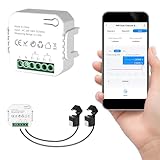
Overview: This budget-friendly dual-channel energy monitor provides targeted real-time electricity tracking for two major circuits or appliances. Designed for homeowners wanting to monitor high-consumption devices like HVAC systems or water heaters, the device connects via 2.4GHz WiFi to Tuya or Smart Life apps. With bi-directional tracking capability, it supports homes with solar panels or backup power systems, offering basic but functional energy insights at an entry-level price point.
What Makes It Stand Out: The ultra-low $27.99 price is the primary differentiator, making energy monitoring accessible to budget-conscious consumers. Dual 80A channels allow monitoring of two separate circuits simultaneously, providing more granularity than whole-house monitors. Bi-directional tracking is rare in this price class, enabling basic solar production monitoring. Tuya/Smart Life integration ensures compatibility with existing smart home ecosystems without additional hubs.
Value for Money: Exceptional value for basic monitoring needs. At under $30, it costs 70% less than entry-level competitors while delivering core functionality. The dual-channel approach lets you prioritize monitoring of your most expensive appliances rather than paying for full panel monitoring you might not need. However, the 80A per-channel limit restricts use on main service lines, making it suitable for branch circuits only.
Strengths and Weaknesses: Strengths include unbeatable price, easy clamp-on installation, dual-channel flexibility, bi-directional tracking, and broad smart home compatibility. The external sensor design avoids electrical work. Weaknesses: no UL certification mentioned, limited to two circuits, 80A capacity insufficient for whole-house monitoring, Tuya dependency may concern privacy-focused users, and accuracy specifications are unclear. Lacks advanced automation features of premium alternatives.
Bottom Line: An excellent entry-level solution for targeted appliance monitoring. Perfect for renters or homeowners wanting to track specific high-consumption devices without major investment. Not a replacement for whole-house monitors but unbeatable value for its intended purpose. Verify compatibility with your electrical system before purchasing.
4. Smart Home Energy Monitor with 16 50A Circuit Level Sensors, Measure Power Usage in Real-Time, History with App (16 50A Circuit Level Sensors) - Compatible with Home Assistant

Overview: This comprehensive energy monitor delivers circuit-level monitoring across 16 individual 50A sensors, providing granular visibility into power consumption of major appliances and systems. Compatible with Home Assistant, it caters to smart home enthusiasts wanting detailed energy data integration. The system supports various electrical configurations including single-phase, split-phase, and three-phase Wye systems up to 415V, making it versatile for different residential and light commercial setups.
What Makes It Stand Out: The 16-sensor array offers unparalleled detail, allowing identification of specific energy hogs by appliance. Home Assistant compatibility enables powerful automation and data visualization within open-source smart home ecosystems. The 1% accuracy rating exceeds many competitors, while automatic phase matching simplifies installation. Unlike cloud-dependent systems, it provides local control options for privacy-conscious users.
Value for Money: At $129.99, it strikes a balance between the budget dual-channel monitor and premium UL-certified options. The per-circuit cost is reasonable for granular monitoring, though professional installation may add expense. For Home Assistant users, the native integration eliminates subscription fees and provides unlimited customization. However, lack of UL certification may concern some buyers when compared to similarly priced alternatives.
Strengths and Weaknesses: Strengths include extensive 16-circuit coverage, high accuracy, flexible phase support, Home Assistant integration, and permanent data export for day/month/year metrics. The 90-day hourly data retention is adequate for most users. Weaknesses: no UL certification mentioned, 2.4GHz WiFi limitation, complex installation requiring panel access, and potential compatibility issues with busbar-only panels requiring special sensors. The 50A sensors may not suit all main line applications.
Bottom Line: Ideal for smart home enthusiasts seeking detailed circuit-level monitoring and Home Assistant integration. Offers excellent granularity and accuracy for the price, though safety certification is unclear. Best suited for technically inclined homeowners comfortable with DIY electrical work and open-source platforms. A strong alternative to cloud-dependent systems.
5. Eyedro Home Energy Monitor – Real-Time Electricity Usage Monitor with Solar Net Metering – Whole House Power Consumption Monitor – WiFi/Ethernet Smart Energy Meter with Reports & History, 2 Sensors

Overview: The Eyedro Home Energy Monitor provides whole-house energy tracking with flexible connectivity options, including both WiFi and Ethernet. Featuring two 200A sensors, it monitors total home consumption and solar net metering without subscription fees. The MyEyedro cloud platform delivers real-time data visualization in multiple units (dollars, watts, amps, volts), helping homeowners identify waste and optimize efficiency across grid-tied, off-grid, or solar-equipped residences.
What Makes It Stand Out: Dual connectivity (WiFi/Ethernet) ensures reliable data transmission even in areas with poor wireless coverage, a unique feature in this category. The no-subscription model provides lifetime access to cloud data and reporting, unlike competitors with premium tiers. With a decade of market presence, Eyedro offers proven reliability and North American safety standards compliance. The system tracks both consumption and production seamlessly for solar users.
Value for Money: At $149.00, it’s competitively priced against the Emporia Vue 3. The included Ethernet capability and absence of subscription fees add long-term value. Two 200A sensors cover whole-house monitoring effectively, though circuit-level detail requires additional equipment. For users wanting reliable whole-home data without ongoing costs, it represents strong value, though budget options exist for basic needs.
Strengths and Weaknesses: Strengths include connection flexibility, no subscription fees, 200A sensor capacity, solar net metering support, and established brand reputation. The system provides permanent data export and multi-unit reporting. Weaknesses: only two sensors limit granularity, no circuit-level monitoring out of box, 2.4GHz WiFi limitation when wireless, and installation complexity similar to competitors. Lacks UL certification mention and advanced automation features found in premium alternatives.
Bottom Line: A reliable, flexible whole-house monitor perfect for users wanting Ethernet backup and no subscription fees. Ideal for solar homeowners needing accurate net metering data. While less granular than multi-sensor systems, its connection options and proven track record make it a dependable choice for comprehensive energy monitoring without ongoing costs.
6. Smart Home Energy Monitor 2×120A, Dual-Channel Real-Time Electricity Usage Monitoring for Household Power, WiFi Energy Meter with App Control, Compatible with Tuya/Smart Life

Overview: This dual-channel energy monitor delivers comprehensive electricity tracking for $29.99, making professional-grade insights accessible to homeowners. The system monitors two independent 120A circuits simultaneously, perfect for tracking major appliances like HVAC systems, EV chargers, or water heaters through the Tuya or Smart Life app ecosystem.
What Makes It Stand Out: The bi-directional monitoring capability sets this apart from budget competitors, enabling accurate tracking of solar panel output and grid consumption simultaneously. The clamp-style sensors require no wire cutting, making installation genuinely DIY-friendly. With real-time data on power, voltage, current, and power factor, plus historical analysis by hour, day, month, or year, it provides utility-grade analytics.
Value for Money: At under $30 for dual-channel monitoring, this represents exceptional value compared to single-channel alternatives. Professional energy monitoring systems typically cost $200+, making this ideal for budget-conscious homeowners who need specific circuit-level data rather than whole-home monitoring.
Strengths and Weaknesses: Strengths include easy clamp-on installation, solar system compatibility, comprehensive historical data, and independent dual-channel tracking. Weaknesses are the 2.4GHz Wi-Fi limitation, requiring the Tuya/Smart Life ecosystem, and lack of native voice assistant integration. The 120A capacity may be insufficient for some high-draw applications.
Bottom Line: An excellent entry-level solution for targeted energy monitoring, particularly valuable for solar households or those wanting to track specific high-consumption appliances without professional installation costs.
7. eMylo 1-Channel WiFi Power Meter 80A Smart Energy Monitor, Clamp-on Ammeter, 2.4GHz WiFi, Real-time Monitoring, Smart Life/TUYA APP, Home Power Monitor, Compatible with Alexa and Google Assistant

Overview: This $22.99 single-channel monitor offers real-time energy tracking through the Smart Life/Tuya ecosystem, with added voice assistant compatibility. The 80A clamp-on sensor monitors individual circuits or appliances, displaying consumption data in kWh across multiple timeframes directly in the app. Installation requires no wire modifications—simply clip the sensor onto the live wire and connect to terminals.
What Makes It Stand Out: Voice assistant integration distinguishes this from basic monitors, allowing Alexa and Google Home users to check consumption hands-free. The automation scenarios enable device-linked actions, such as receiving notifications when appliances switch off or coordinating with other Tuya smart devices for intelligent load management. Real-time monitoring includes voltage, current, power factor, active power, and frequency.
Value for Money: As one of the most affordable smart monitors at $23, it delivers impressive functionality. Competing single-channel sensors often cost $10-15 more without voice support. The 0.2A-80A range covers most residential circuits effectively, making it ideal for tracking large appliances without breaking the bank.
Strengths and Weaknesses: Strengths include voice assistant compatibility, automation triggers, easy clamp installation, and comprehensive metrics. Weaknesses are the single-channel limitation, 2.4GHz Wi-Fi only, and reliance on the Tuya ecosystem. The 80A capacity may not suit main panel monitoring, and the app experience can be complex for beginners.
Bottom Line: Perfect for smart home enthusiasts wanting to monitor specific appliances with voice control and automation capabilities. Best value for single-circuit monitoring with ecosystem integration.
8. SIEMENS Inhab Smart Home Energy Monitor with 16-50Amp Circuit Level Sensors and 2-200Amp Main Sensors for Real Time Electricity Monitoring and Metering
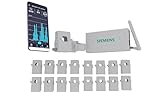
Overview: Siemens’ premium $267.75 energy monitor delivers professional-grade whole-home and circuit-level monitoring. The system includes sensors for two 200A main feeds plus 16 individual branch circuits, providing granular data through a dedicated mobile app. UL Listed and CE marked, it meets rigorous safety standards for North American installations. The monitor captures real-time and historical usage 24/7, offering insights that rival utility-grade equipment.
What Makes It Stand Out: Unlike budget options that estimate usage, this measures consumption directly at the panel for true accuracy. Advanced features include Time of Use management, Peak Demand management, Excess Solar Management, and Net Metering—capabilities typically found in commercial systems. Custom alerts notify users of abnormal behavior like ovens left on, while load shedding integration can automatically manage compatible EV chargers during peak periods.
Value for Money: While significantly more expensive than DIY alternatives, it offers professional accuracy and safety certification. Comparable commercial-grade systems cost $400+, making this reasonable for serious energy managers. The 16-circuit granularity justifies the price for large homes, solar installations, or tech-savvy users wanting detailed analytics and automated control.
Strengths and Weaknesses: Strengths include UL certification, true measurement accuracy, advanced management features, and professional build quality. Weaknesses are the high price point, complex installation requiring electrical panel modifications, and US/Canada-only app support. It’s overkill for renters or those wanting simple plug-and-play monitoring.
Bottom Line: Ideal for homeowners serious about energy management, solar optimization, or EV charging integration. Worth the investment for permanent installations where safety, accuracy, and advanced features outweigh cost considerations.
9. TREATLIFE WiFi Presence Sensor 1 Pack, 24G mmWave Radar Smart Motion Sensor Wired, Support Alexa/Google Home, Real-time Human Occupancy Sensor, No Hub Required

Overview: This $25.64 mmWave presence sensor uses advanced 24GHz radar technology to detect human occupancy beyond simple motion. Unlike PIR sensors, it recognizes micro-movements and stationary presence, making it ideal for rooms where people remain still. The wired USB-powered design eliminates battery changes while providing stable operation. Compatible with Alexa and Google Home, it integrates seamlessly into existing smart home setups without requiring a separate hub.
What Makes It Stand Out: The mmWave radar detects subtle movements and stationary presence, preventing lights from turning off during reading or toilet use. Privacy is maintained without cameras. The magnetic base offers 45° folding and 360° rotation for flexible wall or ceiling mounting, with a 20-foot detection range and 30-day activity logs accessible via smartphone. Instant alerts notify users of unusual motion patterns.
Value for Money: At $26, it’s competitively priced against premium PIR sensors while offering superior detection technology. Battery-free operation saves long-term costs and maintenance hassles. The Alexa/Google integration adds significant value without requiring an additional hub, making it more cost-effective than multi-sensor systems.
Strengths and Weaknesses: Strengths include micro-movement detection, no battery maintenance, flexible mounting, hub-free Wi-Fi connectivity, and detailed activity logs. Weaknesses are the 2.4GHz limitation, indoor-only use (not waterproof), and sensitivity to moving metal objects or curtains causing false triggers. It lacks SmartThings and IFTTT support, limiting ecosystem flexibility.
Bottom Line: Excellent upgrade from traditional motion sensors for smart lighting and automation. Perfect for offices, bathrooms, and bedrooms where stationary occupancy detection is crucial. Best for users wanting reliable presence detection without privacy concerns.
10. Eyedro 200A Current Sensor – Real-Time Energy Web Monitoring, Compatible With Eyedro Home & Business Electricity Monitors, 1.0" ID, Provides Daily, Weekly & Monthly Power Consumption Reports

Overview: This $45.00 split-core current sensor is an accessory for Eyedro monitoring systems, not a standalone product. The 200A sensor installs in electrical panels to measure current flow, working with Eyedro Home or Business monitors (sold separately) to provide real-time usage data through any web browser. It supports daily, weekly, and monthly reporting through the MyEyedro platform, which analyzes and stores consumption patterns for long-term trend analysis.
What Makes It Stand Out: The sensor offers high-resolution data capture with 24/7 usage history maintained in the MyEyedro cloud platform. It supports complex rate structures including fixed, tiered, and time-of-use pricing, providing accurate bill estimates. The split-core design allows installation without disconnecting wires, making it safer for qualified installers. The web-based interface ensures access from any device without proprietary app limitations.
Value for Money: At $45 for a single sensor, it’s reasonably priced for an add-on component, though the required Eyedro base station ($100+) must be factored into total cost. The 200A capacity handles main panel monitoring, and the web-based interface avoids app dependency. Compared to proprietary sensors from other brands, Eyedro’s open sensor compatibility offers better long-term value.
Strengths and Weaknesses: Strengths include high accuracy, web-based access, multi-rate structure support, and professional-grade data resolution. The 1.0" ID split core accommodates most residential conductors. Weaknesses are that it’s not a complete system, requires separate purchase of Eyedro monitor, and lacks native smart home ecosystem integration like Alexa or Google Assistant. Installation still requires electrical panel access and comfort with mains wiring.
Bottom Line: A solid expansion option for existing Eyedro users needing additional monitoring points. Not suitable as a standalone purchase. Best for those committed to the Eyedro ecosystem who want web-based energy analytics without subscription fees and prefer professional-level data granularity over smart home convenience.
Why Energy Monitoring Matters for Renters
Renters face a unique paradox: you’re financially responsible for utility bills, yet you have limited control over the infrastructure generating those costs. Your refrigerator might be from the Clinton era, your windows could leak air like a sieve, and your HVAC system might run on sheer willpower—yet you’re the one footing the bill every month. Wireless energy monitoring sensors democratize energy management by providing granular data that was once only available to homeowners with permanent installations.
The financial impact is more significant than many renters realize. According to the U.S. Energy Information Administration, the average apartment dweller spends $1,200-$1,800 annually on electricity, with usage often spiking 20-40% above necessary levels due to inefficiencies and behavioral patterns. Without visibility into when, where, and why you’re consuming power, you’re essentially writing blank checks to your utility company. Energy monitoring transforms this equation by converting abstract kilowatt-hours into actionable intelligence—showing you that your space heater costs $45 monthly, your gaming setup draws 200 watts in idle mode, or your window AC unit is cycling inefficiently due to poor insulation.
How Wireless Energy Monitoring Sensors Work
At their core, wireless energy monitoring sensors measure electrical current flowing through circuits and transmit that data to your smartphone or web dashboard via Wi-Fi, Bluetooth, or proprietary wireless protocols. They function as continuous translators, converting electromagnetic fields into digestible insights about your consumption patterns. The “wireless” aspect is crucial for renters—it eliminates the need for hardwired connections that could violate lease agreements or require invasive electrical work.
These devices typically employ one of two measurement technologies: current transformers (CTs) that detect magnetic fields around power lines without direct contact, or shunt resistors that measure voltage drop across a small internal resistor. The data is sampled multiple times per second, aggregated locally, then pushed to cloud servers where algorithms identify patterns, categorize devices through machine learning, and generate consumption forecasts. For renters, this means installation often requires nothing more than clipping a sensor around a wire or plugging a device into an existing outlet—no wire cutting, no panel modifications, and no security deposit risks.
Types of Wireless Energy Monitoring Solutions for Renters
Understanding the different sensor architectures is critical for choosing a solution that matches your rental’s constraints, your technical aptitude, and your monitoring objectives. Each type offers distinct advantages and trade-offs in terms of granularity, installation complexity, and cost.
Clamp-On Current Transformers (CT Sensors)
CT sensors represent the gold standard for whole-home monitoring without electrical modifications. These donut-shaped devices open like a clamshell and clamp around the main service wires entering your electrical panel—never touching live conductors directly. For renters, this is revolutionary: you can monitor total household consumption with zero electrical work. The primary challenge is accessing your electrical panel, which may be locked or require landlord permission. Some advanced CT systems use split-core designs that can be installed without disconnecting power, making them truly non-invasive.
Smart Plugs with Energy Monitoring
These are the most renter-friendly entry point into energy monitoring. They plug directly into existing outlets, and you plug appliances into them. Instantly, you gain individual device-level monitoring for anything from refrigerators to entertainment centers. The limitation is obvious: you can only monitor what you plug in. They’re perfect for tracking major appliances or identifying vampire loads, but they won’t capture hardwired devices like ceiling fans, built-in microwaves, or HVAC systems. For apartment dwellers with limited circuits, a strategic collection of 3-5 smart plugs can cover 70-80% of discretionary consumption.
Whole-Home Meter Readers
These ingenious devices attach to your utility meter’s glass face using optical sensors or magnetic induction to read the meter’s own measurement disc or LED pulse. Since they never touch your electrical system, they’re arguably the most landlord-friendly option available. However, they provide only aggregate home data without device-level breakdown, and compatibility varies widely by meter type—analog, digital, or smart. Some utilities explicitly prohibit attachments to their meters, so checking your lease and local regulations is essential.
Appliance-Specific Monitors
Specialized sensors exist for monitoring major appliances without panel access. These include battery-powered vibration sensors that detect when motors run, thermal sensors that track compressor cycles, and inline modules that install at the appliance plug. While niche, they offer deep insights into specific energy hogs like water heaters or HVAC units that renters can’t directly monitor otherwise.
Key Features Renters Should Prioritize
Not all wireless energy monitors are created equal, and renter-specific needs differ dramatically from homeowners. Focus on features that enhance portability, minimize installation friction, and deliver immediate value without long-term commitment.
Non-Invasive Installation
The paramount consideration for any rental-friendly device is its ability to install without altering existing infrastructure. Look for sensors that explicitly advertise “tool-free installation,” “clamp-on design,” or “plug-and-play” functionality. Avoid anything requiring wire splicing, breaker replacements, or panel modifications. The best devices use strong magnets, adhesive strips, or simple clamps that leave zero trace when removed. Check product specifications for installation time—anything over 30 minutes likely involves steps that could raise landlord concerns.
Portability and Lease-Friendly Design
Your lease will eventually end, and your energy monitor should move with you as easily as your furniture. Prioritize compact, lightweight devices with minimal components. Systems with proprietary hubs add moving complexity; instead, favor Wi-Fi direct devices that connect to your existing network. Consider whether the device requires custom firmware updates or cellular connections that could complicate relocation. Some manufacturers offer “renter’s warranties” covering device transfer between properties, which speaks to their confidence in portability.
Real-Time Data and Granularity
The value of energy monitoring multiplies with data resolution. Systems that update every second reveal patterns invisible to 15-minute interval monitors. For renters, this granularity helps distinguish landlord-owned appliances from your personal devices—a critical distinction when negotiating utility responsibilities. Look for monitors offering at least 1-second resolution and the ability to export raw data in CSV format. This empowers you to create custom analyses proving which appliances cost you money, providing leverage in landlord discussions about upgrades.
App Compatibility and User Experience
A sophisticated sensor is useless without intuitive software. Evaluate the companion app’s design before purchasing—many offer free demo modes. The interface should clearly separate your consumption from baseline loads, offer customizable alerts for unusual usage, and provide bill forecasting based on your utility’s rate structure. For renters in multi-unit buildings, ensure the app supports multiple monitor locations, making it seamless to transfer between rentals. Offline data caching is crucial; if your Wi-Fi drops, the sensor should store readings locally and sync when reconnected.
Installation Considerations for Rental Properties
Successfully installing a wireless energy monitor in a rental requires navigating technical, legal, and practical challenges unique to non-owned properties. A methodical approach prevents lease violations and ensures reliable operation.
Electrical Panel Access
Your electrical panel is the nerve center of any CT-based monitoring system, but accessing it can be your biggest hurdle. Many landlords lock panels in utility closets or basements. Start by reviewing your lease—some explicitly prohibit tenant access to electrical infrastructure. If permission is required, frame your request around safety and cost savings: “I’d like to install a non-invasive energy monitor that clips onto wires without any electrical work. It will help me reduce consumption and prevent overloading circuits.” Offer to share data showing the building’s electrical health, which benefits the landlord. Always document permission in writing, even via email.
Wi-Fi Connectivity Challenges
Rental properties often have poor Wi-Fi coverage near electrical panels, especially in basements or utility closets. Before purchasing, test signal strength at the installation location using your phone. If you have less than two bars, consider a mesh network extender or choose a sensor with external antenna options. Some monitors use Bluetooth Low Energy to a nearby hub, which then connects via Ethernet—this can circumvent Wi-Fi dead zones. Remember that 2.4GHz signals penetrate walls better than 5GHz, so ensure your monitor supports the lower frequency.
Landlord Permission Best Practices
Approaching your landlord requires diplomacy and technical clarity. Prepare a one-page document explaining: what the device does, how it installs (with photos), that it’s UL-listed for safety, and that it leaves no permanent marks. Emphasize mutual benefits: reduced electrical load extends appliance lifespan, lower usage decreases building wear, and you might share data revealing inefficient common-area equipment. Some landlords may request professional installation at your expense—factor this $100-$200 cost into your budget. Never proceed without explicit permission; unauthorized electrical work, even non-invasive, can violate lease terms and local tenant laws.
Understanding Compatibility and Technical Requirements
Technical mismatches can render an energy monitor useless in your specific rental situation. Evaluate these compatibility factors before committing to a purchase.
Electrical System Types
North American rentals typically use split-phase 120/240V systems, but older buildings may have knob-and-tube wiring or three-phase commercial hookups. Verify your system type by checking your main breaker—if it has two hot wires, it’s split-phase. Most consumer monitors support this configuration, but three-phase systems require commercial-grade equipment. For apartments, determine if your unit has its own dedicated panel or shares a meter with other units. Shared-meter situations demand whole-meter readers rather than CT clamps, as you can’t isolate your unit’s circuits.
Smart Home Ecosystem Integration
If you’ve already invested in smart home technology, ensure your energy monitor integrates seamlessly. Alexa, Google Home, and Apple HomeKit all have different levels of energy monitoring support. Some monitors trigger routines—like turning off smart plugs when consumption exceeds a threshold. However, be cautious about ecosystem lock-in; a monitor that only works with Samsung SmartThings may become useless if you switch to a Hubitat system in your next rental. Look for IFTTT support or open API access for maximum flexibility across living situations.
Circuit Capacity and Load Calculations
Your monitor should help you understand circuit loading, not just total consumption. Most rental panels have 15-amp or 20-amp breakers, and continuously loading them beyond 80% capacity creates fire hazards. Advanced monitors can alert you when circuits approach dangerous thresholds—crucial in older buildings with limited outlets. Before installation, create a circuit map by turning off breakers and noting which outlets lose power. This helps you interpret monitor data meaningfully and prevents overloading circuits with high-draw appliances like space heaters or air conditioners.
Data Privacy and Security for Renters
When you install an energy monitor, you’re creating a detailed digital fingerprint of your daily life—when you wake up, when you’re home, what devices you use. This data is valuable to advertisers, insurers, and potentially your landlord. Understanding privacy implications is non-negotiable.
Data Ownership and Sharing Policies
Scrutinize the manufacturer’s privacy policy before purchase. Reputable companies encrypt data end-to-end and explicitly state they won’t sell your information. Be wary of “free” monitoring services—if you’re not paying, your data is the product. For renters, the critical question is whether your landlord can request access to your consumption data. Legally, this falls into a gray area. Protect yourself by choosing monitors with local-only storage options or the ability to opt-out of cloud syncing. Some devices let you run a local server on a Raspberry Pi, keeping your data entirely in your control.
Network Security Best Practices
Never connect IoT devices to your primary Wi-Fi network. Create a separate guest network or IoT-specific VLAN with restricted access to other devices on your network. This prevents a compromised energy monitor from becoming a gateway to your laptop, phone, or smart locks. Change default passwords immediately, enable two-factor authentication on the companion app, and regularly update firmware. In multi-unit rentals, be aware that some monitors broadcast unencrypted Bluetooth beacons that neighbors could detect—though they can’t access your data, they can see the device exists.
Cost Analysis and ROI for Short-Term Living
Renters often question whether energy monitoring is worth the investment for a one- or two-year lease. The math frequently surprises skeptics. A quality whole-home monitor costs $100-$300, while smart plug solutions run $15-$30 per plug. If you save just 15% on a $120 monthly electric bill, that’s $216 annually—paying for the monitor in under 14 months. Even on a 12-month lease, you’re likely to see positive ROI.
The key is focusing on immediate, high-impact changes rather than long-term efficiency upgrades. Identifying a single energy vampire—like a window AC unit drawing 800 watts continuously due to a faulty thermostat—can save $30 monthly. For renters in utilities-included units, the ROI shifts: you can’t directly save money, but you can provide landlords with data justifying appliance upgrades or rent negotiations. Some renters successfully negotiate $20-$50 monthly rent credits by demonstrating their energy-conscious monitoring and willingness to share data for building improvements.
Maximizing Your Energy Savings: Actionable Strategies
Owning a monitor is only half the battle; translating data into savings requires strategic action tailored to rental limitations. You can’t replace the HVAC system, but you can optimize around its inefficiencies.
Behavioral Change Through Real-Time Feedback
The most powerful feature for renters is live consumption display. Mount an old tablet on your wall showing real-time usage—studies show this alone reduces consumption by 7-15% through awareness. Set up alerts for when usage exceeds 500 watts during work hours, indicating you left something on. Use the monitor’s “away mode” baseline to identify phantom loads; anything drawing power when you’re not home is a target for smart plugs or unplugging.
Load Shifting for Time-of-Use Rates
Many utilities charge 2-3x more during peak hours (typically 4-9 PM). Your monitor should integrate with your utility’s rate plan and show real-time cost, not just kilowatt-hours. Shift discretionary loads—dishwasher, laundry, EV charging—to off-peak times. For renters, this is pure savings without any investment in equipment. Some monitors can automate this by controlling smart plugs based on time-of-use signals from your utility.
Targeted Appliance Interventions
Use appliance recognition features to identify inefficient devices. When your monitor shows the refrigerator cycling every 12 minutes instead of every 20, that’s a failing compressor seal. Document this data and present it to your landlord with repair estimates. For your own appliances, calculate operating costs: a 1500-watt space heater running 8 hours nightly costs $36 monthly at $0.12/kWh. This math often justifies buying a more efficient oil-filled radiator that uses 700 watts instead.
Troubleshooting Common Issues in Rental Settings
Rental-specific infrastructure quirks can create unique challenges for energy monitors. Knowing how to diagnose and resolve these issues saves frustration and prevents lease violations.
Inaccurate Readings from Multi-Wire Branch Circuits
Many apartments use multi-wire branch circuits where two 120V circuits share a neutral wire. If you install a CT sensor on only one hot wire, you’ll miss half the consumption. Solutions include using two CTs (one per hot wire) with a dual-channel monitor, or installing a single CT around both wires in opposite directions. Some advanced monitors automatically detect and correct for this configuration, but most budget models require manual calibration.
Interference from Neighboring Units
In dense apartment buildings, electrical noise from neighbors can affect monitor accuracy, especially with inexpensive CT sensors. This manifests as phantom readings when all your devices are off. Mitigate this by ensuring your CT is fully closed with no gap, and position it as far from neighboring service wires as possible. If interference persists, add a ferrite choke to the sensor cable to filter high-frequency noise. For whole-meter readers, ensure the optical sensor is shielded from ambient light that could trigger false pulses.
Wi-Fi Dropout in Utility Closets
If your monitor loses connection, it can’t alert you to problems. For critical monitoring, choose a device with local logging that stores weeks of data on-device. When Wi-Fi returns, it backfills the cloud database. As a backup, some monitors support cellular connectivity via a cheap data plan—worth considering if your panel is in a basement far from your router. Powerline Ethernet adapters can also extend network connectivity through your electrical wiring itself, ironically using the same wires you’re monitoring.
Moving With Your Energy Monitor: A Renter’s Guide
The true test of a renter-friendly device is how easily it transfers to your next home. Plan for this eventuality from day one to avoid data loss and reinstallation headaches.
Data Preservation and Transfer
Before moving, export all historical data from your monitor’s app. Most services allow CSV or JSON exports—download these to a cloud storage service. This data becomes valuable for comparing efficiency between rentals. When you reinstall at your new location, you’ll establish a new baseline, but historical data helps you identify whether your new refrigerator is more or less efficient than your previous one. Some cloud services let you maintain multiple “homes” in one account, making transitions seamless.
Reinstallation and Calibration
Take photos during your initial installation—showing CT placement, wire routing, and any settings. This creates a visual guide for reinstallation. Keep all original packaging and mounting hardware. When you move, the electrical configuration will differ; your new panel may have main wires too thick for your CT, or a different meter type. Budget 30-60 minutes for recalibration. Some monitors use GPS location to auto-detect moves and prompt reconfiguration, which simplifies the process.
Lease-End Restoration
Your lease likely requires returning the property to its original condition. Energy monitors should leave zero evidence if installed correctly. However, adhesive mounts can damage paint, and CT sensor wires might leave minor marks. Photograph the area before installation to document its original state. Use 3M Command strips instead of permanent adhesive, and run wires along baseboards with removable cable clips. Keep a small tub of matching touch-up paint for any scuffs. The goal is to leave no trace that your landlord could use to withhold your deposit.
Landlord Negotiations: Making the Case for Energy Monitoring
A successful landlord conversation about energy monitoring can transform a personal tool into a building-wide improvement that benefits all tenants. The key is positioning it as a value-add rather than a tenant demand.
Framing the Value Proposition
Landlords care about property value, tenant retention, and liability. Present your energy monitor as a risk mitigation tool: “This device can detect abnormal electrical patterns that indicate failing appliances before they cause water damage or fire.” Share data showing how excessive cycling of the HVAC compressor suggests imminent failure—a $5,000 replacement they can avoid with early detection. If you’re in a utilities-included unit, propose a “green lease” amendment where you share data in exchange for a rent credit based on documented savings.
Offering Data-Driven Upgrades
After three months of monitoring, compile a report highlighting the building’s inefficiencies. Show that the water heater runs 24/7 due to poor insulation, costing the landlord $60 monthly. Calculate the ROI of adding a timer or insulation blanket. Suggest that your monitor could track the improvement post-upgrade, providing verifiable ROI data. This positions you as a partner in asset management, not a complaining tenant. Some landlords will even reimburse your monitor’s cost if you agree to leave it installed for the next tenant, creating a permanent building improvement.
Navigating Multi-Unit Complications
In buildings with master metering, your monitor reveals consumption for your unit only, but you share a bill. Propose a submetering pilot: you install monitors on each unit’s main feed (with permission) to fairly allocate costs. This is particularly compelling for landlords considering utility billing changes. Be aware that submetering is regulated in some states; your landlord may need to comply with specific accuracy standards and billing procedures. Offer to research local regulations, making their compliance easier.
Advanced Features Worth Considering
While basic monitoring delivers value, certain advanced capabilities can dramatically enhance your rental living experience and provide deeper insights that justify higher upfront costs.
Machine Learning Appliance Detection
Top-tier monitors use AI to automatically identify devices by their electrical signatures. This eliminates manual device naming and provides more accurate breakdowns. For renters, this is invaluable when you can’t physically access landlord-owned appliances to label them. The AI can distinguish the HVAC compressor from the air handler, or identify that mysterious 800-watt load as the water heater. Look for systems that improve detection over time and allow you to correct misidentifications, training the algorithm for your specific environment.
Utility Rate Integration and Bill Forecasting
The best monitors don’t just track kilowatt-hours—they know your utility’s exact rate structure, including time-of-use pricing, demand charges, and tiered rates. They can forecast your monthly bill with 95%+ accuracy by day five of your billing cycle. This feature helps renters budget more effectively and provides concrete evidence when disputing unusually high bills. Some monitors even integrate with utility APIs to pull real-time rates and automatically adjust smart device schedules for maximum savings.
Circuit-Level Monitoring Without Panel Access
Innovative new sensors can monitor individual circuits using electromagnetic field mapping. These battery-powered devices stick to your wall near the electrical panel and detect the unique field signatures of each circuit breaker. While less accurate than direct CT sensors, they provide circuit-level data without opening the panel—a huge advantage for renters with strict landlords. The technology is still emerging, but early adopters report 85-90% accuracy in device identification.
Limitations and Realistic Expectations
Wireless energy monitoring is powerful but not magical. Understanding its boundaries prevents disappointment and helps you focus on achievable outcomes within rental constraints.
Granularity Constraints
No monitor can detect every device perfectly. Low-wattage devices (under 50 watts) often blend into background noise, and devices with similar signatures (LED lights vs. phone chargers) confuse algorithms. In apartments, you may never achieve perfect device-level breakdown because you can’t monitor the landlord’s HVAC or water heater directly. Set realistic expectations: aim to identify your top 5-10 energy consumers, which typically represent 70% of your bill. Perfection is impossible; improvement is guaranteed.
Installation Limitations in Restrictive Leases
Some leases explicitly prohibit any electrical system modifications, including non-invasive sensors. In these situations, your only option is smart plugs or meter readers. Even with permission, some panels are too crowded for CT clamps, or main wires may be inaccessible behind structural components. Before purchasing, ask the manufacturer for dimensional specifications and compare them to your panel’s internal layout. Return policies are your friend here—buy from retailers with 30-day return windows in case physical installation proves impossible.
Data Accuracy vs. Utility Meter
Your monitor will rarely match your utility meter exactly. CT sensors typically have 1-2% error rates, and phase misalignment can add another 1-3%. Over a month, this could mean a $5-$15 discrepancy on a $100 bill. Use your monitor for trend analysis and device identification, not for disputing meter accuracy. If you need precision for submetering or landlord negotiations, choose a monitor that supports calibration against your utility meter during a known load test (like running a 1500-watt heater for exactly one hour).
Frequently Asked Questions
Will my landlord allow me to install an energy monitoring sensor?
Most landlords approve non-invasive sensors that don’t modify electrical systems, especially when presented as a safety and efficiency tool. Provide clear documentation showing the installation method, emphasize that it’s temporary, and offer to share data that could benefit property maintenance. Get written permission to protect your security deposit.
Do I need an electrician to install a wireless energy monitor?
No, renter-friendly monitors are designed for DIY installation. CT sensors clip around wires without touching them, smart plugs simply insert into outlets, and meter readers attach with magnets or adhesive. However, if your electrical panel has no main breaker or you’re uncomfortable working near live wires, hiring an electrician for a 30-minute installation is a valid safety choice.
Can I use energy monitoring in an apartment building?
Absolutely. Apartments are ideal candidates for energy monitoring because you have fewer circuits to track. The main challenge is accessing your electrical panel, which is often in a utility closet. If you can’t access it, focus on smart plugs for your major appliances and a whole-meter reader for aggregate data. Many renters achieve 20%+ savings using just three to five smart plugs.
What if my rental has old or outdated wiring?
Old wiring (knob-and-tube, aluminum) doesn’t affect monitor accuracy, but it does increase the importance of monitoring for safety. CT sensors work regardless of wire type. However, older panels may be too crowded for clamps. Measure your panel’s interior space before purchasing. If wires are frayed or the panel shows signs of overheating, your monitor may detect anomalies that warrant immediate landlord notification.
Is energy monitoring worth it for a short 12-month lease?
Yes. With average savings of 15% on a typical $120 monthly electric bill, you’ll save $216 annually—more than covering a $150 monitor’s cost. The payback period is often under eight months. Additionally, the monitor moves with you, providing continuous value across multiple rentals. Focus on portable solutions like smart plugs that work anywhere.
Can my landlord access my energy consumption data?
Not without your explicit permission if you purchase the monitor yourself. Data privacy policies vary by manufacturer, but reputable companies encrypt your data and require your login credentials for access. If the landlord pays for the monitor or it’s part of a building-wide system, they may have administrative access. Always review the privacy policy and choose monitors with local-only storage if this concerns you.
What happens to my monitor when I move to a new rental?
You take it with you. Renter-friendly monitors are designed for easy removal and reinstallation. Before moving, export your historical data and photograph the installation for reference. At your new location, you’ll establish a new baseline. Some cloud services support multiple properties under one account, making transitions seamless. The device becomes a permanent part of your personal efficiency toolkit.
Will installing a monitor damage my rental’s electrical system or walls?
Properly installed, renter-friendly monitors cause zero damage. CT sensors clip on without touching wires, smart plugs insert normally, and meter readers attach magnetically or with removable adhesive. Avoid permanent mounting hardware. Use Command strips for any attachments and run cables along baseboards with removable clips. Photograph the area before installation to document its original condition.
Can I monitor individual appliances if I can’t access the electrical panel?
Yes, through smart plugs and appliance-specific sensors. Smart plugs with energy monitoring work for any device that plugs into a standard outlet. For hardwired appliances like ceiling fans or built-in microwaves, use vibration or thermal sensors that detect operation cycles. While you won’t get circuit-level data without panel access, you can still identify and optimize 70-80% of your discretionary consumption.
How accurate are wireless energy monitors compared to my utility bill?
Consumer-grade monitors are typically 95-98% accurate compared to utility meters. Small discrepancies arise from measurement timing, phase calibration, and CT sensor positioning. Use your monitor for trend analysis and device identification rather than precise billing disputes. For landlord negotiations or submetering, choose a monitor that supports calibration against your utility meter during a controlled load test to improve accuracy to 99%+.