Tired of smart lights that won’t respond on your top floor? You’re not alone. Multi-level homes create unique challenges for wireless protocols, and even the most robust Zigbee networks can struggle to maintain reliable connections across three floors of walls, floors, and interference sources. As smart home adoption accelerates toward 2026, understanding how to architect a resilient mesh network isn’t just convenient—it’s essential for avoiding the frustration of unresponsive devices and automation failures.
Zigbee 3.0 repeaters, also known as routers, serve as the backbone of any serious whole-home smart home deployment. Unlike simple Wi-Fi extenders that broadcast signals radially, these intelligent devices create a self-healing mesh where each node can relay data to its neighbors. But not all repeaters are engineered equal, especially when vertical signal propagation meets the structural realities of modern construction. Let’s dive into what separates adequate coverage from truly seamless three-floor performance.
Top 10 Zigbee 3.0 Repeaters for Three Floors
Detailed Product Reviews
1. YIFAN Zigbee 3.0 Range Extender with Built-in Power Amplifier, Tuya Zigbee Signal Booster, Long Range up to 7600 sq.ft, Compatible with Alexa/Google Assistant, 2.4GHz, White

Overview: The YIFAN Zigbee 3.0 Range Extender is a dedicated signal booster designed to eliminate dead zones in your smart home network. With its built-in power amplifier and impressive 7,600 square feet coverage, this device targets users struggling with Zigbee connectivity across large homes, multi-story buildings, or outdoor areas. It works exclusively on the 2.4GHz band and integrates with major voice assistants for seamless control.
What Makes It Stand Out: This extender’s 20dB output power amplifier sets it apart from standard Zigbee devices that happen to repeat signals. It’s purpose-built for maximum range penetration through walls and floors. The inclusion of voice control via Alexa and Google Assistant is unusual for a repeater, allowing you to check status or run diagnostics hands-free. The device sharing feature enables family-wide management with real-time status alerts, while the bundled USB-C to USB adapter ensures compatibility with older power sources, enhancing its versatility.
Value for Money: At $29.66, this dedicated extender sits in the mid-range price point. While you can find cheaper Zigbee plugs that double as repeaters, none match its specialized amplification power. For comparison, mesh Wi-Fi extenders with Zigbee support cost $50-80. If you’re specifically battling Zigbee range issues rather than building a new network, this targeted solution offers excellent ROI by maximizing your existing hub’s reach without requiring device replacements.
Strengths and Weaknesses: Strengths include professional-grade amplification, extensive coverage area, voice assistant integration, and thoughtful accessories. The device sharing and alert system provides excellent management capabilities. Weaknesses are its single-purpose design—it won’t control appliances like a smart plug—and it requires an existing Zigbee network. The 2.4GHz limitation may conflict with congested Wi-Fi bands, and the actual range depends heavily on your home’s construction materials.
Bottom Line: For homeowners with established Zigbee networks suffering from coverage gaps, the YIFAN extender is a powerful, cost-effective solution. Its specialized design justifies the price premium over multi-function alternatives if raw signal strength is your primary concern. Skip this if you’re just starting your smart home journey or need device control functionality.
2. THIRDREALITY ZigBee Smart Plug 4 Pack with Real-time Energy Monitoring,15A Outlet, Zigbee Repeater,ETL Certified,ZigBee Hub Required,Work with Home Assistant,Compatible Echo Devices and SmartThings

Overview: This four-pack of Zigbee smart plugs from THIRDREALITY combines essential smart home functions into a single, compact device. Each plug functions as a controllable outlet, energy monitor, and Zigbee network repeater simultaneously. Designed for seamless integration with major platforms like Home Assistant, SmartThings, and Echo devices with built-in Zigbee hubs, these ETL-certified plugs prioritize both safety and functionality.
What Makes It Stand Out: The energy monitoring capability distinguishes this pack from basic smart plugs, allowing you to track consumption in real-time through compatible hubs. The space-saving design ensures adjacent outlets remain usable—a common frustration with bulkier smart plugs. Setup is remarkably simple with Echo devices: just plug in and say “Alexa, discover my devices.” The 15A rating handles most household appliances safely, while the restore-status function (supported on select hubs) maintains your preferences after power outages.
Value for Money: At $38.99 for four plugs ($9.75 each), this pack delivers exceptional value. Individual smart plugs with energy monitoring typically cost $15-20, and dedicated Zigbee repeaters run $25-30. You’re essentially getting three functions—outlet control, energy monitoring, and signal repeating—for less than the price of a basic smart bulb. The ETL certification adds peace of mind without inflating the price, making this one of the most economical ways to expand both your smart device count and network coverage.
Strengths and Weaknesses: Strengths include the unbeatable per-unit price, energy monitoring integration, compact form factor, and broad hub compatibility. The 4-pack enables whole-home deployment in one purchase. Weaknesses are the hub requirement (not included), limited energy monitoring platform support (not available on all hubs), and the 15A rating which excludes high-power appliances like space heaters. The restore-status function is also hub-dependent and not universally supported.
Bottom Line: This 4-pack represents outstanding value for anyone with a compatible Zigbee hub. It solves two problems—device automation and network extension—simultaneously while adding energy awareness. Perfect for first-time smart home builders or those looking to densify their Zigbee mesh. The only reason to pass is if you need individual plug control without a hub or require higher amperage support.
3. THIRDREALITY Multi-Function Night Light, Zigbee Repeater, 3-in-1 Combines a Motion Sensor, a Illumination Sensor and RGB Color Night Light, 1-100% Adjustable Brightness, Zigbee hub Required

Overview: The THIRDREALITY Multi-Function Night Light redefines versatility in smart home sensors by combining three essential functions into one elegant device. It serves as an RGB night light with 1-100% brightness control, a motion detector, and an illumination sensor, all while acting as a Zigbee network repeater. This 3-in-1 design targets users wanting comprehensive environmental awareness without cluttering their walls with multiple devices.
What Makes It Stand Out: True multi-functionality sets this apart—each feature operates independently or in concert with your smart home ecosystem. The motion sensor can trigger security routines or pathway lighting, while the illumination sensor enables sophisticated automation based on natural light levels. The RGB night light offers true color selection beyond basic white temperature adjustments. Its design-conscious aesthetic blends into any décor, and the included adapter eliminates the need for separate purchases. The repeater function strengthens your mesh network with each unit added.
Value for Money: At $29.99, purchasing this single device costs less than buying separate motion sensors ($20-25), light sensors ($15-20), and smart night lights ($20-30). You’re getting three devices plus a repeater for the price of roughly one-and-a-half individual components. For smaller homes or targeted applications like a child’s room or hallway, this represents excellent consolidation value. However, the 4-pack offers better per-unit pricing if you need multiple locations covered.
Strengths and Weaknesses: Strengths include genuine triple functionality, adjustable RGB and brightness, elegant design, included adapter, and network strengthening. It reduces wall outlet clutter and simplifies automation logic. Weaknesses are the hub requirement (not included), single-pack pricing that isn’t as economical as the 4-pack, and potential overkill if you only need one function. The motion sensor’s placement flexibility is limited by the need for AC power, unlike battery-powered alternatives.
Bottom Line: This 3-in-1 night light excels in spaces where motion detection, light sensing, and gentle illumination are all desirable. It’s perfect for nurseries, bathrooms, and hallways. The convenience of integrated functions justifies the price, but consider the 4-pack if outfitting multiple rooms. Avoid if you need only basic night lighting or battery-powered sensor flexibility.
4. THIRDREALITY Multi-Function Night Light 4 Pack, Zigbee Repeater, 3-in-1 Combines a Motion Sensor, a Illumination Sensor and RGB Color Night Light, 1-100% Adjustable Brightness, Zigbee hub Required

Overview: This four-pack bundles THIRDREALITY’s innovative 3-in-1 night lights for whole-home deployment. Each unit combines an RGB night light, motion sensor, illumination sensor, and Zigbee repeater, allowing you to establish comprehensive smart lighting and sensing throughout your house with one purchase. The pack addresses the primary limitation of the single unit—cost-effectiveness for multiple rooms—while delivering identical functionality across all devices.
What Makes It Stand Out: The bulk packaging provides immediate network density, crucial for robust Zigbee mesh performance. Each light you add strengthens the entire system while providing localized automation triggers. The consistent feature set across all units simplifies setup and user experience—you’re not compromising capabilities for quantity. Like the single version, these offer true RGB color selection, 1-100% brightness control, and the ability to trigger other smart devices based on motion or ambient light changes. The included adapters for all four units add hidden value.
Value for Money: At $99.99 ($25 per unit), you’re saving 17% compared to buying four individual lights at $29.99 each ($119.96 total). This discount makes the multi-function concept significantly more attractive for whole-home implementation. Considering each unit replaces three separate devices plus a repeater, the 4-pack effectively delivers twelve devices for $100—under $8.50 per function. For comprehensive smart home builds, this represents one of the most economical ways to achieve pervasive sensing and gentle lighting while simultaneously fortifying your Zigbee network.
Strengths and Weaknesses: Strengths include exceptional per-unit value in the pack, immediate mesh network improvement, versatile automation triggers, and design consistency. The 4-pack enables cohesive whole-home strategies like automated pathway lighting and security responses. Weaknesses are the higher upfront cost, potential for unused units in smaller homes, and the AC-power requirement that limits optimal sensor placement compared to battery options. The hub requirement remains a barrier for those without existing Zigbee infrastructure.
Bottom Line: Buy the 4-pack if you’re committed to Zigbee and need coverage across multiple rooms. The per-unit savings and network benefits make it a smarter investment than individual purchases. It’s ideal for new smart home installations or significant expansions. Pass if you only need one or two locations covered, or if you prefer the placement flexibility of battery-powered sensors. This pack rewards commitment with both economic and technical advantages.
5. Aqara Smart Hub E1 for Home Automation, 2.4 GHz Wi-Fi Required, Features Aqara Zigbee (Not Third-Party), Powered by USB-A, Small Size, Supports HomeKit, Alexa, Google Assistant, IFTTT
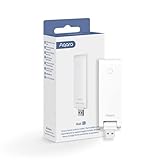
Overview: The Aqara Hub E1 is a compact, USB-powered Zigbee hub designed specifically for the Aqara ecosystem. Its ultra-small form factor and flexible 210-degree rotating shaft make it uniquely adaptable to tight spaces, while supporting up to 128 Aqara devices with Zigbee 3.0 protocol. The hub acts as a bridge between Aqara sensors and major smart home platforms, though it exclusively supports Aqara child devices.
What Makes It Stand Out: Portability and placement flexibility are unmatched—power it from a power bank, laptop, or router’s USB port. The integrated Wi-Fi repeater function (2.4GHz only) provides dual utility, extending both your Zigbee mesh and Wi-Fi coverage simultaneously, though limited to two connected devices. Its cross-platform compatibility is impressive, enabling Aqara devices to appear in HomeKit, Alexa, Google Home, and IFTTT. The 210-degree adjustable angle ensures optimal positioning regardless of the USB port orientation, a thoughtful design touch absent in bulkier hubs.
Value for Money: At $23.99, it’s one of the most affordable certified hubs available. Competitor hubs like SmartThings or Hubitat cost $80-150, though they support third-party Zigbee devices. For pure Aqara users, this price is exceptional, especially considering the Wi-Fi repeater bonus. However, the ecosystem lock-in means you’re not getting a universal Zigbee coordinator—it’s a gateway, not an open system. The value proposition hinges entirely on your commitment to Aqara products.
Strengths and Weaknesses: Strengths include ultra-compact design, flexible USB power, Wi-Fi repeater dual-function, multi-platform support, and support for 128 devices with repeaters. The adjustable angle and low price are significant advantages. Weaknesses are the Aqara-only device restriction, limiting its utility for mixed Zigbee environments. The Wi-Fi repeater supports only two devices, making it a minor benefit. It requires 2.4GHz Wi-Fi and cannot be directly controlled via third-party apps—it’s purely a bridge.
Bottom Line: The E1 Hub is perfect for Apple HomeKit users investing in Aqara’s affordable sensor ecosystem. Its size and price make it ideal for apartments or as a secondary hub. Don’t buy if you want to mix brands or need a universal Zigbee coordinator. For Aqara loyalists, it’s a no-brainer that punches above its weight. For ecosystem explorers, consider more flexible alternatives despite higher cost.
6. SONOFF Zigbee 3.0 & Thread Dongle Lite (EFR32MG21) | USB Stick Coordinator for Home Assistant & Zigbee2MQTT | Compact Gateway with Easy Firmware Flashing & Extension Cable

Overview:
The SONOFF Zigbee 3.0 & Thread Dongle Lite is a versatile USB coordinator for Home Assistant and Zigbee2MQTT users seeking an affordable entry into local smart home control. Built around the reliable EFR32MG21 chipset, this compact stick enables low-latency communication with thousands of Zigbee 3.0 devices while offering future-proof Thread support for Matter integration.
What Makes It Stand Out:
Unlike many competitors, this dongle includes a USB extension cable to mitigate interference from USB 3.0 ports—a common issue that degrades Zigbee performance. Its firmware flexibility is exceptional; users can seamlessly switch between coordinator, router, or Thread RCP modes using SONOFF’s dedicated flashing tool. The dongle’s tiny footprint ensures it won’t block adjacent ports on crowded Raspberry Pi setups.
Value for Money:
At $19.90, this is one of the most cost-effective Zigbee coordinators available. While cheaper options exist, none match its combination of Thread readiness, firmware versatility, and included accessories. It’s priced competitively against the Sonoff ZBDongle-P and offers better value than the $26.99 ZBDongle-E for users comfortable with manual flashing.
Strengths and Weaknesses:
Strengths include excellent compatibility with major platforms, compact design, and the crucial extension cable. The EFR32MG21 chip ensures stable mesh networks. Weaknesses include the lack of pre-flashed firmware, requiring technical know-how for initial setup, and no external antenna for extended range. Windows users may need driver installation.
Bottom Line:
Perfect for DIY enthusiasts who want maximum flexibility at minimum cost. If you’re comfortable with firmware flashing and need Thread support, this $20 dongle delivers exceptional value. For plug-and-play convenience, consider alternatives.
7. Z-Stick 10 Pro - Zigbee 3.0 & Z-Wave 800 Series USB Adapter - Works with HomeAssistant - Zigbee2MQTT - Z-Wave Controller - Z-Wave Long Range - Up to 1 Mile Wireless Range - cloudfree

Overview:
The Z-Stick 10 Pro is a premium dual-protocol USB gateway that combines Z-Wave 800 Series and Zigbee 3.0 radios in a single compact device. Designed for advanced smart home enthusiasts, it supports up to 8,000 devices across both ecosystems, making it ideal for comprehensive whole-home automation without cloud dependency.
What Makes It Stand Out:
This is the only stick offering true dual-radio performance with Z-Wave Long Range capabilities—achieving up to one-mile wireless range in optimal conditions. The latest EFR32ZG23 chip enables Z-Wave LR while the EFR32MG21 handles Zigbee duties. Its slim profile is thoughtfully engineered to avoid blocking adjacent USB ports, a common frustration with bulkier adapters.
Value for Money:
At $59.99, the Z-Stick 10 Pro commands a premium price but delivers genuine dual-protocol functionality that would otherwise require two separate $25-30 dongles. For users needing both Z-Wave and Zigbee, it’s cost-effective and reduces USB port clutter. The 800 Series Z-Wave support ensures future compatibility and superior range compared to older 700 Series sticks.
Strengths and Weaknesses:
Strengths include unmatched protocol versatility, exceptional range, broad platform compatibility, and intelligent industrial design. The 800 Series chip provides significant performance gains. Weaknesses include its high price point for single-protocol users and potential overkill for smaller deployments. Some users report initial firmware quirks requiring updates.
Bottom Line:
If you require both Z-Wave and Zigbee in one device, this is the current market leader. The $60 investment is justified for serious whole-home automation. For Zigbee-only setups, cheaper alternatives suffice.
8. Zigbee 3.0 USB Dongle Plus-E (ZBDongle-E) | Universal Zigbee Coordinator, EFR32MG21 Chip | for Home Assistant (ZHA), Zigbee2MQTT & openHAB | Local Smart Home Automation Hub, Replaces Cloud Hubs

Overview:
The ZBDongle-E is a high-performance Zigbee 3.0 USB coordinator designed for Home Assistant users who demand plug-and-play simplicity without sacrificing power. Pre-flashed with EZNet 6.10.3 firmware, it eliminates the common setup pitfalls that plague many DIY smart home projects while delivering professional-grade mesh network performance.
What Makes It Stand Out:
This dongle’s +20dBm transmission power and aluminum housing set it apart from budget plastic alternatives. The metal enclosure actively shields against Wi-Fi and USB 3.0 interference, ensuring stable connections across multi-story homes. Its ability to support 40+ direct child devices (expandable to 100+) makes it suitable for large deployments. The coordinator-to-router flexibility allows users to repurpose it as a signal repeater if needs change.
Value for Money:
At $26.99, the ZBDongle-E occupies a sweet spot between budget dongles and premium options. The pre-flashed firmware saves hours of troubleshooting, justifying the $7 premium over the SONOFF Lite. Its robust build quality and superior range outmatch similarly priced competitors, making it a better long-term investment than $20 barebones adapters.
Strengths and Weaknesses:
Strengths include true plug-and-play operation on Linux, excellent RF performance, durable aluminum construction, and versatile firmware options. The EFR32MG21 chip ensures broad compatibility. Weaknesses include occasional Windows driver requirements and limited Thread support compared to newer dongles. The price may deter absolute beginners seeking the cheapest option.
Bottom Line:
The best all-around Zigbee coordinator for most Home Assistant users. It balances convenience, performance, and price perfectly. Spend the extra $7 over budget options—you’ll thank yourself during setup.
9. Portable Range Extender 300M, USB Repeater Booster Smart Through The Wall, 2.4GHz to 2.483GHz, for Zigbee Amplifier for Mobile Phone Tablet Laptop TV

Overview:
This USB-powered Zigbee repeater attempts to solve coverage issues in large homes by amplifying signals between devices. Marketed primarily for Tuya ecosystem users, it’s positioned as an affordable alternative to mains-powered Zigbee routers like smart plugs or dedicated repeaters.
What Makes It Stand Out:
The device’s primary appeal is its low price point and USB-powered convenience, allowing flexible placement near power banks or wall adapters. It promises “through-the-wall” signal penetration and claims 300-meter coverage, though real-world performance varies dramatically based on building materials and network congestion.
Value for Money:
At $20.41, this extender seems inexpensive but offers poor value. Dedicated Zigbee routers like the Sonoff S26 smart plug cost less and provide actual controllable devices alongside repeating functionality. The product’s vague specifications and poor English translation raise concerns about reliability and support. You’re paying for a single-purpose device when multi-purpose alternatives cost the same or less.
Strengths and Weaknesses:
Strengths include compact size and USB power flexibility. Weaknesses dominate: unclear chipset specifications, questionable “300M” range claims, limited compatibility information, and no mention of Zigbee 3.0 support. The product description appears machine-translated and lacks technical credibility. It may not integrate properly with Home Assistant or non-Tuya hubs.
Bottom Line:
Avoid this product. Its ambiguous specifications and uncertain compatibility make it a risky purchase. Invest in reputable mains-powered Zigbee devices that double as routers, or consider a proper USB coordinator with router firmware. Cheap repeaters often create more mesh problems than they solve.
10. THIRDREALITY ZigBee Smart Button, 3-Way Remote Control, Require Zigbee hub, Work with SmartThings, Aeotec, Hubitat, Home Assistant, Third Reality Hub, Battery Included.

Overview:
The THIRDREALITY ZigBee Smart Button is a battery-powered scene controller that brings physical smart home interaction to any room. Requiring a separate Zigbee hub, this compact remote offers three distinct control actions—press, double-press, and hold—making it far more versatile than traditional single-function switches.
What Makes It Stand Out:
With an exceptional three-year battery life from two AAA batteries, this button eliminates frequent maintenance concerns. The included magnetic strip and double-sided tape provide unmatched mounting flexibility—stick it to walls, place it on nightstands, or attach it to refrigerator doors. Its Zigbee 3.0 certification ensures stable connectivity across major platforms including SmartThings, Hubitat, and Home Assistant.
Value for Money:
At $19.99, this button delivers solid value for a three-action controller. While cheaper than some premium remotes like the $30-40 Aqara Magic Cube, it competes directly with the similarly priced Sonoff SNZB-01P. The extended battery life and superior mounting options justify its cost compared to coin-cell alternatives that require yearly replacements.
Strengths and Weaknesses:
Strengths include versatile mounting, long battery life, reliable three-action control, and broad hub compatibility. The AAA battery choice is practical and cost-effective. Weaknesses include the requirement for a separate hub (clearly stated but still an added cost) and plastic construction that feels less premium than metal alternatives. Some users report slight latency on first press after periods of inactivity.
Bottom Line:
An excellent entry-level scene controller for any Zigbee ecosystem. Perfect for bedside lighting control, doorbell automation, or disarming security systems. Buy it for the battery life and mounting versatility.
Understanding Zigbee 3.0 Technology in Multi-Floor Homes
Zigbee 3.0 represents a unified standard that consolidates previous application profiles into a single, interoperable framework. For homeowners battling signal dead zones, this matters because it ensures consistent behavior across devices from different manufacturers while maintaining the low-power, mesh-networking advantages that make Zigbee ideal for smart home ecosystems.
The Evolution from Zigbee to Zigbee 3.0
The journey from fragmented Zigbee profiles to the unified 3.0 standard solved critical interoperability headaches. Earlier versions often created siloed networks where lighting devices couldn’t reliably communicate with security sensors. Zigbee 3.0’s unified application layer means your repeater doesn’t just boost signal—it intelligently routes traffic for up to 65,000 devices on a single network, a crucial capability when you’re supporting three floors of sensors, switches, and controllers. The standard also mandates improved security through install codes and stronger encryption, protecting your network from the moment devices join.
Why Three-Floor Coverage Presents Unique Challenges
Vertical signal propagation faces fundamentally different obstacles than horizontal coverage. Concrete subfloors, metal ductwork, and electrical conduits create Faraday cage effects that attenuate 2.4 GHz signals significantly. Each floor transition can introduce 10-30 dB of signal loss, meaning a repeater that works flawlessly on a single level might fail to penetrate even one floor separation. Three-floor homes also suffer from the “last node problem,” where distant devices on the top floor have limited routing options, creating single points of failure in your network topology.
How Zigbee Repeaters Actually Work
Zigbee repeaters aren’t simple amplifiers—they’re full-fledged network routers that make intelligent forwarding decisions based on link quality, congestion, and power availability. Understanding this distinction helps explain why placement and specifications matter more than raw transmission power.
The Mesh Network Advantage
Every mains-powered Zigbee device automatically acts as a repeater, but dedicated units optimize this role. They maintain routing tables that map the best paths through your home, dynamically adjusting when a node fails or interference spikes. In a three-floor setup, quality repeaters create multiple vertical pathways, ensuring your basement sensor can reach your attic hub through several redundant routes. This self-healing capability means removing one device shouldn’t isolate entire sections of your home.
Signal Propagation Through Building Materials
The 2.4 GHz band Zigbee uses penetrates wood and drywall reasonably well but struggles with denser materials. A typical wood floor might reduce signal strength by 3-6 dB, while a concrete slab can impose 12-20 dB losses. Metal HVAC ducts act as waveguides, either blocking signals entirely or creating unpredictable reflection patterns. Effective three-floor repeaters compensate through higher receiver sensitivity (typically -95 dBm or better) and optimized antenna patterns that focus energy vertically rather than wasting power horizontally.
Critical Features for Three-Floor Signal Extension
When evaluating repeaters for multi-level coverage, several specifications directly impact real-world performance more than marketing claims suggest.
Power Output and Sensitivity Specifications
Look for devices with transmit power between +10 dBm and +20 dBm—higher isn’t always better, as excessive power can cause interference and violate regional regulations. More critical is receiver sensitivity; premium repeaters achieve -98 dBm or better, allowing them to “hear” weak signals from distant sensors. This asymmetry matters because most battery devices transmit at low power (+0 to +5 dBm), so a sensitive receiver on your repeater bridges the gap more effectively than brute-force transmission.
Antenna Design and Placement Flexibility
Internal PCB antennas save space but sacrifice 2-4 dB of gain compared to external dipole or chip antennas. For three-floor homes, repeaters with adjustable external antennas let you orient the radiation pattern vertically, maximizing floor-to-floor penetration. Some advanced models feature diversity antennas that automatically select the best signal path, dramatically improving reliability in interference-heavy environments like kitchens or utility rooms.
Device Density and Network Capacity
A single Zigbee repeater can typically manage 15-20 child devices directly, but routing capacity extends far beyond this through the mesh. For three floors, calculate your device density per 500 square feet—if you’re exceeding 30 devices per floor, you’ll need multiple repeaters per level to prevent network congestion. Premium repeaters support enhanced routing tables with 50+ direct connections and can handle hundreds of routed messages per minute without latency spikes.
Strategic Placement Strategies for Multi-Level Homes
Optimal repeater placement violates intuition. The best location is rarely the center of a floor, but rather near vertical conduits that facilitate inter-floor communication.
The “Stairwell Effect” and Vertical Signal Pathways
Stairwells create natural vertical shafts with minimal obstructions. Positioning repeaters within 6 feet of stairwell openings leverages this pathway, allowing signals to travel floor-to-floor with 40% less attenuation. Avoid placing repeaters inside closed closets or behind entertainment centers—these locations add 8-12 dB of unnecessary loss. Instead, think like an architect and identify the vertical “highways” in your home’s design.
Avoiding Interference Zones
Microwave ovens, 2.4 GHz Wi-Fi routers, and baby monitors create localized interference that can cripple Zigbee performance. Use Wi-Fi analyzer apps to identify clear channels—Zigbee channels 11, 15, 20, and 25 typically experience less Wi-Fi overlap. Place repeaters at least 10 feet from Wi-Fi access points and never directly above or below them, as vertical stacking amplifies interference. In three-floor homes, stagger repeater locations horizontally across floors to create diagonal signal paths that circumvent interference hotspots.
Power Considerations and Installation Requirements
The power source affects both performance and reliability. Mains-powered repeaters offer consistent operation, while USB options provide flexibility at the cost of stability.
USB vs. Mains-Powered Options
USB-powered repeaters simplify installation but depend on your USB port’s stability—many enter standby modes that disable Zigbee routing. Mains-powered units with integrated power supplies maintain constant operation and often include powerline filtering that reduces electrical noise. For critical pathways between floors, always choose mains-powered devices. Some advanced models offer Power over Ethernet (PoE) support, ideal for centrally located network closets where you can leverage existing Ethernet runs.
Battery Backup and Reliability
While rare, some premium repeaters include battery backup circuits that keep the mesh alive during power outages. This prevents network reconfiguration storms when power returns, which can take 15-30 minutes to stabilize in large networks. In three-floor homes, maintaining at least one battery-backed repeater per floor ensures your security sensors remain reachable even during outages, preventing automation failures when you need them most.
Compatibility and Interoperability Standards
Zigbee 3.0 certification guarantees baseline compatibility, but vendor implementations still vary. Understanding these nuances prevents costly integration headaches.
Cross-Platform Integration
Your repeater must seamlessly integrate with your chosen hub—whether SmartThings, Hubitat, Home Assistant, or proprietary systems. Look for repeaters supporting ZCL (Zigbee Cluster Library) 1.0 and above, ensuring they correctly report signal strength and routing tables to your hub’s management interface. Some repeaters expose advanced diagnostics through manufacturer-specific clusters, allowing you to visualize mesh health and identify weak links before they cause failures.
Vendor Lock-In Concerns
While Zigbee 3.0 promises interoperability, some vendors implement proprietary extensions that optimize performance only within their ecosystem. This creates subtle lock-in where third-party devices connect but don’t route efficiently. For three-floor coverage, stick to repeaters from manufacturers known for strict Zigbee 3.0 compliance. Check community forums for real-world reports of cross-vendor mesh performance—spec sheets rarely reveal these compatibility quirks.
Security Features in Modern Zigbee 3.0 Repeaters
Security extends beyond encryption—network-wide security depends on how repeaters handle device authentication and key management.
Encryption Standards and Network Keys
Zigbee 3.0 mandates AES-128 encryption, but key exchange methods vary. Repeaters supporting “install codes” use pre-shared keys derived from QR codes, preventing man-in-the-middle attacks during pairing. For three-floor networks, ensure your repeaters support centralized security management, allowing you to rotate network keys without re-pairing every device. This capability becomes critical as you scale beyond 50 devices across multiple floors.
Secure Pairing Protocols
During device pairing, repeaters temporarily operate in a permissive mode vulnerable to sniffing. Quality implementations limit this window to 180 seconds and automatically disable pairing mode afterward. Some repeaters support “touchlink” commissioning, which pairs devices in close proximity without putting the entire network at risk—ideal for adding basement or attic sensors without exposing your main network.
Optimizing Your Mesh Network Topology
A three-floor home requires deliberate network design. Random placement creates bottlenecks where single repeaters become critical paths, undermining mesh resilience.
Parent-Child Relationships and Routing Tables
Zigbee networks form tree-like structures where end devices select parent routers. In multi-floor setups, prevent “orphaning” by ensuring each floor has at least two viable parent candidates. Quality repeaters broadcast “beacon” frames at regular intervals, advertising their routing capacity. Check your hub’s network map to verify no single repeater serves as the sole parent for more than 10 devices, which risks isolation if that repeater fails.
Network Healing and Self-Repair
When you move a repeater or add new devices, the network must recalculate optimal paths. Premium repeaters support “many-to-one” routing, where they proactively report link costs to the hub, enabling faster convergence. This matters in three-floor homes because adding a single basement repeater can shift optimal paths for dozens of devices, triggering a cascade of routing updates. Fast healing prevents automation lag during these transitions.
Troubleshooting Common Multi-Floor Issues
Even well-designed networks encounter problems. Systematic diagnosis separates environmental issues from hardware limitations.
Diagnosing Weak Signal Zones
Use your hub’s Zigbee network map to identify devices with poor LQI (Link Quality Indicator) scores—values below 150 indicate marginal connections. Walk your three floors with a battery-powered Zigbee device, checking connection quality in real-time. If certain areas consistently show LQI below 100, you’ve found a coverage gap. Don’t just add repeaters randomly; analyze whether the gap stems from physical obstructions or interference before deploying hardware.
Resolving Network Bottlenecks
Bottlenecks appear as repeaters with disproportionately high traffic loads. Monitor per-device routing statistics if your hub exposes them. If one repeater handles 60% of inter-floor traffic, redistribute devices by temporarily powering down the overloaded unit, forcing children to find alternative parents. In three-floor homes, vertical bottlenecks often occur at stairwell repeaters—adding a secondary vertical path typically halves the load and improves redundancy.
Future-Proofing Your Zigbee Investment
The smart home landscape evolves rapidly. Your repeater choices today impact compatibility with emerging standards tomorrow.
Matter Compatibility and Thread Interoperability
While Matter runs over Thread, not Zigbee, many 2026 repeaters will support dual-protocol operation. This allows them to bridge legacy Zigbee devices into Matter ecosystems, protecting your investment. Look for repeaters with upgradable firmware and hardware capable of simultaneous multi-protocol operation. Even if you don’t need Matter today, three-floor homes benefit from the enhanced routing algorithms Thread introduces, which manufacturers are backporting to Zigbee stacks.
Frequently Asked Questions
How many repeaters do I actually need for three floors?
For a typical 2,500 sq ft three-floor home, plan on one repeater per floor minimum, plus an additional unit for every 500 sq ft of dense device coverage. A 30-device network usually requires 3-4 strategically placed repeaters, while 60+ devices might need 6-8 to maintain sub-100ms response times.
Will any Zigbee 3.0 device work as a repeater?
Only mains-powered devices function as repeaters. Battery-powered sensors cannot route traffic. While most plugs and switches repeat, dedicated repeaters offer superior antennas and routing capacity. For three-floor coverage, dedicated units outperform generic smart plugs by 15-20 dB in signal penetration.
Can I mix brands of repeaters and hubs?
Yes, Zigbee 3.0 certification ensures basic compatibility. However, mixing brands may prevent access to advanced diagnostics. For three-floor networks, stick to one brand for critical backbone repeaters while using secondary brands for leaf nodes to balance performance and cost.
How do I know if my repeater is actually helping?
Check your hub’s network map for improved LQI scores on distant devices. Effective placement should raise LQI from sub-100 to 180+ on targeted devices. Also monitor automation response times—successful repeater deployment reduces latency by 50-100ms for edge-of-network devices.
What’s the ideal height for mounting repeaters?
Mount repeaters 4-6 feet high for optimal floor-to-floor propagation. Too low (near the floor) wastes signal penetrating foundations; too high (near ceilings) can trap signals in attic spaces. In three-floor homes, align repeater heights vertically across floors to create direct line-of-sight pathways through floor structures.
Do repeaters work through concrete floors?
Yes, but with significant attenuation. Expect 12-20 dB loss per concrete slab. Position repeaters directly above/below each other near stairwells to minimize the number of concrete barriers. For solid concrete construction, you may need two repeaters per floor offset horizontally to create diagonal paths that reduce perpendicular penetration.
Should I disable my 2.4 GHz Wi-Fi to help Zigbee?
No, but separate them. Set Wi-Fi to channels 1, 6, or 11, and Zigbee to channels 11, 15, 20, or 25. This creates 15-20 MHz guard bands that prevent interference. In three-floor homes, stagger Wi-Fi and Zigbee channels across floors to minimize co-channel interference from neighboring networks.
How often should I update repeater firmware?
Check quarterly, but update only if release notes mention routing improvements or security patches. Firmware updates can trigger network rejoins that temporarily destabilize your mesh. For three-floor networks, update one repeater at a time, starting from the top floor downward, allowing 24 hours between updates for routing tables to stabilize.
Can repeaters cause network instability?
Poorly implemented repeaters can create routing loops or broadcast storms. Quality devices include loop prevention and rate limiting. If your network becomes unstable after adding a repeater, check for duplicate extended PAN IDs or mismatched security keys—common issues when mixing old and new hardware.
What’s the lifespan of a Zigbee repeater?
Expect 5-7 years of reliable operation. Unlike battery devices, repeaters don’t suffer from power cycling wear. However, capacitors in power supplies degrade. For three-floor homes, replace backbone repeaters every 5 years proactively to prevent cascade failures as components age.